
Ryan S
Retired Sonos Staff
June 8, 2020

Introducing S2, New App and OS for Sonos
Related content:Software
Introducing S2, New App and OS for Sonos

The next generation of Sonos software is now available. Sonos S2 is a new app and an operating system for compatible devices, which brings support for higher resolution audio, saved groups, support for new Sonos products, and more.

Learn more about the Sonos S2 app on our S2 home page.


Support for the newest Sonos products

The all new Sonos Arc, Sonos Five, and Sonos Sub will require the Sonos S2 app. These new players are not supported by the Sonos S1 Controller. 


Saved Groups
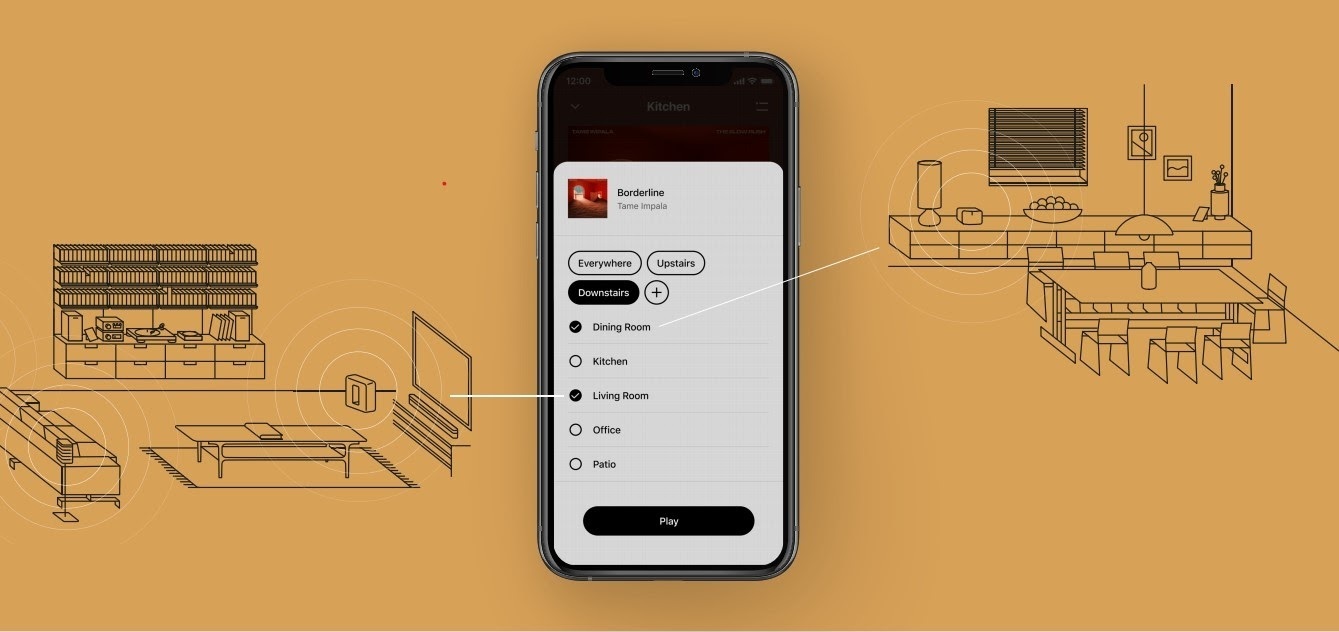
The new S2 app can save groups of rooms to create groups quickly and easily. Once a group is created, you can select it to start playing music and the players will automatically group up. 


High Resolution Audio


With S2, Sonos speakers now have support for high resolution audio, 24-bit, 44.1/48kHz for FLAC/ALAC only. This support is for local music libraries shared from computers and network attached drives. We’ve updated the article on Sonos supported music formats here.

The Sonos Arc is a Dolby Atmos soundbar, and S2 brings support for that audio to Sonos for home theater and music. Dolby Atmos can be read from Dolby Digital Plus, Dolby MAT, and Dolby TrueHD. 


How to get S2

All Sonos systems will be able to update to Sonos version 11.2, which contains some bug fixes and stability improvements. This version is a new S1 update, and compatible with all players. 

Once the 11.2 update is completed, systems compatible with Sonos S2 will receive a notification that the new app is available. You can tap that notification to start updating and the new app which will guide you through updating compatible players to the new platform. If you don’t see the notification banner, you go to System Tools in Settings to check compatibility and update. Sonos S2 is Sonos version 12.0.

You can check our Sonos S2 Compatibility article for a list of products that are compatible with S2.​​​​​


Articles and important information about S2

We will support products on Sonos S1 with bug fixes and security patches, and we will do what we can to ensure they keep working with the music services you love given their limited RAM and processing power.

We’ve put together answers to some of the top questions we’ve seen around S2 here, so please check out the following articles on:

Sonos S2 Overview - A great starting place to learn more about S2.

Sonos S2 Compatibility - Information about the differences between Sonos S2 and S1, including which Sonos products are compatible.

Set up separate S1 and S2 systems - Learn how to set up a separate Sonos S1 system with Sonos products that are not compatible with S2.

Known limitations with separate S1 and S2 Sonos systems - This article covers what you can expect when using two separate S1 and S2 systems.

Set up a separate Sonos S1 system

Remove Sonos products that are not compatible with S2 - Instructions on how to use the product removal tool in the Sonos S1 Controller before updating to Sonos S2.

Information about Trade Up:

If you’re interested in updating older Sonos speakers, here’s all the details on our Trade Up program, a way to get a big discount on any new Sonos products that are S2 compatible.

Trade Up home page - Get a general overview of the Sonos Trade Up program.

Trade Up support article - Step by step instructions on how to trade up your eligible Sonos products.

This topic has been closed for further comments. You can use the search bar to find a similar topic, or create a new one by clicking Create Topic at the top of the page.

230 replies

ratty
June 14, 2020

There are references here to upgrading to S2 from within the S1 app, but I can't see how to do this. Check for updates just says that I am up to date. I am on S1 / 11.2. My oldest device is a Play 5 Gen2. I have checked with iOS and Android apps. How do you do this? 

Settings/System/System Tools and run the S2 compatibility check.

You should have been prompted automatically in the next couple of days anyway.

Contributor I
June 14, 2020

I haven't been paying attention so I was very confused by the Sonos S1 app but it all makes sense now.

It's a pretty stupid solution to the problem really. I was expecting one app to control new and legacy products. I wasn't expecting new and legacy products could be grouped or anything.

I'm now actively in the market for cheap second hand sonos gear. Unfortunately it's a tough market because Sonos products generally last very well so hold their value. That is a bit ironic isn't it - oh well.

Avid Contributor I
June 14, 2020

I always thought “new app” meant it was going to be an all-new app, but I get the impression it’s the same as the old one bar a couple of extremely minor aesthetic tweaks and the room group feature, which is of no use to me.  So it’s “new” in that it has a different app ID so needs to be installed separately.  On the one hand it’s great because it gives me no incentive to upgrade my old play:5s that are stuck on S1, but on the other I was hoping that a new app might at least have been a bit more exciting.  In particular, I seriously could do with a dark theme as the current white design is really hard for me to use.  I presume the new app doesn’t even work with the “force dark” developer option in Android 10 as per the old one?  I presume the OSX app is exactly the same as per S1?

I always thought the Sonos PR was a bit rubbish in the lead-up to this because they were concentrating almost solely on the lack of support for old kit and nothing at all about the new features, but I think I see why.  Emperor’s new clothes and that.  Hopefully the new OS will prove its worth in the future.

Lyricist I
June 14, 2020

I have a issue with S2. It works fine when using the app and playing playlist off Amazon. If I use Alexa to play a single song it starts for a second then drops all rooms but one then it takes at lest 10 seconds for it to synchronize all speakers. 

This setup has worked prefect for 3 months on S1. 
 

4 Sonos Ones

1 Port Hardwired 

1 Amp Hardwired 

Trending Lyricist I
June 14, 2020

With s2 did we lose the ability to give thumbs up to a pandora track? I don’t have this option anymore 

Prominent Collaborator I
June 16, 2020

One change at a time, they only have a finite amount of support staff. I’ve now got a split system, works fine for me with a few speaker moves.

Wrong change, wrong time. The number of streamers using Sonos speakers far outnumbers those playing files from their local libraries. Streaming is the present, playing files stored on a hard drive is the past. Most businesses support the majority of their customer base, not the minority. 

This is not fair, IMO. My NAS device is cancel-culture and license-litigation proof.  😁👍

AMPx2, One SLx6, Play5x2, SUBx2, Play1x2, Move, Roam (Yuck), ARC, PlayBar, Beam, SYMFONISKx2, Awful New App.
T00LF00L
Prodigy I
June 18, 2020

Introducing the crappy new icon you must look at if you don’t upgrade your system.

I am just a worthless liar. I am just an imbecil.
ratty
June 18, 2020

Introducing the crappy new icon you must look at if you don’t upgrade your system.

Double post:

https://en.community.sonos.com/controllers-software-228995/s1-app-new-icon-6842195?postid=16437131#post16437131

T00LF00L
Prodigy I
June 18, 2020

Introducing the crappy new icon you must look at if you don’t upgrade your system.

Double post:

https://en.community.sonos.com/controllers-software-228995/s1-app-new-icon-6842195?postid=16437131#post16437131

Yes it is.  I’d like Sonos to pay attention and fix this.

I am just a worthless liar. I am just an imbecil.
Contributor I
June 18, 2020

Anyone else having issues with the new S2 app? I made to ultimate mistake of upgrading to the S2 app and for 3 days now I have been trying to use it! It is completely unusable! It does not connect to any of my 13 players! I have reset all 13 players one by one and tried to add them back, not working! this is very disappointing to say the least. this app does not work with any of my phones. I got a new Boost yesterday and it won't even find it. frustrated!

Yes I had some initial problems -- I decided to try a fix for an old problem.  My old problem was connection, my new problem was wonky error messages about music file format, other connections.  This fixed it both times (the second entry, labeled “Best Answer”:

https://en.community.sonos.com/troubleshooting-228999/speaker-and-connection-problems-6807105

Follow the order exactly.  Also note the last paragraph about assigning IP addresses. 

A little more discussion on the topic:

https://en.community.sonos.com/troubleshooting-228999/speaker-connection-problems-6838968?postid=16420107#post16420107


Good luck!