
Ryan S
Retired Sonos Staff
June 8, 2020

Introducing S2, New App and OS for Sonos
Related content:Software
Introducing S2, New App and OS for Sonos

The next generation of Sonos software is now available. Sonos S2 is a new app and an operating system for compatible devices, which brings support for higher resolution audio, saved groups, support for new Sonos products, and more.

Learn more about the Sonos S2 app on our S2 home page.


Support for the newest Sonos products

The all new Sonos Arc, Sonos Five, and Sonos Sub will require the Sonos S2 app. These new players are not supported by the Sonos S1 Controller. 


Saved Groups
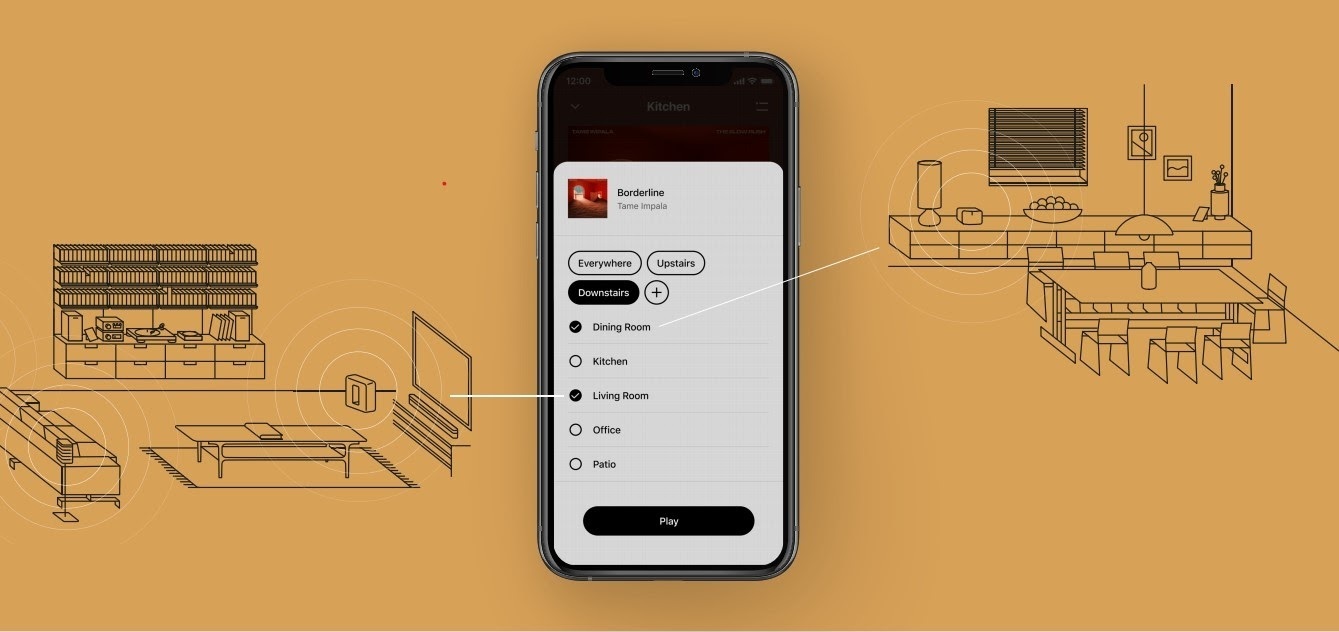
The new S2 app can save groups of rooms to create groups quickly and easily. Once a group is created, you can select it to start playing music and the players will automatically group up. 


High Resolution Audio


With S2, Sonos speakers now have support for high resolution audio, 24-bit, 44.1/48kHz for FLAC/ALAC only. This support is for local music libraries shared from computers and network attached drives. We’ve updated the article on Sonos supported music formats here.

The Sonos Arc is a Dolby Atmos soundbar, and S2 brings support for that audio to Sonos for home theater and music. Dolby Atmos can be read from Dolby Digital Plus, Dolby MAT, and Dolby TrueHD. 


How to get S2

All Sonos systems will be able to update to Sonos version 11.2, which contains some bug fixes and stability improvements. This version is a new S1 update, and compatible with all players. 

Once the 11.2 update is completed, systems compatible with Sonos S2 will receive a notification that the new app is available. You can tap that notification to start updating and the new app which will guide you through updating compatible players to the new platform. If you don’t see the notification banner, you go to System Tools in Settings to check compatibility and update. Sonos S2 is Sonos version 12.0.

You can check our Sonos S2 Compatibility article for a list of products that are compatible with S2.​​​​​


Articles and important information about S2

We will support products on Sonos S1 with bug fixes and security patches, and we will do what we can to ensure they keep working with the music services you love given their limited RAM and processing power.

We’ve put together answers to some of the top questions we’ve seen around S2 here, so please check out the following articles on:

Sonos S2 Overview - A great starting place to learn more about S2.

Sonos S2 Compatibility - Information about the differences between Sonos S2 and S1, including which Sonos products are compatible.

Set up separate S1 and S2 systems - Learn how to set up a separate Sonos S1 system with Sonos products that are not compatible with S2.

Known limitations with separate S1 and S2 Sonos systems - This article covers what you can expect when using two separate S1 and S2 systems.

Set up a separate Sonos S1 system

Remove Sonos products that are not compatible with S2 - Instructions on how to use the product removal tool in the Sonos S1 Controller before updating to Sonos S2.

Information about Trade Up:

If you’re interested in updating older Sonos speakers, here’s all the details on our Trade Up program, a way to get a big discount on any new Sonos products that are S2 compatible.

Trade Up home page - Get a general overview of the Sonos Trade Up program.

Trade Up support article - Step by step instructions on how to trade up your eligible Sonos products.

This topic has been closed for further comments. You can use the search bar to find a similar topic, or create a new one by clicking Create Topic at the top of the page.

230 replies

arcadelt
Enthusiast I
June 11, 2020

...I need to update to Port, spend more money for similar features as connect. 

You could look for a secondhand Connect (Gen 2), and that would be significantly cheaper. However, I suggest you compare that to the Trade-Up price of a Port, as the generous discount Sonos are offering might make it cheaper than you assume.

Contributor I
June 12, 2020

Updated my two One Gen 2 and Windows app to S2 OK. Works fine, but when requesting BBC stations from Alexa with the BBC skill installed, it plays fine, but says while starting playing the station ‘Sorry, I’m having a little trouble. Please try in a little while’. I’ve rebooted all and re-installed Alexa app and Sonos S2 Android app v 12.0 and deleted the old S1 app (Huawei P30 on EMUI 10).  I’ve disabled the BBC skill and re-enabled. Any other suggestions please?


It’s a change from a few months ago when Alexa said ‘Playing xxx’ and silence ensued till repeated. That was fixed by an Alexa app update eventually. Is this likely to be a similar problem?

Replying to my own post, this has cured itself somehow without any updates to apps or skills. All fine now.

Lyricist I
June 12, 2020

Anyone else having issues with the new S2 app? I made to ultimate mistake of upgrading to the S2 app and for 3 days now I have been trying to use it! It is completely unusable! It does not connect to any of my 13 players! I have reset all 13 players one by one and tried to add them back, not working! this is very disappointing to say the least. this app does not work with any of my phones. I got a new Boost yesterday and it won't even find it. frustrated!

Invinoveritasty
Trending Lyricist I
June 12, 2020

Anyone else having issues with the new S2 app? ... It is completely unusable! ...frustrated!

This is surprising to hear.  I have 11 devices and the switch to S2 was fast and flawless.  In the past, I have found Sonos customer support very helpful. Good luck.

arcadelt
Enthusiast I
June 12, 2020

Anyone else having issues with the new S2 app? I made to ultimate mistake of upgrading to the S2 app and for 3 days now I have been trying to use it! It is completely unusable! It does not connect to any of my 13 players! I have reset all 13 players one by one and tried to add them back, not working! this is very disappointing to say the least. this app does not work with any of my phones. I got a new Boost yesterday and it won't even find it. frustrated!

I too am surprised. The upgrade to S2 was flawless for me too, and I have a very complex setup with 16 audio components and two Boosts spread over two buildings. I’ve had a few dropouts while playing, but by-and-large these are related to my internet connection and so far it’s better than what I was experiencing before S2 was introduced. Along with @Invinoveritasty, I suggest you settle in with a call to Sonos tech support.

Prodigy II
June 13, 2020

Did the virtual surround get some love with the new releases and updates? Picked up Terminator 2 on 4k disc which has a DTS track. The stereo downmix from my Panasonic Bluray player gets a real good upmix with my Playbase and ones. Haven't had such a good experience with the couple of other DTS based discs I have.

"I saw the Stooges and the MC5"
Lyricist I
June 13, 2020

My whole Sonos system is upgraded to version 11.2 (build57377280), as is also my IOS Sonos app (new name Sonos S1).

However I don't see any notification that the new S2 app is available.

Search for and download it on the App Store, located about 4-6 spots down? in hierarchy (not sure why either but the engineering team is notified and working to fix). Undock or Completely Close out the S1 app (don’t leave it launched in the background). Launch S2, sign in and enjoy!  Delete the S1 app.  
 

<These are the steps I took after contacting customer support but with little resolution took it upon myself, like others on the forum, to locate and download S2.>

IMO, There should have been a scrub of customers who have S2 compatible equipment, an email sent to us to download S2 app, and remove S1 once that was pushed over the prior app. Simple, right?

Engineering & CS must work harder at the next Product/ software rollout for improved customer engagement and retention, and with sales promotions to legacy and even crossover (Just “barely made it” [play:1 & play:3] customers on Launch.

Prominent Collaborator I
June 13, 2020

disgusted sonos what an utter pain your twitter team is and all you phone lines not working  1 have 11 units including beam, playbar, play5s and several play ones, your mac os s2 app will not detect my sonos system at all  phone will iPad will mac os no chance, twitter support answered one tweet the vanished and all phone lines not work  not something one would expect from you guys

Lyricist I
June 13, 2020

disgusted sonos what an utter pain your twitter team is and all you phone lines not working  1 have 11 units including beam, playbar, play5s and several play ones, your mac os s2 app will not detect my sonos system at all  phone will iPad will mac os no chance, twitter support answered one tweet the vanished and all phone lines not work  not something one would expect from you guys

Hi, it’s the weekend and most customer service centers are not open weekends and those that are may be operational with limited service hours during pandemic here in the states. Also, weekend is when IT/engineering teams perform updates. fingers crossed this will all be worked out soon. ;)

Guy_19
Enthusiast II
June 14, 2020

There are references here to upgrading to S2 from within the S1 app, but I can't see how to do this. Check for updates just says that I am up to date. I am on S1 / 11.2. My oldest device is a Play 5 Gen2. I have checked with iOS and Android apps. How do you do this? 

BTW that S1 icon is ugly - I am glad I can change it on my main phone to one of those below (on a jet black background).


7 rooms: One SL Stereo Pair, One SL x 2, Move, Play:5 Gen2 & Port into Arcam AVR with AE floorstanders, Port into Denon microsystem.