
Ryan S
Retired Sonos Staff
June 8, 2020

Introducing S2, New App and OS for Sonos
Related content:Software
Introducing S2, New App and OS for Sonos

The next generation of Sonos software is now available. Sonos S2 is a new app and an operating system for compatible devices, which brings support for higher resolution audio, saved groups, support for new Sonos products, and more.

Learn more about the Sonos S2 app on our S2 home page.


Support for the newest Sonos products

The all new Sonos Arc, Sonos Five, and Sonos Sub will require the Sonos S2 app. These new players are not supported by the Sonos S1 Controller. 


Saved Groups
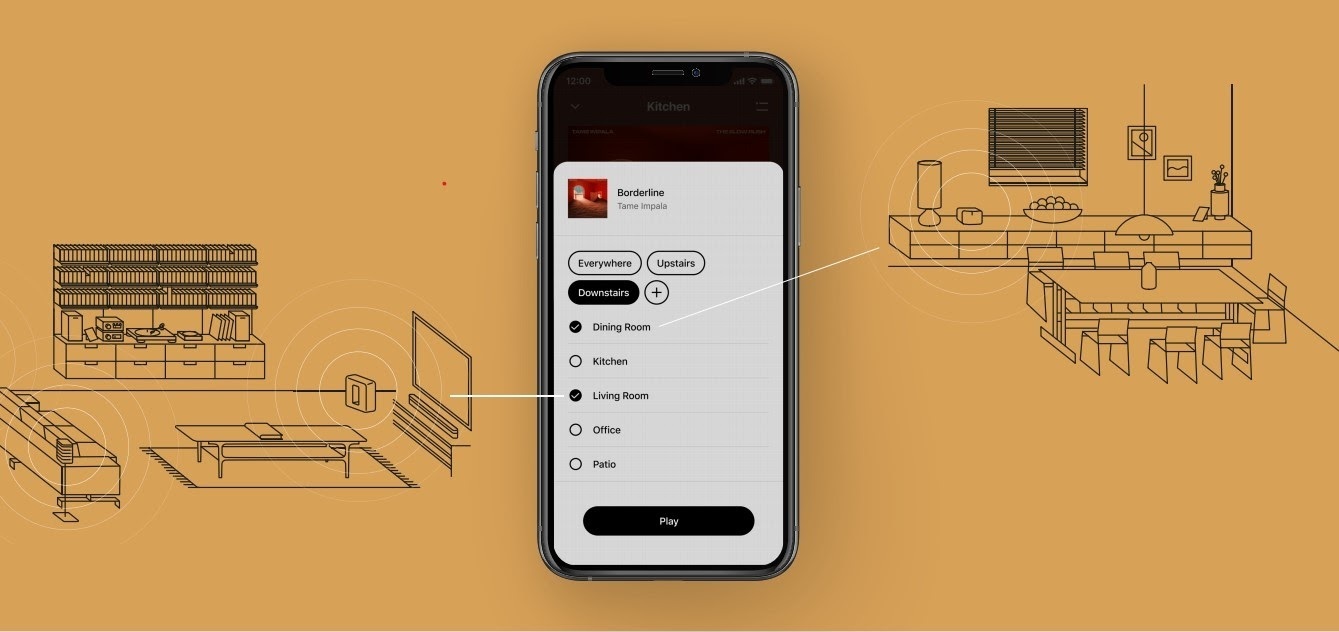
The new S2 app can save groups of rooms to create groups quickly and easily. Once a group is created, you can select it to start playing music and the players will automatically group up. 


High Resolution Audio


With S2, Sonos speakers now have support for high resolution audio, 24-bit, 44.1/48kHz for FLAC/ALAC only. This support is for local music libraries shared from computers and network attached drives. We’ve updated the article on Sonos supported music formats here.

The Sonos Arc is a Dolby Atmos soundbar, and S2 brings support for that audio to Sonos for home theater and music. Dolby Atmos can be read from Dolby Digital Plus, Dolby MAT, and Dolby TrueHD. 


How to get S2

All Sonos systems will be able to update to Sonos version 11.2, which contains some bug fixes and stability improvements. This version is a new S1 update, and compatible with all players. 

Once the 11.2 update is completed, systems compatible with Sonos S2 will receive a notification that the new app is available. You can tap that notification to start updating and the new app which will guide you through updating compatible players to the new platform. If you don’t see the notification banner, you go to System Tools in Settings to check compatibility and update. Sonos S2 is Sonos version 12.0.

You can check our Sonos S2 Compatibility article for a list of products that are compatible with S2.​​​​​


Articles and important information about S2

We will support products on Sonos S1 with bug fixes and security patches, and we will do what we can to ensure they keep working with the music services you love given their limited RAM and processing power.

We’ve put together answers to some of the top questions we’ve seen around S2 here, so please check out the following articles on:

Sonos S2 Overview - A great starting place to learn more about S2.

Sonos S2 Compatibility - Information about the differences between Sonos S2 and S1, including which Sonos products are compatible.

Set up separate S1 and S2 systems - Learn how to set up a separate Sonos S1 system with Sonos products that are not compatible with S2.

Known limitations with separate S1 and S2 Sonos systems - This article covers what you can expect when using two separate S1 and S2 systems.

Set up a separate Sonos S1 system

Remove Sonos products that are not compatible with S2 - Instructions on how to use the product removal tool in the Sonos S1 Controller before updating to Sonos S2.

Information about Trade Up:

If you’re interested in updating older Sonos speakers, here’s all the details on our Trade Up program, a way to get a big discount on any new Sonos products that are S2 compatible.

Trade Up home page - Get a general overview of the Sonos Trade Up program.

Trade Up support article - Step by step instructions on how to trade up your eligible Sonos products.

This topic has been closed for further comments. You can use the search bar to find a similar topic, or create a new one by clicking Create Topic at the top of the page.

230 replies

Invinoveritasty
Trending Lyricist I
June 11, 2020

“Sonos S2 is a new app ... which brings support for higher resolution audio...”  This marketing claim reminds me of the joke about the real estate agent who claims a “Central Park View” but when you look at the apartment, the “view” requires an open window and your head out the window to look down the side of the building.  I hope this gets fixed soon.  

arcadelt
Enthusiast I
June 11, 2020

“Sonos S2 is a new app ... which brings support for higher resolution audio...”  This marketing claim reminds me of the joke about the real estate agent who claims a “Central Park View” but when you look at the apartment, the “view” requires an open window and your head out the window to look down the side of the building.  I hope this gets fixed soon.  

I think it’s more like Central Park view because the building across the street blocking the view is going to be demolished and not replaced, but they haven’t done it yet (or maybe partially done, because you can get hi-res from your own sources at the moment).

Producer I
June 11, 2020

The S2 app on the iphone doesn’t work at all for me. The app is frozen, even after reinstalling it. The S1 doesn’t work either says it’s not compatible with my system!!!!!!!!!!!!!!!!!!!!!!!!!!!!!!!!

Nothing like getting screwed over just to upgrade.

Lyricist III
June 11, 2020

If I upgrade to S2, will I still be able to use the OS X controller app? I don’t see an S2 version of the OSX controller for download. How does that work?

pwt
Virtuoso
June 11, 2020

If I upgrade to S2, will I still be able to use the OS X controller app? I don’t see an S2 version of the OSX controller for download. How does that work?

Yes: https://support.sonos.com/s/downloads?language=en_US

4 x P:5 | Sub | 4 x P:1 | 3 x Connect | 2 x Boost | Connect:Amp | 2 x One | Amp | Move | Port | Era 300
Enthusiast II
June 11, 2020

“Sonos S2 is a new app ... which brings support for higher resolution audio...”  This marketing claim reminds me of the joke about the real estate agent who claims a “Central Park View” but when you look at the apartment, the “view” requires an open window and your head out the window to look down the side of the building.  I hope this gets fixed soon.  


Isn’t the hoax here the so-called hi-res audio by itself ? I thought it was proven a long time ago that going over 16 bit / 44 kHz provided no practical advantage.

However lossless encoding support has benefits.

Producer I
June 11, 2020

How does one unsubscribe from threads here??

arcadelt
Enthusiast I
June 11, 2020

How does one unsubscribe from threads here??

Go to your profile image at the top right of the screen and tap (phone/tablet) or click it (PC). A menu will come up, including Subscriptions. Tap or click Subscriptions. On the next screen, which shows all the threads you are subscribed to, there is a star under each topic. Tap or click the star to unsubscribe.

Ryan S
Ryan SAuthor
Retired Sonos Staff
June 11, 2020

How does one unsubscribe from threads here??

Go to your profile image at the top right of the screen and tap (phone/tablet) or click it (PC). A menu will come up, including Subscriptions. Tap or click Subscriptions. On the next screen, which shows all the threads you are subscribed to, there is a star under each topic. Tap or click the star to unsubscribe.

Also, if you’re on the thread, there’s a star you can click at the bottom of the first post to remove it from your favorites.

Mark good posts by pressing the like button, and select the best answer on questions you've asked to help others find solutions.
Avid Contributor I
June 11, 2020

Sorry for a bit of a rant but using Sonos for many years and this S2 app has not neen a great thing.

Thing is when I got the 2 connects I was told since mfg date is 2015 and both had play/pause button will be classed as modern devices and upon registration it showed as modern devices and not legacy.
Now I am being told 1 connect mfg date 1504 is on s1 app and my other connect mfg date 1511 can be on s2 app. So along with one connect, gen 2 play 5 can update to s2 while connect in bedroom will be s1 so creating 2 zones, not great. How can sonos be so slack in classifying gen 1 and gen 2 connects? Talked with sonos rep and even though both connects were registered as modern, same physical features, mfg year 2015, one connect will be on s2, other s1 app, how is that any good from the point of view of a customer?

I was with Sonos since 2010 for ease of use and to be able to connect different device and now it isnt possible if I update to s2, if I stay on s1, no updates, not happy with this and if I need to update to Port, spend more money for similar features as connect. 


Living room: Playbar | Dining: Play 5 | Bedroom: Sonos One