
Ryan S
Retired Sonos Staff
June 8, 2020

Introducing S2, New App and OS for Sonos
Related content:Software
Introducing S2, New App and OS for Sonos

The next generation of Sonos software is now available. Sonos S2 is a new app and an operating system for compatible devices, which brings support for higher resolution audio, saved groups, support for new Sonos products, and more.

Learn more about the Sonos S2 app on our S2 home page.


Support for the newest Sonos products

The all new Sonos Arc, Sonos Five, and Sonos Sub will require the Sonos S2 app. These new players are not supported by the Sonos S1 Controller. 


Saved Groups
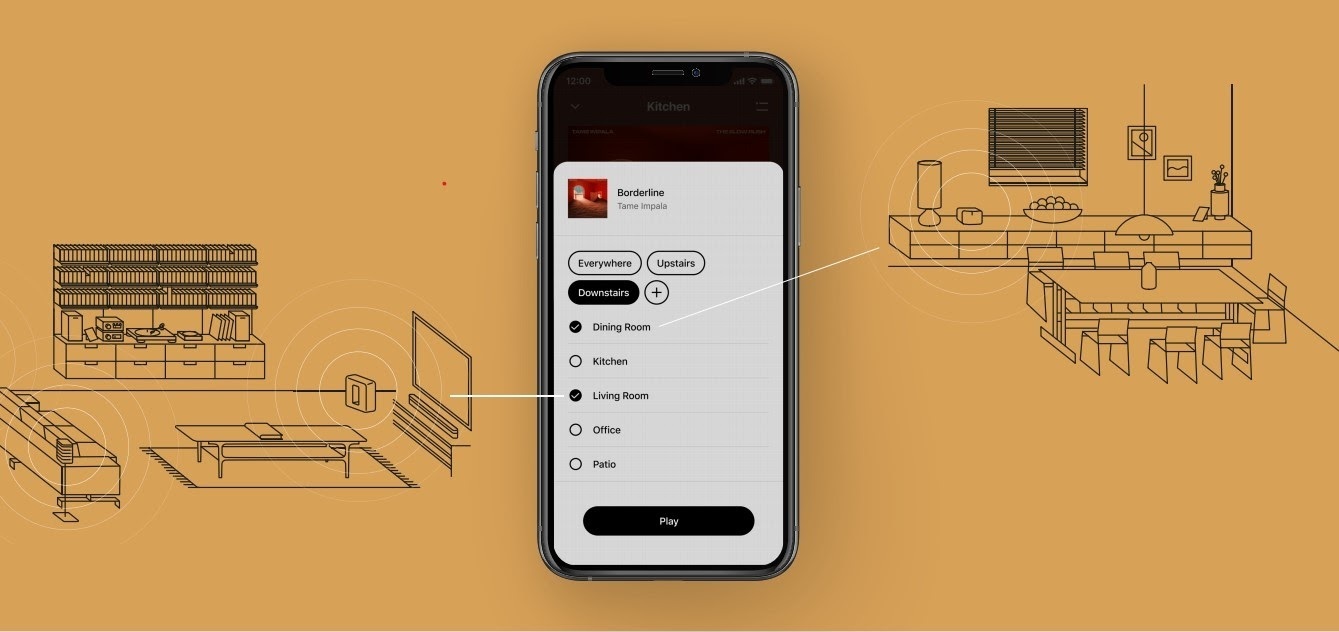
The new S2 app can save groups of rooms to create groups quickly and easily. Once a group is created, you can select it to start playing music and the players will automatically group up. 


High Resolution Audio


With S2, Sonos speakers now have support for high resolution audio, 24-bit, 44.1/48kHz for FLAC/ALAC only. This support is for local music libraries shared from computers and network attached drives. We’ve updated the article on Sonos supported music formats here.

The Sonos Arc is a Dolby Atmos soundbar, and S2 brings support for that audio to Sonos for home theater and music. Dolby Atmos can be read from Dolby Digital Plus, Dolby MAT, and Dolby TrueHD. 


How to get S2

All Sonos systems will be able to update to Sonos version 11.2, which contains some bug fixes and stability improvements. This version is a new S1 update, and compatible with all players. 

Once the 11.2 update is completed, systems compatible with Sonos S2 will receive a notification that the new app is available. You can tap that notification to start updating and the new app which will guide you through updating compatible players to the new platform. If you don’t see the notification banner, you go to System Tools in Settings to check compatibility and update. Sonos S2 is Sonos version 12.0.

You can check our Sonos S2 Compatibility article for a list of products that are compatible with S2.​​​​​


Articles and important information about S2

We will support products on Sonos S1 with bug fixes and security patches, and we will do what we can to ensure they keep working with the music services you love given their limited RAM and processing power.

We’ve put together answers to some of the top questions we’ve seen around S2 here, so please check out the following articles on:

Sonos S2 Overview - A great starting place to learn more about S2.

Sonos S2 Compatibility - Information about the differences between Sonos S2 and S1, including which Sonos products are compatible.

Set up separate S1 and S2 systems - Learn how to set up a separate Sonos S1 system with Sonos products that are not compatible with S2.

Known limitations with separate S1 and S2 Sonos systems - This article covers what you can expect when using two separate S1 and S2 systems.

Set up a separate Sonos S1 system

Remove Sonos products that are not compatible with S2 - Instructions on how to use the product removal tool in the Sonos S1 Controller before updating to Sonos S2.

Information about Trade Up:

If you’re interested in updating older Sonos speakers, here’s all the details on our Trade Up program, a way to get a big discount on any new Sonos products that are S2 compatible.

Trade Up home page - Get a general overview of the Sonos Trade Up program.

Trade Up support article - Step by step instructions on how to trade up your eligible Sonos products.

This topic has been closed for further comments. You can use the search bar to find a similar topic, or create a new one by clicking Create Topic at the top of the page.

230 replies

Shimo
Avid Contributor I
June 10, 2020

Am I correct that S2 continues to require that SMB V1 is activated in order to access NAS stored music libary? SMB V1 is terribly outdated, has security issues and since many years is replaced by V2 and in meanwhile V3.


Contributor II
June 10, 2020

Just upgraded to S2, seems okay but I am having trouble using TruPlay with a pair of play ones, anyone else had this?

I wish I had checked the community first, I have signed up for a trial of Tidal and have not noticed much of a difference over Spotify, now I know why!

testcard
Prodigy I
June 10, 2020

Is there an S2 controller for Mac available yet?

Edit: found it.

Trending Lyricist I
June 10, 2020

Hmm... am I missing something? I what way does S2 support hi-res any more than S1?


It supports Dolby Atmos (on ARC), and 24 bit FLAC/ALAC on up to 48 kHz. 96 kHz is still rather broken, though - it plays the music really slowly.


I’m really hoping they’ll fix that… play it on Arc/Port, just play a downsampled version on the other speakers if they can’t play it natively.

Lyricist I
June 10, 2020

I really, really, really dislike the darker background colour in the new app.  It’s like you listened to all the people that want dark mode and decided for something in the middle that will make everybody unhappy. Or maybe it’s just me that is baffled and horrified by the new Sonos branding and ubiquitous weird background colours.  
 

Lyricist I
June 10, 2020

My now Sonos S1 controller is lighter now, and I can no longer play XM nor can I update for new Sonos app. I just want to play my xm on all of my speakers. I have a play:1, a Play:3, 2 Play :5 and sub (for TV), as well as a bar and a boost. What’s the deal? This has been nothing but a pain for the last year or so. My late husband used to trouble shoot, but I have had it.

melvimbe
June 10, 2020

I really, really, really dislike the darker background colour in the new app.  It’s like you listened to all the people that want dark mode and decided for something in the middle that will make everybody unhappy. Or maybe it’s just me that is baffled and horrified by the new Sonos branding and ubiquitous weird background colours.  
 

Horrified?

Danny
Lyricist I
June 10, 2020

I really, really, really dislike the darker background colour in the new app.  It’s like you listened to all the people that want dark mode and decided for something in the middle that will make everybody unhappy. Or maybe it’s just me that is baffled and horrified by the new Sonos branding and ubiquitous weird background colours.  
 

Horrified?

Yes sir, I am not a fan of black text on a rather dark gray background.  

chicks
June 10, 2020

Running Qobuz via the UPnP plugin for LMS.  Looks like “hi-rez” streaming from Qobuz is working fine, at least this FLAC stream is.  No idea if it’s 24-bit or 16-bit, but obviously would be no difference in the sound.


Contributor I
June 11, 2020

Updated my two One Gen 2 and Windows app to S2 OK. Works fine, but when requesting BBC stations from Alexa with the BBC skill installed, it plays fine, but says while starting playing the station ‘Sorry, I’m having a little trouble. Please try in a little while’. I’ve rebooted all and re-installed Alexa app and Sonos S2 Android app v 12.0 and deleted the old S1 app (Huawei P30 on EMUI 10).  I’ve disabled the BBC skill and re-enabled. Any other suggestions please?


It’s a change from a few months ago when Alexa said ‘Playing xxx’ and silence ensued till repeated. That was fixed by an Alexa app update eventually. Is this likely to be a similar problem?