
Ryan S
Retired Sonos Staff
June 8, 2020

Introducing S2, New App and OS for Sonos
Related content:Software
Introducing S2, New App and OS for Sonos

The next generation of Sonos software is now available. Sonos S2 is a new app and an operating system for compatible devices, which brings support for higher resolution audio, saved groups, support for new Sonos products, and more.

Learn more about the Sonos S2 app on our S2 home page.


Support for the newest Sonos products

The all new Sonos Arc, Sonos Five, and Sonos Sub will require the Sonos S2 app. These new players are not supported by the Sonos S1 Controller. 


Saved Groups
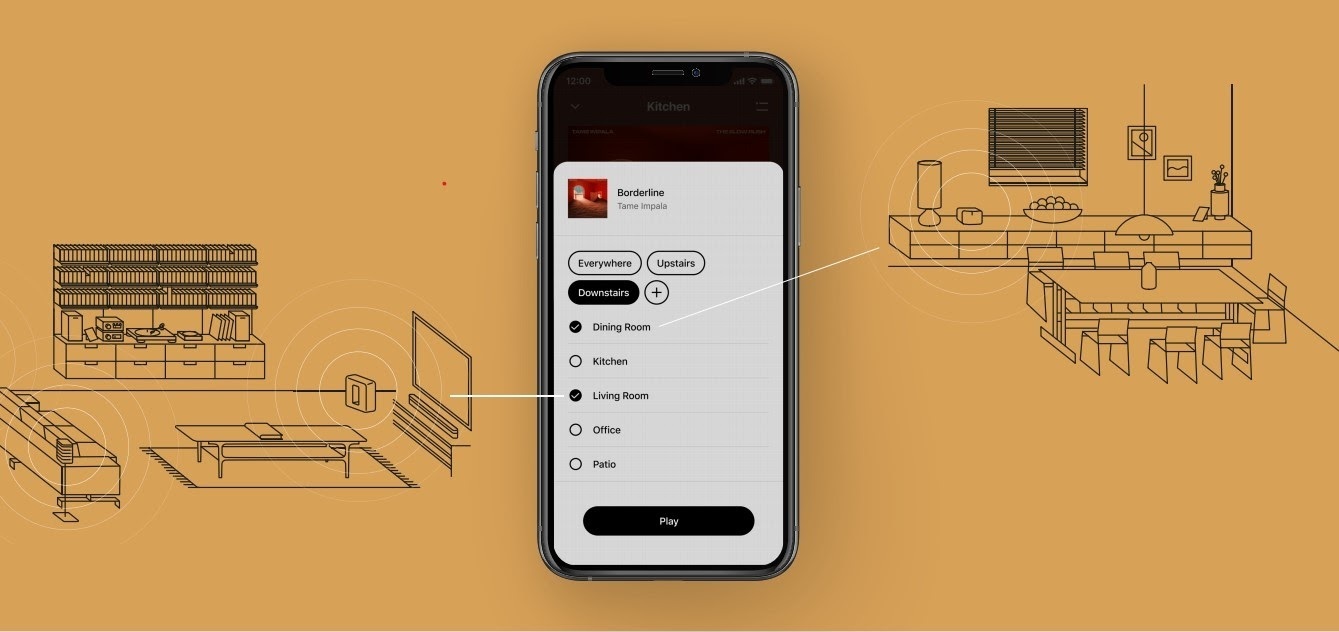
The new S2 app can save groups of rooms to create groups quickly and easily. Once a group is created, you can select it to start playing music and the players will automatically group up. 


High Resolution Audio


With S2, Sonos speakers now have support for high resolution audio, 24-bit, 44.1/48kHz for FLAC/ALAC only. This support is for local music libraries shared from computers and network attached drives. We’ve updated the article on Sonos supported music formats here.

The Sonos Arc is a Dolby Atmos soundbar, and S2 brings support for that audio to Sonos for home theater and music. Dolby Atmos can be read from Dolby Digital Plus, Dolby MAT, and Dolby TrueHD. 


How to get S2

All Sonos systems will be able to update to Sonos version 11.2, which contains some bug fixes and stability improvements. This version is a new S1 update, and compatible with all players. 

Once the 11.2 update is completed, systems compatible with Sonos S2 will receive a notification that the new app is available. You can tap that notification to start updating and the new app which will guide you through updating compatible players to the new platform. If you don’t see the notification banner, you go to System Tools in Settings to check compatibility and update. Sonos S2 is Sonos version 12.0.

You can check our Sonos S2 Compatibility article for a list of products that are compatible with S2.​​​​​


Articles and important information about S2

We will support products on Sonos S1 with bug fixes and security patches, and we will do what we can to ensure they keep working with the music services you love given their limited RAM and processing power.

We’ve put together answers to some of the top questions we’ve seen around S2 here, so please check out the following articles on:

Sonos S2 Overview - A great starting place to learn more about S2.

Sonos S2 Compatibility - Information about the differences between Sonos S2 and S1, including which Sonos products are compatible.

Set up separate S1 and S2 systems - Learn how to set up a separate Sonos S1 system with Sonos products that are not compatible with S2.

Known limitations with separate S1 and S2 Sonos systems - This article covers what you can expect when using two separate S1 and S2 systems.

Set up a separate Sonos S1 system

Remove Sonos products that are not compatible with S2 - Instructions on how to use the product removal tool in the Sonos S1 Controller before updating to Sonos S2.

Information about Trade Up:

If you’re interested in updating older Sonos speakers, here’s all the details on our Trade Up program, a way to get a big discount on any new Sonos products that are S2 compatible.

Trade Up home page - Get a general overview of the Sonos Trade Up program.

Trade Up support article - Step by step instructions on how to trade up your eligible Sonos products.

This topic has been closed for further comments. You can use the search bar to find a similar topic, or create a new one by clicking Create Topic at the top of the page.

230 replies

Contributor I
June 19, 2020

So here’s an interesting issue. 
 

I upgraded my full system to S2, however, due to having some legacy products, wanted to make a split between S1 and S2.
 

Found out that once individual speakers have been upgraded to S2, they are no longer compatible with S1!!

Tried it with both my Play:1 and Symfonisk speaker, see screenshot. 
 

Why wasn’t this clearly communicated??


jgatie
June 19, 2020

So here’s an interesting issue. 
 

I upgraded my full system to S2, however, due to having some legacy products, wanted to make a split between S1 and S2.
 

Found out that once individual speakers have been upgraded to S2, they are no longer compatible with S1!!

Tried it with both my Play:1 and Symfonisk speaker, see screenshot. 
 

Why wasn’t this clearly communicated??


Not sure what you are trying to do here when you say “no longer compatible with S1”.  If you mean an S2 capable speaker cannot be used in an S1 and S2 system at the same time, well yes that was clearly communicated.  If you want to remove a speaker from an S2 system and add it to an S1 system, you first need to factory reset the speaker, then add it to the S1 system.


Contributor I
June 21, 2020

@jgatie: that’s what I did, a factory reset. However, I can’t any of the speakers that were previously part of the S2 system to join the S1 system after the factory reset...

Lyricist I
June 23, 2020

None of my Play1 works with the new app.  Try to reset 100 times. 
 

Thank you for killing my systems. So worthless. 
Do not tel my to cerats a new email. So from the 80 s. 
 

Henrik 

Enthusiast II
June 25, 2020

Sonos fan (mostly) with 19 devices and all now upgraded to S2 compatibility.  Despite the many warnings on the the Apple App Store about S2,  I stupidly ran the “compatibility test” and now the iOS/Win apps require I upgrade to S2 which I had to do.  WOW, EPIC FAIL! 


Start with the visuals.  Gone is eye-strain-reducing black background, now it’s Military Gray, Monkey Vomit Green Infobars, and Baby Poo orange icons etc. 

NO improvements for HD/UHD from streaming services.

And it took over an hour to get the various devices and apps recognizing each other even though S1 was working perfectly for weeks on end! 

And that’s just today! 

Honestly, this LONG AWAITED upgrade is a backward step and so disappointing after the breathless promotion from marketing/management on the promises of the S2 paradigm. 

Amazing hardware, disappointing software/apps (probably contracted out now) and an out-of- touch management team.   

How long will we have to wait till they sort it out?  The reviews on the app store are pretty negative and realistic. 

Lyricist I
June 26, 2020

The lack of SMB2 completely is a disaster at this point. Almost every new NAS, and every default Win10 is SMB2/3.SMB1 is a security nightmare. There is no reason that Sonos has to be this far behind.

binh25
Avid Contributor I
July 2, 2020

I got Playbase + Sub (Gen 2) + 2x Play:1 as surround sound, would it break my surround if I upgrade to S2? other Sonos I got 2x Play5 (gen 2), Move, Beam, and 2 more Play:1

Everything is working good I don't want to mess with it but I hate the upgrade pop up can I disable these upgrade pop up?

 
106rallye
July 2, 2020

On my system upgrading to S2 worked like any other update. Perfectly. Looks like all your gear is modern (please check: https://www.sonos.com/myaccount/system/households/devices/). If it is there's no reason you should not update. Why would it break your surround especially? 

binh25
Avid Contributor I
July 4, 2020

Honestly I found this S1 and S2 split is confusing and unwarranted and it a step away from what made Sonos good in the first place simple to use don’t have to read up on what works, what compatible etc ... 

I just want something that just works like an iPhone and that the reason I went with Sonos in the first place but lately I think they are stepping away from this philosophy.


I have a lot of sonos products and I like it a lot but with phasing in and out of hardware support and you have to work out what works 

it give me second thoughts about buying more

I have done some alternative research and will buy the next speaker with bluesound  as a test and if it works out well and as my Sonos coming to end of life in coming years I move to bluesound.


Enthusiast II
July 11, 2020

Introducing the crappy new icon you must look at if you don’t upgrade your system.

I realise it’s a double post, but I agree. It seems they went out of their way to show a “faded” icon to indicate that we shouldn’t be using S1 for too long.

Sonos for me right now is like Microsoft was in the past. I still bought a new Windows licence because it seemed like the least worse option, but years later I moved onto better things.

Similar with Sonos, I think a combination of the upgrade programme and not wanting to invest in something more high-end right now makes it just about worth it, but they cannot count on my loyalty without a complete transformation.

So, about S2, will it fix these problems?

  • Spotify (and sometimes YouTube) skipping tracks. I’ve seen numerous threads on this and the problem seems to have gone away for now, but I could never understand how this can happen with five Sonos players ALL wired in to a reliable Ethernet network and broadband connection. I discovered that Amazon music was immune to the problem and just used that for a while.
  • The fact that it can take up to a minute of frustration to get my playlist off repeat each day, because for some stupid reason they changed the alarm clock to auto-enable repeat with no option not to, and for some insane reason neither the Android nor the OS X controllers get a reliable response to the repeat button. (Support long since contacted and unable to help.)
  • The fear I feel every time I use the app while music is already playing, because it’s insanely easy to interrupt the current track with a single press. The dots are too easy to miss although a long press is a bit safer. Sonos used to be fun at parties until they changed this.
  • The weird habit of inserting a new track second in the list. e.g. if I have tracks A1, A2 and A3 in the queue and A3 is playing, and I play B1, then I end up with A1, B1, A2, A3.
  • Alarm hidden away in system settings

In short, never mind new features, can I expect the usability and lack of bugs that we used to enjoy in the heyday of Sonos (first five or so years after I got my first ZP80 and CR100)?