
Ryan S
Retired Sonos Staff
June 8, 2020

Introducing S2, New App and OS for Sonos
Related content:Software
Introducing S2, New App and OS for Sonos

The next generation of Sonos software is now available. Sonos S2 is a new app and an operating system for compatible devices, which brings support for higher resolution audio, saved groups, support for new Sonos products, and more.

Learn more about the Sonos S2 app on our S2 home page.


Support for the newest Sonos products

The all new Sonos Arc, Sonos Five, and Sonos Sub will require the Sonos S2 app. These new players are not supported by the Sonos S1 Controller. 


Saved Groups
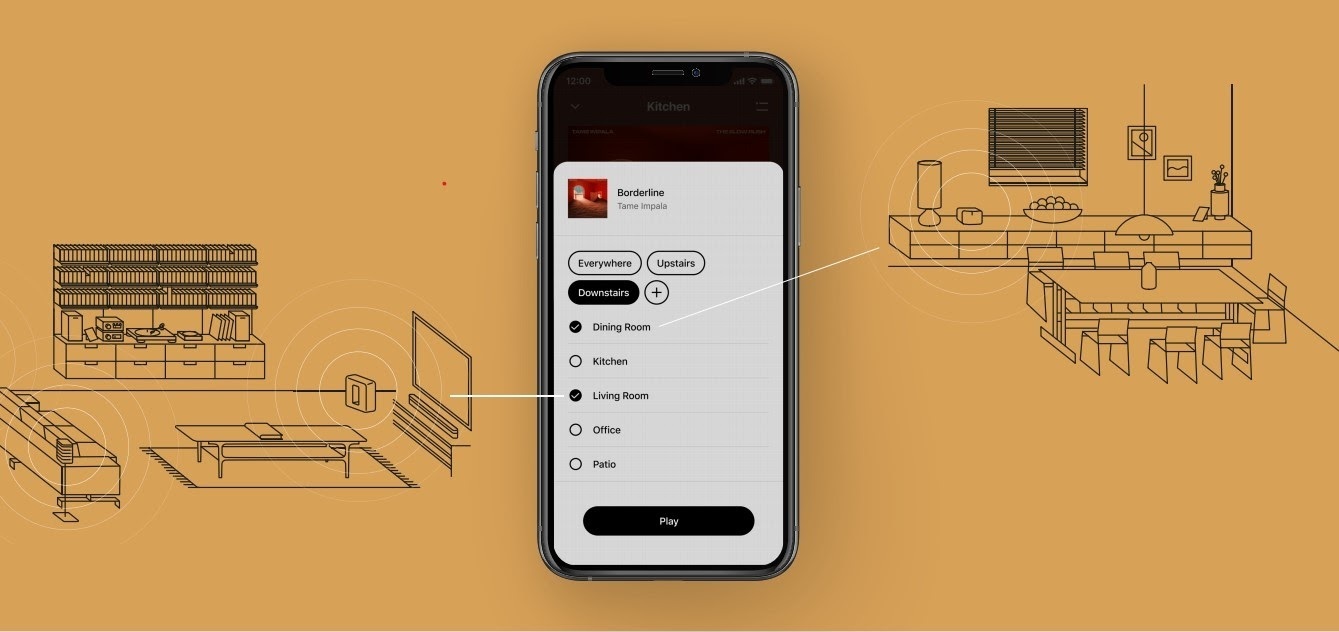
The new S2 app can save groups of rooms to create groups quickly and easily. Once a group is created, you can select it to start playing music and the players will automatically group up. 


High Resolution Audio


With S2, Sonos speakers now have support for high resolution audio, 24-bit, 44.1/48kHz for FLAC/ALAC only. This support is for local music libraries shared from computers and network attached drives. We’ve updated the article on Sonos supported music formats here.

The Sonos Arc is a Dolby Atmos soundbar, and S2 brings support for that audio to Sonos for home theater and music. Dolby Atmos can be read from Dolby Digital Plus, Dolby MAT, and Dolby TrueHD. 


How to get S2

All Sonos systems will be able to update to Sonos version 11.2, which contains some bug fixes and stability improvements. This version is a new S1 update, and compatible with all players. 

Once the 11.2 update is completed, systems compatible with Sonos S2 will receive a notification that the new app is available. You can tap that notification to start updating and the new app which will guide you through updating compatible players to the new platform. If you don’t see the notification banner, you go to System Tools in Settings to check compatibility and update. Sonos S2 is Sonos version 12.0.

You can check our Sonos S2 Compatibility article for a list of products that are compatible with S2.​​​​​


Articles and important information about S2

We will support products on Sonos S1 with bug fixes and security patches, and we will do what we can to ensure they keep working with the music services you love given their limited RAM and processing power.

We’ve put together answers to some of the top questions we’ve seen around S2 here, so please check out the following articles on:

Sonos S2 Overview - A great starting place to learn more about S2.

Sonos S2 Compatibility - Information about the differences between Sonos S2 and S1, including which Sonos products are compatible.

Set up separate S1 and S2 systems - Learn how to set up a separate Sonos S1 system with Sonos products that are not compatible with S2.

Known limitations with separate S1 and S2 Sonos systems - This article covers what you can expect when using two separate S1 and S2 systems.

Set up a separate Sonos S1 system

Remove Sonos products that are not compatible with S2 - Instructions on how to use the product removal tool in the Sonos S1 Controller before updating to Sonos S2.

Information about Trade Up:

If you’re interested in updating older Sonos speakers, here’s all the details on our Trade Up program, a way to get a big discount on any new Sonos products that are S2 compatible.

Trade Up home page - Get a general overview of the Sonos Trade Up program.

Trade Up support article - Step by step instructions on how to trade up your eligible Sonos products.

This topic has been closed for further comments. You can use the search bar to find a similar topic, or create a new one by clicking Create Topic at the top of the page.

230 replies

Lyricist II
July 13, 2020

Worst update ever


I stupidly updated my system to the new software and the new S2 app. It worked for a few days but now I can’t stream any music, radio etc. 


Will this be fixed at some point hopefully soon? People are not exactly giving great reviews on the various forums and app stores at the moment. Stupid way to kill an otherwise nice system 

Senior Virtuoso
July 13, 2020

Worst update ever


I stupidly updated my system to the new software and the new S2 app. It worked for a few days but now I can’t stream any music, radio etc. 


Will this be fixed at some point hopefully soon? People are not exactly giving great reviews on the various forums and app stores at the moment. Stupid way to kill an otherwise nice system 


If it worked at first, and stopped after a few days, I would check your router/wifi environment rather than blame the app. I suspect IP address conflicts, which can be resolved by powering down all speakers and router. Reboot router and wait for it to fully restart. Then power up speakers one at a time, letting each fully restart before powering the next. 

Contributor I
July 13, 2020

This new Sonos S2 software is absolute sh*t! 

99% of the time it dosen’t work. There are too many issues to list but here are a few; if I try to change a station on XM radio or move to a different music service, all hell breaks loose. The system will go into a time-out or say it can’t connect. Or when it finally does connect some of the the speakers take minutes to catch up. And then it skips or I can’t control the volume. This new up-date has made listing to music very irritating and frustrating for my family. 


We have 6 smaller speakers and one sound bar which are basically “bricked” with the new software and I expect Sonos to issue me a refund because they are useless without working Software. 

:frowning2:

Airgetlam
July 13, 2020

It makes me wonder what is different about my 19 speaker system, which is working fine under S2, and yours. Have you followed the recommendation made by nik9669a, in the post immediately before yours? Have you contacted Sonos support for assistance in troubleshooting your system?

Bruce
Lyricist II
July 14, 2020

What is going on?


I can't find a way to get a ticket open to explain why a speaker that worked yesterday now disappeared and is both not reset (when it is) and has been fine for 2 weeks since app update. 


This is utterly ridiculous. I had a different speaker drop yesterday and magically reappear. 


Sonos support now none existant and only available by calling the USA what is this ?? 

Contributor I
July 14, 2020

My system worked almost flawlessly with the old app and I’m not the only one having problems with S2.
I can’t even keep up with all the bugs that are happening because just about every time I try to use it a new issue occurs.  
 
For instance, 2 nights ago the bedroom TV sounbar began playing the TV program on every speaker in the house and I never changed a setting to make this occur. 


On some speaker, even though I have the indicator light switched off they will appear at random times. 
 

This isn’t a little thing, it’s a major problem for me when your system basically stops working.  I‘Ve done the resets and troubleshooting and it’s still the same. 


Contributor I
July 15, 2020

So what is the user experience if I have a mixture of new and old equipment which is going to be the majority of us for some time.  Do I have to use one app for the S1 equipment and then the newer S2 for the newer equipment?  How do I sync playing music across that ecosystem?  Thanks

It is awful.   It rarely recognises my sonos kit and then it picks and chooses what it wants to recognoise,  onew day the kitchen the next the sittign room another day a bedroom.   And even then it rarely allows me access to my music files or radio station.

Strangly the app on my phone works ok so I thought maybe it is a network connection but that makes no sense when the old app worked fine and this one is a disaster.

Lyricist II
July 15, 2020

Worst update ever


I stupidly updated my system to the new software and the new S2 app. It worked for a few days but now I can’t stream any music, radio etc. 


Will this be fixed at some point hopefully soon? People are not exactly giving great reviews on the various forums and app stores at the moment. Stupid way to kill an otherwise nice system 


If it worked at first, and stopped after a few days, I would check your router/wifi environment rather than blame the app. I suspect IP address conflicts, which can be resolved by powering down all speakers and router. Reboot router and wait for it to fully restart. Then power up speakers one at a time, letting each fully restart before powering the next. 


Thank you for the advice. It worked for approximately one day. Now the app rarely connects to anything and if it connects, it only lasts for a short while. Really a deal breaker especially since I had absolutely no issues with the old S1 app. Anyways, I’m sure they will prioritize this and get it fixed before the bad publicity spirals out of control....

Lyricist III
July 22, 2020

Just don’t do it. Do not upgrade. I’ve gone from a rock solid Sonos system to one plagued by problems for the last month or so (since “upgrading”)

Customer support was abruptly stopped on twitter with no warning and no way to continue the discussion. Just appalling contempt for loyal customers. 

Lyricist I
July 22, 2020

I’m 100% going to switch back to BOSE because of this horrible app. I don’t even know where to start with complaining. The SONOS managers apparently never heard of “if it’s not broken, don’t fix it”