
Ryan S
Retired Sonos Staff
June 8, 2020

Introducing S2, New App and OS for Sonos
Related content:Software
Introducing S2, New App and OS for Sonos

The next generation of Sonos software is now available. Sonos S2 is a new app and an operating system for compatible devices, which brings support for higher resolution audio, saved groups, support for new Sonos products, and more.

Learn more about the Sonos S2 app on our S2 home page.


Support for the newest Sonos products

The all new Sonos Arc, Sonos Five, and Sonos Sub will require the Sonos S2 app. These new players are not supported by the Sonos S1 Controller. 


Saved Groups
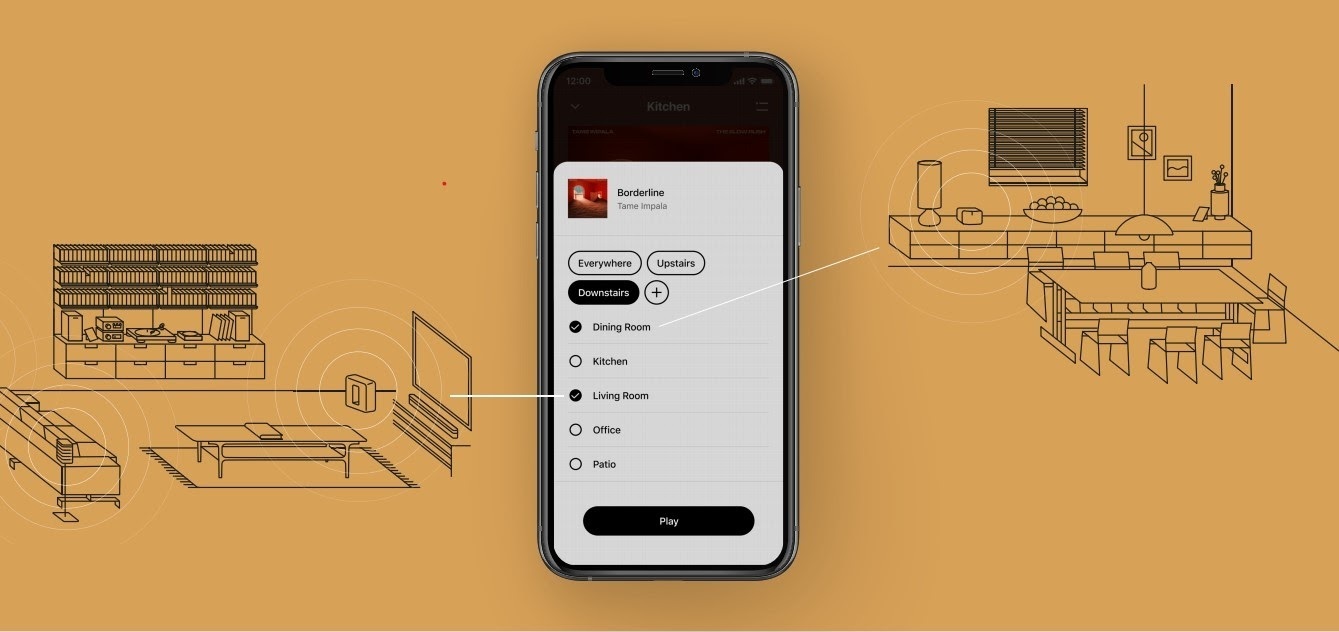
The new S2 app can save groups of rooms to create groups quickly and easily. Once a group is created, you can select it to start playing music and the players will automatically group up. 


High Resolution Audio


With S2, Sonos speakers now have support for high resolution audio, 24-bit, 44.1/48kHz for FLAC/ALAC only. This support is for local music libraries shared from computers and network attached drives. We’ve updated the article on Sonos supported music formats here.

The Sonos Arc is a Dolby Atmos soundbar, and S2 brings support for that audio to Sonos for home theater and music. Dolby Atmos can be read from Dolby Digital Plus, Dolby MAT, and Dolby TrueHD. 


How to get S2

All Sonos systems will be able to update to Sonos version 11.2, which contains some bug fixes and stability improvements. This version is a new S1 update, and compatible with all players. 

Once the 11.2 update is completed, systems compatible with Sonos S2 will receive a notification that the new app is available. You can tap that notification to start updating and the new app which will guide you through updating compatible players to the new platform. If you don’t see the notification banner, you go to System Tools in Settings to check compatibility and update. Sonos S2 is Sonos version 12.0.

You can check our Sonos S2 Compatibility article for a list of products that are compatible with S2.​​​​​


Articles and important information about S2

We will support products on Sonos S1 with bug fixes and security patches, and we will do what we can to ensure they keep working with the music services you love given their limited RAM and processing power.

We’ve put together answers to some of the top questions we’ve seen around S2 here, so please check out the following articles on:

Sonos S2 Overview - A great starting place to learn more about S2.

Sonos S2 Compatibility - Information about the differences between Sonos S2 and S1, including which Sonos products are compatible.

Set up separate S1 and S2 systems - Learn how to set up a separate Sonos S1 system with Sonos products that are not compatible with S2.

Known limitations with separate S1 and S2 Sonos systems - This article covers what you can expect when using two separate S1 and S2 systems.

Set up a separate Sonos S1 system

Remove Sonos products that are not compatible with S2 - Instructions on how to use the product removal tool in the Sonos S1 Controller before updating to Sonos S2.

Information about Trade Up:

If you’re interested in updating older Sonos speakers, here’s all the details on our Trade Up program, a way to get a big discount on any new Sonos products that are S2 compatible.

Trade Up home page - Get a general overview of the Sonos Trade Up program.

Trade Up support article - Step by step instructions on how to trade up your eligible Sonos products.

This topic has been closed for further comments. You can use the search bar to find a similar topic, or create a new one by clicking Create Topic at the top of the page.

230 replies

Enthusiast II
July 23, 2020

My system is starting to settle down with S2 after the last update, but what I don’t get is why the app is SO SLOW to load on either iOS or Fire devices.  iPads, iPhones, Fire HD, doesn’t matter, it just sits there spinning for a minute or so before the app will finally emerge.  S1 loaded instantly just like every single app on any devices we have in our household.  


Wishlist for S2:

  1. Give us control over the new and awful app colors.
  2. Make app loading more responsive.
  3. GET HD streaming services up and running... sure we can play from our server libraries, but that’s not what I/we thought S2 was going to deliver.
  4. I know times are tough all round, but contracting-out your once stellar support to off-shore-third party/contracted support companies is just hurting your brand and is so frustrating for users/customers.  
  5. Please respond to at least a few of the hundreds of Apple App Store complaints/reviews on S2, it makes your company look AWOL for not even attempting to address the hordes of disappointed users/customers.  
Lyricist II
July 26, 2020

Worst update ever


I stupidly updated my system to the new software and the new S2 app. It worked for a few days but now I can’t stream any music, radio etc. 


Will this be fixed at some point hopefully soon? People are not exactly giving great reviews on the various forums and app stores at the moment. Stupid way to kill an otherwise nice system 


If it worked at first, and stopped after a few days, I would check your router/wifi environment rather than blame the app. I suspect IP address conflicts, which can be resolved by powering down all speakers and router. Reboot router and wait for it to fully restart. Then power up speakers one at a time, letting each fully restart before powering the next. 

Worst update ever


I stupidly updated my system to the new software and the new S2 app. It worked for a few days but now I can’t stream any music, radio etc. 


Will this be fixed at some point hopefully soon? People are not exactly giving great reviews on the various forums and app stores at the moment. Stupid way to kill an otherwise nice system 


If it worked at first, and stopped after a few days, I would check your router/wifi environment rather than blame the app. I suspect IP address conflicts, which can be resolved by powering down all speakers and router. Reboot router and wait for it to fully restart. Then power up speakers one at a time, letting each fully restart before powering the next. 


Thank you for the advice. It worked for approximately one day. Now the app rarely connects to anything and if it connects, it only lasts for a short while. Really a deal breaker especially since I had absolutely no issues with the old S1 app. Anyways, I’m sure they will prioritize this and get it fixed before the bad publicity spirals out of control....


Just an quick update… it still doesn’t work. I now regularly have to re-start my router and Sonos system to get anything from a few hours to a day of connectivity. Then I lose all connection to the Sonos system and have to repeat. Wonderful. 
 

Have anyone heard anything about when they will release a functional version of the software?

Enthusiast II
July 28, 2020

I’ve not noticed any major problems on my system since loading the S2 version, except maybe the apps taking a little longer to load.

I would like to see a more configurable My Sonos screen on the app though. For me it’s virtually unusable and I can’t remember the last time I actually used that screen...

First of all I don’t want it to spin up my NAS drive to show my playlists every time I access that screen because during the day I mostly listen to tunein radio stations and so keep powering up the NAS drive is very annoying. I can’t remove my playlists from that screen because it’s the only place you can actually access them in the app.

Secondly the display of the radio stations is poorly implemented as it doesn’t show them all so I have to go through multiple menus to actually access my radio stations on the app.

The My Sonos screen is user configurable but only very slightly so I can’t change it to meet my requirements and so never use it. What a waste!


fullerscopes
Enthusiast I
August 2, 2020

Using the new app with a Samsung tablet. At the bottom of the screen there is a bar with details of another speaker in the household. How do I get rid of this?

106rallye
August 3, 2020

@fullerscopes Not sure what you mean by this. Can you post a print screen?

fullerscopes
Enthusiast I
August 3, 2020

This is what I mean.


fullerscopes
Enthusiast I
August 3, 2020

I think it might have sorted itself out. When I originally posted I was browsing in "Living Room" but "Kitchen" was at bottom of screen, which didn't make sense. Now it seems to be ok.

106rallye
August 3, 2020

You can choose a different speaker when you touch the four horizontal lines in de middle.

Trending Lyricist I
August 3, 2020

Will the S1 app be updated in the future for new OSes for both computers and phones or is Sonos simply abandoning it?

106rallye
August 3, 2020

Why would they give us a choice now, only to abandon it later?