
Ryan S
Retired Sonos Staff
June 8, 2020

Introducing S2, New App and OS for Sonos
Related content:Software
Introducing S2, New App and OS for Sonos

The next generation of Sonos software is now available. Sonos S2 is a new app and an operating system for compatible devices, which brings support for higher resolution audio, saved groups, support for new Sonos products, and more.

Learn more about the Sonos S2 app on our S2 home page.


Support for the newest Sonos products

The all new Sonos Arc, Sonos Five, and Sonos Sub will require the Sonos S2 app. These new players are not supported by the Sonos S1 Controller. 


Saved Groups
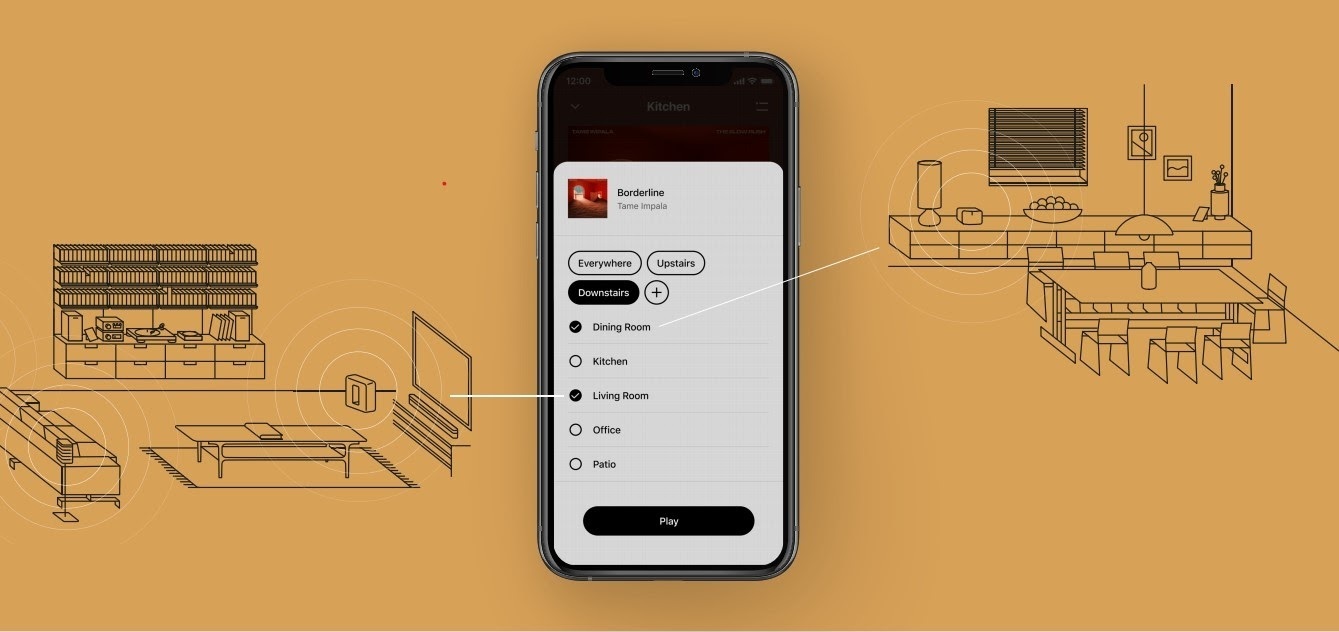
The new S2 app can save groups of rooms to create groups quickly and easily. Once a group is created, you can select it to start playing music and the players will automatically group up. 


High Resolution Audio


With S2, Sonos speakers now have support for high resolution audio, 24-bit, 44.1/48kHz for FLAC/ALAC only. This support is for local music libraries shared from computers and network attached drives. We’ve updated the article on Sonos supported music formats here.

The Sonos Arc is a Dolby Atmos soundbar, and S2 brings support for that audio to Sonos for home theater and music. Dolby Atmos can be read from Dolby Digital Plus, Dolby MAT, and Dolby TrueHD. 


How to get S2

All Sonos systems will be able to update to Sonos version 11.2, which contains some bug fixes and stability improvements. This version is a new S1 update, and compatible with all players. 

Once the 11.2 update is completed, systems compatible with Sonos S2 will receive a notification that the new app is available. You can tap that notification to start updating and the new app which will guide you through updating compatible players to the new platform. If you don’t see the notification banner, you go to System Tools in Settings to check compatibility and update. Sonos S2 is Sonos version 12.0.

You can check our Sonos S2 Compatibility article for a list of products that are compatible with S2.​​​​​


Articles and important information about S2

We will support products on Sonos S1 with bug fixes and security patches, and we will do what we can to ensure they keep working with the music services you love given their limited RAM and processing power.

We’ve put together answers to some of the top questions we’ve seen around S2 here, so please check out the following articles on:

Sonos S2 Overview - A great starting place to learn more about S2.

Sonos S2 Compatibility - Information about the differences between Sonos S2 and S1, including which Sonos products are compatible.

Set up separate S1 and S2 systems - Learn how to set up a separate Sonos S1 system with Sonos products that are not compatible with S2.

Known limitations with separate S1 and S2 Sonos systems - This article covers what you can expect when using two separate S1 and S2 systems.

Set up a separate Sonos S1 system

Remove Sonos products that are not compatible with S2 - Instructions on how to use the product removal tool in the Sonos S1 Controller before updating to Sonos S2.

Information about Trade Up:

If you’re interested in updating older Sonos speakers, here’s all the details on our Trade Up program, a way to get a big discount on any new Sonos products that are S2 compatible.

Trade Up home page - Get a general overview of the Sonos Trade Up program.

Trade Up support article - Step by step instructions on how to trade up your eligible Sonos products.

This topic has been closed for further comments. You can use the search bar to find a similar topic, or create a new one by clicking Create Topic at the top of the page.

230 replies

Contributor I
August 4, 2020

afraid i have the same issue as numerous others when i changed to the sonus 2 app tried everything no results so frustrating and cant use the sonus 1 app now

Trending Lyricist I
August 4, 2020

Why would they give us a choice now, only to abandon it later?

Well, maybe to make the massive wave of critique fizzle out in the background and make it look like they care of so called “obsolete” speakers? I was planning to expand my system but now Sonos has lost my trust and I won’t be getting any more. I mean, who knows when they will make more speakers obsolete?

106rallye
August 4, 2020

They have stated to support speakers at least five years after production has stopped.…

Sonos has made s1 available for those with older devices, instead of following through with their harsh decision to stop support for legacy devices. Your statement shows a lot of trust....

Ken_Griffiths
August 4, 2020

Why would they give us a choice now, only to abandon it later?

Well, maybe to make the massive wave of critique fizzle out in the background and make it look like they care instead saying f*ck you to all users of so called “obsolete” speakers? I was planning to expand my system but now Sonos has lost my trust and I won’t be getting any more. I mean, who knows when they will make more speakers obsolete?

Never mind the minimum 5 year (post production) guarantee given by Sonos, I’m not aware of any sonos ‘player-model’ that doesn’t still play today… I think every ‘player-product’ the company has ever made for public release, can still be used for audio playback under either the S1 or S2 software system.
 

Some of those Sonos device models have been playing more than double and nearly treble that minimum guarantee period... and long may they continue.
 

Anyone who has lost trust with that type of ‘track record‘ is definitely out of touch with the ‘real world’ and with what Sonos have been (and are still) doing with all their main products.
 

I cannot think of any such similar hardware manufacturer that can boast such lasting support for each and every single type of computerised player.
 

Entirely contrary to the comment from ‘Swedish Dude’, whilst I do understand that things may not last forever, I will happily continue to buy more products from such a company. The track record for all Sonos players still speaks for itself and it certainly far exceeds my own personal expectations.

melvimbe
August 4, 2020

Will the S1 app be updated in the future for new OSes for both computers and phones or is Sonos simply abandoning it?


I think the that depends on what a  ‘new OS’ is.  Sonos has stated that they will provide bug fixes and security updates for S1 systems.  I don’t think that means that,  if a new S2 app is developed for Chrome, linux, or something like that, there will be a corresponding S1 app in the same OS.  I also don’t think it means that if there are significant changes to a currently supported OS that requires a redesign of the existing app, Sonos will do the dev work for S1.  Most new versions of OS are usually backward compatible.


Danny
Enthusiast II
August 4, 2020

Seems identical to the old app.  What a lot of fuss over nothing 

Airgetlam
August 4, 2020

I certainly expect greater deviation over time. In my past, every time there was a fundamental background change to software in my world, the engineering team always said ‘let us get it to the way it works now, before we start making changes’. 

Bruce
Contributor I
August 11, 2020

I’ll be hanging on to S1 for as long as is physically possible. The reviews on the Android store with absolutely NO response from Sonos are horrifying. Many companies make mistakes when revising their ecosystem, but not to respond to the people that feed them makes them look contemptuous.

Lyricist I
August 14, 2020

System was working fine, downloaded the S2 app and Now cannot connect anything and S1 now doesn’t recognise products that are plugged into router… not a great experience

Ken_Griffiths
August 14, 2020

System was working fine, downloaded the S2 app and Now cannot connect anything and S1 now doesn’t recognise products that are plugged into router… not a great experience

Sorry, but there is not anywhere near enough detail in your post to even make a suggestion, other than to perhaps try a network and device reboot.

If you can’t figure out how to undertake the update to S2, then you could perhaps detail your setup and what you did and what you have already tried, otherwise I can’t see anyone ‘remote’ being able to suggest where you may need to go next to get things working.
 

Plenty of folk here willing to assist, I’m sure, but you need to explain things in far greater detail, or maybe give Sonos a call.