
Ryan S
Retired Sonos Staff
June 8, 2020

Introducing S2, New App and OS for Sonos
Related content:Software
Introducing S2, New App and OS for Sonos

The next generation of Sonos software is now available. Sonos S2 is a new app and an operating system for compatible devices, which brings support for higher resolution audio, saved groups, support for new Sonos products, and more.

Learn more about the Sonos S2 app on our S2 home page.


Support for the newest Sonos products

The all new Sonos Arc, Sonos Five, and Sonos Sub will require the Sonos S2 app. These new players are not supported by the Sonos S1 Controller. 


Saved Groups
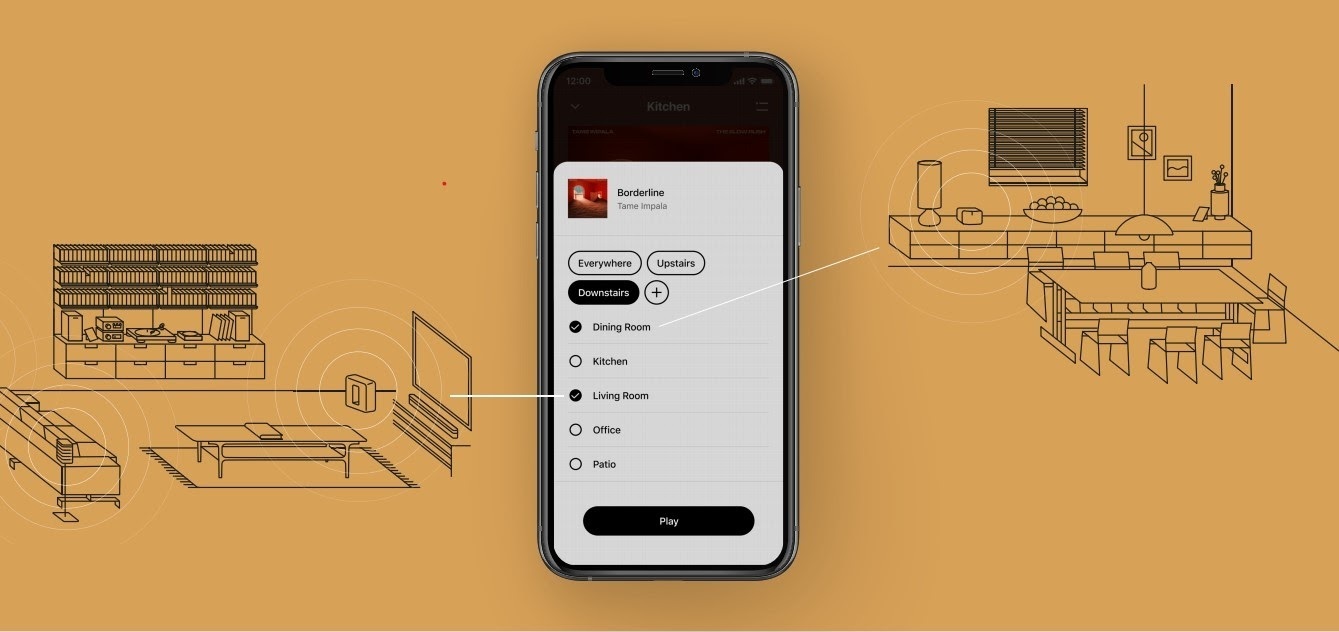
The new S2 app can save groups of rooms to create groups quickly and easily. Once a group is created, you can select it to start playing music and the players will automatically group up. 


High Resolution Audio


With S2, Sonos speakers now have support for high resolution audio, 24-bit, 44.1/48kHz for FLAC/ALAC only. This support is for local music libraries shared from computers and network attached drives. We’ve updated the article on Sonos supported music formats here.

The Sonos Arc is a Dolby Atmos soundbar, and S2 brings support for that audio to Sonos for home theater and music. Dolby Atmos can be read from Dolby Digital Plus, Dolby MAT, and Dolby TrueHD. 


How to get S2

All Sonos systems will be able to update to Sonos version 11.2, which contains some bug fixes and stability improvements. This version is a new S1 update, and compatible with all players. 

Once the 11.2 update is completed, systems compatible with Sonos S2 will receive a notification that the new app is available. You can tap that notification to start updating and the new app which will guide you through updating compatible players to the new platform. If you don’t see the notification banner, you go to System Tools in Settings to check compatibility and update. Sonos S2 is Sonos version 12.0.

You can check our Sonos S2 Compatibility article for a list of products that are compatible with S2.​​​​​


Articles and important information about S2

We will support products on Sonos S1 with bug fixes and security patches, and we will do what we can to ensure they keep working with the music services you love given their limited RAM and processing power.

We’ve put together answers to some of the top questions we’ve seen around S2 here, so please check out the following articles on:

Sonos S2 Overview - A great starting place to learn more about S2.

Sonos S2 Compatibility - Information about the differences between Sonos S2 and S1, including which Sonos products are compatible.

Set up separate S1 and S2 systems - Learn how to set up a separate Sonos S1 system with Sonos products that are not compatible with S2.

Known limitations with separate S1 and S2 Sonos systems - This article covers what you can expect when using two separate S1 and S2 systems.

Set up a separate Sonos S1 system

Remove Sonos products that are not compatible with S2 - Instructions on how to use the product removal tool in the Sonos S1 Controller before updating to Sonos S2.

Information about Trade Up:

If you’re interested in updating older Sonos speakers, here’s all the details on our Trade Up program, a way to get a big discount on any new Sonos products that are S2 compatible.

Trade Up home page - Get a general overview of the Sonos Trade Up program.

Trade Up support article - Step by step instructions on how to trade up your eligible Sonos products.

This topic has been closed for further comments. You can use the search bar to find a similar topic, or create a new one by clicking Create Topic at the top of the page.

230 replies

Contributor I
August 16, 2020

Ken to be fair to the poster, he didn’t ask for assistance but was simply posting the experience he (and many, many others) has had in attempting to upgrade. The fact that he needs to resort to “folk here willing to assist” or giving Sonos a call indicates that Sonos should have made their update process a lot more straightforward than they have done.

Ken_Griffiths
August 16, 2020

Ken to be fair to the poster, he didn’t ask for assistance but was simply posting the experience he (and many, many others) has had in attempting to upgrade. The fact that he needs to resort to “folk here willing to assist” or giving Sonos a call indicates that Sonos should have made their update process a lot more straightforward than they have done.

I didn’t personally experience any issues updating to S2, nor did my son, son-in-law or his relatives either, so I was just thinking that I (or possibly others here) might just be able to assist that’s all.👍


Contributor I
September 5, 2020

I seem to have loads more connectivity issues since the new app, is it possibly connected to the app "upgrade"?  If so is an improvement coming?

Airgetlam
September 5, 2020

Unlikely. There’s a significantly larger possibility that your issues are with the local network. You may want to open a new thread with details and perhaps a diagnostic, and someone may be able to assist you. 

Bruce
Contributor I
September 5, 2020

Ok, but do the diagnostics work, if you cannot connect to the sonos system? Presummably if it can't find anything, the diagnostics can't work.  I can run everything else off my wi-fi.  On the google play app store comments, there seem to be lots of people with the issue with sonos 2.

Lyricist I
October 23, 2020

So what is the user experience if I have a mixture of new and old equipment which is going to be the majority of us for some time.  Do I have to use one app for the S1 equipment and then the newer S2 for the newer equipment?  How do I sync playing music across that ecosystem?  Thanks

Bose is making good products. When my old sonos unsupported products become unusable, I will make the switch. I have invested about 4k in Sonos bit no more. 

jgatie
October 23, 2020

Bose is making good products. When my old sonos unsupported products become unusable, I will make the switch. I have invested about 4k in Sonos bit no more. 


Bose recently abandoned an entire lineup of smart speakers that were less than a decade old design, replacing them with a new Alexa capable lineup that is 100% incompatible with the old.  Even worse, these older model speakers were sold right up until the day they dropped them.  You literally could have bought a speaker one day, and the very next day your speaker was obsolete; incapable of working with any future Bose devices.  

So, good luck with Bose.  

Contributor I
November 22, 2020

For me the question is what is an alternative to buying sonos speakers now? I want a distribution system which does not need me to upgrade the actual speakers every few years as that looks like the way its going. Am I better off buying a quality amp and using a different service for distribution?

Avid Contributor III
November 23, 2020

For me the question is what is an alternative to buying sonos speakers now? I want a distribution system which does not need me to upgrade the actual speakers every few years as that looks like the way its going. Am I better off buying a quality amp and using a different service for distribution?

Tricky isn’t it?

I’m going back to hi-fi. I've been listening to a friend’s hifi recently and I’d forgotten how much better it sounds anyway. Streaming, bluetooth etc are no longer the sole domain of smart speakers. You can get plenty of streaming boxes, bluetooth receivers, active speakers that can make up a hifi system that sounds way better than Sonos ever could. Second-hand amps and speakers are often incredible value.

Looking where I’ve got my Sonos right now, it wouldn’t be the end of the world if a few more wires were involved. And do I really need just one controller for the whole house? TBH - no I don’t.  I can invest a bit into the speakers and they will still be producing great sound in 20 years.

Headliner I
November 24, 2020

Just like KEF LS50 ?