
News

Lossless is here. Included in Spotify Premium

Related content:Software NewsPartner News
  • October 23, 2025
  • 73 replies
  • 3246 views

Show first post

73 replies

Airgetlam
  • January 28, 2026

@Brooks Perry If you can, I’d certainly recommend that you ‘edit’ your post to remove both serial numbers (which can be used to gather discounts) and IP addresses (which might be used for hacking purposes). 


Corry P
Forum|alt.badge.img+19
  • Sonos Staff
  • January 28, 2026

Hi ​@Brooks Perry 

Yes, your speakers are compatible with Spotify Lossless.

To reboot everything, the best way to go about it is to turn off (or unplug) your router and all your speakers. Once the router has a been off for at least 30 seconds, turn it back on and wait for Wi-Fi to return before turning on the speakers, turning the Playbar on before the surrounds or Sub. Reboot the phone at roughly the same time - so it reconnects to the rebooted router. I wouldn’t even open the Sonos or Spotify apps until a minute after the last speaker has stopped flashing its white light.

I hope this helps.


Mr. T
  • January 28, 2026

​ Thanks for getting back to us (DT24 is my partner--I posted the question from her account because we use her account to manage Sonos at this house).


I’d check that your partner’s Spotify account, which is the account linked to Sonos, has Lossless enabled.


Forum|alt.badge.img
  • Contributor I
  • January 28, 2026

@Corry P 


I completed a reboot of my wifi router, all Sonos devices, my iPhone, my MacBook Pro, and her iPad.


Her iPhone is not at the house right now, but I reinstalled Spotify on her iPad and updated the wifi stream quality setting to Lossless on that device. I’ll update Spotify stream quality settings on her iPhone when she gets home.
 

Everything is now reconnected and the issue persists… no luck. I will try contacting Sonos Tech Support.
 

I have been unable to get ahold of anyone helpful at Spotify so far.


Forum|alt.badge.img
  • Contributor I
  • January 28, 2026

@Corry P 

Also, I tested the functionality from the freshly reinstalled Spotify app on her iPad after the reboot and reproduced the same issue with her device and Spotify account. So it’s not specific to the account. 


Corry P
Forum|alt.badge.img+19
  • Sonos Staff
  • January 29, 2026

Hi ​@Brooks Perry 

That’s quite unusual - I hope the team can figure it out for you.


Forum|alt.badge.img+18
  • Prodigy II
  • January 29, 2026

@Corry P 

Also, I tested the functionality from the freshly reinstalled Spotify app on her iPad after the reboot and reproduced the same issue with her device and Spotify account. So it’s not specific to the account. 

Can I just check you’ve done it all?

Airplay a track from Spotify on iPhone or iPad to a Sonos speaker (using the same Spotify account that is used on your Sonos app), and while playing music, go to your name on the Spotify app (top left), select Settings and Privacy, then Media Quality, and ensure “Audio Streaming quality” is set to Lossless. Give it a minute, then stop Airplay streaming to the speaker. 

Go to the Sonos app and remove Spotify. Then re-add it (ensuring the same account as you had just Airplayed from), and start playing music. It should then stream in Lossless. Sometimes to see the Lossless tag, you might need to drag the elapsed time slider towards the end of the song, and then back again to get the tag to appear. A quirk of Sonos. 


106rallye
Forum|alt.badge.img+18
  • January 30, 2026

AirPlay a track from Spotify? You mean play a track to Sonos via Spotify Connect?


Forum|alt.badge.img+18
  • Prodigy II
  • January 30, 2026

AirPlay a track from Spotify? You mean play a track to Sonos via Spotify Connect?

Yes, same thing but I don’t want to assume anyone knows what Spotify Connect is. It’s not intuitive.


Mr. T
  • January 30, 2026

AirPlay a track from Spotify? You mean play a track to Sonos via Spotify Connect?

Yes, same thing but I don’t want to assume anyone knows what Spotify Connect is. It’s not intuitive.

You can also select to AirPlay from Spotify app in the speaker connection options. It does say Airplay > Lossless in the Spotify app when connected to Sonos, with Sonos app just evidencing Airplay.


106rallye
Forum|alt.badge.img+18
  • January 30, 2026

Not to make to fine a point of this but AirPlay and Spotify Connect are totally different things. AirPlay streams music from an iPhone only (Android does not do AirPlay) to your speaker, while Spotify Connect makes the speaker fetch a direct link to Spotify - that on Sonos will not even be broken when the phone that was used to for Spotify Connect leaves your WiFi.


Forum|alt.badge.img
  • Contributor I
  • February 2, 2026

@Rhonny Yes, I’ve done that all. Several times now. Super strange.

The one other thing I’ll add is that Spotify streams lossless from my iPhone through my BMW Carplay just fine. So again, this points me to something specific to the Spotify Connect > Sonos integration.

I don’t have time to keep troubleshooting it, so I’m just over it at this point… If I find time and energy to deal Sonos and Spotify support and it goes anywhere, I’ll circle back here. But I might just wait til we move to a new house and set everything up from factory settings to see if that resolves it.

Very High sounds good enough that I’m not going to throw another 5+ hours at this issue. Thanks for everyone’s help and input!


  • Lyricist I
  • February 4, 2026

@Corry P and ​@Rhonny great news!

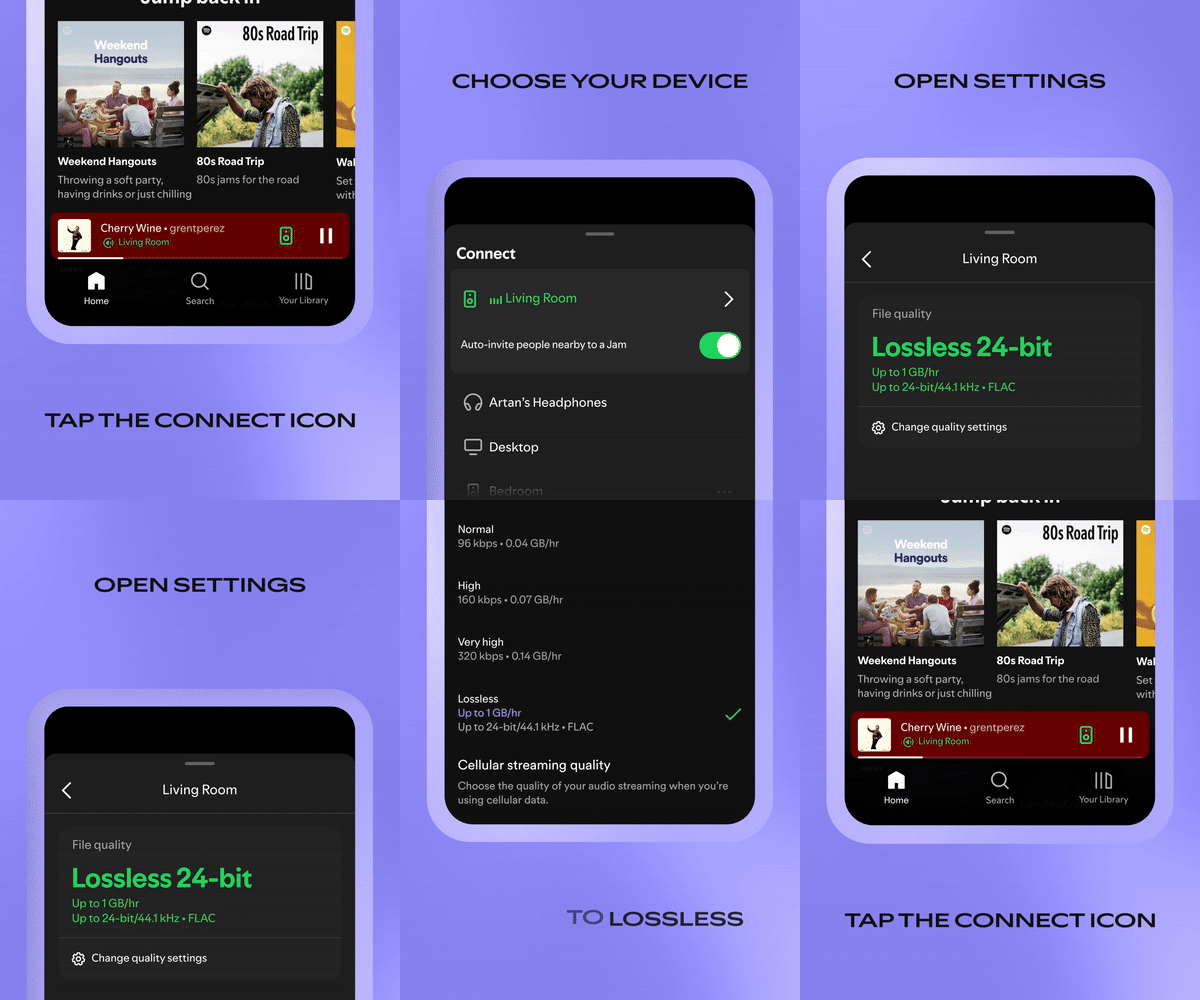
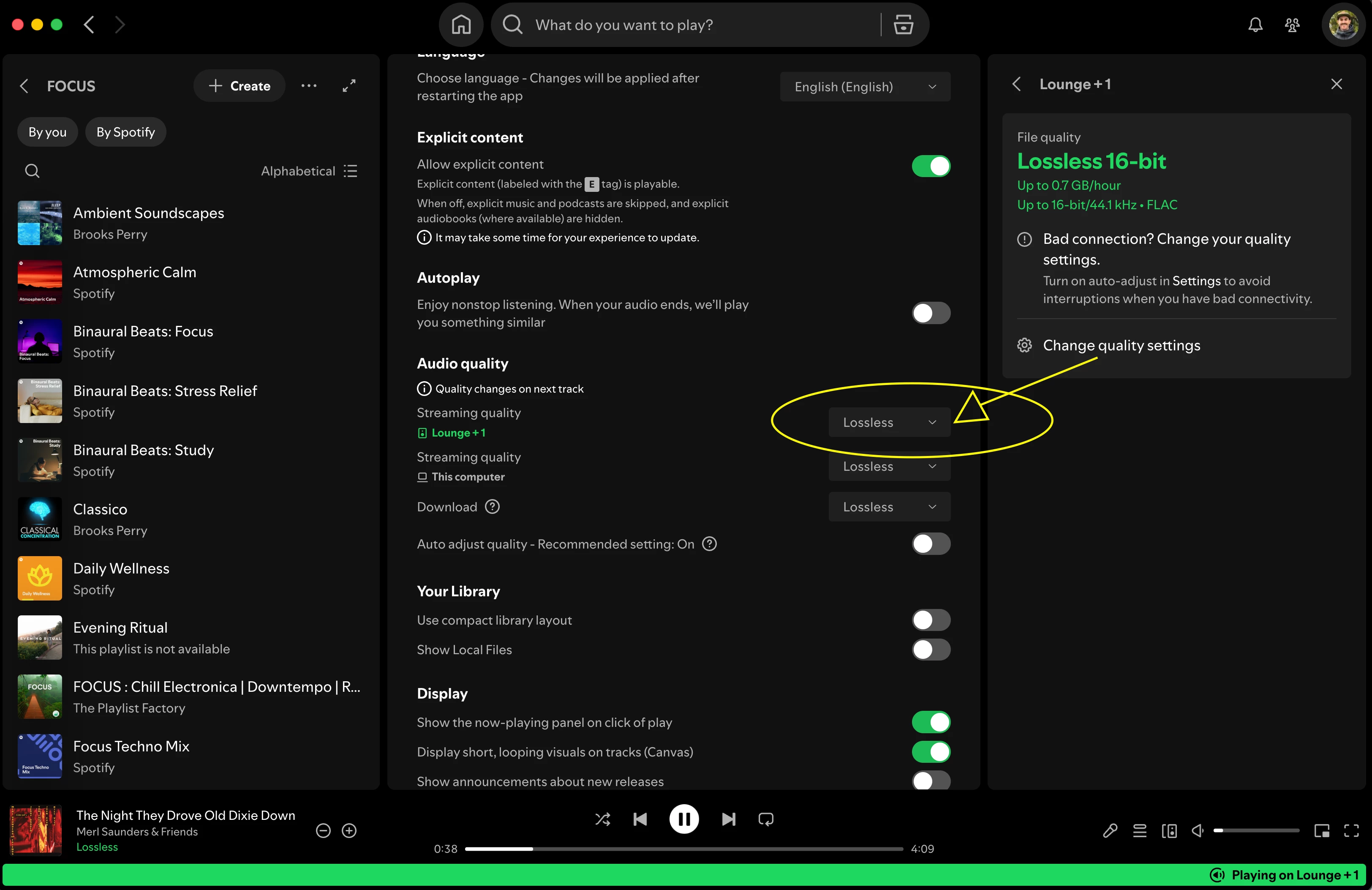
Shortly after I posted that last reply to Rhonny a couple days ago, I checked both desktop OS versions of Spotify and Sonos for updates again and found a couple minor updates available. After I installed those updates, I gave the steps Rhonny suggested again just for good measure and for the first time, I saw a new option available after starting the Spotify Connect stream to my Sonos system when I clicked on Change quality settings.

Suddenly under Audio quality I saw separate streaming quality fields for my selected Sonos speakers above the streaming quality setting for This computer. At the time, audio quality had been set to Lossless wherever possible and it was already selected for This computer and for Downloads, but for the new devices that hadn’t appeared before it was set to Very high. I changed this to Lossless and advanced the track and my problem was solved!

Screenshot of new field attached. Hope this helps others who may not have had/seen this option before! Thanks for everyone’s help and patience. Grateful to the support gods who reviewed my case and finally ruled in my favor.

Cheers,

Brooks


Forum|alt.badge.img+18
  • Prodigy II
  • February 4, 2026

@DT24 

That’s really very good news. 

By coincidence, I noticed today that I wasn’t streaming from Spotify on Sonos in Lossless. So I had to repeat the process. But what I realised was that - on the Spotify iPhone app - rather than selecting ‘Bluetooth & Airplay’ after tapping the speaker bottom left (which I had advised you before), I needed to select the Sonos speaker itself and play directly on there. THEN I changed the audio quality in the Spotify app to Lossless, and went into the Sonos app’s playback screen to check - and there was Lossless playing. 

I had mentioned Airplay to you in this thread previously, and some had jumped on that as incorrect. I now know that I needed to ignore Airplay and just select the Sonos speaker before changing the audio quality. Apologies to you and those who had seen my error….


MoPac
Forum|alt.badge.img+18
  • Headliner III
  • February 4, 2026

 When I look at the Now Playing screen why don’t I see the type of stream.  Only when it’s Atmos is that information showing.


Mr. T
  • February 5, 2026

 When I look at the Now Playing screen why don’t I see the type of stream.  Only when it’s Atmos is that information showing.

The Sonos Now Playing screen will show Lossless badge for Spotify when applicable.


Forum|alt.badge.img+2
  • Enthusiast II
  • February 5, 2026

Does Spotify lossless played through the Sonos app glitch/skip the way Apple Music does?


Forum|alt.badge.img+18
  • Prodigy II
  • February 5, 2026

Does Spotify lossless played through the Sonos app glitch/skip the way Apple Music does?

Neither Apple Lossless nor Spotify lossless skips here via the Sonos app…


MoPac
Forum|alt.badge.img+18
  • Headliner III
  • February 5, 2026

 The Now Playing screen, with some streaming services, does not show the streaming type unless it’s Atmos.  Apple Music & Qobuz show nothing unless of course Apple is streaming Spacial Audio.  This morning I did get Amazon Music Unlimited to show HD or Ultra HD.  I don’t care if Spotify shows anything as it’s only used for background dinner music.  I did however set up Spotify to stream High-Res.


MoPac
Forum|alt.badge.img+18
  • Headliner III
  • February 5, 2026

Raghu:

 The only issue I had with Apple Music was with Atmos.  It would play several tracks then just stop playing.  Amazon does not have that issue with Atmos streaming.


Forum|alt.badge.img+2
  • Enthusiast II
  • February 5, 2026

Raghu:

 The only issue I had with Apple Music was with Atmos.  It would play several tracks then just stop playing.  Amazon does not have that issue with Atmos streaming.

I’m getting a brief (split second) repeatable glitch on every Apple Music track right at the moment the Lossless badge appears, then the song plays normally afterward. This never occurs if I throttle bandwidth enough to prevent lossless from kicking in, a workaround I picked up from others with the same issue. So it seems directly tied to the switch into lossless, yes it’s oddly specific but very annoying. 
 

@Rhonny thank you I will give Spotify a try 


Mr. T
  • February 5, 2026

 The Now Playing screen, with some streaming services, does not show the streaming type unless it’s Atmos.  Apple Music & Qobuz show nothing unless of course Apple is streaming Spacial Audio.  This morning I did get Amazon Music Unlimited to show HD or Ultra HD.  I don’t care if Spotify shows anything as it’s only used for background dinner music.  I did however set up Spotify to stream High-Res.

And?

This thread is about the release of Lossless on Spotify…

The Sonos app has however shown Lossless badge for Apple Music for months and Amazon Music has shown HD/Ultra HD for years.


Corry P
Forum|alt.badge.img+19
  • Sonos Staff
  • February 9, 2026

Hi ​@DT24 

That’s great - thanks for updating the thread with your findings!