
Ryan S
Retired Sonos Staff
August 29, 2018

Introducing Sonos Amp
Related content:Hardware


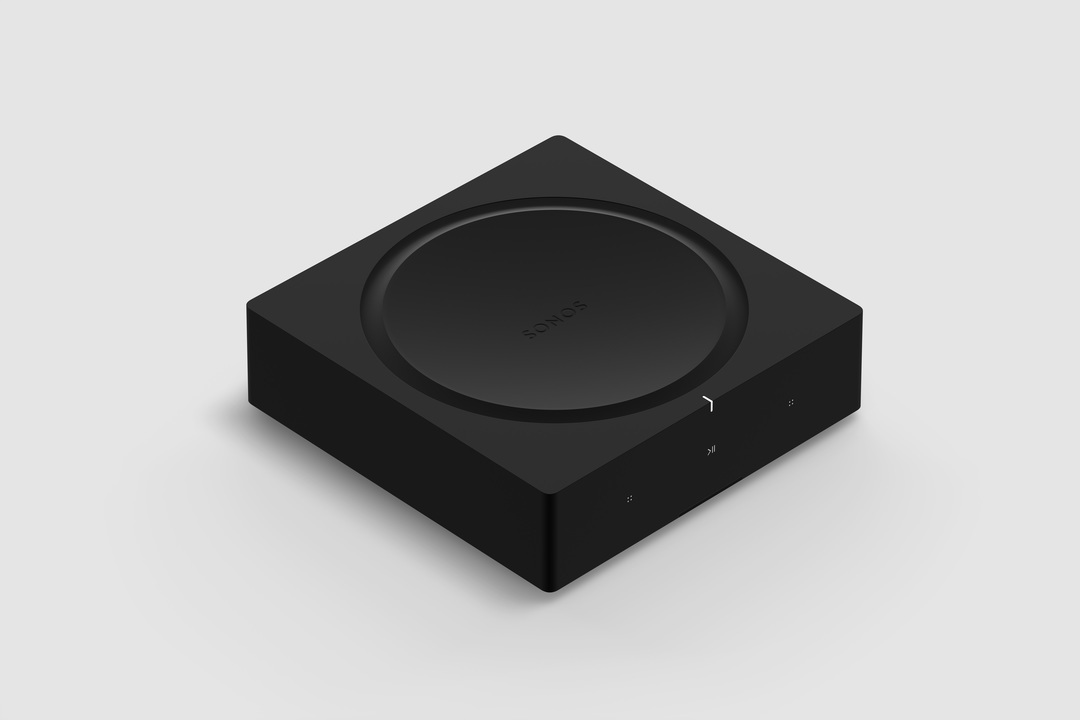
Available starting February 2019, Sonos Amp is the all-new, versatile amplifier to power all your entertainment and bring the sonic content you love to every room of your home. The Amp has been redesigned with more than twice the power of the original Connect:Amp, with more versatility, and will enable new experiences through the platform.

Play your favorite streaming content on Sonos, connect to your TV through HDMI-ARC, or plug into any audio device, including a turntable to power your vinyl collection.

Sonos Amp will fit in any home environment, whether as a compact and elegant solution for in-rack AV installations, wall mounted, tucked under furniture, or on display in a room.

Details and Specs
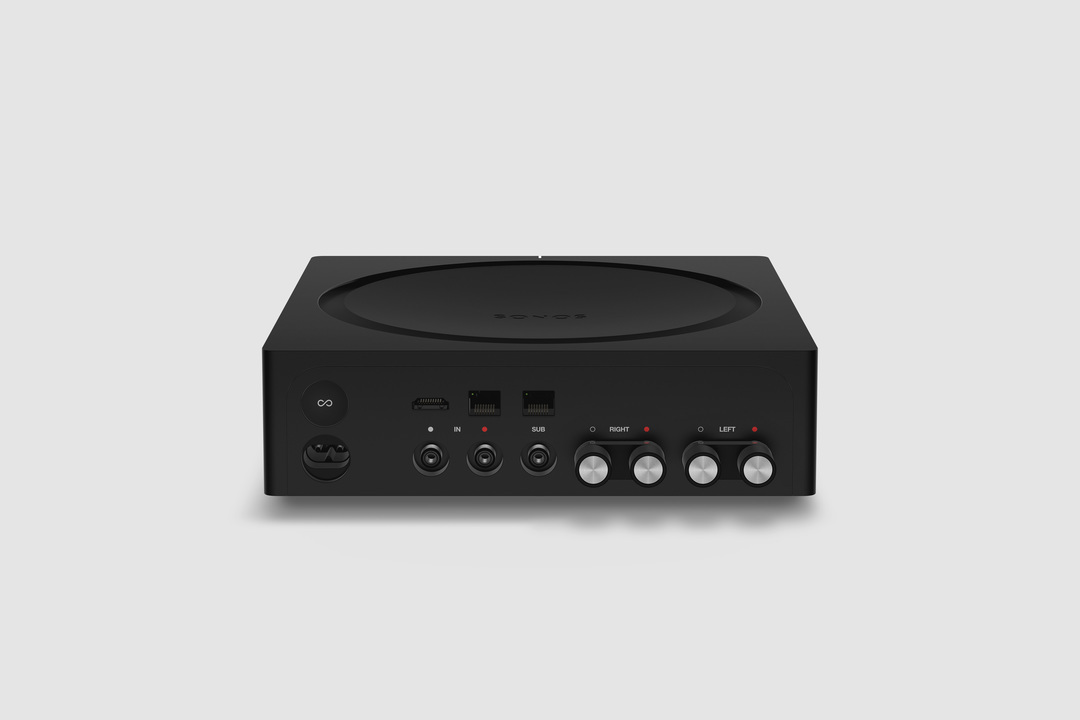


Physical Specs Amp comes in Matte black with black and silver banana plugs all in a standard rack fit size. The dimensions are 8.54 x 8.54 x 2.52 in. (217 mm (w) x 217 mm (d) x 64 mm (h)) and it weighs 4.6 lbs. (2.1 kg). Custom banana plugs that accept 10 - 18 AWG speaker wire and the Class-D digital amplifier sends a maximum of 125W per channel at 8 Ohms.

The subwoofer output is auto-detecting RCA with adjustable crossover (50 to 110Hz).

Capable of using two line-in sources, analog RCA audio input, and HDMI-ARC inputs. Amp plays Dolby Digital 5.1 or PCM stereo sound over HDMI-ARC.

Versatile Design


Use Sonos Amp to power your installed speakers as a separate Sonos room, or bond it with a pair of Sonos Ones, Play:1s, Play:3s, or Play:5s to become a surround sound setup that you can use with your TV. You can also use Amp to add your speakers as rears to a Sonos home-theater setup (by wirelessly bonding an Amp with Beam, Playbar, or Playbase) or use two Sonos Amps (one for the front right and left channels, the other for the rear channels) for surround sound.

The Sonos Amp drives left and right speakers, and it will create a phantom center channel when sent discrete audio for that channel.

Sonos Amp has all the features of Sonos in a powerful package:
  • Sonos supports over 100 services. Choose the ones you want and listen to music, podcasts, radio, and audiobooks. You can also play all the music stored on your computer or other devices.
  • Sonos has built a software platform that enables hundreds of partners and gives our customers unparalleled freedom of choice. Amp features AirPlay 2, access to home automation partners, and voice control when wirelessly connected with Amazon Echo or Alexa-enabled devices, including Sonos One and Beam.
  • Use the Sonos app on your phone or tablet, your TV remote, keypads, AirPlay 2, or your voice with Amazon Echo and Alexa-enabled devices.
  • New APIs and deeper integrations with our platform partners let you create seamless smart home control.
  • Sonos is a system. Start with Amp and expand into more rooms with additional speakers through WiFi.
  • Sonos regularly updates with new features, voice services, and API integrations, so your options are always up to date and improving.


Availability


General availability on February 5, 2019 for $599 USD (£599 GBP, €699 EUR). Early access for installed solutions professionals on December 1 in the United States and Canada. Sign up to be notified of availability on Sonos.com.

For more details, check out our blog post on the Sonos Amp here.

This topic has been closed for further comments. You can use the search bar to find a similar topic, or create a new one by clicking Create Topic at the top of the page.

364 replies

Chris
Lead Maestro
September 17, 2018
Your never going to get it to be center only. Maybe you should stick with playbar as I agree if the front are in ceiling the created center by amp is. It going to give you good center
Respect the Queue (2)Move (3)Beam (1) Era100 (2)ARC (1)SonosOne (1)Playbar (4)Play5 (4)Play1 (3)Play3 (1)Port (2)Connect (1) Roam (2) Ace (1)Connect:Amp (4)Sonos Amp (1)Sub + (9) Echo + Smartthings; (2)Play)
Ryan S
Ryan SAuthor
Retired Sonos Staff
September 17, 2018
@Sonos team, can you comment on any possibility of being able to leverage a Beam/Playbar as a center channel in this type of a setup? Even if the Beam/Playbar continue to do their FL/C/FR audio, just in addition to the Amp's own FL/FR channels? In my experience, the dedicated center channel is the single most important speaker in a HT setup.
It's not currently a planned setup, but I'll make sure you add your interest to the team.

Also worth noting that for voice control of the CEC it's best to have a voice-enabled Sonos player that's bonded as the surrounds. An Alexa enabled device in the room would have most voice control functions, but some of the CEC controls will perform better if there's a voice-enabled device as part of the "room".
Mark good posts by pressing the like button, and select the best answer on questions you've asked to help others find solutions.
melvimbe
September 17, 2018
Sonos rarely comments on future features and products like this. But you never know. My personal opinion is that Sonos is more likely to come out with a new speaker that can act as a center channel rather than allow the Beam/Playbar to be repurposed like this. But it's just an opinion.

It's also my opinion that Sonos will introduce a playbar 2.0 with HDMI-ARC before they come out with a center channel. If you have a secondary use in mind for the Sonos:amp, you may want to wait another 6 months or so to see if there is any noise about that, as it sounds more like the product you really want.

As far as the ARC functionality (CEC really), it's nice, but I don't find it to be that big of an improvement over optical. In my case anyway, the Samsung TV doesn't allow turning off the TV, or switching inputs through ARC. Volume related controls work, but you can do that through IR remote already.
Danny
Ken_Griffiths
September 17, 2018
It’s true that Sonos rarely mention, or publish, their roadmaps when it comes to these things, but I’m inclined to think the same as Melvimbe (Danny) here and that Sonos are possibly unlikely to re-purpose their existing devices, like the Beam etc. as a 'center only' surround speaker, particularly for use with the new Amp.

It makes more sense that Sonos will eventually come out with further products, like a PlayBar v2, for example, or some kind of new dedicated center device.

I will also be very surprised to see the Amp quickly adapted to work this way, as there is already a lot to (probably) test before its release to professional installers in early December and its general release to the public early next year.

I think the Amps fantom/ghost center channel is possibly here to stay when it is used with a TV, at least for the foreseeable future.
Dani Ionescu
Avid Contributor I
September 17, 2018
Please, please, please make also a white version! Otherwise I can not buy it. I have everything from you also because you have white products. And you do give people option until now, white and black . Please give this option further.

Thank you!
http://fotosapiens.ro
Lyricist I
September 20, 2018
Just to be clear, when the new SONOS AMP is available, you will be able to pair with the SONOS SUB? But currently the SONOS CONNECT AMP you CANNOT pair with the SONOS SUB if you are using NON SONOS speakers with the CONNECT AMP?
Ryan S
Ryan SAuthor
Retired Sonos Staff
September 20, 2018
Just to be clear, when the new SONOS AMP is available, you will be able to pair with the SONOS SUB? But currently the SONOS CONNECT AMP you CANNOT pair with the SONOS SUB if you are using NON SONOS speakers with the CONNECT AMP?

I've got some good news for you Anthony, first off, you absolutely will be able to pair a Sonos Amp with a Sonos Sub or another subwoofer using the sub output. But secondly, you can pair a current Connect:Amp with a Sonos Sub when using non-Sonos speakers. The Connect is the only Sonos player that can't pair with a Sonos Sub, largely because we have no way of controlling anything regarding whatever is downstream from the Connect, which would make for a terrible Sub experience.
Mark good posts by pressing the like button, and select the best answer on questions you've asked to help others find solutions.
Lyricist I
September 21, 2018
Sounds great.
Question: With the Connect:Amp, when you use it to join with a Playbar to get surround speakers the sub output is disabled. With this one can I use my existing non sonos powered sub and rear surrounds and pair it with a playbar?
Avid Contributor I
September 21, 2018
Can you use a beam to connect with the amp to pass on the sound signal from TV to it? Thus negating having to run an HDMI ARC cable all the way to the amp.

It seems from other questions you can’t use a beam in the 5.1 setup though, is this correct? Even if it acts as left/right and centre still
melvimbe
September 21, 2018
Sounds great.
Question: With the Connect:Amp, when you use it to join with a Playbar to get surround speakers the sub output is disabled. With this one can I use my existing non sonos powered sub and rear surrounds and pair it with a playbar?


Ryan answered this in his post below.

https://en.community.sonos.com/announcements-228985/introducing-sonos-amp-6812069/index1.html#post16263379

Can you use a beam to connect with the amp to pass on the sound signal from TV to it? Thus negating having to run an HDMI ARC cable all the way to the amp.


Any of the Sonos devices that connect to the TV (Beam, playbar, playbase, sonos amp) can send TV audio to any Sonos speaker or device setup as a separate room through the grouping functions. However if that speaker or device is not bonded with your device connected to the TV as a sub or rear speakers, then it will need to be setup as a separate room, and there will be a slight delay in the TV audio and it would only play stereo audio for that source.

If I'm understanding what your getting at, if you want to use the Sonos:amp as front speakers for a tv, the Sonos:amp really needs to be connected to the TV.


It seems from other questions you can’t use a beam in the 5.1 setup though, is this correct? Even if it acts as left/right and centre still


The Beam absolutely can be used in a 5.1 setup. It will be the front left/right/center and would then be bonded with a sub and/or rear speakers (sonos one/play:1/play:3/play:5/connect:amp/sonos amp). Whatever Sonos device is used for the front speakers (Beam, playbar, playbase, or Sonos amp) needs to be connected directly to the TV)
Danny