

News

Heads up: "Update Required" prompt in the Sonos app

Related content:Software News
  • May 4, 2026
  • 48 replies
  • 1108 views
Show first post

48 replies

Airgetlam
  • May 6, 2026

As far back as I can remember, there’s been a loose connection between the app version (controller) and what is running on the system (speakers). That extends back to the late 2000s. I’ve had to call in in the past to get an un-updated device I’d been charged with maintaining up to a version that could be updated by the current controller and subsequently updated without a call. This would have been long before the S1/S2 split, back around 2015 or so. 


Stanley_4
  • Grand Maestro
  • May 6, 2026

I'm not unhappy with the way things are and have been working, where new app versions require compatible firmware but the firmware will continue working, at some level, with older apps.

The rare cases of systems with no Internet connection to update firmware shouldn't be a reason to impact a majority of users.

Might be nice to have a way to update firmware over a cellular or other connection if there are enough users that would help to be worth the investment.

Not the full use of the system that isn't (below) supported, just a firmware update tool that can work over otherwise unsuppoted connections. Maybe a tool to download/cache the files needed for updating with no network connection necessary? (My router offers that as an update option and it is quite handy.)

https://support.sonos.com/en-us/article/sonos-system-requirements


Forum|alt.badge.img+1
  • Lyricist III
  • May 6, 2026

@Smilja Sonos S1 would like a word. 


jgatie
  • May 7, 2026

Just ignore it folks, don't take the bait.


buzz
  • May 7, 2026

With respect to remotely located devices, beyond Internet coverage, it would be possible to develop an application that could be loaded on to a computer or portable drive that could then update the remote system, but I don’t think that the development cost could be justified.


  • Lyricist I
  • May 12, 2026

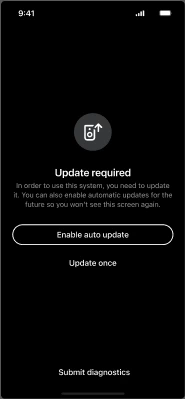
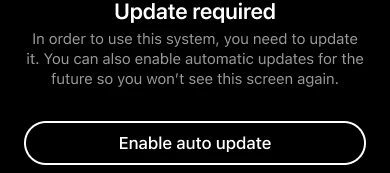
I am getting the same message in the app: “Update Required” with two options “Enable auto update” and “Update once”. Whichever I choose, I am asked to login but after providing login credentials, I am returned back to the same “Update Required” screen, making it a loop. I am not able to use my Sonos system now. Anyone else having this issue? Thanks


Airgetlam
  • May 12, 2026

I updated my Mac version yesterday with zero issues, as well as my iOS versions today. Have you called Sonos Support to discuss it?


Forum|alt.badge.img+1
  • Lyricist III
  • May 12, 2026

I am getting the same message in the app: “Update Required” with two options “Enable auto update” and “Update once”. Whichever I choose, I am asked to login but after providing login credentials, I am returned back to the same “Update Required” screen, making it a loop. I am not able to use my Sonos system now. Anyone else having this issue? Thanks

Oh man awesome work Sonos, not surprised with this given how buggy the app and update process is that people are gonna have this issue. How about you warn people but do not lock them out ever from using their systems? 


  • Lyricist I
  • May 12, 2026

I managed to update the Sonos device via the Windows application, I don’t know why this happened in Android (I am using Android 16). Thank you for your feedback.


106rallye
Forum|alt.badge.img+18
  • May 13, 2026

As explained: they don’t. App and firmware versions always needed to be within a few version number of each other. You can still set your system to not do automatic updates and you still need your phone to also not update the app automatically. Sonos is just being more transparent about this.

I am always amazed that on the one hand there are people on this community that go out of their way to have all Sonos devices on separate IOT networks and on the other hand you have people that gladly refuse to get (security) updates on their connected devices……


Forum|alt.badge.img+18
  • Prodigy II
  • May 13, 2026

Edited.


jgatie
  • May 13, 2026

Again folks, don’t take the bait.  It’s the same stuff that keeps coming around again and again.  The names change, but the shtick stays the same.  Ignore it, it’s not worth the time.


  • Lyricist I
  • May 17, 2026

As a result of the forced app update I can no longer use my Sonos Play:1. The update keeps returning an error so I can’t update it & I can’t use my speaker. Sonos please help! You can’t just cut support to legacy products that work perfectly well. It’s not a sustainability message that you’d like shared!!!


buzz
  • May 17, 2026

Can you show us the error message?


106rallye
Forum|alt.badge.img+18
  • May 18, 2026

Just because your speaker doesn’t update (which is very annoying, I understand this), does not mean Sonos cut support to older devices. All Sonos devices except for the remotes are still supported, unlike older devices from other manufacturers.

You could try and call Sonos.


buzz
  • May 18, 2026

Players from the original 2005 batch are still supported. But, due to limited memory and processor speed, these old units can’t run the latest features, such as voice control, demanded by many modern users.


Forum|alt.badge.img+18
  • Prodigy II
  • May 18, 2026

As a result of the forced app update I can no longer use my Sonos Play:1. The update keeps returning an error so I can’t update it & I can’t use my speaker. Sonos please help! You can’t just cut support to legacy products that work perfectly well. It’s not a sustainability message that you’d like shared!!!

Try running the update from the desktop app (search Sonos desktop app download). That can often succeed in updating where phones etc fail. 


Forum|alt.badge.img
  • Lyricist III
  • May 21, 2026

Hey Sonos, can you tell me why I couldn’t update my system and thus not able to use either my app nor any speakers due to an infinite update loop?  I couldn’t quit the update process to investigate any system issues.  An attempt to use an up-to-date controller on a Windows machine was no help either.


The solution I found (and I’ve had to do this before):

 - Isolate (power-off) random speakers to see if app starts working

 - turn on individual speakers, check each for an update

 - rinse and repeat until update sticks or problem returns

In today’s latest episode I had to isolate my pair of Era 300’s, remove them as surround speakers (connected to an Arc), check again for any other speaker updates, then one-by-one power up the Era, update then add both back as surrounds.


In almost every case it has been my pair of Era 300’s used as surrounds on and Arc (if not the Era’s, then it’s the associated subwoofer).  Is there a bug with passing updates to the Era’s / subwoofer when they’re connected as accessories to an Arc?  It’s getting pretty annoying to have to intrusively interfere with my system just to apply and update to regain app control.


To be clear, once this update failure occurred the app on both my iPhone and iPad (IOS 26.4.2 & iPadOS 26.4.2) was unusable.  It was stuck at the black update required screen and that was all.  Useage was only possible after I’d powered-down speakers (obviously including the Era 300’s that were the problem).


Please advise what a better process would be.

JB


Stanley_4
  • Grand Maestro
  • May 22, 2026

Often powering down all Sonos and rebooting the router before powering them back up will clear the issue.  Not doing all often doesn't work.

If it happens often setting DHCP reserved addresses will usually stop it. 


Forum|alt.badge.img+18
  • Local Superstar
  • May 22, 2026

Please advise what a better process would be.

JB

I would create a new thread, and describe your network. I strongly suspect if the bonded HT speakers are having issues with updates, there is an ARP Spoof/Poison and/or ARP Cache issue being detected on your network equipment when the speakers are updated. If you can detail your network equipment, there is probably a setting that will help. I doubt reserving IP addresses, especially for HT speakers, will help.


Forum|alt.badge.img+7
  • Prodigy I
  • May 22, 2026


Please advise what a better process would be.

JB

I had this exact issue with bonded 300's and Sub failing updates, the same solution too. 

However, as ​@craigski suggests, it turned out to be anti ARP spoofing on my router blocking the speakers. Removed the ARP entries for the bonded speakers and no issues with updating since... 


Stanley_4
  • Grand Maestro
  • May 22, 2026

Reserving addresses is not a cure-all but it does solve a long running class of problems, even Sonos has acknowledged that.

Reserving the addresses only takes a few minutes, hurts nothing, and can be undone in a couple minutes.

Trying to diagnose the IP issues(s) has proven to be beyond the skills of any who have posted about it here, leaving the "try it and see" option. 


jgatie
  • May 22, 2026

Gee ​@Mangoe, we hardly knew ye.  😉