


News

Heads up: "Update Required" prompt in the Sonos app

Related content:Software News
  • May 4, 2026
  • 16 replies
  • 261 views
Atom P
Forum|alt.badge.img+2

Hi everyone 🖖

Just wanted to keep you looped in as we roll out the latest app update this week.

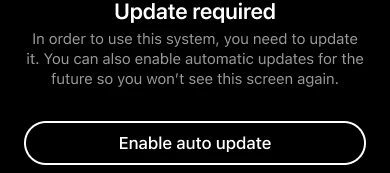
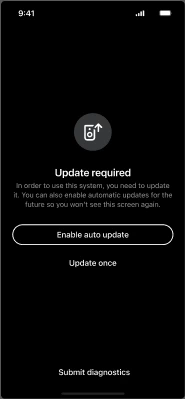
Most of you won't see any changes, but for a small percentage of users running older software, you may encounter an "Update Required" screen. This is a new minimum requirement to make sure your system includes the benefits of our most recent updates, such as improved reliability, streaming performance, and sound quality.
What you need to know:

    •  If your Sonos system is running an older version (more than 6 months old, prior to firmware version 92.0 for modern players or 86.2 for legacy players), you’ll be prompted to update to the latest firmware.

    •  Simply run the update (it should only take a few minutes) and you’re good to go.

    •  You’ll also see an option to toggle on Auto-updates, which we recommend to keep things running smoothly in the future.

If you already have auto-updates enabled, your system will have done this in the background. No actions required on your part.

As always, if you run into any hitches during the update process or have questions about your specific setup, drop a comment below. We’re here to help get you back to enjoying the music 🎶

16 replies

Forum|alt.badge.img+1
  • Lyricist III
  • May 4, 2026

Forcing updates is disrespectful and anti owner/consumer. I remember May 2024 and the insanely disruptive 12-18 months after. Reconsider this. 


Forum|alt.badge.img+16
  • Local Superstar
  • May 4, 2026

Can you clarify what is meant by ‘required’?

It says “In order to use this system, you need to update it.”. Is that true?

Some are still waiting for functions to return that were taken away 2 years ago - even though some of those are discussed as feature requests.

I can't imagine a system where I'm less likely to enable Automatic Updates than Sonos.


Stanley_4
  • Grand Maestro
  • May 4, 2026

Is this mandatory or can it be skipped with the system still operating?

Is this going to impact folks with old/unsupported Apps on no longer supported hardware/software?


106rallye
Forum|alt.badge.img+18

Will this message appear only when the app is updated and the system isn’t, or will it appear regardless of app version?


buzz
  • May 5, 2026

I suppose this is envisioned as a way to reduce support calls.

Does this mean that systems being used at an offline location (boats, remote homes, etc.) will stop working? This also implies that system use tracking was installed some time ago. So that users can plan their response to this past development, which older version installed this tracking?

Since this tracking was installed sometime in the past, affected users are known to SONOS. I think that potentially affected users should individually be notified that their system will soon stop operating. Failure to do this will result in someone going to their remote system and discover that it has been disabled. 


Forum|alt.badge.img+18
  • Prodigy II
  • May 5, 2026

Uh oh - I foresee a thread that generates the excitement / anger / division / incredulity / obstinance / irrational pre-emption / agitation that we saw after the May 2024 update. That’s quite some pin Sonos just pulled from their update grenade - delivered with an over-friendliness that I suspect was intended to quell the ire, but I can see the same faces running to their sheds for their pitchforks as we speak…


Is this a two-year anniversary attempt to stir up some forum action??


  • May 5, 2026

The 4/14/26 app/system update stated:

“Starting with version 84, the Sonos app will start requiring a minimum system software version to ensure your system is running at its best.”

Lots of questions about it at the time. No answers.

So here we are with an announcement that this will now be implemented. And still no information or details about this. Is this an example of how the new transparent Sonos will be operating?


Forum|alt.badge.img+7
  • Prodigy I
  • May 5, 2026

What is all this fuss about? 

Apart from the fact it is Sonos doing it and they have a bit of recent history that is not so good. So do Apple but they seem to be acceptable…

Most software providers issue mandatory updates, especially when they have firm and soft updates that need to be kept aligned…

Pick your toys up, get back in your prams, and enjoy the ride 🤓

(and, 3...2...1..…GO!)


Forum|alt.badge.img+1
  • Lyricist III
  • May 5, 2026


Apart from the fact it is Sonos doing it and they have a bit of recent history that is not so good. So do Apple but they seem to be acceptable…

Most software providers issue mandatory updates, especially when they have firm and soft updates that need to be kept aligned…


Apple does not issue mandatory updates that locks your phone until you update. Not do any software providers that I use. 
 

You are entitled to your opinion, but not your own facts. 


Atom P
Forum|alt.badge.img+2
  • Author
  • Sonos Staff
  • May 5, 2026

Can you clarify what is meant by ‘required’?

Sure thing. If a user has app updates enabled on their mobile device, but has had system (firmware) updates disabled for more than 6 months, then the system update is required so that the mobile device can continue to control the hardware.

Is this mandatory or can it be skipped with the system still operating?

Is this going to impact folks with old/unsupported Apps on no longer supported hardware/software?

It is only required for users who have an up-to-date mobile controller, but 6-month-of-older firmware on the players. It does not impact users of the S1 platform.

Will this message appear only when the app is updated and the system isn’t, or will it appear regardless of app version?

Yep, correct - only if the app is updated and the system isn’t. 


Atom P
Forum|alt.badge.img+2
  • Author
  • Sonos Staff
  • May 5, 2026

Does this mean that systems being used at an offline location (boats, remote homes, etc.) will stop working? 

If the app hasn’t been updated and the system also hasn’t been updated, there will be no change. This only impacts users who have been updating the app, but the system hasn’t been updated in more than 6 months.

No changes specifically for using Sonos in an offline environment (Sonos on a boat), because presumably the app also hasn’t been updating. 


  • May 5, 2026

Does this mean that systems being used at an offline location (boats, remote homes, etc.) will stop working? 

If the app hasn’t been updated and the system also hasn’t been updated, there will be no change. This only impacts users who have been updating the app, but the system hasn’t been updated in more than 6 months.

No changes specifically for using Sonos in an offline environment (Sonos on a boat), because presumably the app also hasn’t been updating. 

I think that might be a bad assumption. The app is on your phone and has been kept up to date. The remote system has not, and now the controller refuses to work because a system update is ”required”. 


Atom P
Forum|alt.badge.img+2
  • Author
  • Sonos Staff
  • May 5, 2026

I think that might be a bad assumption. The app is on your phone and has been kept up to date. The remote system has not, and now the controller refuses to work because a system update is ”required”. 

In that scenario, you’re correct. If the mobile app has been updating and the system hasn’t for at least 6 months...regardless of whether it’s in a home, or on a boat, or out in the middle of the woods...the system update will be required. 


Forum|alt.badge.img+16
  • Local Superstar
  • May 5, 2026

Online systems where firmware or software (app) haven't been updated for more than 6 months are OK though, yes?


Forum|alt.badge.img+18
  • Prodigy II
  • May 5, 2026

I’d imagine so. In the same way an improved sewerage system would be of no consequence to you if you prefer to leave your toilet unflushed.


Atom P
Forum|alt.badge.img+2
  • Author
  • Sonos Staff
  • May 6, 2026

Online systems where firmware or software (app) haven't been updated for more than 6 months are OK though, yes?

tl;dr - Yes.

Depends on what you mean by “OK though”, so I might describe it slightly differently:

If “automatic updates” within the Sonos app are disabled, and app updates are disabled on each controller that’s used with Sonos (so either the Apple App Store or the Google Play Store), no update is required. Obviously we believe you’re missing out on some valuable updates, and we’d encourage you to take advantage of those improvements...but the app won’t require a change.

If “automatic updates” within the Sonos app have been disabled for at least 6 months (prior to firmware versions 92.0/86.2), but automatic app updates are enabled in the relevant app store, then the new app will see the old firmware and you’ll get the “Update Required” screen shown above. 

If “automatic updates” within the Sonos app have been disabled for less than 6 months (meaning your system firmware is on 92.0/86.2 or higher), and automatic app updates are enabled in the relevant app store, then no update is required. But we’d still recommend it. 

That’s a long way of saying “yes”, but it assumes that you mean that automatic updates for the app store are also disabled.


