

Liz P.
Sonos Staff
Nov 3, 2026 2:47 PM UTC

3rd Nov 2026 📲 New Sonos 27 App & Player Updates Now Available! 🔊
Related content:Software

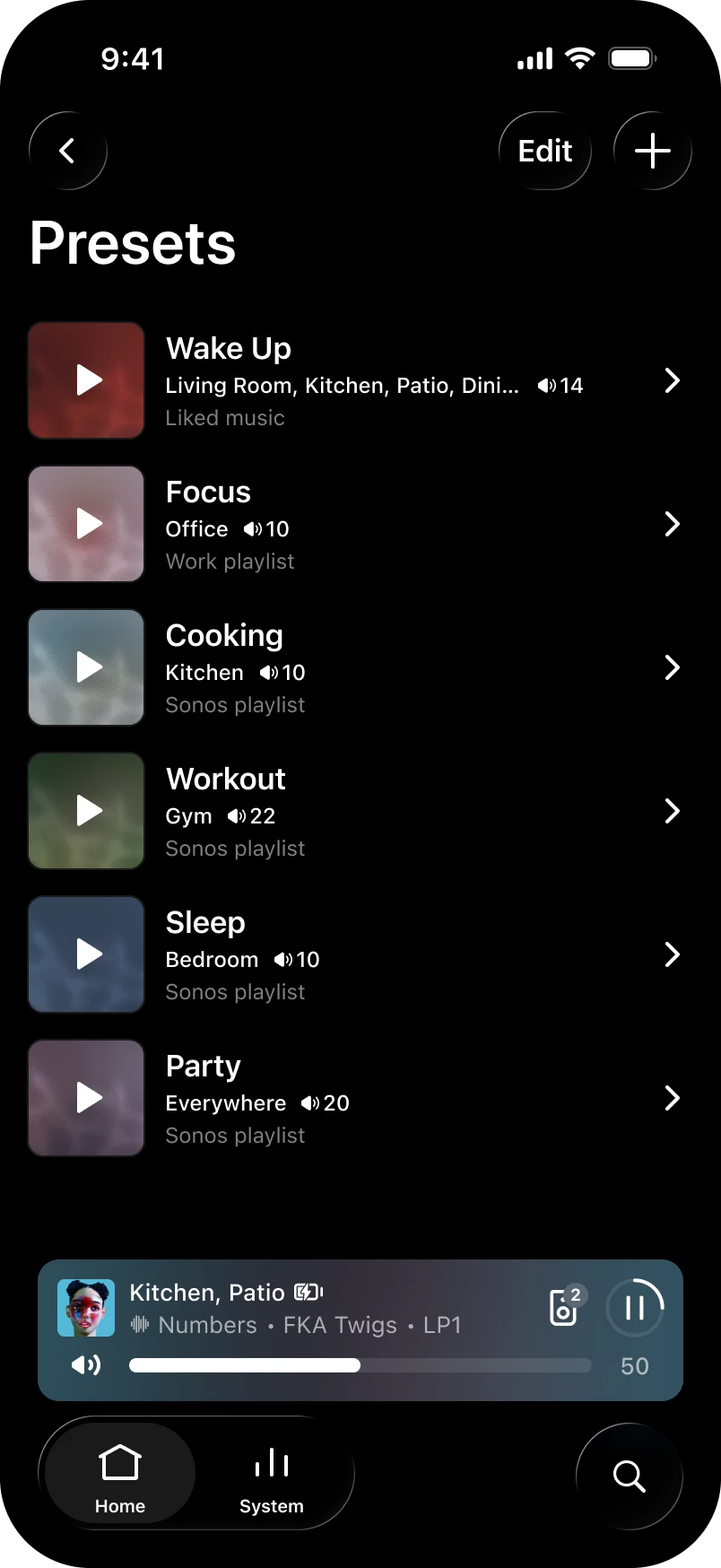
Hey all! We've got a new update live for both iOS and Android. This update brings an often requested feature: Presets - now you can start playback in a chosen room at a set volume with one tap! 

Want the full history of what we've been up to? Check out our App Release Notes here and System (Player) Release Notes here. This release is Sonos 27.3 for both App and Player.

Sonos app releases and features are rolled out over the course of several days, and in some instances, weeks, so you may not immediately receive the update or feature. You can check for updates in your iOS or Android app store to download the latest version of the app when it’s available. If you're on iOS and want to nudge it along, head to the App Store, pull down on your Account page (the one showing pending updates), and give it a refresh. That usually does the trick. Now, the details:


App Update

  • iOS - 91.00.41
  • Android - 91.00.33

Player Update

  • Modern: 98.0-82170
  • Legacy: 86.11-82170
  • Spotify volume levels, whether you use the Sonos app or direct control, are now more consistent with other services on Sonos.

What's New:

  • Presets - Start playback of pre-saved content in a chosen room at a specific volume with one tap.
  • Reorder your favorites - Arrange your saved content in preferred order by editing the "Featured" section in Sonos Favorites.
  • Swipe to skip - Swipe on Now Playing or the mini player to skip tracks.
  • Update network experience - Improvements to the experience when updating your network.
  • Sonos 27voice - Available starting Fall 2026 and supports US-English. If you're in the United States, you can opt in to try it and share feedback during early access. Signups begin soon - more to come.

iOS only

  • System Health - Find self-help info to spot potential issues and fixes for your system with the new System Health feature in the Help Center.

Android only

  • Services - You can now rearrange your list of connected services.


Ace Ultra - 3.0.10

  • Ace Vocal Guidance - Get spoken prompts when you change noise control modes, check battery percentage, or switch Bluetooth connections. You can turn it on or off in the app under Headphones > Settings > Hardware controls > Vocal guidance.


Let us know when you try out Presets. Tell us how you're using them, like a morning routine or a go-to party setup. We'd love to hear what's working for you. 

As always, feedback is welcome. The good, bad, or in-between. We read it all. 


42 replies

Lyricist II
Nov 7, 2026 12:19 PM UTC

Great update, Sonos team! 🎉

The new Presets feature is a welcome addition, especially for quickly playing favorite music in a specific room at a preferred volume.

Reordering favorites, swipe-to-skip controls, and improved network updates are also useful enhancements.

One suggestion: It would be great to have scheduled Presets for morning routines or bedtime listening.

One question: Are there plans to support automated Presets based on time or daily routines?

Thanks for continuing to improve the Sonos experience!

Translate
Schlumpf
Virtuoso
Nov 7, 2026 7:28 PM UTC

For new ideas or suggestions you can use the new “request line” where users can upvote your idea. 
 

Regarding “plans” or development of any Sonos product (hardware and also software and new features) Sonos traditionally don’t communicate anything before announcing official facts. So I strongly suppose you won’t get any information about that from Sonos. 😉

Translate
Ralf
MoPac
Headliner III
Nov 7, 2026 8:46 PM UTC

Don't have Presets yet.  When I get them will they be accessible in Shortcuts?

Translate
Schlumpf
Virtuoso
Nov 7, 2026 10:03 PM UTC

I took a look, but couldn’t find them to add to iOS shortcuts. 

Translate
Ralf
MoPac
Headliner III
Nov 7, 2026 10:44 PM UTC

Dang!

Translate
IanJShaw
Chromatic Producer I
Nov 8, 2026 11:50 AM UTC

Looks like this update has broken "Add to queue” on Android for at least some of us.  


Thread here

Translate
Smilja
Nov 8, 2026 12:05 PM UTC

​@IanJShaw, There are no support representatives active here in the customer forum. However, product development depends on diagnostics to begin troubleshooting. Please contact customer support.

Translate
»And the world is like an apple whirling silently in space, Like the circles that you find in the windmills of your mind.« (›Windmills Of Your Mind‹ [1967]. Music by Michel Legrand ; English lyrics written by Alan & Marilyn Bergman)
IanJShaw
Chromatic Producer I
Nov 8, 2026 12:18 PM UTC

The opening post says “As always, feedback is welcome. The good, bad, or in-between. We read it all.“

Translate
Enthusiast II
Nov 8, 2026 1:06 PM UTC

I've updated the app to the new version, and the software is also up to date, but I don't yet have the presets available. 


I can swipe to skip though so some aspects of the latest release are available, but not all. 


Translate
Smilja
Nov 8, 2026 1:28 PM UTC

​@Parsnip62, The rollout may take a fortnight.


Sonos app releases and features are rolled out over the course of several days, and in some instances, weeks, so you may not immediately receive the update or feature.

Translate
»And the world is like an apple whirling silently in space, Like the circles that you find in the windmills of your mind.« (›Windmills Of Your Mind‹ [1967]. Music by Michel Legrand ; English lyrics written by Alan & Marilyn Bergman)
Puppeteer
Trending Lyricist I
Nov 8, 2026 3:19 PM UTC

This forum is becoming toxic!

Translate
Long term forum contributor, @User117655 now 'Anonymous', who had a forced user reset imposed by the forum update...
Local Superstar
Nov 8, 2026 3:30 PM UTC

Not sure what's going on at Sonos QA the last year or so. So much regression in standard functionality is making it through to public release. 😔 

Translate
AjTrek1
Nov 8, 2026 5:46 PM UTC

PRESETS Update:

My experience with the Presets is as follows:

I like them…I think they’re a great feature. However, there are a few things you may want to know. They can disappear regardless of what Sonos says about being saved to your account (see below):

  • Presets let you start your favorite music in the rooms you choose, at the volume you set, with one tap. Presets appear in their own section on the Home screen of the Sonos app. Choose from your Sonos Favorites, or search for music across your services. Presets are saved to your Sonos account, so they appear when you sign in to the Sonos app on your phones and tablets.


My devices are an iPhone 17 ProMax, iPad Pro 13 inch (2025) and Samsung Galaxy Tab A9. For some reason I decided to perform a few tests to determine the volatility (to the Preset feature) that might occur under certain circumstances.

Presets Remain when:

  • Stopping the app (swipe up on iOS)
  • Rebooting Device (iOS)

Presets disappear (for a time)

  • After Deleting the app and re-installing (iOS)

Regarding the last procedure. Resetting the app under App Preferences had no effect. I, deleted and reinstalled the app multiple times and signed into my account. Not only were the Presets gone but the option to add them was gone as well. Accordingly, they should have been saved to my account. I called Sonos Tech support after several attempts. They ran diagnostics and elevated the issue to Level 2.

Now here’s the stickler. All the above occurred in the morning (Saturday 11/7/26) between 7AM and 9AM CST. At around 9PM CST I decided to delete and reinstall the app again…which BTW forces one to sign in to their account each time. Low and behold the Presets reappeared as well as the option to add additional presets. Go Figure? 🤷🏻

The other part…my Sam Galaxy Tab Ap (Android) still doesn’t show the Preset option. I’m not going to worry about that for the moment. Maybe another Android user can chime -in.

Anyway…all good for now.🤞I’d be interested to know if anyone else experienced the same.


Translate
Together Everyone Achieves More = T.E.A.M.