

Meet System Health: A New Way to Check On Your Sonos System 🩺
Hi, everybody! 🩺
Starting with the latest iOS update, the Sonos app has a new feature called System Health. It puts the details of your system in one place, some of them for the first time, and flags common issues when it spots them.
Let me be up front: this is a first look, not a deep dive. Have a look around and tell us what you find in the comments. Your questions will shape what we cover next.
Where to find System Health
System Health is available now on iOS, with Android to follow in a future update.
- Open the Sonos app and go to Settings.
- Select Help Center.
- Select System health.
You'll need to be signed in to your Sonos account. System Health gets its information from the cloud, so you can check on a system even when you're away from home.
What you'll see
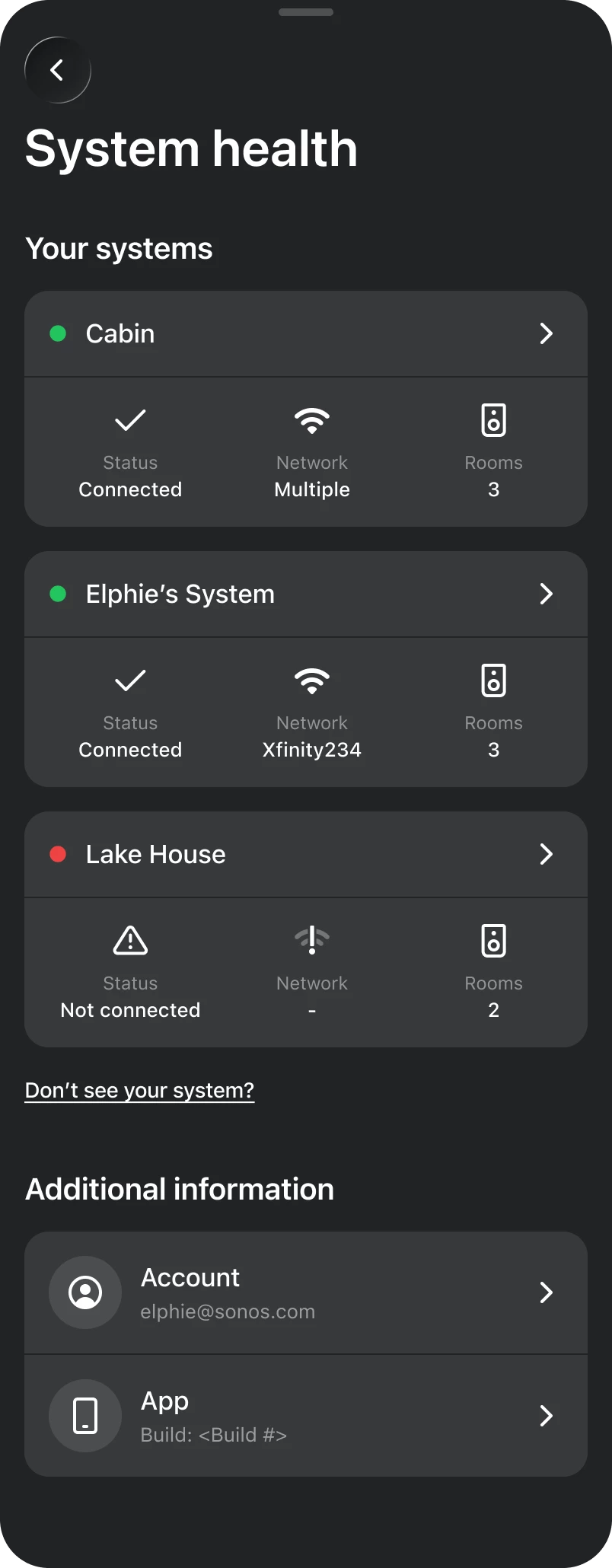
- your systems, with each one's status, network, and number of rooms
- each system's WiFi network, connection type, and products, with any that are offline called out
- each product's connection details (signal strength, signal-to-noise ratio, IP address, WiFi channel), audio settings, Trueplay status, and software version
Signal-to-noise ratio (SNR) compares a product's WiFi signal to the background noise around it. Higher is better.
What System Health checks for
In this first release, System Health looks for:
- An update is available for your system or the app. Tap it to update.
- Your system doesn't have a name. Tap it to name your system.
- Your system isn't connected. None of its products can reach the Sonos cloud. You'll see when it was last online (as long as it’s been less than 90 days).
- A product isn't connected. Sometimes that's expected, like a portable speaker that's asleep or on Bluetooth.
- Double NAT detected. More on this one below.
Double NAT Explained
Double NAT is the first network issue System Health can detect. It usually starts with a new router or mesh system plugged into the router from your internet provider, with both left running (often with the same WiFi name and password). That gives your home two networks, and your phone and speakers end up split between them.
Sonos products find each other, and your phone, over your local network, so devices on one router's network can't see devices on the other. The result can look like "System not found," missing rooms, or products that drop in and out. (NAT is how a router shares one internet connection with the devices behind it, so two routers means it happens twice.)
Not working: two routers, two networks.
When System Health spots it, you'll see Double NAT detected on that system's page (open the system from the main list to see it). Tap it for our support article, Resolving double NAT issues. The short version:
- Put one router in bridge mode (recommended), so only one router runs your network. Your internet provider can help with this.
- Use one router. If you don't need the second one, unplug it, then remove its WiFi network from your Sonos system.
- Give each network its own name, connect everything to the one you choose, and remove the other from your Sonos system.
Working: one router in bridge mode.
A few things to know
- It shows the systems linked to the account you're signed in with. If one is missing, tap Don't see your system? for help. It may be on a partner's account, or a previous owner's if you bought it secondhand.
- System Health checks in with the Sonos cloud, while the rest of the app talks to your products over your home network. So a product that's missing from your rooms but connected in System Health is online, and something on your network is keeping your phone from reaching it.
- Screens don't refresh on their own. After you make a change, back out of System Health and open it again.
- If you share a screenshot, make sure to crop or blur your email, Sonos ID, IP addresses, and serial numbers first.
Wrap-Up
A lot of you have asked for a way to see what's going on with your system. This is the first version of that, and we'll pass what you tell us to the team building it. A few questions to start with:
- What did System Health show you?
- What was confusing, or what's missing?
- What should it check for next?
I'll be in the comments gathering your questions, and we'll follow up with answers. Doctor's orders.
Bye, everybody! 🩺