Liz P.
Sonos Staff
Nov 3, 2026 2:47 PM UTC

3rd Nov 2026 πŸ“² New Sonos 27 App & Player Updates Now Available! πŸ”Š

Related content:Software

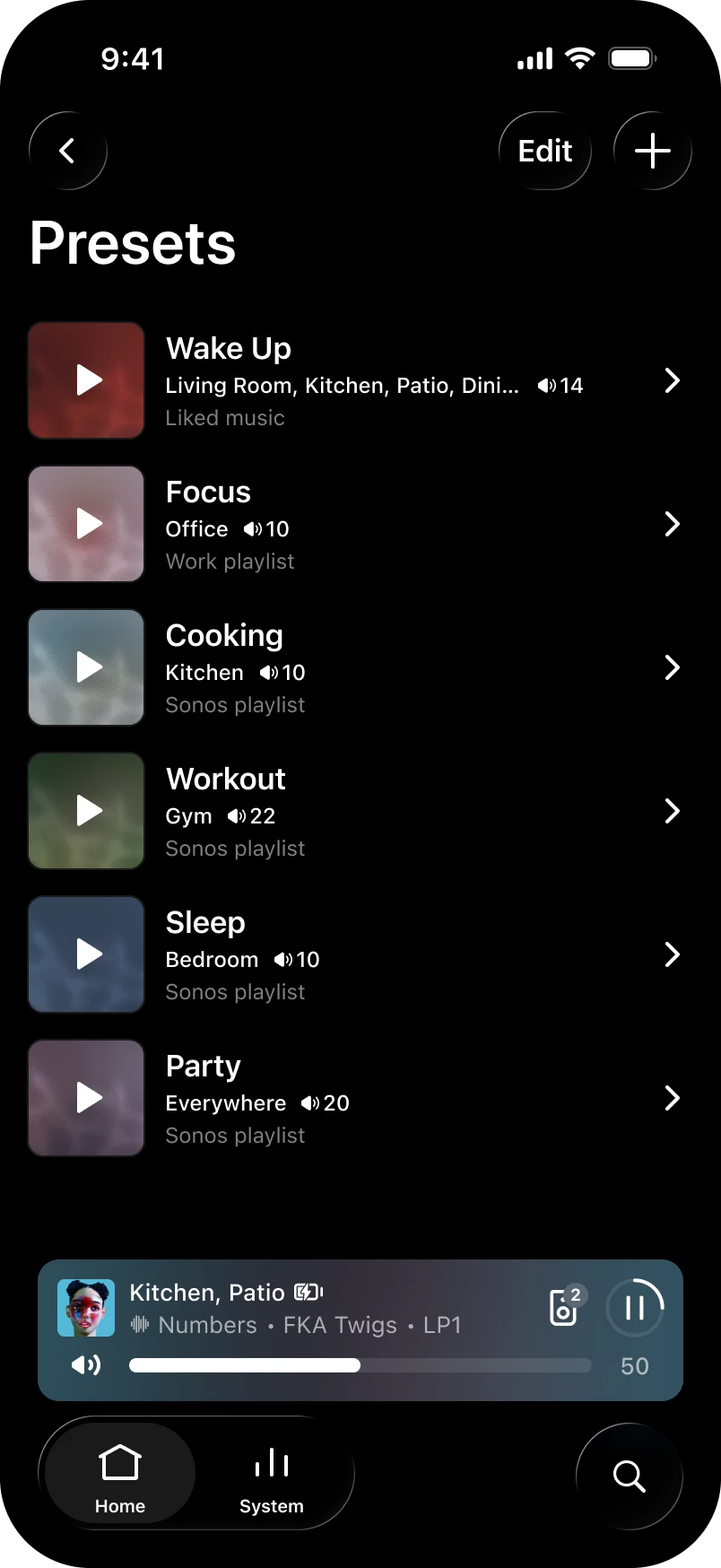
Hey all! We've got a new update live for both iOS and Android. This update brings an often requested feature: Presets - now you can start playback in a chosen room at a set volume with one tap!Β 

Want the full history of what we've been up to? Check out our App Release Notes here and System (Player) Release Notes here. This release is Sonos 27.3 for both App and Player.

Sonos app releases and features are rolled out over the course of several days, and in some instances, weeks, so you may not immediately receive the update or feature. You can check for updates in your iOS or Android app store to download the latest version of the app when it’s available. If you're on iOS and want to nudge it along, head to the App Store, pull down on your Account page (the one showing pending updates), and give it a refresh. That usually does the trick. Now, the details:

Β 

App Update

  • iOS - 91.00.41
  • Android - 91.00.33

Player Update

  • Modern: 98.0-82170
  • Legacy: 86.11-82170
  • Spotify volume levels, whether you use the Sonos app or direct control, are now more consistent with other services on Sonos.

What's New:

  • Presets - Start playback of pre-saved content in a chosen room at a specific volume with one tap.
  • Reorder your favorites - Arrange your saved content in preferred order by editing the "Featured" section in Sonos Favorites.
  • Swipe to skip - Swipe on Now Playing or the mini player to skip tracks.
  • Update network experience - Improvements to the experience when updating your network.
  • Sonos 27voice - Available starting Fall 2026 and supports US-English. If you're in the United States, you can opt in to try it and share feedback during early access. Signups begin soon - more to come.

iOS only

  • System Health - Find self-help info to spot potential issues and fixes for your system with the new System Health feature in the Help Center.

Android only

  • Services - You can now rearrange your list of connected services.

Β 

Ace Ultra - 3.0.10

  • Ace Vocal Guidance - Get spoken prompts when you change noise control modes, check battery percentage, or switch Bluetooth connections. You can turn it on or off in the app under Headphones > Settings > Hardware controls > Vocal guidance.

Β 

Let us know when you try out Presets. Tell us how you're using them, like a morning routine or a go-to party setup. We'd love to hear what's working for you.Β 

As always, feedback is welcome. The good, bad, or in-between. We read it all.Β 

Β 

41 replies

Enthusiast II
Nov 4, 2026 6:25 AM UTC

Like new features, esp reordering services.

The enhanced info on about your system v. useful too.

Good to be able to reorder queuing on android again.

Be good to see HD/Hi-Res banners again on Local Library please in future....πŸ‘

Translate
buzz
Grand Maestro
Nov 4, 2026 6:52 AM UTC

You may need to Edit Home in order to enable Presets.

Translate
Stanley_4
Grand Maestro
Nov 4, 2026 3:33 PM UTC

The reordering favorites is really nice, having my most common choices first is handy.

Translate
kris92086
Lyricist III
Nov 4, 2026 9:31 PM UTC

+1 This is a feature I have been waiting for since I first started my Sonos journey. In addition to reordering or sortingΒ Featured items, it would be great if the same could be applied to the Playlists, Albums, and Stations sections too.Β 

Translate
Stanley_4
Grand Maestro
Nov 4, 2026 9:50 PM UTC

Can't easily see if you have but if you haven't go here and add a vote and your comment to the Open IdeaΒ topic.

https://en.community.sonos.com/ideas/sonos-s2-sonos-favorites-6935049

Β 

Edit, ah ha! If you very carefully tap the Upvote NUMBER you can see the list of voters.

Tap the Upvote/Upvoted or arrow to vote or remove your vote.

Follow will send you notificationsΒ of activity.

Translate
Stanley_4
Grand Maestro
Nov 4, 2026 9:44 PM UTC

Something I should have tried but didn't.

Open Favorites, Edit, Sort Alphabetically, Save.

Open and Edit again, select Manual sort and drag my "most favorite"Β 18 to the top and then Save again.

Β 

Translate
Contributor II
Nov 5, 2026 1:01 AM UTC

I’ve installed the 27.3 system update and have the latest iOS 27.3 build but no preset section in home and edit home doesnt show it.Β  Β I can reorder stations in favorites though.Β  I want me presets! :-)

Translate
Prominent Collaborator I
Nov 5, 2026 2:55 PM UTC

Exactly the same for me. Called support, all they could suggest, after an hour, was wait three days!

Translate
Smilja
Nov 5, 2026 3:27 PM UTC

Sonos app releases and features are rolled out over the course of several days, and in some instances, weeks, so you may not immediately receive the update or feature.

Β 

It can take up to 14 days.

Translate
Β»And the world is like an apple whirling silently in space, Like the circles that you find in the windmills of your mind.Β« (β€ΊWindmills Of Your Mindβ€Ή [1967]. Music by Michel Legrand ; English lyrics written by Alan & Marilyn Bergman)
AjTrek1
Nov 5, 2026 3:11 PM UTC

Presets are nice especially for a speaker that is not designated as default.

One improvement I’d suggest is to allow the β€œplay arrow” to change to a β€œsquare” for stop or dual β€œvertical” lines” for pause. Although, the visual icon controlsΒ appear in the β€œnow playing” section; IMO it would be nice to have the preset icon controls mimic that.

AsΒ can be seen in the picture below my preset speaker (Garage) is playing but the β€œplay” icon in the preset window still shows as though IΒ could start play.

EDIT:

Not that it matters much to me. However, I did notice that the feature does not present itself in the MacOS desktop app. I assume there is a reason or maybe an oversightΒ πŸ€”

Β 

Β 

Β 

Translate
Together Everyone Achieves More = T.E.A.M.
kdowling
Nov 5, 2026 3:47 PM UTC

Not that it matters much to me. However, I did notice that the feature does not present itself in the MacOS desktop app. I assume there is a reason or maybe an oversightΒ πŸ€”

I wouldn’t expect any new features in the Desktop controllers. Since they are in maintenance mode only and will eventually be phased out. At least that’s what I seen posted here for years. It would be a pleasant surprise though.

I agree, the playing icon should change to reflect the current state. Although, what happens when you start with a preset, but then make changes after it was started?

Edit: Now that I’ve played around with it, I don’t see how changing the icon would help. It’s not a control. Tapping it again just restarts the preset. It always just starts the preset.

Translate
AjTrek1
Nov 5, 2026 4:40 PM UTC

Regarding the preset IMO it is a control as it starts the selected speaker to play. Haven’t played with pressing it a second time after the room is playing. However, if as you say it restarts the preset that’s interrupting the live stream. Therefore making the icon change would be a visual not to press it a second time thus interrupting play. As I said it’s JMO whether it changes or not makes no real difference to me as I know what to expect.

As far as the desktop app is concerned it still getsΒ updates. Β As I said I’m just curious as to why it wasn’t included. Also the desktop app appears as though it may be around longer than previously assumed. I do agree that not all features need to roll over. However, what’s the difference between showing my preset radio stations in the DT app and the newly created preset icon.Β 

Translate
Together Everyone Achieves More = T.E.A.M.
Smilja
Nov 6, 2026 3:22 AM UTC

No new features have been added to the desktop controllers since 2018.

Translate
Β»And the world is like an apple whirling silently in space, Like the circles that you find in the windmills of your mind.Β« (β€ΊWindmills Of Your Mindβ€Ή [1967]. Music by Michel Legrand ; English lyrics written by Alan & Marilyn Bergman)
Enthusiast II
Nov 6, 2026 9:38 AM UTC

Still I’m sure many Sonos owners (me included) would be happy to see them relived and developing.Β :)
(Don’t tell me about the poor rudimentary β€œweb app”, sorry)

Translate
Trending Lyricist II
Nov 7, 2026 7:11 AM UTC

My presets disappeared from the iPhone app,Β How to get them back?

Β 

Translate
My First Sonos@2012
Smilja
Nov 7, 2026 9:28 AM UTC

​@ronvgs,Β Do the presets reappear after restarting the iPhone?

Translate
Β»And the world is like an apple whirling silently in space, Like the circles that you find in the windmills of your mind.Β« (β€ΊWindmills Of Your Mindβ€Ή [1967]. Music by Michel Legrand ; English lyrics written by Alan & Marilyn Bergman)
Trending Lyricist II
Nov 7, 2026 1:14 PM UTC

Yes but After a while it deasappears again.Β 

Translate
My First Sonos@2012
Enthusiast II
Nov 7, 2026 11:29 AM UTC

Just to say, I like the swipe to skip feature. I've been thinking this would be a good feature to have for a while, so a welcome surprise.Β 

Translate