

Sonos Home Theater Speaker: Comparison Chart
Published 5/10/20
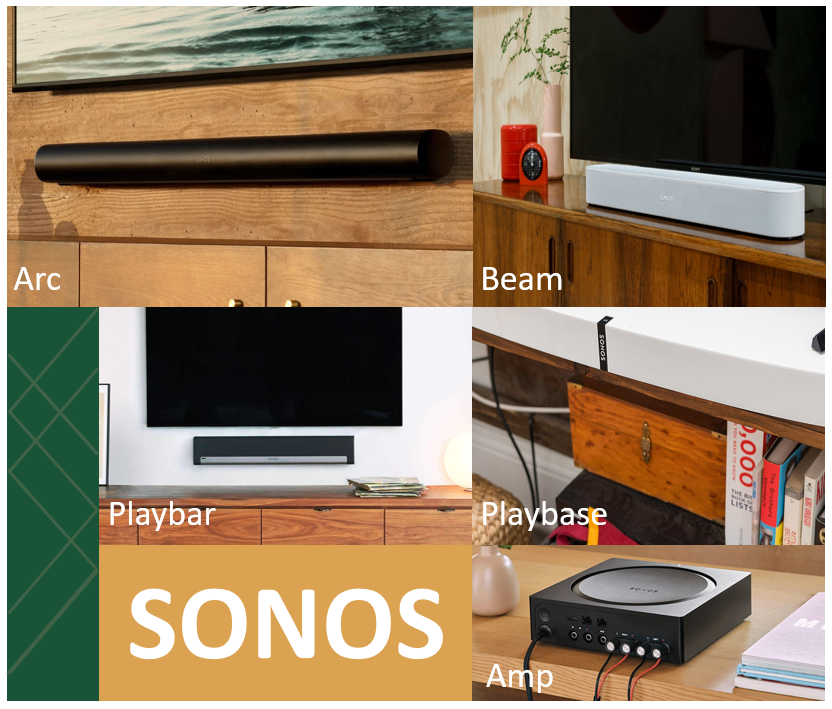
Exciting things are happening at Sonos. They have just announced the June 10, 2020 release of a much anticipated addition to their family of Home Theater speakers. That being the Sonos Arc with Dolby Atmos.
An obvious question is how will the Arc fit into the Sonos line-up apart from the fact that it is capable of bringing the Dolby Atmos experience to home theater entertainment? Hopefully the chart below will answer some of those questions. As you review the chart keep in mind that those points highlighted in blue are footnoted.
The Sonos Amp has been added to this group; although not technically a speaker, it can be used in Home Theater to power 3rd party speakers for left/right front channels or Sonos in-wall (left/right) architectural speakers by Sonance. Doing so it approximates the Center channel referred to as a “phantom center”. It can also be used to drive a pair of 3rd party speakers (typically book shelf or in-ceiling) as surrounds. Sonos in-ceiling architectural speakers by Sonance can be used as surrounds as well.
As always Community Members are here to assist and answer additional questions/points not covered in the chart. Cheers!
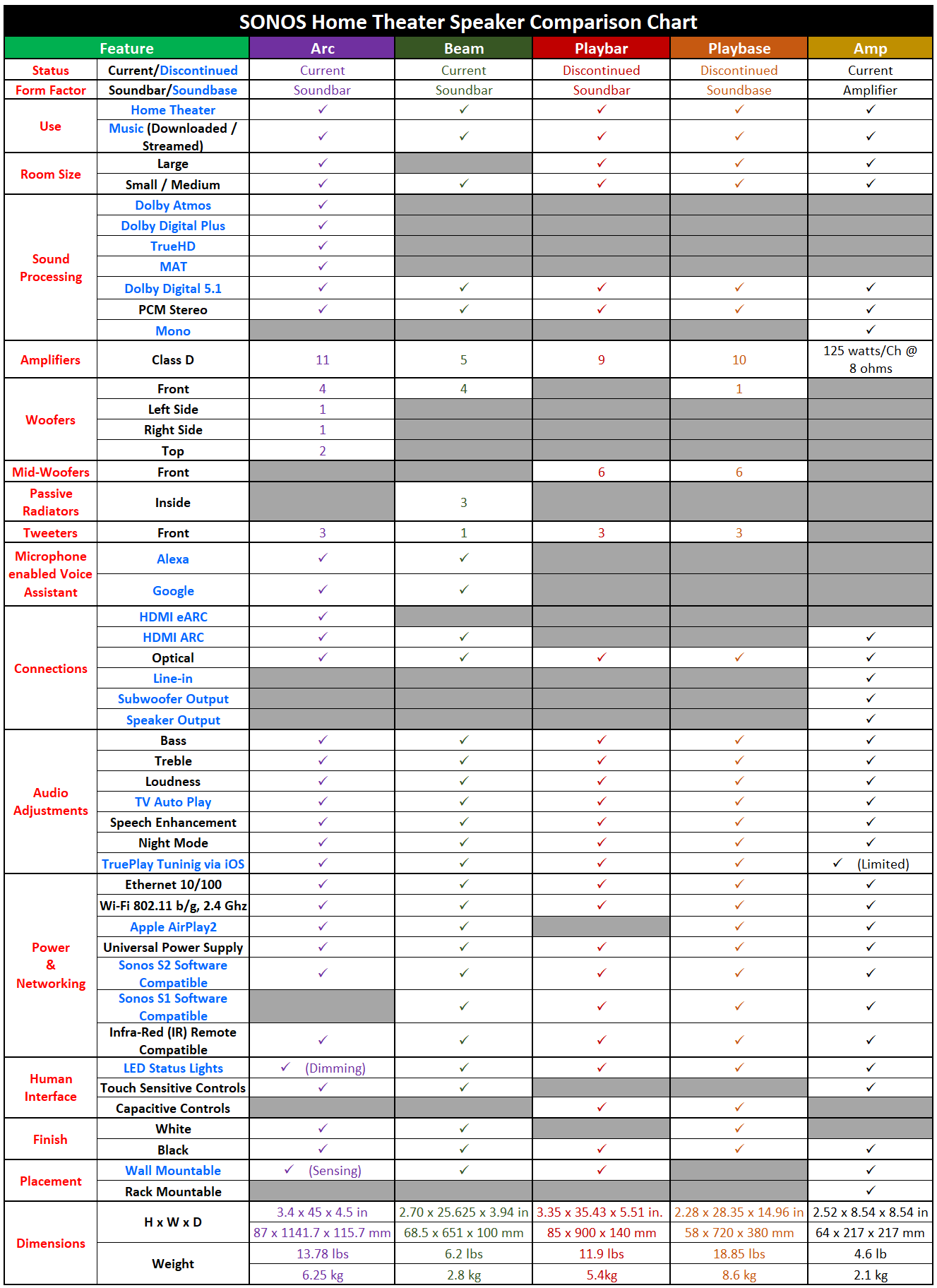
Discontinued: The Playbase and Playbar will no longer be manufactured. They are still available through Sonos (via Last Chance) and select retailers while supplies last.
Soundbase: The Playbase surface area measurements of width and depth are sufficient to allow placement of a TV weighing 77 lbs., (34.9 kg) on top of it when supported by a desk or table.
Music: Downloaded refers to music that is stored on a tablet or cell phone (iOS/Android), Computer (Windows or OSX) or Network Attached Storage (NAS).
Home Theater: See paragraph on Sonos Amp above
Dolby Atmos: You’ll need a TV that includes an HDMI eARC port (and 4K Blu-ray player) to reproduce the lossless Atmos playback that the Arc offers. Older TV’s with only HDMI ARC can enjoy compressed Atmos through popular video streaming services.
On its own, the Arc can serve as a 5.0.2 Atmos system. It always mixes seven-channel audio feeds down to five. The Arc’s eleven (11) speakers work in channels comprised of multiple speakers.
- Left Front Channel x 2 / Center Front Channel x 3 / Right Front Channel x 2
- Left Side Channel x 1 / Right Side Channel x 1
- Upward Firing Channel x 2
Items One & Two above represents the 5 in 5.0.2
Item Three represents the 2 in 5.0.2
Zero (0) is a place-holder in 5.0.2; but changes to One (1) if a Sonos Sub is added making the Arc a 5.1.2 sound system.
When reproducing material that doesn’t contain Dolby Atmos audio, the upward-firing speakers will focus on low-end response.
When a Sonos One/One SL (x2) or Play 5 (x2) or Five (x2) or Play:1 (x2) or Play 3 (x2) are used as surrounds the Arc’s side firing speakers revert to lend support to the left/right channels.
Since the Arc has built-in voice assistant capability for either Alexa or Google the Sonos One SL is recommended over the Sonos One as the voice assistant capability will be muted in the Sonos One.
Also a Play 5 cannot be used with a Five to create the surround channel.
Note: Incidentally, the last two statements also apply to the Beam.
TrueHD / MAT / Dolby Digital Plus / Dolby Digital: If you connect to a TV with eARC, the Dolby audio formats supported include Dolby Atmos, TrueHD, MAT, Dolby Digital Plus, and Dolby Digital.
If you connect to a TV using ARC, the Dolby audio formats supported are dependent on your TV model and manufacturer. The TV may be capable of sending Dolby Atmos, Dolby Digital Plus, and Dolby Digital. An ARC connection cannot support TrueHD or MAT.
If you connect to a TV using the optical adapter, the Dolby audio formats supported are dependent on your TV model and manufacturer. The TV may be capable of sending Dolby Digital. An optical connection cannot support Dolby Atmos, TrueHD, MAT, or Dolby Digital Plus.
Mono: The Amp is capable of stereo or dual mono sound.
Alexa & Google Assistants: These assistants accept voice commands received via far-field microphone technology embedded in the Arc and Beam. Select either Alexa or Google for native support. Playbar and Playbase require Amazon or Google device integration.
HDMI eARC / HDMI ARC: See Dolby Atmos, TrueHD, MAT, Dolby Digital Plus and/or Dolby Digital above. The Beam and Amp only support HDMI ARC.
Line-in: Amp Sources Supported: Audio device with analog RCA output or optical output (optical adaptor required).
Subwoofer Output: Subwoofer output: Auto-detecting RCA type, user-adjustable 50-110 Hz crossover
Speaker Output: Speaker output connections: Banana plugs (2) capable of stereo or dual mono sound
TV Autoplay: Audio can be enjoyed via speaker automatically when a signal is detected.
TruePlay Tuning: Using an iOS or iPadOS speakers can be tuned via the Sonos app to room environment for ultimate enjoyment of movies and music.
Limited feature via Sonos Amp that is only available when using Sonos in-wall or in-ceiling architectural speakers by Sonance. Does not work with 3rd party or Sonance outdoor speakers.
Apple AirPlay2: Native to Arc, Beam and Playbase. Playbar can be grouped to a Sonos speaker with AirPlay2 capability (typically a Sonos One/One SL, Play 5, Five, Move, Port or Amp) to facilitate whole home music audio.
Sonos S1 and S2 Software: All new Sonos products starting with Arc, Five and upgraded Sub will not be backward compatible to Sonos S1. Some existing Sonos products will continue to work with Sonos S1 software and the more powerful Sonos S2 software. For complete details on Sonos S1 and S2 software (as well as compatible products) click this link.
LED Status Lights: LED’s on the Arc will dim according to room lighting conditions.
Wall Mountable: The Arc will sense when mounted to a wall and lower bass response to prevent low-end vibrations.