Help us make Sonos easier to learn and use?

  • February 26, 2026
  • 85 replies
  • 1723 views

Show first post

85 replies

Forum|alt.badge.img+18
  • Local Superstar
  • March 16, 2026

Many pages in the App should have a scroll bar, or some other method to indicate that there is more on the page available via swiping/scrolling, if the screen has a limited size, eg iPhone.

A good example of this is the Settings » Alarms page, when you click the Alarm,  you are presented with a page to ‘Edit Alarm’ and ‘Settings’, there is a volume slider at bottom, and a ‘save’ button underneath.

It is not obvious there are more settings available to edit if you swipe up, you see ‘Options’

If you select ‘Room’, you are presented with Rooms, if you have more than 10 Rooms, the ‘Options’ to ‘Include Grouped Rooms’ is hidden, its not obvious there are more options.

I’m sure there are other examples of this. New users tend to know what a scroll bar is, from other Apps they are familiar with, it makes it obvious there is more on the page.


Forum|alt.badge.img+6
  • Enthusiast II
  • April 9, 2026

My design requests would be:

  1. the app should open with the Sonos components in the system listed with small icons at the top of the screen ( like those used for services) with a horizontal scrolling list if needed for larger systems.  This is so I can easily select the Sonos device or room I want to control with one click. (Currently it is at least two actions)

Horizontal swipe(s) and a tap would also be at least two actions?

For phone users you would get 4 or 5 components across the screen and thus for many users systems there would be no need to scroll, just one click. And if you do have more units then if you could choose the sequence yourself you could have your most frequent choices first.

the iPad version could squeeze in 8 or 10 units without scrolling.

my main point is that the very first thing I want to do when controlling Sonos is to pick the unit or units I want to control so why have this displayed in such an unnatural / hidden way?


MoPac
Forum|alt.badge.img+19
  • Headliner III
  • April 10, 2026

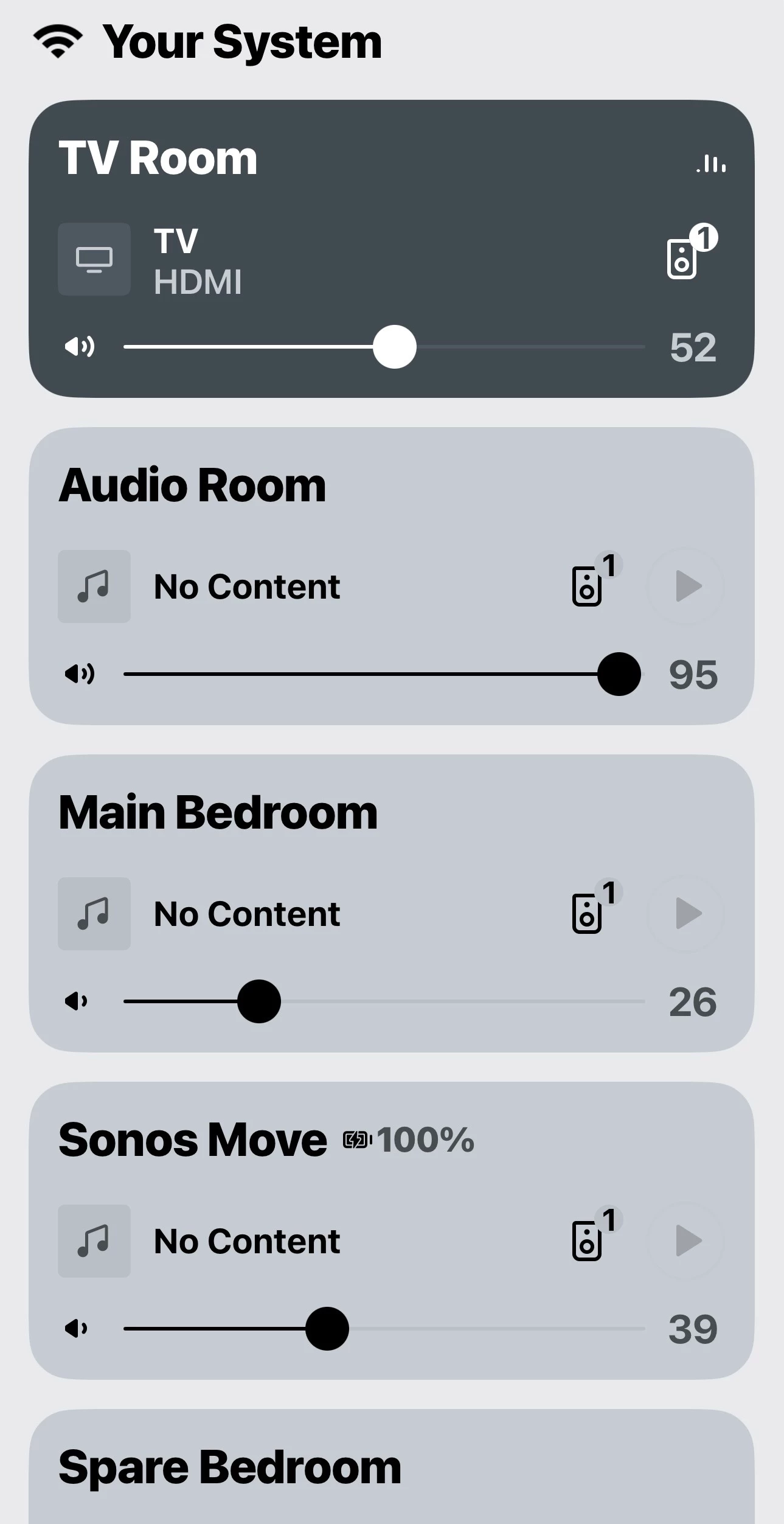
 It’s not that difficult to get to a list of all your devices, but the Room listings definitely could be smaller allowing more to show on the screen.


MoPac
Forum|alt.badge.img+19
  • Headliner III
  • April 10, 2026

It would be easier if there was a way to get to the Home screen from the queue screen without having to swipe down twice and then touching “SONOS” on the top of the screen if you weren’t already on the Home Screen.  

If “SONOS” was added to the queue screen or above the queue screen you could touch it and it would take you to the Home screen without needing to swipe down the queue & now playing screens.  To put it differently don’t hide “SONOS” when on the now playing or queue screens.

if you want to go from the queue screen to the now playing screen just swipe down the queue screen like it’s done now.


Smilja
  • April 10, 2026

 It’s not that difficult to get to a list of all your devices, but the Room listings definitely could be smaller allowing more to show on the screen.


What’s so difficult about scrolling? There are visually impaired people out there, like me.


MoPac
Forum|alt.badge.img+19
  • Headliner III
  • April 10, 2026

@Smilja 

If you look at one of the room listings you’ll notice there is a lot of wasted space.  Making the room listings smaller would not necessarily involve changing the font size.  Maybe just compress the lines of information.  
 
I have no issues scrolling, but if you’re reading comments in this community there are people that do have an issue with scrolling.


Stanley_4
  • Grand Maestro
  • April 10, 2026

Scrolling is a pain for me, Android tablet in landscape. Trying to scroll, sometimes it just won't and I have to fuss with it to go down the list. Sometimes I touch the wrong spot and max out the volume in another Room, not spouse pleasing.

I still haven't figured out the sorting order as you try to control multiple Rooms and the screen rearranges them as it sees fit.


MoPac
Forum|alt.badge.img+19
  • Headliner III
  • April 10, 2026

I do wish the order of “Your System” & “Your Services” could allow choosing the order shown similar to how “Edit Home” does that process.


  • Lyricist I
  • April 22, 2026

Sonos needs a “Remember this volume” feature for groups. I feel like I spend so much time readjusting all the volume settings every time I want to switch from watching TV to listening to music to night time background soft listening. It’d be nice to have permanent groups volumes for like “Light listening/Dinner Party”, “Listening to music all around the house”, and “TV” if that makes sense that automatically sets all the speakers to their saved independent volumes, instead of having to reconfigure every speaker each time


  • Contributor I
  • May 13, 2026

I would like to draw further attention to and 100% echo the feature request set out by MVPotato in his excellent posts on the matter, clearly setting out the need for a seemingly easily implementable feature whereby a home theatre set up can easily be switched between outputting the TV audio source in 5.1 surround mode or a “full stereo” mode where all speakers output the same audio at the same volume.

This would be a ‘night and day’ level game changer for Sonos home theatre set-ups and, frankly, something that every other surround sound system I have ever had could do.


Please instigate this Sonos!


I re-post MVPotato’s excellent full post below for reference:


Hi everyone,

I’d like to raise (again) a feature request that has come up in several threads already, because it significantly affects the listening experience for people using Sonos home theater systems as their primary music system.

My setup is an Arc Ultra with Sub and Era 300 surrounds. For movies and Atmos content, the system is excellent. However, the experience when listening to stereo sources over HDMI (YouTube, Spotify via PlayStation, TV apps, etc.) is honestly extremely disappointing.

When the system receives Stereo PCM 2.0, only the soundbar plays while the rear speakers remain silent. Sonos currently does not provide an option to duplicate or upmix stereo channels to the surrounds for TV sources.

This means that a multi-speaker system that costs several thousand dollars ends up behaving like a single soundbar for a huge amount of everyday content.

What makes this especially frustrating is that Sonos already supports something very similar for music played inside the Sonos ecosystem. When using the Sonos app and setting music playback to “Full,” stereo audio can already be distributed across all speakers in the room.

So the system clearly has the capability - it simply isn’t available for HDMI sources.

Before switching to Sonos, I used a traditional AVR with a 5.1 system. Even basic receivers have had a simple “All Channel Stereo” / stereo mirror mode for decades. It’s not about creating fake surround effects - it’s simply about filling the room with music when the source is stereo.

Another aspect that I find frustrating is that discussions about this topic sometimes turn into telling users how they “should” listen to audio - for example, that stereo should only come from the front speakers. Respectfully, that feels a bit patronizing.

People invest in multi-speaker systems because they want an immersive room-filling experience, and different users prefer different listening styles. Having an optional toggle would allow everyone to choose what they prefer.

There are already several threads discussing similar requests:

All of these discussions point to the same underlying request: give users more control over how their speakers are used.

A simple solution could be a toggle in the surround settings such as:

  • Preserve original mix (current behavior)
  • Stereo mirror / All Channel Stereo

This would dramatically improve the experience for music, YouTube, podcasts, live concerts, and many other common stereo sources.

Given the capability of modern Sonos hardware, this feels like something that should be achievable via software. I hope Sonos considers adding this as an official feature request.

Thanks for reading.