

rosswells127
Prodigy I
July 16, 2024
Answered

Music Library Compilation Issue under new 16.3 Firmware

  • July 16, 2024
  • 240 replies
  • 12063 views

Today I successfully updated to the latest 16.3 Firmware and Windows Desktop Controller.
I subsequently performed an “Update Music Library Now” from the 16.3 Windows Desktop Controller.
Now any Sonos Controller (including SonoPhone, SonoPad) show multiple entries for each compilation album when viewing Albums.
Just an example shown below...
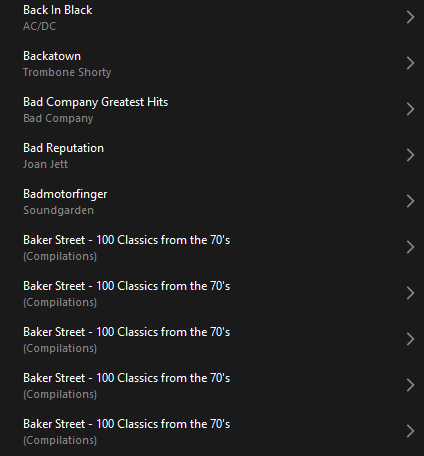
 

Does anyone else have this issue?
Ross.

This topic has been closed for further comments. You can use the search bar to find a similar topic, or create a new one by clicking Create Topic at the top of the page.
Best answer by Corry P

Hi ​@rosswells127 et al

I have an update regarding this behaviour.

It is (now) expected behaviour that if you have a compilation album with no Album Artist metadata tagged on an S2 system, it will appear in the album list multiple times. To resolve this issue, please tag all tracks in the album with an Album Artist - if there is no single artist, please tag each track in the album with “Various Artists”. Once an album has a Album Artist tag, it will no longer appear as duplicates in the Album container list.

I hope this helps.

Edit: This thread was automatically closed due to inactivity. I have reopened it.

240 replies

World-Class Superstar
December 24, 2024

Bluesound works.

If that really is your point of view I can only advice you to switch to Bluesound. If you choose not to, you'd be better off by changing the tags of your music files. It'll make your problems disappear.

Lyricist III
December 24, 2024

I now have both. I use Bluesound with my receiver and living room and outdoor speakers and Sonos on two soundbars attached to TV’s. The Sonos port is still there for use with the receiver but gets little play now. As I said in an earlier post, I will reach out to Sonos for assistance. 

World-Class Superstar
December 24, 2024

I will reach out to Sonos for assistance. 

Clever thinking.

MoPac
Headliner III
December 24, 2024

None of it came from the net. It was all loaded into Itunes from CD’s. In the few cases where there was a problem, it was easily solved by changing the tags to match. I didn’t intend to buy an audio engineering project. It worked as planned. Now it doesn’t. We were told not retag, now we are told retagging is the only thing that will restore the compilation function. Bluesound works.

Who told you not to tag?  If you want every music control point software ever conceived by humans to read your music library correctly you really need an Album Artist tag ( Exception:  Sonos a while back could not even read the Album Artist tag.  Was later fixed ). 
 

If you want an “audio engineering project” take up classical music.  Those tags are a mess!
 

You might want to ask Apple why their tagging does not include an Album Artist tag by default.  I think there is a setting in Apple somewhere to utilize Album Artist, but I don’t ever use iTunes so I don’t know.

Yes Sonos used to read those Apple tags correctly.  Maybe someday they will again.

Lyricist III
December 24, 2024

Fairly early into the compilations problem someone suggested a tagging solution. Corry discouraged it as he had no idea what the fix would be and seemed concerned that if the tags were changed and the Sonos changed back to the way it was, there would be a new problem. Can’t blame him for caution in uncertain times. My library is about 8500 tracks, more thant half classical. I downloaded the MP3tag software and am researching how to use it. 

Lyricist III
December 24, 2024

BTW there were two similar threads dealing with this issue. Not sure which one had that advice from Corry or, at this point, where I read anything. It’s all blended together.

MoPac
Headliner III
December 24, 2024

Fairly early into the compilations problem someone suggested a tagging solution. Corry discouraged it as he had no idea what the fix would be and seemed concerned that if the tags were changed and the Sonos changed back to the way it was, there would be a new problem. Can’t blame him for caution in uncertain times. My library is about 8500 tracks, more thant half classical. I downloaded the MP3tag software and am researching how to use it. 

Classical tagging is fun!  NOT!!

Trending Lyricist I
December 24, 2024

Sorry, but omg… what do you think!? 
Sonos music library isn’t a magic trashcan to put in all your untagged music files from all over the net. 
You need well tagged files to get it work like a charm. 
If it worked somehow in the past without tagging such accurately, it might have been a lucky situation. 
But just shouting out loudly „it has to work“ without knowing or ignoring the needs for that imo is like a little kid stamping feet on the ground. 
Good luck finding that magic tool… 

Just my 2 cents…

All.l my.l music already “worked like a charm” until Sonos f***ed it up. It continues to “work like a charm” in my subsonic system. That system is able to understand that the album called “a state of trance - disc 1” is a single album with tracks by multiple artists. Sonos used to be able to work this out too. Nothing that Sonos have said in this topic explains why they are no longer able to do this.

Moderator Note: Modified in accordance with the Community Code of Conduct.

Enthusiast II
December 25, 2024

Hi @Editor

Well, the issue is that before, there was no way to resolve the issue of albums being mistaken for or combined with other albums. There is a way for you to resolve what is happening now - to add Album Artists tags to your media. The tag is there, and in my mind, that is because it is felt that it should be used if needed. It is needed for compilation albums.

To put it another way, I think it very unlikely that it will be changed again.

Corry, 

if this is the official position of Sonos and you really do expect everyone to tag their compilation albums to resolve the Album fragmentation issue then can I ask that you at least approach the engineers to get them to resolve the Artist list capability as if you do Tag your albums with “Various Artists” or similar in the “Album Artist” Tag all the individual Artists no longer appear in the Artist List.  I have found the situation to be:

IPAD Version 

    Compilation Artist* appears in Artist List = NO

    Compilation Artist appears in Search = YES 

Android Version 

    Compilation Artist appears in Artist List = NO

    Compilation Artist appears in Search = YES 

Windows PC Version 

    Compilation Artist appears in Artist List = NO

    Compilation Artist appears in Search = NO 

  • by “Compilation Artist” I am referring to the Artist tagged on an individual track within a compilation album that has been tagged with Album Artist = |”Various Artists” or similar

which is all very inconsistent and annoying. 

Corry P
Sonos Staff
December 27, 2024

Hi ​@Editor 

Thank you for reporting this, and for laying it out clearly. I have passed this on as requested.

"Common sense is the collection of prejudices acquired by age eighteen." - Albert Einstein