

rosswells127
Prodigy I
July 16, 2024
Answered

Music Library Compilation Issue under new 16.3 Firmware

  • July 16, 2024
  • 240 replies
  • 12063 views

Today I successfully updated to the latest 16.3 Firmware and Windows Desktop Controller.
I subsequently performed an “Update Music Library Now” from the 16.3 Windows Desktop Controller.
Now any Sonos Controller (including SonoPhone, SonoPad) show multiple entries for each compilation album when viewing Albums.
Just an example shown below...
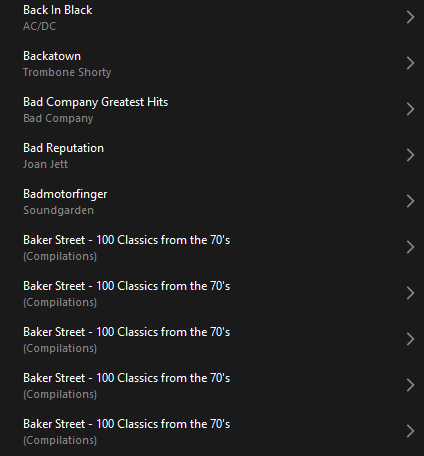
 

Does anyone else have this issue?
Ross.

This topic has been closed for further comments. You can use the search bar to find a similar topic, or create a new one by clicking Create Topic at the top of the page.
Best answer by Corry P

Hi ​@rosswells127 et al

I have an update regarding this behaviour.

It is (now) expected behaviour that if you have a compilation album with no Album Artist metadata tagged on an S2 system, it will appear in the album list multiple times. To resolve this issue, please tag all tracks in the album with an Album Artist - if there is no single artist, please tag each track in the album with “Various Artists”. Once an album has a Album Artist tag, it will no longer appear as duplicates in the Album container list.

I hope this helps.

Edit: This thread was automatically closed due to inactivity. I have reopened it.

240 replies

Enthusiast II
December 28, 2024


IPAD Version 

    Compilation Artist* appears in Artist List = NO

    Compilation Artist appears in Search = YES 

Android Version 

    Compilation Artist appears in Artist List = NO

    Compilation Artist appears in Search = YES 

Windows PC Version 

    Compilation Artist appears in Artist List = NO

    Compilation Artist appears in Search = NO 

  • by “Compilation Artist” I am referring to the Artist tagged on an individual track within a compilation album that has been tagged with Album Artist = |”Various Artists” or similar

which is all very inconsistent and annoying. 


just to clarify a little further:  

In the above scenario the Artist may still appear in the list if your library has other solo albums by the same Artist but the compilation album won’t appear under their name in the list. 

If you don’t have other albums by the Artist then the Artist wont appear in the Artist list at all. 


Lyricist I
February 3, 2025

Jumping in at the end here after reading many threads and hope this one is OK, please guide me elsewhere if needed….

In my case, even after tagging the compilations Album Artist with “Various” (using MediaMonkey) some compilations still did not group (many did). After much searching I found that the problem ones were all .WAV files. Now even though MediaMonkey has a slot for Album Artist for .WAV files, when you look at the file properties in Windows explorer there is no Album Artist category, only Contributing Artist (same as Artist inn Media Monkey). .FLAC etc formats do have both Contributing Artist and Album Artist in Windows properties. e.g.


So, a bit more trial and error and it looks like SONOS can’t group .WAV files by Album Artist because that category doesn't exist for .WAV files (as far as SONOS is concerned) so it appears to default to [Windows]Contributing Artist (which just to confuse things MediaMonkey calls Artist) for compilation album grouping which obviously creates an “album” for each [Windows] Contributing Artist / [MediaMonkey] Artist….

It also seems that the SONOS App uses [SONOS] Artist to refer to [Windows] Album Artist rather than [Windows] Contributing Artist ….

I guess the answer for me is to re-format / re-acquire and re-tag all my .WAV files, at least I’ll get some better quality!


Hope this was helpful to a few people.

cheers

Corry P
Sonos Staff
February 6, 2025

Hi ​@DJK Synology NAS 

I am surprised to hear you are using WAV files - they are traditionally entirely uncompressed, and as so, are a bit of a waste of disk space. They also pre-date PCs being able to reproduce anything but the most basic of audio, so it does not surprise me to hear that the ID3 tags are not working as expected.

I agree/highly recommend that you re-encode all your WAV files as FLAC files - as a lossless codec, the output of a FLAC decoding is exactly what was inputted to the encoder in the first place, i.e. CD quality (or better) audio. I don’t think you will get better audio as a result, but you should have much better luck with the tagging of it, at the least.

I hope this helps.

"Common sense is the collection of prejudices acquired by age eighteen." - Albert Einstein
Trending Lyricist I
May 1, 2025

I thought flac file do not support id3 tags - rather use vorbis.


Corry P
Sonos Staff
May 1, 2025

Hi ​@tombay the fog 

I have several albums encoded as FLAC in my own library, and have no issue with tagging them with “Various Artists” in the Album Artist field.

I do not know if FLAC uses ID3 or Vorbis - as you say - for tagging, nor do I know what the difference would be in any case - I just know that I personally have no issue with FLAC metadata, nor have I heard of anyone else ever having issue with it.

I hope this helps.

"Common sense is the collection of prejudices acquired by age eighteen." - Albert Einstein
bockersjv
Local Superstar
May 1, 2025

All my FLAC files are tagged successfully with ID3 tags.  I used a free tag editor to do so and add embedded album art.  Works a treat.

Trending Lyricist I
May 1, 2025

It would be nice to know which one. I have hsed picard, mediamonkey and easytag which all seem to add vorbis ones %-)

Corry P
Sonos Staff
May 1, 2025

Hi ​@tombay the fog 

I personally use MediaMonkey, so I don’t really understand why you are having an issue, but I guess I can give you a personal recommendation for it more than for any other software. Note: neither I nor Sonos can accept any responsibility for any data lost or issues caused by the use of third-party software.

I hope this helps.

"Common sense is the collection of prejudices acquired by age eighteen." - Albert Einstein
Trending Lyricist I
May 1, 2025

My mediamonkey does not do flac id3v2. (Basic free one). many of the other taggers state the id3 flac stuff is not correct and I would think that Sonos should support standards. That being said I have managed to have one file with (FLAC ID3v2) tags. Unfortunately I dont know which app did it. I am doing this on windows and linux and jumped around a bit too much. Mediamonkey does have a menu option to clean id3 tags but not one to add them. 

Corry P
Sonos Staff
May 1, 2025

Hi ​@tombay the fog 

Ah sorry - I do use MediaMonkey, but, thinking about it, I am not sure if I actually edited metadata on FLAC files with it, specifically. I did recently rip some CDs to FLAC files using WinAmp - perhaps it was WinAmp that correctly set the Album Artist tags for me.

There is a discussion on the MediaMoney forums that may be of use to you: https://www.mediamonkey.com/forum/viewtopic.php?t=30377

And another one here, regarding the conversion of tags: https://www.mediamonkey.com/forum/viewtopic.php?t=47807

I hope this helps.

"Common sense is the collection of prejudices acquired by age eighteen." - Albert Einstein