
press250
Prodigy III
May 6, 2024

Adding a Windows SMB Share, Step-by-Step

  • May 6, 2024
  • 44 replies
  • 20965 views

For those who have been using the Sonos proprietary(ish) file sharing built into the about-to-be-deprecated Windows desktop client (SonosLibraryShare.exe), here are the steps to enable Windows 11 ‘native’ SMB file sharing (applies to Windows 10 with some nomenclature differences). Godspeed to all.

If you’re running an up-to-date version of Windows 10 or 11, you’ll automagically get SMBv2 which is forward-compatible with Sonos. (SMBv1 and SMBv2 discussed at length elsewhere in these forums).


1. Switch your LAN to “Private Network”
Settings > Network & internet > Ethernet/WiFi
- Select “Private Network” radio button
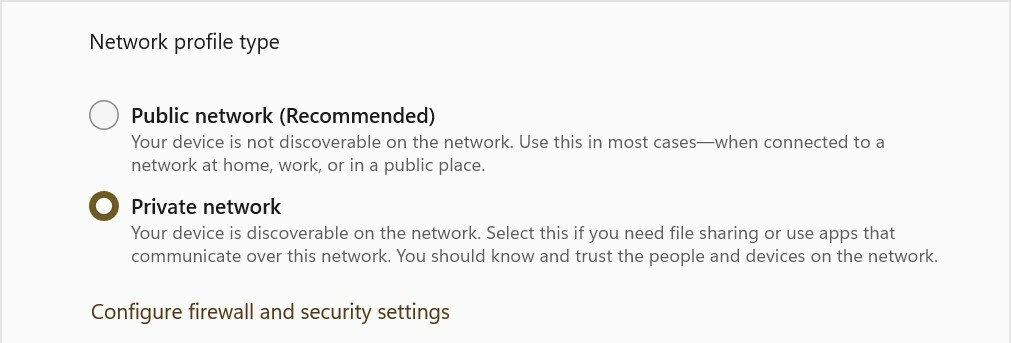

2. Enable file sharing
Settings > Network & internet > Advanced sharing settings
- Under “Private networks” (current profile) section
    - Set “Network discovery” On
    - Set “Setup network connected devices automatically” checked
    - Set “File and printer sharing” On
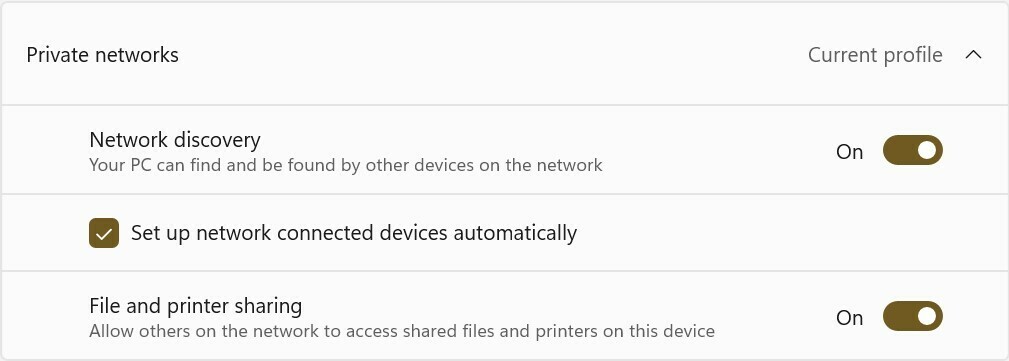

3. Setup local account specifically for music file sharing
Oh man, I can’t tackle the whole “local account” gauntlet here, so you’ll need to Google/ChatGPT it yourself. This step might not be strictly required, tho’ it is highly recommended from a security standpoint. I’m going to name this user ‘MusicShare’.

4. Share your music folder (or drive)
- Right-click on your music folder (or drive) and select Properties from the pop-up
    - Select the “Sharing” tab, and click the “Advanced Sharing” button
    - Check the “Share this folder” checkbox
    - Set “Share name” to ‘SonosLibrary’ (no quotes)
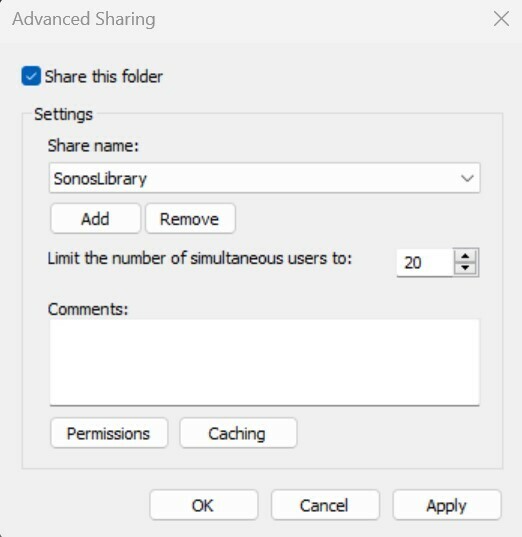

    - Click the “Permissions” button
    - In the pop-up under “Enter the object names to select” type ‘MusicShare’ (no quotes)
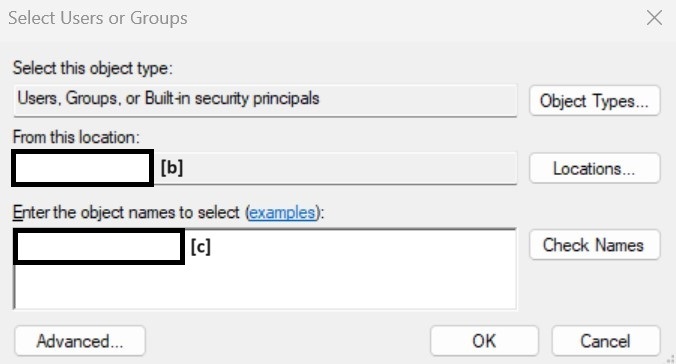
 

[b] auto-populates your machine name, [c] type ‘MusicShare’ here


- click the “Check names” button to validate, and click the “OK” and/or “Apply” buttons to close the nest dialog boxes
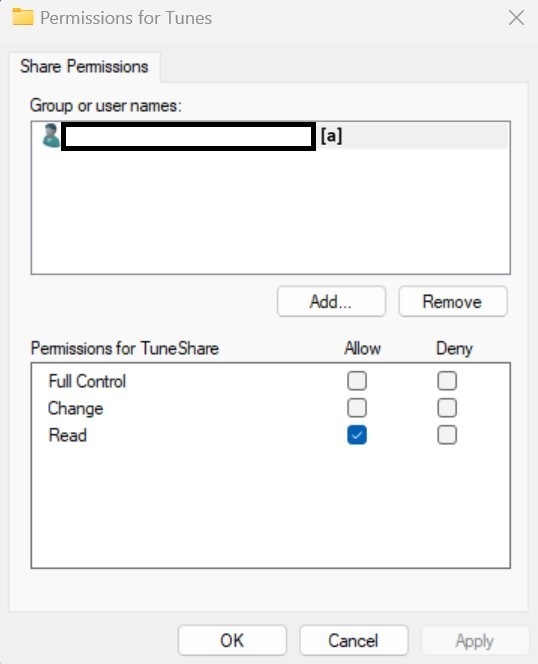
[a] auto-populates the full share name


5. Sonos Music Library Setup
- In the Sonos iOS or Android client, navigate to “Music Library Setup”
- Select “Add Shared Music Folder”
- Path = \\[your machine name]\SonosLibrary
- User name = MusicShare
- Password = [from Step 3]
- Cross your fingers (seriously) and wait for Music Index to build

This topic has been closed for further comments. You can use the search bar to find a similar topic, or create a new one by clicking Create Topic at the top of the page.

44 replies

jgatie
June 25, 2024

Not many can be so wrong and be so sure they are right.  Its rather funny.

Lyricist III
June 26, 2024

Not many can be so wrong and be so sure they are right.  Its rather funny.

☝🏼

Contributor I
July 4, 2024

Can someone at Sonos, tell me how to get my itunes music back lese with clear instructions for a MAC. I would be eternally grateful


Geoff

Lyricist III
July 11, 2024

I try everything you said and i obtain the message Access to the shared folder XXXXXX\SonosLibrary is denied. I even put MusicShare as an administrator.

So f****** conplicated. 

I'm really  thinking to getting rid of Sonos.

So good sound but an as***** application.


Moderator Note: Modified in accordance with the Community Code of Conduct.

This has happened to me too. So sick and tired of it. I went through all the trouble, even opened command prompt and enabled SMBv2 sharing, and tried all the other steps in this, and it still hasn’t worked.

jgatie
July 11, 2024

This has happened to me too. So sick and tired of it. I went through all the trouble, even opened command prompt and enabled SMBv2 sharing, and tried all the other steps in this, and it still hasn’t worked.


https://support.sonos.com/en-us/article/add-your-music-library-to-sonos

Lyricist III
July 11, 2024

This has happened to me too. So sick and tired of it. I went through all the trouble, even opened command prompt and enabled SMBv2 sharing, and tried all the other steps in this, and it still hasn’t worked.


https://support.sonos.com/en-us/article/add-your-music-library-to-sonos

yes, I did exactly this, and it didn’t work. So I’m not sure why you’re giving me the same set of instructions that didn’t work the first time round… 

Ken_Griffiths
July 11, 2024

This has happened to me too. So sick and tired of it. I went through all the trouble, even opened command prompt and enabled SMBv2 sharing, and tried all the other steps in this, and it still hasn’t worked.


https://support.sonos.com/en-us/article/add-your-music-library-to-sonos

yes, I did exactly this, and it didn’t work. So I’m not sure why you’re giving me the same set of instructions that didn’t work the first time round… 

Maybe add an ‘Everyone’ (read, or read/write) permission to the folder share and see if that perhaps gets it working for you.

Lyricist III
July 11, 2024

This has happened to me too. So sick and tired of it. I went through all the trouble, even opened command prompt and enabled SMBv2 sharing, and tried all the other steps in this, and it still hasn’t worked.


https://support.sonos.com/en-us/article/add-your-music-library-to-sonos

yes, I did exactly this, and it didn’t work. So I’m not sure why you’re giving me the same set of instructions that didn’t work the first time round… 

Maybe add an ‘Everyone’ (read, or read/write) permission to the folder share and see if that perhaps gets it working for you.

Thanks for the suggestion. I’ve already tried that and it doesn’t work either >_< 

Ken_Griffiths
July 11, 2024

This has happened to me too. So sick and tired of it. I went through all the trouble, even opened command prompt and enabled SMBv2 sharing, and tried all the other steps in this, and it still hasn’t worked.


https://support.sonos.com/en-us/article/add-your-music-library-to-sonos

yes, I did exactly this, and it didn’t work. So I’m not sure why you’re giving me the same set of instructions that didn’t work the first time round… 

Maybe add an ‘Everyone’ (read, or read/write) permission to the folder share and see if that perhaps gets it working for you.

Thanks for the suggestion. I’ve already tried that and it doesn’t work either >_< 

Maybe see if there is anything in this link that may help…

https://support.sonos.com/en-us/article/configure-windows-10-network-and-security-settings

Also see if "temporarily" switching off the local firewall on the PC (if applicable) may make any difference too. 

Lyricist III
July 11, 2024

This has happened to me too. So sick and tired of it. I went through all the trouble, even opened command prompt and enabled SMBv2 sharing, and tried all the other steps in this, and it still hasn’t worked.


https://support.sonos.com/en-us/article/add-your-music-library-to-sonos

yes, I did exactly this, and it didn’t work. So I’m not sure why you’re giving me the same set of instructions that didn’t work the first time round… 

Maybe add an ‘Everyone’ (read, or read/write) permission to the folder share and see if that perhaps gets it working for you.

Thanks for the suggestion. I’ve already tried that and it doesn’t work either >_< 

Maybe see if there is anything in this link that may help…

https://support.sonos.com/en-us/article/configure-windows-10-network-and-security-settings

Also see if "temporarily" switching off the local firewall on the PC (if applicable) may make any difference too. 

hey, thanks for continually helping out -- I’m on Windows 11 Home, will these steps apply?