
press250
Prodigy III
May 6, 2024

Adding a Windows SMB Share, Step-by-Step

  • May 6, 2024
  • 44 replies
  • 20965 views

For those who have been using the Sonos proprietary(ish) file sharing built into the about-to-be-deprecated Windows desktop client (SonosLibraryShare.exe), here are the steps to enable Windows 11 ‘native’ SMB file sharing (applies to Windows 10 with some nomenclature differences). Godspeed to all.

If you’re running an up-to-date version of Windows 10 or 11, you’ll automagically get SMBv2 which is forward-compatible with Sonos. (SMBv1 and SMBv2 discussed at length elsewhere in these forums).


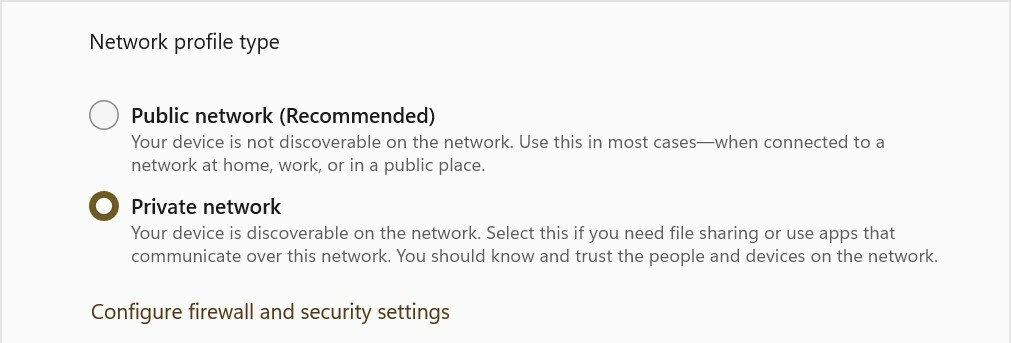
1. Switch your LAN to “Private Network”
Settings > Network & internet > Ethernet/WiFi
- Select “Private Network” radio button

2. Enable file sharing
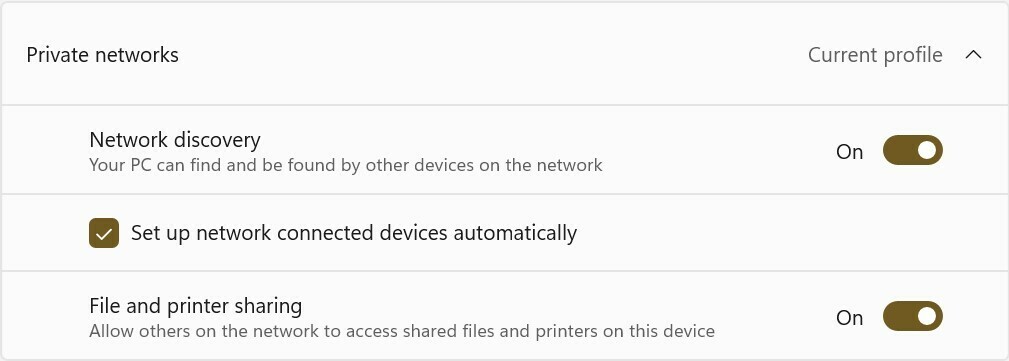
Settings > Network & internet > Advanced sharing settings
- Under “Private networks” (current profile) section
    - Set “Network discovery” On
    - Set “Setup network connected devices automatically” checked
    - Set “File and printer sharing” On

3. Setup local account specifically for music file sharing
Oh man, I can’t tackle the whole “local account” gauntlet here, so you’ll need to Google/ChatGPT it yourself. This step might not be strictly required, tho’ it is highly recommended from a security standpoint. I’m going to name this user ‘MusicShare’.

4. Share your music folder (or drive)
- Right-click on your music folder (or drive) and select Properties from the pop-up
    - Select the “Sharing” tab, and click the “Advanced Sharing” button
    - Check the “Share this folder” checkbox
    - Set “Share name” to ‘SonosLibrary’ (no quotes)
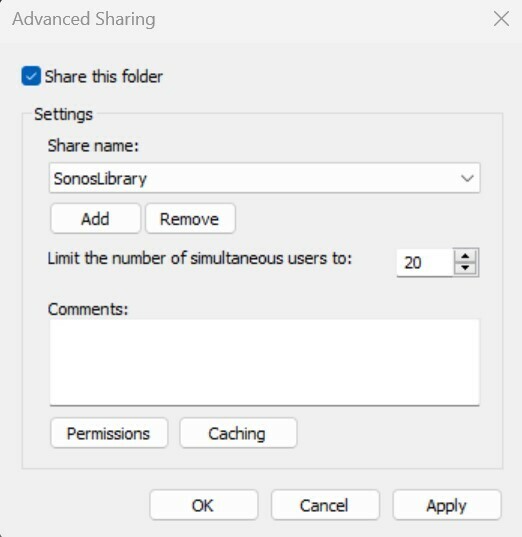

    - Click the “Permissions” button
    - In the pop-up under “Enter the object names to select” type ‘MusicShare’ (no quotes)
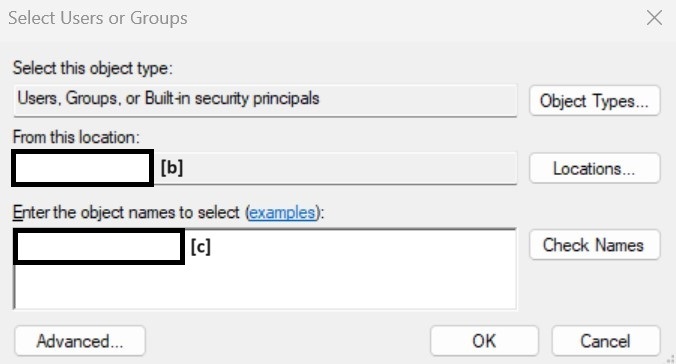
 

[b] auto-populates your machine name, [c] type ‘MusicShare’ here


- click the “Check names” button to validate, and click the “OK” and/or “Apply” buttons to close the nest dialog boxes
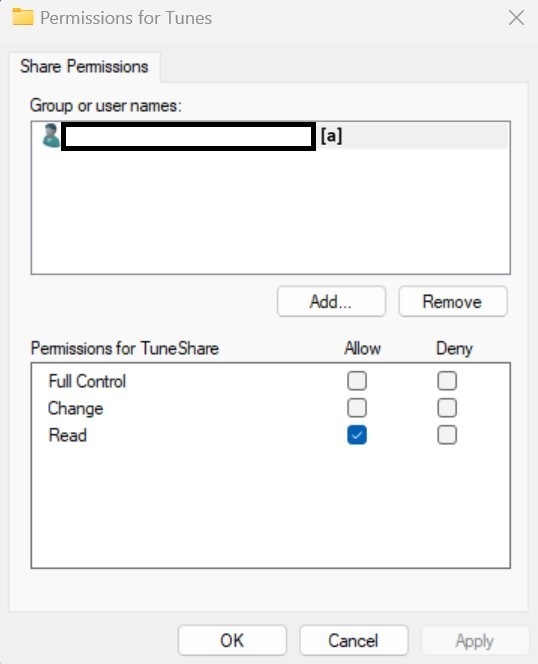
[a] auto-populates the full share name


5. Sonos Music Library Setup
- In the Sonos iOS or Android client, navigate to “Music Library Setup”
- Select “Add Shared Music Folder”
- Path = \\[your machine name]\SonosLibrary
- User name = MusicShare
- Password = [from Step 3]
- Cross your fingers (seriously) and wait for Music Index to build

This topic has been closed for further comments. You can use the search bar to find a similar topic, or create a new one by clicking Create Topic at the top of the page.

44 replies

press250
press250Author
Prodigy III
June 25, 2024

I don't recall ever ticking a box authorizing any Sonos apps to do http sharing and I don't think that's actually what it did (see Claude info here), but in any case some obscure Sonos proprietary risks aren't something likely to attract significant devotion of blackhat effort.  Windows file sharing, on the other hand, is installed and enabled on hundreds of millions of computers.  Not going there, and it's a ridiculous ask imo

You are clearly not comfortable turning on Windows file sharing and I respect that! For those who are on the fence, I offer the following ...

I am 100% certain: the Sonos desktop app created a proprietary http share, created a ‘Sonos’ user, and ran a SonosLibrary service. Anything scanning your network would come across the http share. Six years back I ran a packet sniffer to verify all of this, so I am absolutely confident that my answer is better than Claude’s in this instance. 😅

You are absolutely correct that Windows file sharing represents a ‘popular’ target, though that cuts both ways. SMBv2 file sharing has been included in Windows since 2008 and it is safe to say that it has been hammered on extensively by whitehats and blackhats alike. Those of us who work in infosec (decade+ here) are much more comfortable with risks that have survived the gauntlet of time than we are with risks to proprietary software from companies with zero security expertise. ¯\_(ツ)_/¯

jgatie
June 25, 2024

You are clearly not comfortable turning on Windows file sharing and I respect that! For those who are on the fence, I offer the following ...

I am 100% certain: the Sonos desktop app created a proprietary http share, created a ‘Sonos’ user, and ran a SonosLibrary service. Anything scanning your network would come across the http share. Six years back I ran a packet sniffer to verify all of this, so I am absolutely confident that my answer is better than Claude’s in this instance. 😅

You are absolutely correct that Windows file sharing represents a ‘popular’ target, though that cuts both ways. SMBv2 file sharing has been included in Windows since 2008 and it is safe to say that it has been hammered on extensively by whitehats and blackhats alike. Those of us who work in infosec (decade+ here) are much more comfortable with risks that have survived the gauntlet of time than we are with risks to proprietary software from companies with zero security expertise. ¯\_(ツ)_/¯


I concur, and I too am 100% certain that the previous local library housed on a PC/Mac used a proprietary version of  HTTP sharing.  Sonos stated as much when they sent out the notice that HTTP sharing will no longer be supported.


Lyricist III
June 25, 2024

You are clearly not comfortable turning on Windows file sharing and I respect that! For those who are on the fence, I offer the following ...

I am 100% certain: the Sonos desktop app created a proprietary http share, created a ‘Sonos’ user, and ran a SonosLibrary service. Anything scanning your network would come across the http share. Six years back I ran a packet sniffer to verify all of this, so I am absolutely confident that my answer is better than Claude’s in this instance. 😅

You are absolutely correct that Windows file sharing represents a ‘popular’ target, though that cuts both ways. SMBv2 file sharing has been included in Windows since 2008 and it is safe to say that it has been hammered on extensively by whitehats and blackhats alike. Those of us who work in infosec (decade+ here) are much more comfortable with risks that have survived the gauntlet of time than we are with risks to proprietary software from companies with zero security expertise. ¯\_(ツ)_/¯


I concur, and I too am 100% certain that the previous local library housed on a PC/Mac used proprietary version of  HTTP sharing.  Sonos stated as much when they sent out the notice that HTTP sharing will no longer be supported.


Well i dont accept comments from Sonos at face value / as true, but that would be unsettling if true.  Applications don't need file sharing privileges to access local files, nor to create data and send it over a local area network.  Each Sonos device connected to your LAN receives, holds, and plays audio from a rather substantial buffer portion of the origin file, the buffer is presumably being created on a rolling basis by the host Sonos app that's reading a local sound file.  Just no need for any sort of file sharing to play a local file.  Control from additional instances of the Sonos app running on other devices on a local network wouldn't even necessitate file sharing, although maybe easier to do that way.  But for God's sake Sonos at least give us the option to simply play back local content from the local app, without invoking file sharing 

press250
press250Author
Prodigy III
June 25, 2024

Well i dont accept comments from Sonos at face value / as true, but that would be unsettling if true.  Applications don't need file sharing privileges to access local files, nor to create data and send it over a local area network.  Each Sonos device connected to your LAN receives, holds, and plays audio from a rather substantial buffer portion of the origin file, the buffer is presumably being created on a rolling basis by the host Sonos app that's reading a local sound file.  Just no need for any sort of file sharing to play a local file.  Control from additional instances of the Sonos app running on other devices on a local network wouldn't even necessitate file sharing, although maybe easier to do that way.  But for God's sake Sonos at least give us the option to simply play back local content from the local app, without invoking file sharing 

You are correct that “applications don't need file sharing privileges to access local files.” However, the Sonos desktop app did not need to be running for your Sonos devices to access the proprietary http file share. Indeed, no user needed to be logged in for your Sonos devices to access the proprietary http file share. You could reboot your Windows machine, leave it on the lock screen, and everything worked fine.

Having beat this thing into submission 😂 at this point, I’d like to provide a community service. Even if you never enabled Sonos proprietary file sharing, remnants of it remain on your Windows PC. If you’re inclined toward “security paranoia” consider disabling the entirely-obsolete-and-unused Sonos Library Service:

  • Run services.msc
  • Scroll down, find SonosLibraryService, and double-click on it
  • If the service is running, click the Stop button
  • From the Startup type pulldown select Disabled
  • Click OK
jgatie
June 25, 2024


Well i dont accept comments from Sonos at face value / as true, but that would be unsettling if true.  Applications don't need file sharing privileges to access local files, nor to create data and send it over a local area network.  Each Sonos device connected to your LAN receives, holds, and plays audio from a rather substantial buffer portion of the origin file, the buffer is presumably being created on a rolling basis by the host Sonos app that's reading a local sound file.  Just no need for any sort of file sharing to play a local file.  Control from additional instances of the Sonos app running on other devices on a local network wouldn't even necessitate file sharing, although maybe easier to do that way.  But for God's sake Sonos at least give us the option to simply play back local content from the local app, without invoking file sharing 


You have a fundamental misunderstanding of how Sonos actually works.  The Sonos apps do not “play” or “buffer” anything.  They are only controllers.  They tell Sonos devices what to play from which source, and the Sonos device then goes out and gets the media stream or file from whatever source it is told.  In the case of a local library selection, the Sonos device is given a network share and pathname to a file in your local library to fetch and play.  Without some type of network sharing, there is no way the device can fetch the file. 

Again, the Sonos apps are only controllers.  No media streams through or from the apps.   All media is fetched by the smart Sonos devices directly from the source, and if that source is your local library, the fetching is accomplished through some type of network sharing. 


Lyricist III
June 25, 2024


Well i dont accept comments from Sonos at face value / as true, but that would be unsettling if true.  Applications don't need file sharing privileges to access local files, nor to create data and send it over a local area network.  Each Sonos device connected to your LAN receives, holds, and plays audio from a rather substantial buffer portion of the origin file, the buffer is presumably being created on a rolling basis by the host Sonos app that's reading a local sound file.  Just no need for any sort of file sharing to play a local file.  Control from additional instances of the Sonos app running on other devices on a local network wouldn't even necessitate file sharing, although maybe easier to do that way.  But for God's sake Sonos at least give us the option to simply play back local content from the local app, without invoking file sharing 


You have a fundamental misunderstanding of how Sonos actually works.  The Sonos apps do not “play” or “buffer” anything.  They are only controllers.  They tell Sonos devices what to play from which source, and the Sonos device then goes out and gets the media stream or file from whatever source it is told.  In the case of a local library selection, the Sonos device is given a network share and pathname to a file in your local library to fetch and play.  Without some type of network sharing, there is no way the device can fetch the file. 

Again, the Sonos apps are only controllers.  No media streams through or from the apps.   All media is fetched by the smart Sonos devices directly from the source, and if that source is your local library, the fetching is accomplished through some type of network sharing. 


Wrong. You can shut your local area network off and Sonos Plays will continue playing buffered audio for quite some time

jgatie
June 25, 2024

Wrong. You can shut your local area network off and Sonos Plays will continue playing buffered audio for quite some time


That’s because the buffer is on the Sonos devices. If the buffer were on the Sonos app, how would it traverse the downed network connection to get to the Sonos units?  

Look, I’ve been at this many years, and I know the inner workings of Sonos inside and out.  You are not going to win this one.  If your Sonos system used a local library housed on a PC or Mac, you had network sharing enabled.  It was originally SMB v1, until ~6 years ago when they switched to a proprietary HTTP sharing scheme.  You can believe that or not, but it is the 100% truth.  Whether you keep looking foolish about it is up to you.

Lyricist III
June 25, 2024

Wrong. You can shut your local area network off and Sonos Plays will continue playing buffered audio for quite some time


That’s because the buffer is on the Sonos devices. If the buffer were on the Sonos app, how would it traverse the downed network connection to get to the Sonos units?  

Look, I’ve been at this many years, and I know the inner workings of Sonos inside and out.  You are not going to win this one.  If your Sonos system used a local library housed on a PC or Mac, you had network sharing enabled.  It was originally SMB v1, until ~6 years ago when they switched to a proprietary HTTP sharing scheme.  You can believe that or not, but it is the 100% truth.  Whether you keep looking foolish about it is up to you.

Your years spent clearly have not translated into wisdom.  The buffer is created at the app, and sent to the Sonos devices obviously <on a rolling basis>.  A 50gb audio file will continue playing back even on my Play:1s for a significant time after the network is shut off ... So I guess this is where you claim a Play:1 receives and stores a 50gb file onboard and then plays it 🤡

jgatie
June 25, 2024

Your years spent clearly have not translated into wisdom.  The buffer is created at the app, and sent to the Sonos devices obviously <on a rolling basis>.  A 50gb audio file will continue playing back even on my Play:1s for a significant time after the network is shut off ... So I guess this is where you claim a Play:1 receives and stores a 50gb file onboard and then plays it 🤡


Meh, I give up.  You are either a troll, or just won’t listen to facts.  Either way, be happy in your ignorance.

Lyricist III
June 25, 2024

Your years spent clearly have not translated into wisdom.  The buffer is created at the app, and sent to the Sonos devices obviously <on a rolling basis>.  A 50gb audio file will continue playing back even on my Play:1s for a significant time after the network is shut off ... So I guess this is where you claim a Play:1 receives and stores a 50gb file onboard and then plays it 🤡


Meh, I give up.  You are either a troll, or just won’t listen to facts.  Either way, be happy in your ignorance.

Sure, <I'm> the troll.  You interjected with bs and got called out, all the while spouting ad hominem