
press250
Prodigy III
May 6, 2024

Adding a Windows SMB Share, Step-by-Step

  • May 6, 2024
  • 44 replies
  • 20965 views

For those who have been using the Sonos proprietary(ish) file sharing built into the about-to-be-deprecated Windows desktop client (SonosLibraryShare.exe), here are the steps to enable Windows 11 ‘native’ SMB file sharing (applies to Windows 10 with some nomenclature differences). Godspeed to all.

If you’re running an up-to-date version of Windows 10 or 11, you’ll automagically get SMBv2 which is forward-compatible with Sonos. (SMBv1 and SMBv2 discussed at length elsewhere in these forums).


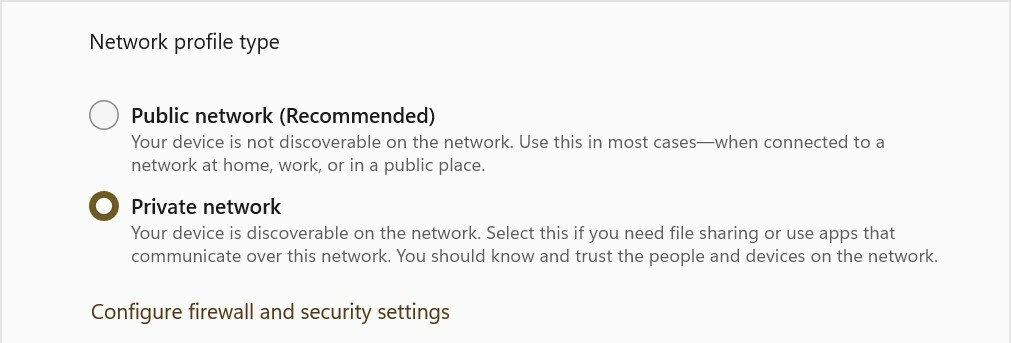
1. Switch your LAN to “Private Network”
Settings > Network & internet > Ethernet/WiFi
- Select “Private Network” radio button

2. Enable file sharing
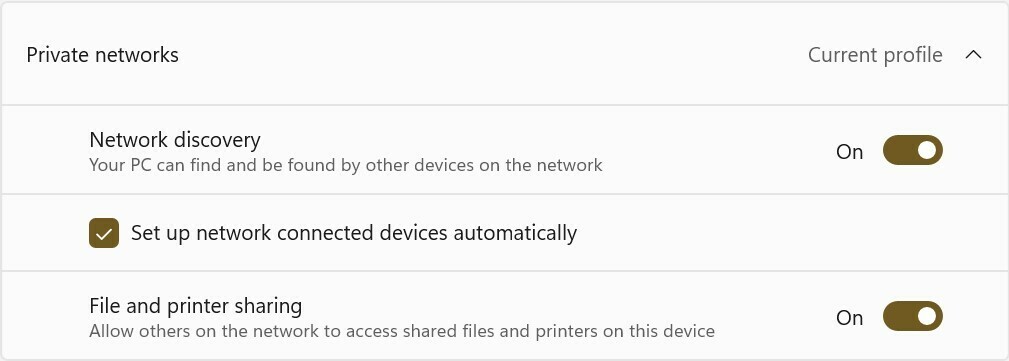
Settings > Network & internet > Advanced sharing settings
- Under “Private networks” (current profile) section
    - Set “Network discovery” On
    - Set “Setup network connected devices automatically” checked
    - Set “File and printer sharing” On

3. Setup local account specifically for music file sharing
Oh man, I can’t tackle the whole “local account” gauntlet here, so you’ll need to Google/ChatGPT it yourself. This step might not be strictly required, tho’ it is highly recommended from a security standpoint. I’m going to name this user ‘MusicShare’.

4. Share your music folder (or drive)
- Right-click on your music folder (or drive) and select Properties from the pop-up
    - Select the “Sharing” tab, and click the “Advanced Sharing” button
    - Check the “Share this folder” checkbox
    - Set “Share name” to ‘SonosLibrary’ (no quotes)
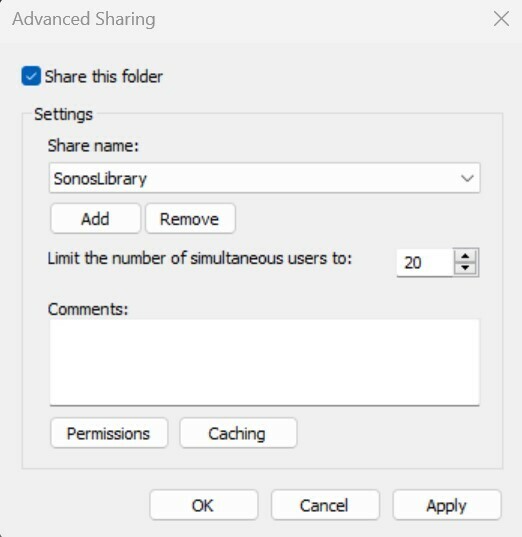

    - Click the “Permissions” button
    - In the pop-up under “Enter the object names to select” type ‘MusicShare’ (no quotes)
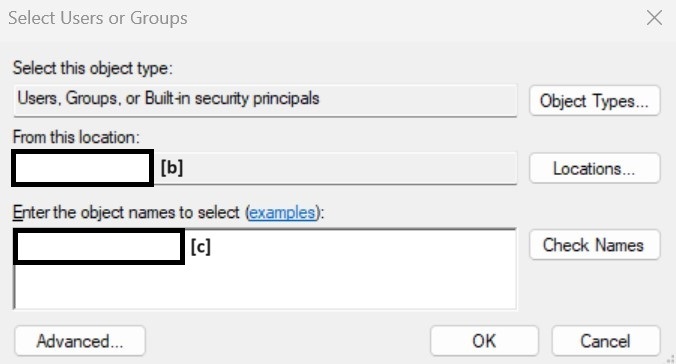
 

[b] auto-populates your machine name, [c] type ‘MusicShare’ here


- click the “Check names” button to validate, and click the “OK” and/or “Apply” buttons to close the nest dialog boxes
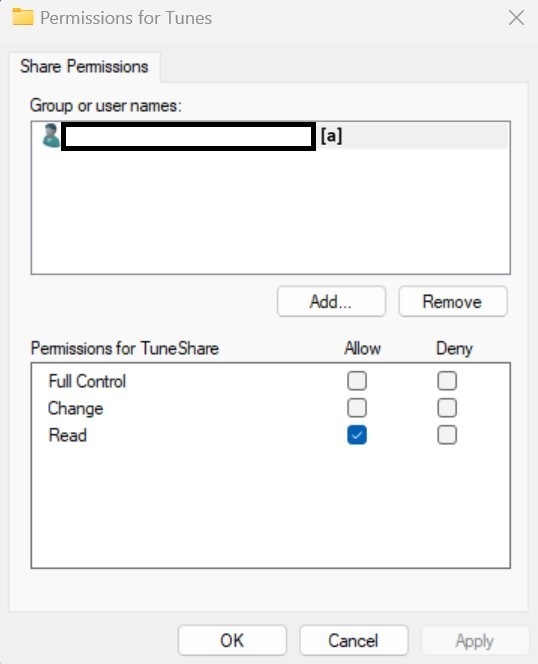
[a] auto-populates the full share name


5. Sonos Music Library Setup
- In the Sonos iOS or Android client, navigate to “Music Library Setup”
- Select “Add Shared Music Folder”
- Path = \\[your machine name]\SonosLibrary
- User name = MusicShare
- Password = [from Step 3]
- Cross your fingers (seriously) and wait for Music Index to build

This topic has been closed for further comments. You can use the search bar to find a similar topic, or create a new one by clicking Create Topic at the top of the page.

44 replies

Enthusiast I
May 25, 2024

You may try all this and find out with latest updates, Sonos doesn’t let you search your library anymore and made it extremely difficult to add anything from local library if you figure a way how. Best of luck to you and Sonos.


Avid Contributor I
May 27, 2024

Updated yesterday and my library disappeared - ‘Unable to access...’ and all that malarkey. No guidance anywhere on the support site. Chat contact unavailable for the first three hours of trying. Managed to get onto a chat (You are number 35 in the queue) where support indicated I was still using SMBvb1 (quoi?!) and started to run through steps to remove v1 and re-enable SMBv2/3, but a ‘system error’ at the support end started giving me solutions to somebody else’s problem (‘Sorry about that please ignore’) before the connection dropped out. Now I’m promised that if I call the support line (and wait for an hour so for a response I guess) they will talk me through all of the steps I now need to take to get back to where I was last Saturday.

I like the kit and have been using it for around 15 years I think, but from the moment the salesman stopped talking and the tech support started explaining that ‘Oh, it’s not actually going to do that for you...’, it’s been a titanic struggle to get the system to stay where I want it to be and not be dragged into Sonos’ pointless development dreams. But we are all trapped by the sunk cost of our own time and energy in making this grim software do what we want..

As of now I have a system which will not play any of the 15,000 or so tracks that I have patiently ripped from my CD collection and put into a place where three days ago the system used to find it and play it, playlists and all, just as I wanted. And the Sonos response is ‘Don’t worry, you’ll soon be able to reinstall your alarms’. I have a clock that does that for me. I want this system to play my music.

Lyricist III
May 27, 2024

Google translation

Good morning,

Like other Sonos users, I got the following message:

Sonos was unable to add the music folder.

Reason: Unable to add the shared folder //DESKTOP-EOS7G7H/Music to your music library (913).

After some thought I found a solution to the problem which apparently worked.

Here is the explanation: Right click on the Music folder and click on PROPERTIES at the bottom of the menu.

Click on the SHARE tab and then click on the first SHARE button…

A new window opens and you click on the V button next to the ADD button.

Click on SONOS WIRELESS WI-FI SYSTEM then click on the ADD button and finally click on SHARE.

Open your Sonos app on your PC and add your music library.


It works wonderfully for me and I wish you the same success.

Contributor I
May 29, 2024

Nope.  “An object named "MusicShare" cannot be found. Check the selected object types and location for accuracy and ensure that you typed the object name correctly, or remove this object from the selection.”  This is madness.  I. Can’t. Listen. To. My. Music.

Trending Lyricist I
June 1, 2024

I’m in the same boat. Two days ago I found the Sonos controller on my laptop for my two Sonos One speakers couldn’t find them and they also disappeared off my Windows 11 explorer wifi devices list. have attached via ethernet/rebooted laptop & computer and still no change. When I open my Virgin Media dashboard the two Sonos speakers are listed as connected devices. What the hell is going on here Sonos????


All works fine on my phone but no music library access from my NAS. Now I see everyone else has the same problem. Nightmare. Poor again from Sonos.

Lyricist III
June 4, 2024

On my Windows 10 desktop, I shared my MUSIC folder as instructed on some of the posts. The message pops up:

Your folder is shared.  \\DESKTOP-7PBHEBR\Users\mrscn\Music

When I try to re-add my Music Library, instead of getting error 903 like I was getting, I now get error 1002.

Sonos was unable to add the music folder.
Reason: Unable to add the shared folder “//DESKTOP-7PBHEBR/Music” to your Music Library (1002).

It’s like it expects the Music folder to be in a different folder.

I think I’m changing my Sonos password to SonosSucksBigtime

Lyricist I
June 21, 2024

Hello press250 and thank you for your post.

I did all the steps as you outlined.

Unfortunately, at Step 5, the Sonos app no longer lets you modify your Music Library.  Those features are “grayed out”.  The screenshot below is from a Windows 11 PC using the old app.  And on my iPhone, the new app only allows the users to add a streaming service or listen to Sonos Radio.

I have waited for the updated app that promised to “re introduce” what we lost.  I have spent dozens of hours trying all the different “work arounds” suggest in this community and other.  I cannot get music back into my house.  I have run out of patience.


Lyricist III
June 25, 2024

I have never needed or had Windows file sharing installed/enabled, and refuse to do so now.  Here, add one more ridiculously unnecessary attack surface, exacerbated by Sonos' invasive new Terms of Service ... just to play music from the very device I'm using the app on.  Ludicrous


press250
press250Author
Prodigy III
June 25, 2024

I have never needed or had Windows file sharing installed/enabled, and refuse to do so now.  Here, add one more ridiculously unnecessary attack surface, exacerbated by Sonos' invasive new Terms of Service ... just to play music from the very device I'm using the app on.  Ludicrous

My security posture borders on paranoid, so I share your concerns. Opening up a READ-ONLY file share of your music files is an extremely limited risk. The proprietary music library mechanism built into the Sonos desktop apps (technically http sharing) was a far greater risk.

Lyricist III
June 25, 2024

I don't recall ever ticking a box authorizing any Sonos apps to do http sharing and I don't think that's actually what it did (see Claude info here), but in any case some obscure Sonos proprietary risks aren't something likely to attract significant devotion of blackhat effort.  Windows file sharing, on the other hand, is installed and enabled on hundreds of millions of computers.  Not going there, and it's a ridiculous ask imo

I have never needed or had Windows file sharing installed/enabled, and refuse to do so now.  Here, add one more ridiculously unnecessary attack surface, exacerbated by Sonos' invasive new Terms of Service ... just to play music from the very device I'm using the app on.  Ludicrous

My security posture borders on paranoid, so I share your concerns. Opening up a READ-ONLY file share of your music files is an extremely limited risk. The proprietary music library mechanism built into the Sonos desktop apps (technically http sharing) was a far greater risk.