
Answered

Line in Era 100 - connected but no sound

  • March 10, 2026
  • 15 replies
  • 111 views

Forum|alt.badge.img

I have an argon turntable with preamp and the official Sonos line-in connection. Turntable connected, preamp functioning and line-in set up on the Era 100. Line in chosen as source and in the app linein is marked on the era 100 and the “sound icon shows music playing- but no sound. Volume turned up and down numerous times. Autoplay - tried  both on and off,Cables checked, Sonos and app updated and every post here read and tried - no sound. Any tips? Turntable works with other amps/speakers, Era is functioning in the Sonos system and it is set up as a single unit. 
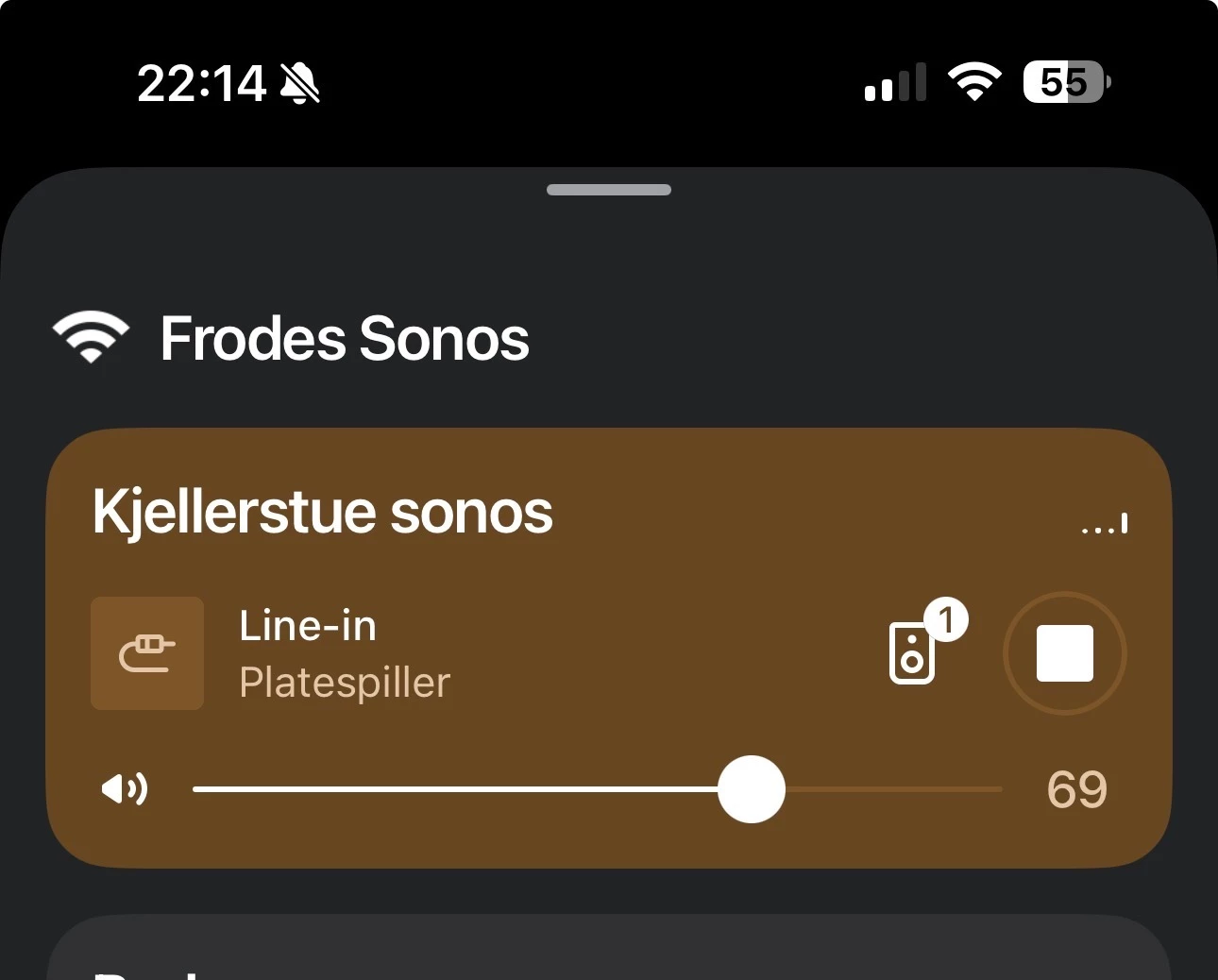
Picture showing the era 100, playing by line in
 

Best answer by Airgetlam

Ok, from your screenshot, the Sonos recognizes the line in (something is plugged in), but don’t get caught out by the bouncing lines, they aren’t measuring anything. 

There are a couple of things I’d check. Both of which you’ve probably done, but just in case…. First, check to ensure the cables going to the Sonos adapter are plugged in correctly. This screenshot is indicative to me of the Sonos line in adapter not receiving a line level signal. Next, check your pre-amp (is it internal or external?) to ensure it is set to ‘Line’ and not ‘Phono’. 

If neither of those are helpful, I’d call Sonos Support to discuss it.

When you speak directly to the Support staff, they have tools at their disposal that will allow them to give you advice specific to your network and Sonos system.

15 replies

Stanley_4
  • Grand Maestro
  • March 10, 2026

What happens if you Group with another Sonos?

What happens if you select the line-in from another Sonos?


Airgetlam
  • Answer
  • March 10, 2026

Ok, from your screenshot, the Sonos recognizes the line in (something is plugged in), but don’t get caught out by the bouncing lines, they aren’t measuring anything. 

There are a couple of things I’d check. Both of which you’ve probably done, but just in case…. First, check to ensure the cables going to the Sonos adapter are plugged in correctly. This screenshot is indicative to me of the Sonos line in adapter not receiving a line level signal. Next, check your pre-amp (is it internal or external?) to ensure it is set to ‘Line’ and not ‘Phono’. 

If neither of those are helpful, I’d call Sonos Support to discuss it.

When you speak directly to the Support staff, they have tools at their disposal that will allow them to give you advice specific to your network and Sonos system.


Forum|alt.badge.img
  • Author
  • Contributor II
  • March 10, 2026

Thanks. No difference if I group the speakers. I have a lot of Sonos but only this era 200/ speaker with line in capability. Internal pre amp with only off and on switch , not sure if I understand the line in and pre amp suggestion. 


Airgetlam
  • March 10, 2026

What are the two position labels on the internal pre-amp? Normally speaking, they should be ‘Phono’ and ‘Line’, but they might be slightly different on your turntable. You’d want the setting for ‘Line’, and it might be worth flipping it back and forth a couple of times. Sometimes, they don’t make appropriate contact. 

What did Support say, when you called in?


Stanley_4
  • Grand Maestro
  • March 10, 2026

Airgetlam
  • March 11, 2026

Which Argon turntable do you have?


Forum|alt.badge.img
  • Author
  • Contributor II
  • March 11, 2026

I have the MK ll. 


Airgetlam
  • March 11, 2026

There is a TT Mk2, and a TT-4 Mk 2?


Forum|alt.badge.img
  • Author
  • Contributor II
  • March 11, 2026

It’s the TT Mk2. 
thanks for the reply’s. haven’t found the time to call Sonos support and do some more testing but will get back to that over the weekend. 


Pools-3015
Forum|alt.badge.img+17
  • Prodigy I
  • March 11, 2026

It’s the TT Mk2. 
thanks for the reply’s. haven’t found the time to call Sonos support and do some more testing but will get back to that over the weekend. 

From the sound of things, you need to have the RIAA enabled on the to Mk2 for the internal preamp to be active.

Then you will need to go to Settings (the gear icon in the top right), the room where the Era 100 is, then Line in Sources and set the source level to 8. The default is sometimes not enough for some sources.


Forum|alt.badge.img
  • Author
  • Contributor II
  • March 13, 2026

I had of course RIAA enabled and tried all the output-settings. Went and godt a new splitter, that partly did the trick. I now have sound but it is kind of distorted.  In the I’ll try everything mode I connected the turntable to my Harman Kardon surrounds system and took a 3,5 jack from the headphone output to the Sonos line in - and behold, perfect sound in all the house. Sucsess - but stikk don’t know why it is distorted connected directly to the era100. 


Forum|alt.badge.img+19
  • Senior Virtuoso
  • March 14, 2026

Went and godt a new splitter, that partly did the trick. I now have sound but it is kind of distorted.  


There’s a setting for the Line-in Source Level. Try it at a lower setting - try each value until you get the required level. 


Forum|alt.badge.img
  • Author
  • Contributor II
  • March 14, 2026

Have tried them all, still distorted. And still perfect when I take the sound through my Harman Kardon. Can live with that solution but would like to know why it doesnt work when connected directly to the era100. 


Forum|alt.badge.img+19
  • Senior Virtuoso
  • March 14, 2026

Have tried them all, still distorted. And still perfect when I take the sound through my Harman Kardon. Can live with that solution but would like to know why it doesnt work when connected directly to the era100. 

I think that may be an answer that only Sonos Support can provide. 


buzz
  • March 14, 2026

I had of course RIAA enabled and tried all the output-settings. Went and godt a new splitter, 

What is a “splitter”? Why are you using this device?

