
Tutorial

Sonos + UniFi: Best Practices & Recommended Settings

  • April 8, 2026
  • 71 replies
  • 7221 views

Show first post

71 replies

  • Contributor II
  • August 13, 2026

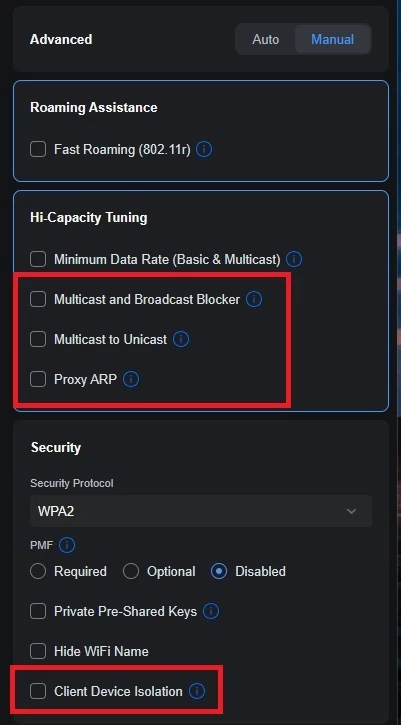
Some Unifi controller update enabled Wireless Fast Roaming (802.11r).  Sonos devices don’t support this and it causes them to fall off the network if you have multiple access points.  This needs to be disabled on the wifi network sonos is connectings to.


Forum|alt.badge.img+18
  • Local Superstar
  • August 14, 2026

Some Unifi controller update enabled Wireless Fast Roaming (802.11r).  Sonos devices don’t support this and it causes them to fall off the network if you have multiple access points.  This needs to be disabled on the wifi network sonos is connectings to.

Interesting. Is there specific Sonos devices that ‘fall off the network’? I’m only using WPA3 and have 802.11r, 802.11v, Band Steering & BSS Transition enabled, and haven't experienced this.

Maybe issue is if you have legacy Sonos devices and/or WPA2/WPA3 mixed mode? Mixed APs (different Unifi devices have different chipsets, Qualcomm vs MediaTek)?


  • Contributor I
  • August 21, 2026

Just wanted to say there is a LOT of misinformation in the Sonos staff guide. 

  1. You CAN run a mix of wired and wireless with Sonos on a Unifi network
  2. You CAN run Sonos in a IOT vlan with controller on a primary lan
  3. You CAN run RSTP mode

Ignore the guide. What you MUST do is the following

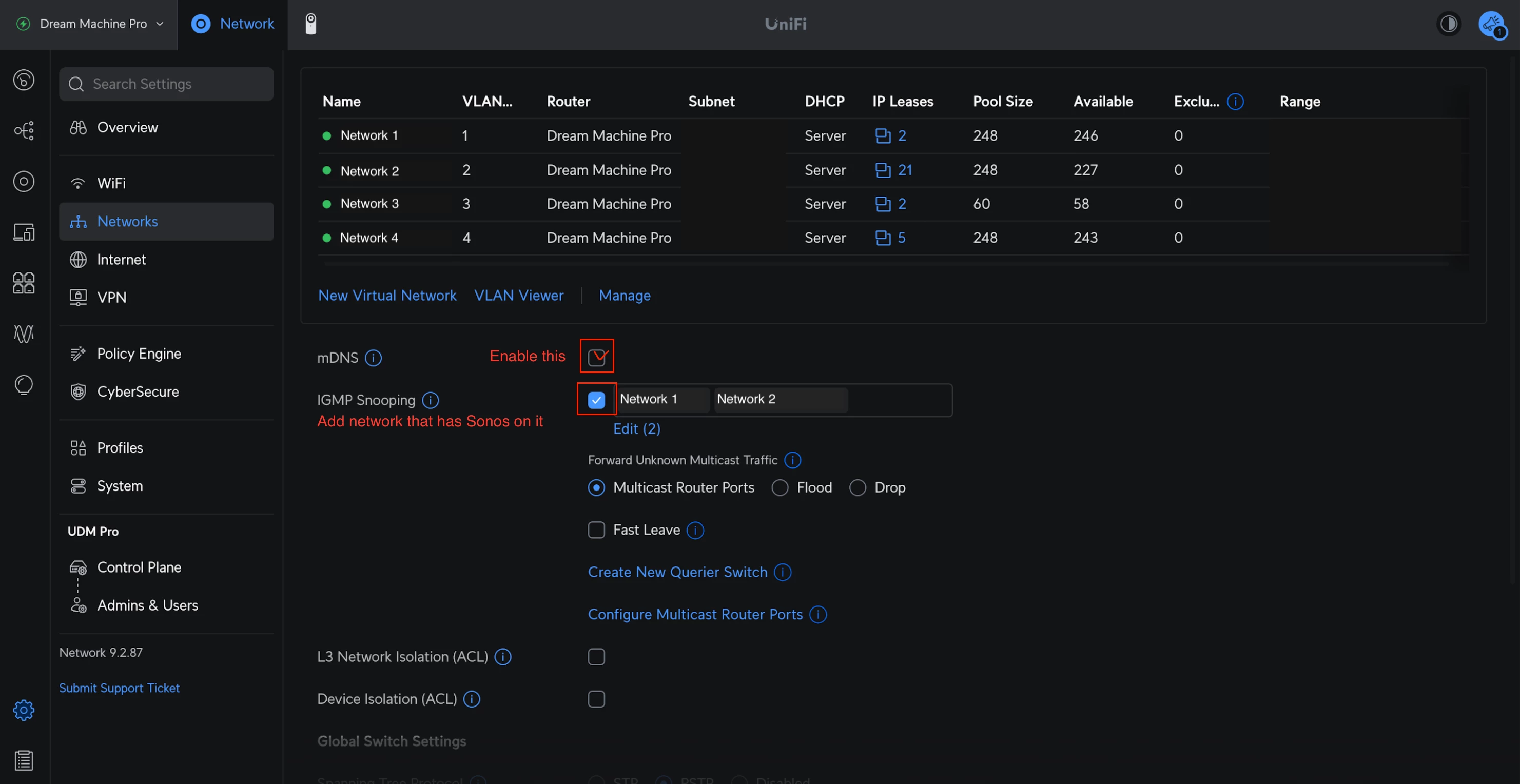
  • Gateway mDNS Proxy set to Audo
  • IGMP Snooping must be on and apply it to your Sonos network and your controller network
  • Most importantly as of recent versions of Unifi, the golden ticket, turn on “Auto Unknown Traffic Handling”. This is what makes everything work
  • Also...it males it easier if your IOT network and Main Network are on the same Internal Zone. Less rules to worry about
  • I have enabled Sonos TCP/UDP firewall rules between vlans just to be safe even though its on the same internal zone

Forum|alt.badge.img+18
  • Local Superstar
  • August 21, 2026

Just wanted to say there is a LOT of misinformation in the Sonos staff guide. 

  1. You CAN run a mix of wired and wireless with Sonos on a Unifi network
  2. You CAN run Sonos in a IOT vlan with controller on a primary lan
  3. You CAN run RSTP mode

Just because you ‘CAN’, doesn't necessarily mean its Best Practice. Having controller and devices on separate VLAN will require additional dependency on the mDNS Proxy, that may change (break) with network equipment firmware revisions. Different users will have different use cases, eg AirPlay.

If you CAN, then no need follow Best Practice, until it breaks.


controlav
Forum|alt.badge.img+24
  • Lead Maestro
  • August 21, 2026

Just wanted to say there is a LOT of misinformation in the Sonos staff guide. 

  1. You CAN run a mix of wired and wireless with Sonos on a Unifi network

I agree with this one: the “recommendation” to be all wired or wireless is nonsense, and impractical or impossible for many. Sadly it is also what the official guidance from Uni is, which is even more inexcusable than Sonos saying it.


Forum|alt.badge.img+18
  • Local Superstar
  • August 21, 2026

Just wanted to say there is a LOT of misinformation in the Sonos staff guide. 

  1. You CAN run a mix of wired and wireless with Sonos on a Unifi network

I agree with this one: the “recommendation” to be all wired or wireless is nonsense, and impractical or impossible for many.

Maybe “impractical or impossible for many” to correctly configure STP, hence the recommendation(s), albeit before the disable SonosNet wizard in App?


beto1969
Forum|alt.badge.img
  • Lyricist I
  • August 21, 2026

Hey all!  I’m new to Ubiquiti and networking in general.  I’ve been using CoPilot and Claude, for the past two days, to help me set everything up (VLANs, SSIDs, Port Profiles, Network Lists, etc.)


Everything seems to be working fine. Had some hiccups here and there, but I’m now able to use my Sonos app, while on my Trusted VLAN (LAN and Wifi), to all my Sonos devices on my Sonos VLAN (both wired and Wifi -- not using SonosNet)


Hopefully I got everything here, but this is my setup...

Network

  • Gateway mDNS Proxy > Custom > Trusted and Sonos VLANs selected
  • IGMP Snooping >  Trusted and Sonos VLANs selected
  • Network Lists > I added ports to TCP and UDP as outlined here: Configure your firewall to work with Sonos | Sonos
    • I didn’t any Firewall Rules for the Domain Exceptions
  • Port Profiles for all my VLANs
    • Trusted VLAN > Tagged VLANs >Allowed All > Port Mode > Edge
    • Sonos VLAN > Tagged VLANs > Blocked > Port Mode > Edge
    • On my switch, I assigned my Sonos Port Profile to three ports for my: Sonos Arc, Sonos Sub, Sonos Amp: 

Firewall Rules

  • Simple rules
    • I have Trusted VLANs Allowed to Sonos VLAN
    • Sonos VLAN Blocked to All other VLANs
    • All VLANs Allowed to Internet
  • Advanced Rules I have these three “Before Predefined”
    • Third Rule is using TCP/UDP ports from Network Lists


SSIDs

  • Trusted SSID: Nothing Special here, all defaults with all Radio Frequencies selected
  • Sonos SSID
    • Radio Band: 2.4 GHz only
    • IoT Optimization: All Un-selected
    • Security Protocol: WPA2 only
    • PMF: Disabled
    • everything else is defaulted

Hope this helps..  so far so good on my setup.  I’m going to have a friend that’s a network engineer come check out my setup, just to make sure it all looks right and that I’m not opening up any of my network to the outside world.


Stanley_4
  • Grand Maestro
  • August 21, 2026

Sonos can also use the 5 gHz band, you might want to enable that. Most of mine use it instead of the 2.4 band.


beto1969
Forum|alt.badge.img
  • Lyricist I
  • August 21, 2026

Sonos can also use the 5 gHz band, you might want to enable that. Most of mine use it instead of the 2.4 band.

Enabled 5 gHz -- everything working great! Thank you!


controlav
Forum|alt.badge.img+24
  • Lead Maestro
  • August 21, 2026

Just wanted to say there is a LOT of misinformation in the Sonos staff guide. 

  1. You CAN run a mix of wired and wireless with Sonos on a Unifi network

I agree with this one: the “recommendation” to be all wired or wireless is nonsense, and impractical or impossible for many.

Maybe “impractical or impossible for many” to correctly configure STP, hence the recommendation(s), albeit before the disable SonosNet wizard in App?

The difference is that very few might be affected by the STP issue (you need a managed switch somewhere on the network), but many want to mix wired with wireless.


  • Contributor I
  • August 30, 2026

Hello, great work on this tutorial. From what I understand you are aiming on bigger instalations with multiple AP?

Have anybody looked at RSSI thresholds?

I do have Cisco network at home, it was a pain to set everything at start, as I opted for wired connection where it was possible, what a novice mistake….. :D . But after disabling wifi everywhere. Things went well.

Few days ago some stutters ocured in my setup.

I found out that the master device (wirelles “Bathroom”, as if I corectly understand master is the one which is the closest to start of alfabet) have noncosistend network latency with spikes to 200ms and more. 


Today I checked signal from APs and found out that speaker is connected to AP with on 5GHz, 80MHz band width with rssi -60dbm, even tho there is another AP on 5GHz, 40MHz band width with rssi -45dbm. And found out that another speaker is the same but -69dbm vs -63dbm. I do have any roaming “help” protocols turned off on network.

Any knowledge on this topic?


Stanley_4
  • Grand Maestro
  • August 30, 2026

Disabling the Sonos radio, which is what disable Wi-Fi actually does, is usually a bad idea. It is particularly bad for Home Theater Rooms where it disables the low latency 5 gHz network needed for synchronized Sub and Surround sound.

Much better to leave the radio on and disable Sonosnet which simplifies things without breaking anything.


  • Contributor I
  • August 30, 2026

Thank you, but my beam gen2, sub gen3 and amp are working flawless, all wired, with wifi turned off, and sonosnet turned off about 5ms after this option was available :D.

To be honest… there is no way 5GHz wifi standard is faster than good old ethernet cable….

But that is not my question.


jgatie
  • August 30, 2026

Thank you, but my beam gen2, sub gen3 and amp are working flawless, all wired, with wifi turned off, and sonosnet turned off about 5ms after this option was available :D.

To be honest… there is no way 5GHz wifi standard is faster than good old ethernet cable….

But that is not my question.


It's not 5GHz wifi standard.  It's a custom, ad-hoc, one-way, direct connection between soundbar and the subs/surrounds.  Unlike Ethernet, the direct connection skips the hops required to traverse the network to the router and back to the surrounds/Subs, so yes, in general it is found to be more reliable than Ethernet for the low latency required for synching with video. The fact Ethernet works for you probably means the number of hops for your setup are a bare minimum and do not cause dropouts.


buzz
  • August 30, 2026

If there are any network switches, make sure that each has a different priority. The primary should have the lowest priority.


Stanley_4
  • Grand Maestro
  • August 30, 2026

Thank you, but my beam gen2, sub gen3 and amp are working flawless, all wired, with wifi turned off, and sonosnet turned off about 5ms after this option was available :D.

To be honest… there is no way 5GHz wifi standard is faster than good old ethernet cable….

But that is not my question.


As above, I said nothing about 5 gHz wifi, only the Sonos hidden - not quite wifi - 5 gHz Home Theater network.

If you read past posts here you will see a number of users discussing issues with wired Sub and Surrounds. You might even find something from me, taking your position and being proven wrong when the issues I was having went away when I disconnected Ethernet from all but primary Sonos devices.

Working well now with a only a few primary devices wired (For no good reason past, well the wire was rignt tnere so why not.) and Sonosnet disabled, the rest are on my Wi-Fi with the Sonos HT 5 gHz networks available. No radios needed to be disabled, which matches the official Sonos guidance.


  • Contributor I
  • August 31, 2026

Again. That was not my question….. My system is functioning well. Just curious, can you post me a source with “bonding” functionality? Just to make it clear for me. THX


Back to my original question, how is it with roaming with these speakers? Cause I clearly have better signal on other AP but they do not roam.


Stanley_4
  • Grand Maestro
  • August 31, 2026

Sonos doesn't have anything on the Bonding deails in the support FAQ that I could find, might be in one of the other sections.

Unless your network is forcing connections Sonos should connect to the strongest AP. Double-check that  and if there is  nothing doing that submit a diwg ostic and call support.


buzz
  • August 31, 2026

With respect to surrounds and SUB, they are in the same room as the soundbar, maybe not with an AMP.   Unless AMP is too distant, the direct 5GHz connection will almost always be the best approach because it bypasses network congestion. In rare cases when there is significant 5Ghz interference, wired might be better, but since 5GHz range is limited, this is unusual.


Forum|alt.badge.img+18
  • Local Superstar
  • August 31, 2026


Today I checked signal from APs and found out that speaker is connected to AP with on 5GHz, 80MHz band width with rssi -60dbm, even tho there is another AP on 5GHz, 40MHz band width with rssi -45dbm. And found out that another speaker is the same but -69dbm vs -63dbm. I do have any roaming “help” protocols turned off on network.

Any knowledge on this topic?

The Wi-Fi client is responsible for making roaming decisions, and can be nudged by the AP. You need to be careful, as the client may want to revert back after being nudged by the AP.

In your example above the RSSI is above the minimum threshold for the client to trigger a roam event. 

Not sure why you have 80MHz bands mixed with 40MHz? I use 20MHz for 2.4GHz, and 40MHz for 5GHz.


I found out that the master device (wirelles “Bathroom”, as if I corectly understand master is the one which is the closest to start of alfabet) have noncosistend network latency with spikes to 200ms and more. 

When you say ‘master’ you mean group coordinator? I suspect you started a stream on bathroom, then group other speakers to bathroom? That may not have been optimum for your network configuration. Maybe start the stream on a wired speaker, and add bathroom to group?

200ms latency suggests something wrong with the network configuration.


To be honest… there is no way 5GHz wifi standard is faster than good old ethernet cable….

A properly configured 5GHz Wi-Fi, even with 40MHz channel width, is many times faster than 100Mbs FE network.


buzz
  • August 31, 2026

I saw random high latency PING’s on a UNFI network calm down after priorities were straightened out.