Question

Sonos playback

  • July 11, 2026
  • 14 replies
  • 44 views

Recently my Sonos app will stop playing if I use another music app on my phone. I used to be able to have a radio station playing through the Sonos app, and separately have a music app playing out to headphones through the phone.

This no longer works, if I start playing say Spotify or BBC Sounds on my phone it stops any existing streaming on the Sonos app. And vice versa, if I attempt to restart the stream within the Sonos app, it cuts off the other music playing out through the phone. This behaviour started recently, is it no longer possible for the Sonos speaker to play independently from the phone?

14 replies

Airgetlam
  • July 11, 2026

It shouldn’t be an issue, playing music using the Sonos app, and playing music on your phone, but where this concept breaks down is if you have your phone paired with the Sonos speaker, either via Bluetooth, or AirPlay 2. If you ‘kill’ that connection, the Sonos speaker will continue to play the music it was told to by the controller, and your phone will stop interrupting the music playback by sending its own output to the Sonos. 


  • Author
  • Contributor I
  • July 11, 2026

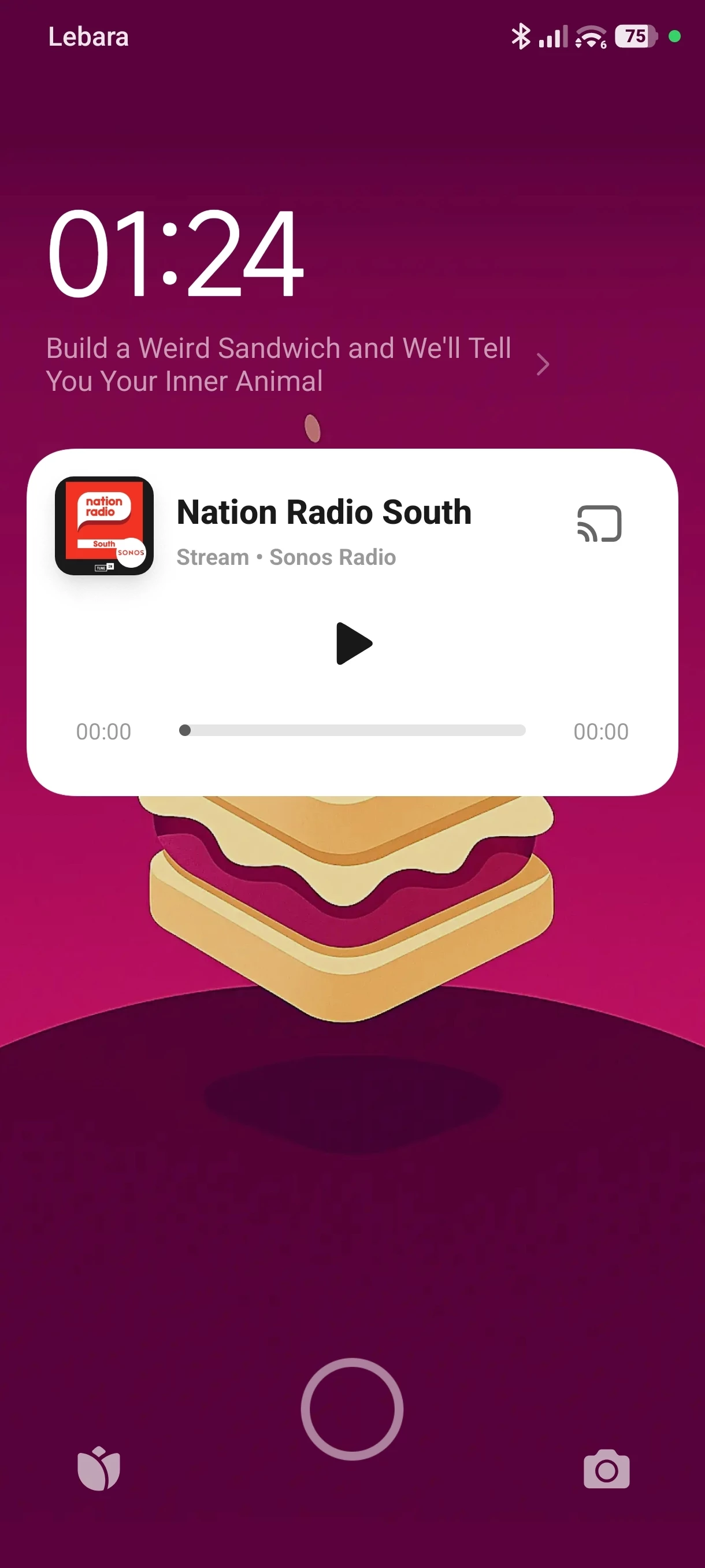
It's weird, I've never paired the Sonos with my phone over Bluetooth, I only manage its playback through the app. You now get a permanent Sonos widget on the phone while the speaker is in use, which I think is where the issue has crept in. It seems maybe having multiple widgets playing at the same time causes confusion somewhere, and the phone feels it has to stop playback on one to play the other?


Stanley_4
  • Grand Maestro
  • July 11, 2026

You can drop the phone to Sonos bluetooth configuration from the phone settings. Either the disconnect or unpair options.


  • July 11, 2026

You now get a permanent Sonos widget on the phone while the speaker is in use, which I think is where the issue has crept in. It seems maybe having multiple widgets playing at the same time causes confusion somewhere, and the phone feels it has to stop playback on one to play the other?

I don’t have a Sonos “widget” on any of my android or iOS devices. Is this something you enabled on your phone? If so, you could test your theory by turning it off to see if playback still gets interrupted.


  • Author
  • Contributor I
  • July 11, 2026

I haven't knowingly enabled a widget, there's no options for one in the app settings that I can see. Just whenever Sonos is playing there's a persistent widget/control panel on the lock screen. I don't know how to make it go away other than force closing the Sonos app, which isn't desirable. If I stop streaming on the speaker, the widget sticks around until I start playback on another app.


Airgetlam
  • July 11, 2026

I’m afraid I’m with ​@kdowling on this, I get no ‘widget’ showing on my lock screen for any devices when Sonos is playing, or not playing. Can you take a screenshot, and post it? 
 

Are you by chance using S1 rather than S2? Which Sonos devices are you using?


Airgetlam
  • July 11, 2026

Just thinking out loud, but I would get a widget showing what was playing if I used Bluetooth or AirPlay 2, just not when using the Sonos controller. 


  • July 11, 2026

Lock screen controls was recently added to the android S2 controller. In the Sonos controller app click on the person icon at the top to get to your Account settings → App Preferences. From there you can turn on/off Lock Screen Controls. I never turned that on.

If that’s not it, then ​@Airgetlam is correct that you get widgets using other audio apps, which the sonos controller app is not.


  • July 11, 2026

I would consider it a bug for the lock screen control to behave like that. If it was an audio app, that would make sense. But since it’s not playing any audio on the device, it should not be interring with actual audio playing apps.


  • Author
  • Contributor I
  • July 12, 2026

Have grabbed a screenshot from the lock screen. This is when playback is stopped but widget will likely stick around until I play something through another app. Behaviour is the same whether the screen is locked or not tbh. I'm using S2 on Android, all up to date. My speaker is Era 100. Rather perplexed to hear no one else sees this controller widget when using the app.


.


  • Author
  • Contributor I
  • July 12, 2026

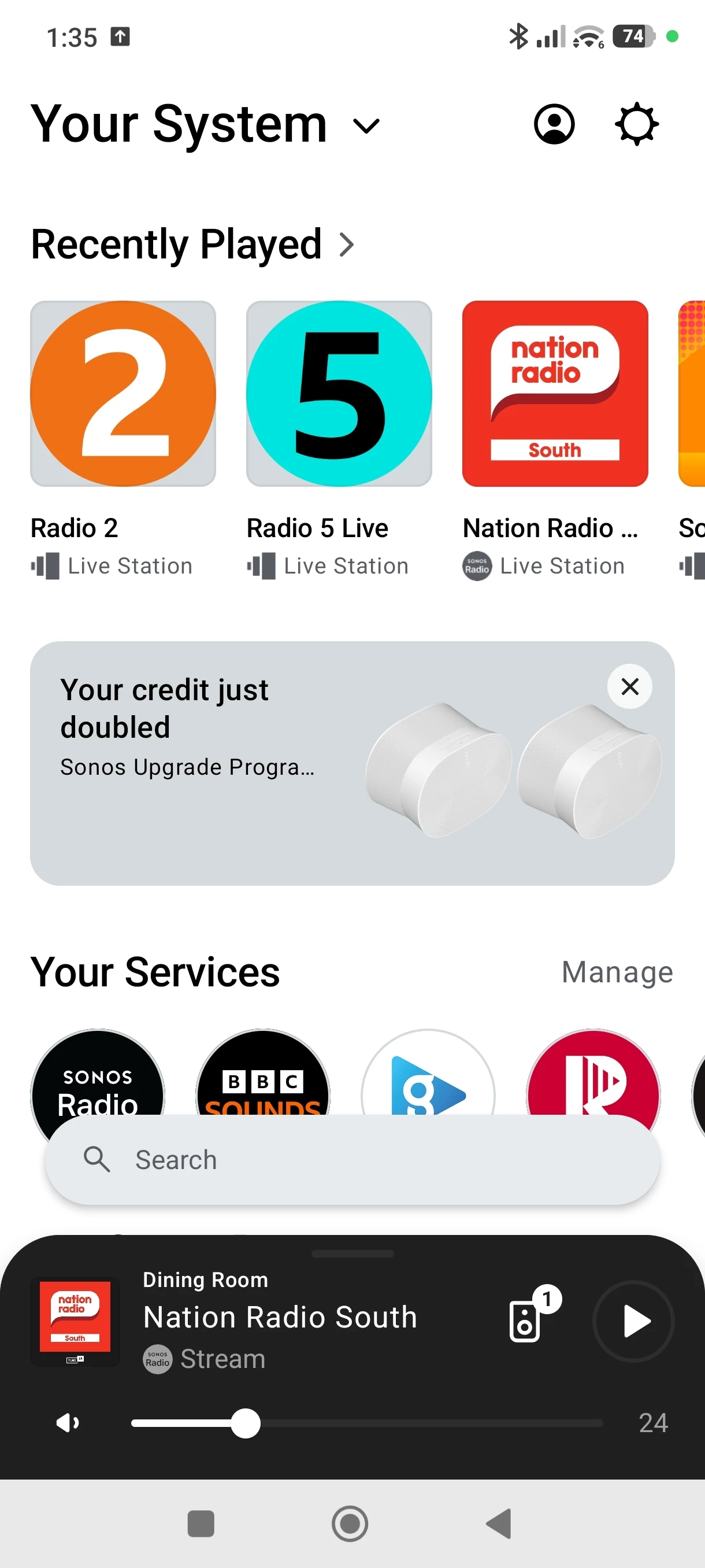
For those of you saying you don't see a controller widget on your mobile devices, when you're in the app do you not get this thing at the bottom with the play button and volume control? 


  • July 12, 2026

The thing with the play button and volume in the Sonos app is called the Now Playing Bar. Tap it to bring up the Now Playing Screen. That’s not considered a “widget”. A widget is an element of the OS you’re using (Android or iOS for example).

For other elements of the Sonos app/screen see: SONOS User Guide | Sonos app

Did you try turning off the Lock Screen Control (your first screenshot), like I described above?


Airgetlam
  • July 12, 2026

As it’s Android, I’ll bow out ;)


  • Author
  • Contributor I
  • July 12, 2026

Apologies, I wasn't aware of the distinction, so yes any time I have made reference to the widget, I in fact meant the now playing bar.

I do appreciate people taking the time to contribute and try to help with this. It turns out though that simply restarting the phone and it doing some updates has corrected the behaviour for me. I can play Sonos and other music apps independent again now! Thanks all