
Contributor I
June 1, 2025

Sonos Play:1 won't connect to new wifi network

Hi, I find it impossible to add my Play:1 to a new network or system. I factory reset the speaker. The setup in the app works smooth: It finds the speaker, recognizes the audio PIN, and even prompts for the wifi name and password. However after copy+pasting (!) the password it always returns the same communication error message:

> Your mobile device couldn’t communicate with your Play:1. Check your network connection and try again later.

I’ve been now through the millionth factory reset and setup process in the last week. I uninstalled the (new) Sonos App and restarted the phone. I restarted the router. Nothing helped. The speaker works fine if wired though. And I can setup a new system and add a Sonos One SL easily. But it’s the Play:1 that drives me crazy. It worked though before I moved and I am now wondering if the last setup was done with the old app and whether it’s a problem of the new Sonos App.

Sonos App Info: 80.21.3-release+20250516.6a59431
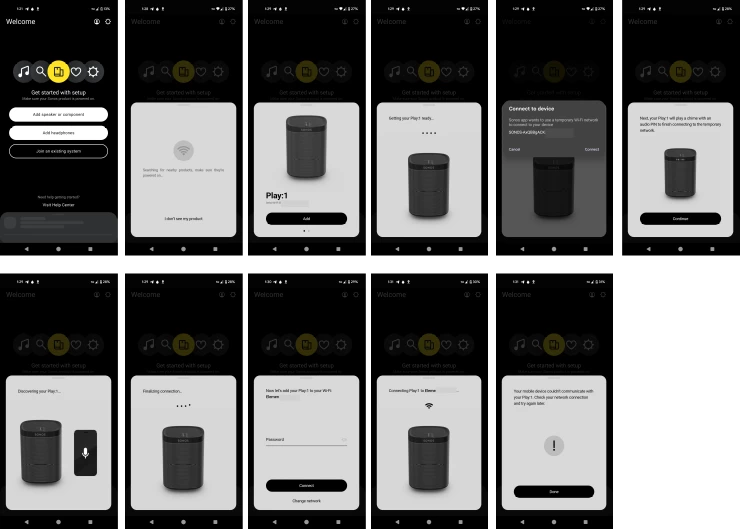
 

Setup process Sonos Play:1


This topic has been closed for further comments. You can use the search bar to find a similar topic, or create a new one by clicking Create Topic at the top of the page.

15 replies

controlav
Lead Maestro
June 1, 2025

Can’t tell, if this is iOS look for the common problems: “local network” permission and MDM/VPN installation.

Translate
Author of the leading independent Sonos apps for Android, MacOS, iOS, Windows and Xbox.
Contributor I
June 1, 2025

thx contrikav, I’m not sure if I got this right but I am using the Anroid app. I tried it on a Google Pixel4 and a Pixel 8a. Both behave the same as illustrated in the question.

Translate
Senior Virtuoso
June 1, 2025

Sometimes it helps to connect the Play:1 to your router with an internet cable during setup. 

Translate
Contributor I
June 1, 2025

yes, connecting the Play:1 with an ethernet cable works fine. I can see the speaker, add it to the system and play music. However, I cannot transfer the wifi to the speaker, i.e. the wifi-speaker essentially becomes a wired speaker...

Translate
Senior Virtuoso
June 1, 2025

yes, connecting the Play:1 with an ethernet cable works fine. I can see the speaker, add it to the system and play music. However, I cannot transfer the wifi to the speaker, i.e. the wifi-speaker essentially becomes a wired speaker...

Are you sure wifi is enabled on the speaker - toggle it on and off a few times. There’s a small possibility the wifi in the speaker has failed. Have you spoken to Sonos support? 

Translate
Ken_Griffiths
June 1, 2025

​@jaqui.phinehas,

Maybe see if the 2.4Ghz WiFi band on the new router is 802.11b/g/n backward compatible and maybe try security mode WPA2-AES personal and see if that resolves the issue.

Also ensure the mobile controller device meets the Sonos system requirements mentioned HERE and that it’s WiFi connection is not using ‘low data’ mode

Translate
Contributor I
June 2, 2025

​@jaqui.phinehas,

Maybe see if the 2.4Ghz WiFi band on the new router is 802.11b/g/n backward compatible and maybe try security mode WPA2-AES personal and see if that resolves the issue.

Also ensure the mobile controller device meets the Sonos system requirements mentioned HERE and that it’s WiFi connection is not using ‘low data’ mode

I like the idea that it’s a wifi-problem. The 2.4GHz band is 802.11/n (wifi 4) which should be backward compatible by design. I cannot change it anyway. Bandwidth is 40MHz (default / uneditable); channel 13.

I tested with security set to “WPA2+WPA” and with WPA2 alone. Nothing worked. The app is alright. Wifi is enabled and no such thing as a “low data mode”. Interestingly, I was able to add the speaker to a friend’s system though (even without typing in the wifi password).

Translate
Ken_Griffiths
June 2, 2025

​@jaqui.phinehas,

Maybe see if the 2.4Ghz WiFi band on the new router is 802.11b/g/n backward compatible and maybe try security mode WPA2-AES personal and see if that resolves the issue.

Also ensure the mobile controller device meets the Sonos system requirements mentioned HERE and that it’s WiFi connection is not using ‘low data’ mode

I like the idea that it’s a wifi-problem. The 2.4GHz band is 802.11/n (wifi 4) which should be backward compatible by design. I cannot change it anyway. Bandwidth is 40MHz (default / uneditable); channel 13.

I tested with security set to “WPA2+WPA” and with WPA2 alone. Nothing worked. The app is alright. Wifi is enabled and no such thing as a “low data mode”. Interestingly, I was able to add the speaker to a friend’s system though (even without typing in the wifi password).

The fact it works with your friends WiFi I guess points to it ‘likely’ being a local network issue/conflict - some routers/switches are listed on the Sonos hardware ‘incompatibility list’ so it might be something along those lines (perhaps)? In such cases, often wiring at least one Sonos speaker (or a Sonos Boost) direct to the router can often resolve such hardware issues. Anyhow here is the list of incompatible products FYI:

https://support.sonos.com/en-us/article/incompatible-network-hardware

Translate
Local Superstar
June 3, 2025

Change the router away from Channel 13 and try again.  Where in the world are you and the speaker is from the same area, yes?

Translate
Local Superstar
June 3, 2025

Special character in SSID?


Translate