Question

Play5 not connecting to S1 or Sonos app

  • May 5, 2026
  • 13 replies
  • 111 views

Since the app updates I cannot connect my Play5 gen 1 to either the S1 or SONOS app. I have a mixed system with older speakers and newer ARC and Sub woofer. The other speakers are in other rooms. The 5 is the only one that gets momentarily seen in the S1 app and it automaticallty switches to the 5GZ  SONOS app and doesnt appear there either.

13 replies

Stanley_4
  • Grand Maestro
  • May 5, 2026

What is a 5GZ Sonos App?

There are just two official Sonos apps, Sonos S1 Controller and Sonos app (used to be called S2) but they dropped  that name.

The Gen 1 Play 5 can't connect to the new Sonos app, they are not compatible.

Aside from that what happens if you u plug your other Sonos so it is just the Play 5?

While,you have the others unplugged try a temporary Ethernet cable to the P.ay 5 and see what happens.


  • Author
  • Contributor I
  • May 5, 2026

Hi and thanks for replying

I meant the SONOS app (S2) runs on the 5 GHz part of my home network vs the 2.4 Ghz part, and the older speakers like the Play5 only worked on the original S1 app at 2.4 Ghz.. Now they (Play1s and 3s) all automatically migrated to SONOS when I opened S1, except for the Play5, And S1 gets overridden by S2 when launched.

From your note “Aside from that what happens if you u plug your other Sonos so it is just the Play 5?”

do you mean unplugging all other speakers and then try the Play5 by itself? 

Will try that if so.

Also will try the ethernet cable suggestion.

Thanks, Phil


  • May 5, 2026

Hi and thanks for replying

I meant the SONOS app (S2) runs on the 5 GHz part of my home network vs the 2.4 Ghz part, and the older speakers like the Play5 only worked on the original S1 app at 2.4 Ghz.. Now they (Play1s and 3s) all automatically migrated to SONOS when I opened S1, except for the Play5, And S1 gets overridden by S2 when launched.

From your note “Aside from that what happens if you u plug your other Sonos so it is just the Play 5?”

do you mean unplugging all other speakers and then try the Play5 by itself? 

Will try that if so.

Also will try the ethernet cable suggestion.

Thanks, Phil

Since all your devices except the Play 5 were updated to S2, they should appear in the SONOS app, and the Play 5 (only) should show up in the SONOS S1 app. Two separate apps.

And S1 gets overridden by S2 when launched.

Can you explain what you mean by this? The two apps should both work without interfering with each other.


Stanley_4
  • Grand Maestro
  • May 5, 2026

S2 runs on both 2.4 and 5 gHz.

S1 and S2 can't see each other, there is no overriding going on.

If the speaker supports both bands it decides where the signal is best and connects there.

If you have Ethernet connected you will get Sonosnet, that is only 2.4 gHz and an older standard. You probably do not want it.


Yes just try the Play 5 Gen 1 all alone with only the S1 controller active.


  • Author
  • Contributor I
  • May 7, 2026

And S1 gets overridden by S2 when launched.

Can you explain what you mean by this? The two apps should both work without interfering with each other.”

When S1 is launched and detects the older speakers, such as the play5, it automatically launches S2. The older speakers minus the Play5 show up, and only if my network is on 2.4 gHz. 

Yes just try the Play 5 Gen 1 all alone with only the S1 controller active.” Still haven’t tried that. Will let you know the result.  

Read something about Play5 gen1 that makes it an outlier in this S1/S2 issue.

Thanks!


106rallye
Forum|alt.badge.img+18
  • May 7, 2026

“Read something about Play5 gen1 that makes it an outlier in this S1/S2 issue.”
Insofar that the Play 5 ( Gen 1) is S1 only, so not S2 capable.


  • Author
  • Contributor I
  • May 8, 2026

“Read something about Play5 gen1 that makes it an outlier in this S1/S2 issue”

I think this the issue that the Play5 gen1 is an outlier. 

Yes just try the Play 5 Gen 1 all alone with only the S1 controller active.” 

Assuming this means to delete the S2 app from all devices and then re-install it later.

thx for all your help.


Stanley_4
  • Grand Maestro
  • May 8, 2026

No reason to remove the S2 app, just don't start it or if it is started force it to stop.


Rajpriye
Forum|alt.badge.img+1
  • Lyricist III
  • May 11, 2026

Your Play:5 Gen 1 is S1-only, and the mixed S1/S2 setup is likely causing the discovery issue. Try resetting the Play:5 and reconnecting it through the S1 app only on a 2.4GHz network Sonos devices often struggle with band steering and mixed ecosystems.


  • Author
  • Contributor I
  • May 16, 2026

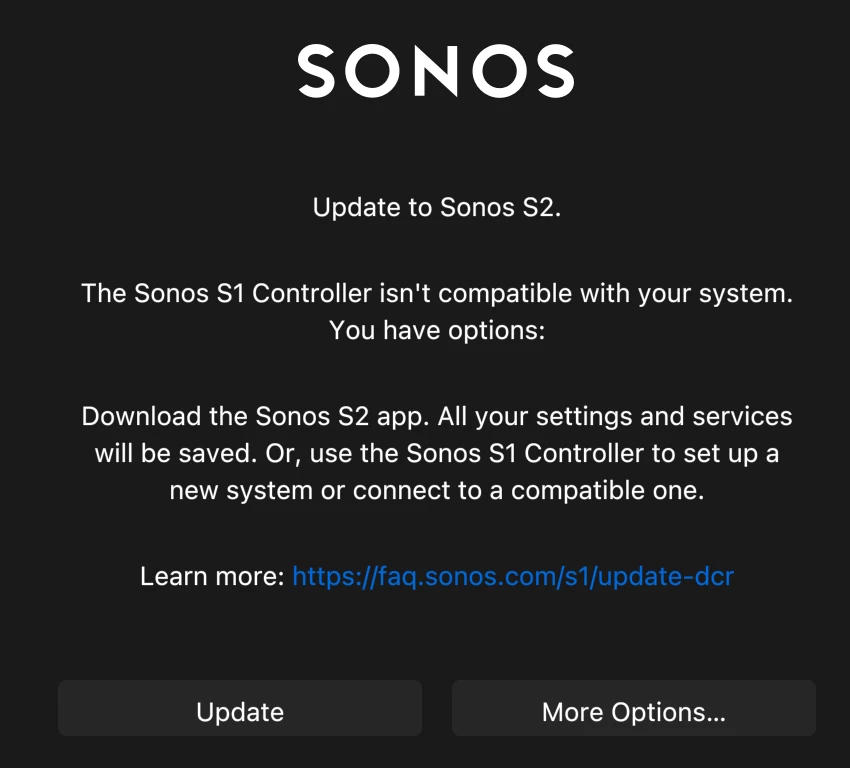
Thanks for all the replies. I tried connecting the Play5 via Ethernet to my router with all other speakers disconnected, but still get the solid amber light of no connection. I deleted and downloaded another S1 from the SONOS site as well to no avail. I still get the update to S2 message when opening S1 (attached).


Mr. T
  • May 16, 2026

Have you clicked on more options in the screenshot to join a compatible system?

if that doesn’t work, power down your S2 system, force close and reopen S1 app to see if it then finds your Play:5


  • Author
  • Contributor I
  • May 17, 2026

I tried unplugging all speakers and connecting the 5 via ethernet to the router and still get the flashing amber light of not connecting this way either it seems. I hear the usual tone when I push the sound button. solid white, blinking white, dimmer blinking light.

Update: Finally got the Play:5 to connect with my network and S1 by creating a new S1 system and it discovered the Play:5 and worked. However, it only did so while it was connected via cat5 to the router. When I unpluged the cable it didn’t connect to WiFi automatically.

Next steps it seems.

Thanks for all tips-


Stanley_4
  • Grand Maestro
  • May 18, 2026

It could be a network card failure, connect the Ethernet and submit a diagnostic, then call Sonos and see what they can tell from the diagnostic data.