Question

New Era Nightmare

  • July 18, 2026
  • 24 replies
  • 207 views

Can someone explain to me why on earth Sonos decided to discontinue support of SonosNet on the new Era speakers?  I have had a whole-home Sonos system for about 8 years now, and for much of that time I had constant issues with speakers cutting out audio or completely disappearing from the app while connected to my Google Wifi mesh network.  Finally, not that long ago I move all of them over to SonosNet via my Sonos Beam, which immediately resolved these issues.  Before this revelation, I was very close to getting rid of my entire Sonos system and moving to something else, because I was so sick of all the time wasted trying to troubleshoot this system, not to mention the complete nightmare the app has been over recent years.  This fix renewed my love for Sonos products, so much so I recently decided to upgrade some of my speakers and one of those purchases was the Era 300.  I was torn between the 5 and the Era 300, but given the room this was intended for and the fact that I wanted to future-proof new purchases with the newer product line, I went with the Era 300. 

When I first set it up and tuned it, it sounded great.  I then learned that this new model doesn’t support SonosNet, which was alarming to me given my previous experience with using my speakers over Wifi.  A bit of research assured me that it could coexist with a SonosNet system though, so I grouped it with some of my other rooms, and for a few hours it worked wonderfully.  But then, without changing any settings, the next time I attempted to play and group the Era with the rest of the house, these old problems of speakers dropping connection came back in full force.  The Era specifically will not even maintain a connection to my wifi network.  I continually unplug and plug it back in, and it will appear for a few minutes, and then drop off again.  At this point I have spent hours troubleshooting my network, attempting different network configurations, entire system reboots, contacted my ISP tech support for assistance, and nothing helps.  Not only is the Era 300 apparently completely unusable, it has rendered my entire Sonos system unusable unless I disregard this speaker entirely.  AI tells me I should just abandon SonosNet because my Google mesh network is far more capable of handling a whole home Sonos system than SonosNet is.  This is honestly laughable because I know from years of experience this is not the case.  

On top of this, when I was setting up the Era 300, I was initially excited about the new Zones feature, as this seemed like it would solve another age old problem of having speakers in adjoining rooms that ideally should be synced, and the gain trim control it provided would be a great solution to this.  But alas, I discover this completely disregards any Trueplay tuning and does not support spacial audio.  Another half-baked release.

I really wish Sonos could release an update of software or products that actually solved something without creating new problems.  

If anyone has any ideas on how to solve these issues, I’d appreciate any input. 

24 replies

Ken_Griffiths

Although it’s a little old now, maybe see this thread-link below, starting with a post from Sonos Staff in relation to Google WiFi…
 

SonosNet, by all accounts these days is a somewhat older wireless technology and uses the slower 2.4ghz band, whereas modern-day routers and WiFi mesh home systems now provide access in all rooms of the Home to the much faster and less cluttered 5Ghz band and no doubt things will continue to progress towards the 6Ghz band eventually too. Sonos has simply moved away from the older exclusive SonosNet connection and chosen the more modern-day ‘faster’ connection.

I have now moved away from SonosNet myself too and steered the majority of my Sonos speakers onto the 5Ghz band of my Home WiFi mesh and since doing that, everything is noticeably quicker and much more reliable. I truly cannot recall the last time I had an audio dropout. As for players disappearing, that’s something I’ve not seen in very long time and I suspect that is perhaps more to do with the Google WiFi mesh, rather than Sonos, but I’m basing that on the facts mentioned in the earlier Staff post that I’ve linked above, but to be fair here, I've not ever used a Google WiFi setup myself to pass comment, but I have seen other users complain about it the past in this community.

Usually devices will disappear from the controller App due to ‘device-discovery issues’ over the LAN and my own personal understanding is that Sonos uses SSDP (the UPnP simple service discovery protocol), and these days they also use a version of mDNS to discover the Sonos players and this is done via multicast packets sent between the controller App and also the Sonos players.

Both the Sonos players and controllers must share the same network subnet and most mesh systems will clearly work okay with Sonos, but some others may not, particularly if the satellites/AP’s are perhaps acting as separate access points/subnets with their own WiFi channels/channel-width etc.

I’ve certainly seen some people report discovery issues with Google ‘nest’ mesh WiFi, for example, although others will occasionally say it works fine for their ‘smaller’ Sonos setup.

What is certainly not fully supported though by Sonos, are wireless range extenders, as some can mangle device MAC addresses and EoP (powerline) adapters.. so if you are using those type of wireless access points aswell, to extend the mesh wireless network coverage, then that may cause such intermittent device discovery issues by the App too.

Reserving the IP addresses in the routers DHCP reservation table can often assist with device discovery, so consider making your Sonos IP addresses static. The router user-manual will normally assist you to do that in most cases.

Just to add aswell, it can sometimes be Apps/software running on the mobile ‘controller’ device that interfere with ‘device discovery’. Examples to perhaps consider are…

  • VPN Client 
  • Firewall software
  • Antivirus software
  • WiFi Calling/Dial assist
  • Private network address (MAC address spoofing)
  • Mobile data enabled for the Sonos App  

So if relevant, perhaps consider disabling these features, even temporarily, just to see if that may fix your device ‘discovery’ issue… also see the advice mentioned in the link above by the Staff and other users.

Finally, I would, at the very least, take a step in a different direction here and simply try running ALL your Sonos products on your Google WiFi only and just see what happens, because Sonos have clearly made a lot of changes in this area in the past couple of years, which in my view as another user, seem to be for the better.


Stanley_4
  • Grand Maestro
  • July 19, 2026

That is very odd as Sonosnet (v2) is pretty much just an old Wi-Fi standard network with the SSID hidden. If it works for you any properly configured modern Wi-Fi system should work as well or better.

Use of Sonosnet (v2) has dropped to the point the Boost device has been long discontinued and as you are seeing it is being dropped for new products that support the more reliabble and robust Wi-Fi standards available since it was released. Same happened to the original Sonosnet (v1) and it's even older standards Wi-Fi when the Bridge was discontinued.

Folks can probably help you get your system working on Wi-Fi, possibly with some wired, but without the old Sonosnet complicating things if you are i terested.


  • Author
  • Contributor II
  • July 19, 2026


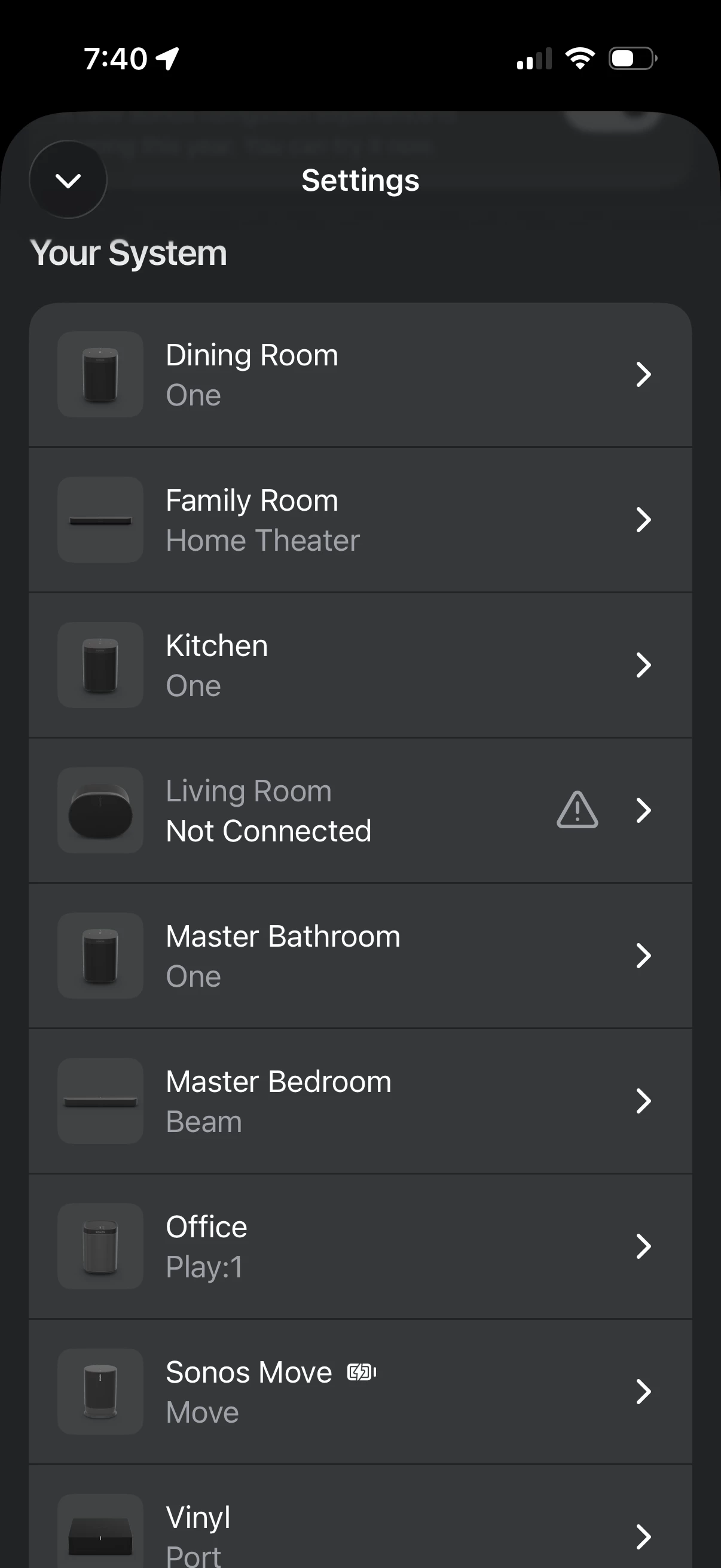
I have now tried unplugging my soundbar from the router, eliminating SonosNet and moving all speakers back to my WiFi. I’ve assigned DHCP IPs to each speaker and rebooted my entire network and speakers. Same problem, but worse. When the Era 300 does connect temporarily, I cannot play a full track on any speakers.  Then eventually it goes to this (shown above). It’s completely unusable, and the only way I can use the rest of my system is to unplug the 300 entirely. I’ve spent my entire afternoon troubleshooting it. I have other smart home devices all over the place that have no issues with my mesh network. What gives Sonos?


Stanley_4
  • Grand Maestro
  • July 19, 2026

After assigning the addresses did you power down ALL Sonos then reboot the router and power the Sonos back up?

Did you look at the issues and suggestions in the first reply here?

Is your Wi-Fi set to use the 2.4 gHz channel you were using for Sonosnet? 

In a Wi-Fi monitor app do the 2.4 and 5 gHz channels used show good quality. I like Ubiquity's wifiman for this.

Are all the mesh units all set to use the same 2.4 and 5 gHz channels?

What does the app show for signal quality and strength for your speakers?

Is your ISP router set to bridge/transparent mode and your Google gear providing all networking services?

If all else fails, submit a diagnostic and follow up with a call to Sonos support, get a human and if they don't get you working request escalated support.


  • Author
  • Contributor II
  • July 19, 2026

After assigning the addresses did you power down ALL Sonos then reboot the router and power the Sonos back up?

Did you look at the issues and suggestions in the first reply here?

Is your Wi-Fi set to use the 2.4 gHz channel you were using for Sonosnet? 

In a Wi-Fi monitor app do the 2.4 and 5 gHz channels used show good quality. I like Ubiquity's wifiman for this.

Are all the mesh units all set to use the same 2.4 and 5 gHz channels?

What does the app show for signal quality and strength for your speakers?

Is your ISP router set to bridge/transparent mode and your Google gear providing all networking services?

If all else fails, submit a diagnostic and follow up with a call to Sonos support, get a human and if they don't get you working request escalated support.

Yes, I’ve done all of these things, truly. After all these efforts were exhausted, I employed Claude, ChatGPT and Perplexity computer to troubleshoot, and they all came back with the same response: either Sonos’s recent software update is problematic or the specific Era 300 device I received has flawed hardware.  Either way, I’m spent on troubleshooting this.  At the price point of Sonos products, they really should be mostly plug-and-play.  This shouldn’t take up so much of my time troubleshooting bad tech.  
 

Sonos, you’ve got 28 days to find a solution here and save a long time customer.  Otherwise, I will be returning this speaker, offloading the rest of my system onto second-hand markets, and leaving Sonos behind.  It would be a shame, since I’ve invested thousands of dollars and nearly a decade to your brand. This is not sustainable though. 


106rallye
Forum|alt.badge.img+18
  • July 19, 2026

On top of this, when I was setting up the Era 300, I was initially excited about the new Zones feature, as this seemed like it would solve another age old problem of having speakers in adjoining rooms that ideally should be synced, and the gain trim control it provided would be a great solution to this.  But alas, I discover this completely disregards any Trueplay tuning and does not support spacial audio.  Another half-baked release.

Not sure I understand this part of your post. There should be no problems in having speakers in adjoining rooms synced when using the grouping feature - Sonos built its software with grouping in mind adding a (in other cases much maligned) delay of 70ms to any non-TV audio stream in order to get the sync right. Are you using the grouping feature or are you starting separate streams in different rooms. If the latter they indeed will go out of sync, whence the grouping feauture. More bout grouping heren https://support.sonos.com/en/article/group-and-ungroup-rooms

If you are already grouping speakers and they go out of sync, I suspect that’s another symptom of your Google WiFi making a mess of things.


  • Author
  • Contributor II
  • July 19, 2026

On top of this, when I was setting up the Era 300, I was initially excited about the new Zones feature, as this seemed like it would solve another age old problem of having speakers in adjoining rooms that ideally should be synced, and the gain trim control it provided would be a great solution to this.  But alas, I discover this completely disregards any Trueplay tuning and does not support spacial audio.  Another half-baked release.

Not sure I understand this part of your post. There should be no problems in having speakers in adjoining rooms synced when using the grouping feature - Sonos built its software with grouping in mind adding a (in other cases much maligned) delay of 70ms to any non-TV audio stream in order to get the sync right. Are you using the grouping feature or are you starting separate streams in different rooms. If the latter they indeed will go out of sync, whence the grouping feauture. More bout grouping heren https://support.sonos.com/en/article/group-and-ungroup-rooms

If you are already grouping speakers and they go out of sync, I suspect that’s another symptom of your Google WiFi making a mess of things.


I understand grouping, and have used it for years. Zones is a new feature in the recent update that is similar but different.  Grouping is a temporary, easily changeable connection to play music across multiple individual rooms in sync. In contrast, a Zone is a semi-permanent configuration that combines multiple physical speakers into a single listing in your app, controlled as if they were one unified speaker (like how a soundbar binds to a sub or surrounds).  I was saying this would be a useful feature for adjoining rooms that are not part of a TV apparatus, but not so useful when it disregards Trueplay and spatial audio. 

Regardless, I cannot “group” or “zone” my Era speaker with any other speakers in my house without it completely sabotaging the whole thing.  Somehow I have a couple of 12 year old Sonos Play:1s that are never a problem.


MoPac
Forum|alt.badge.img+19
  • Headliner III
  • July 19, 2026

Can you show me with a screenshot where the “Zone” feature is in the Sonos app?  Never heard of such a thing.


buzz
  • July 19, 2026

MoPac
Forum|alt.badge.img+19
  • Headliner III
  • July 19, 2026

Thanks Buzz.  Never used that before.  As the OP states does a Zone ignore TruePlay settings that you have already executed for each Room in the zone?

I have been using IOS Shortcuts for what I guess is similar to Zones.


  • July 19, 2026

Yes, I’ve done all of these things, truly. After all these efforts were exhausted, I employed Claude, ChatGPT and Perplexity computer to troubleshoot, and they all came back with the same response: either Sonos’s recent software update is problematic or the specific Era 300 device I received has flawed hardware.  Either way, I’m spent on troubleshooting this.  At the price point of Sonos products, they really should be mostly plug-and-play.  This shouldn’t take up so much of my time troubleshooting bad tech.  
 

Sonos, you’ve got 28 days to find a solution here and save a long time customer.  Otherwise, I will be returning this speaker, offloading the rest of my system onto second-hand markets, and leaving Sonos behind.  It would be a shame, since I’ve invested thousands of dollars and nearly a decade to your brand. This is not sustainable though. 

@Dawntreader1, you need to submit a system diagnostic and call Sonos Support. Don’t post the diagnostic number here. They will be able to see what is happening on your network and/or the problem with your Era 300.

The users here trying to help you are not sonos support. If the first level support isn’t able to help, then escalate to the next level. That’s the only way you’re going to find out what’s wrong.

Edit to add: Just based on your description of the problem, is sounds to me like a packet storm on your network when the Era 300 is plugged in. Which would indicate a misconfigured network. But I don’t have the expertise to help you there.


AjTrek1
  • July 19, 2026

OK…

SonosNet

None of the newer Sonos products (including some previous releases) are going to recognize the SonosNet:

  • Era 100
  • Era 300
  • Era 100 SL
  • Move
  • Move 2
  • Roam
  • Roam SL
  • Roam 2
  • Arc Ultra
  • Sub 4

Zones 

Feature was designed only a year or two ago. The ideal connection is Wired Ethernet to reach each product (see link provided by ​@buzz).

TruePlay

Not an option for the Zones feature. Designers assumed speakers may be in different Zones (Rooms).Trueplay is designed to only work with:

  • Individual speakers
  • Stereo Pair
  • Home Theater (Sonos soundbar, surrounds and sub)

GFiber Google Mesh

  • Consists of several configurations (2 to 4 components) and generations
  • Which generation/configuration do you have?
  • If configured properly each WiFi band 2.4Ghz, 5Ghz and 6Ghz (if available) should have the same SSID.
  • If WiFi bands have different SSID’s the Era 300(s) may be connecting to 5Ghz and disappear from your device which is on 2.4Ghz or vice versa.
  • There is no need for a personal router if using Google supplied equipment

Bottomline if you are using a Google Mesh system there should be no need for SonosNet as the Sonos products in your profile all should be WiFi only cable. Therefore, there must be:

  • A network mis-configuration
  • Extreme WiFi interference 
  • Out-dated Google Mesh components
  • A combination of any of the aforementioned

If you don’t want to deal with the back ‘n forth in this thread (or can't isolate the issue) I suggest the following:

  • Do not Factory Reset your speakers (as doing so destroys any valuable data)
  • Run a diagnostic within 10 minutes of the next occurence
  • Make noe of the reference ID (Do not publish in this thread/community)
  • Call Sonos Tech Support to discuss the data

Edit:

Threatening Sonos with 28 days to resolve an issue is not going to buy mileage in this community. You need to contact Sonos Sales/Customer Support. 


Stanley_4
  • Grand Maestro
  • July 19, 2026

Silly to make threats here where Sonos is unlikely to see them but I'll leave you to it and move on.


buzz
  • July 19, 2026

There is another division of the SONOS company that targets offices, restaurants, banks, and multi-venue installations such as a chain of stores and restaurants. These professional, multi-venue installations can be managed from a central point. The Zones option was developed to help manage large spaces, such as gyms, ballrooms, and multiple small rooms such as customer waiting areas that don’t need special features, such as stereo and surround. I think that Zones was carried over to the consumer side as a convenience for small users who cannot justify the licensing fees of the professional service. (The licensing fees include copyright payments).

With respect to networking, SONOS players must be able to extensively chat and share with each other in order to stay in sync with each other and the controllers. This is a significantly higher load than simply controlling a bunch of thermostats and light switches or even one way online video. A network that is “perfect” for other routine services can be too slow or congested for flawless SONOS operation.

In terms of “congestion”, I live in an urban area. Until a recent move, a WiFi scan could show well over 100 nearby access points. I suspect some of these were drive-by. A scan a few seconds ago only showed 74 access points at my current location. At this level of congestion packets of data will collide and need to be discarded and resent. While this may only require a few milliseconds (for each discarded packet) this can totally destroy music integrity. SONOS does an excellent job of working through this mess, but there are limits to what is technically possible. In spite of the urban mess, I have not been having issues.


  • Author
  • Contributor II
  • July 20, 2026

OK…

SonosNet

None of the newer Sonos products (including some previous releases) are going to recognize the SonosNet:

  • Era 100
  • Era 300
  • Era 100 SL
  • Move
  • Move 2
  • Roam
  • Roam SL
  • Roam 2
  • Arc Ultra
  • Sub 4

Zones 

Feature was designed only a year or two ago. The ideal connection is Wired Ethernet to reach each product (see link provided by ​@buzz).

TruePlay

Not an option for the Zones feature. Designers assumed speakers may be in different Zones (Rooms).Trueplay is designed to only work with:

  • Individual speakers
  • Stereo Pair
  • Home Theater (Sonos soundbar, surrounds and sub)

GFiber Google Mesh

  • Consists of several configurations (2 to 4 components) and generations
  • Which generation/configuration do you have?
  • If configured properly each WiFi band 2.4Ghz, 5Ghz and 6Ghz (if available) should have the same SSID.
  • If WiFi bands have different SSID’s the Era 300(s) may be connecting to 5Ghz and disappear from your device which is on 2.4Ghz or vice versa.
  • There is no need for a personal router if using Google supplied equipment

Bottomline if you are using a Google Mesh system there should be no need for SonosNet as the Sonos products in your profile all should be WiFi only cable. Therefore, there must be:

  • A network mis-configuration
  • Extreme WiFi interference 
  • Out-dated Google Mesh components
  • A combination of any of the aforementioned

If you don’t want to deal with the back ‘n forth in this thread (or can't isolate the issue) I suggest the following:

  • Do not Factory Reset your speakers (as doing so destroys any valuable data)
  • Run a diagnostic within 10 minutes of the next occurence
  • Make noe of the reference ID (Do not publish in this thread/community)
  • Call Sonos Tech Support to discuss the data

Edit:

Threatening Sonos with 28 days to resolve an issue is not going to buy mileage in this community. You need to contact Sonos Sales/Customer Support. 


Thanks for the tips. 

You cannot separate or manually control the individual Wi-Fi bands (2.4GHz, 5GHz, and 6GHz) to have different network names (SSIDs) within the Google Home app.

Here is how Google mesh system manages these frequencies:

  • Unified Network: Google routers are designed to use a single network name across all radio bands, which are kept active simultaneously.

  • Band Steering: Instead of allowing manual selection, Google utilizes a feature called "band steering". The system automatically analyzes connections and attempts to route your devices to the best available band based on compatibility, signal strength, and distance.

Basically, Google's design forces all bands to share the exact same SSID

And to clarify, I’m not trying to threaten anyone.  I’m just hoping Sonos or someone can provide a solution before the 30 day return window closes on the new speaker I bought.  I’ve submitted the diagnostic data to Sonos support, so if it leads to a resolution I’ll update this thread in case someone else runs into this craziness. 


Airgetlam
  • July 20, 2026

Remember, submitting a diagnostic doesn’t automatically generate a response, you must to call in. You may want to read the  Diagnostics - How do they work? thread.


AjTrek1
  • July 20, 2026

OK…

As far as the 28 days is concerned the mention of that in the community is a moot point. No one that could take that statement to heart monitors this community. It’s better to call Sonos Customer Support to vent that grievance.

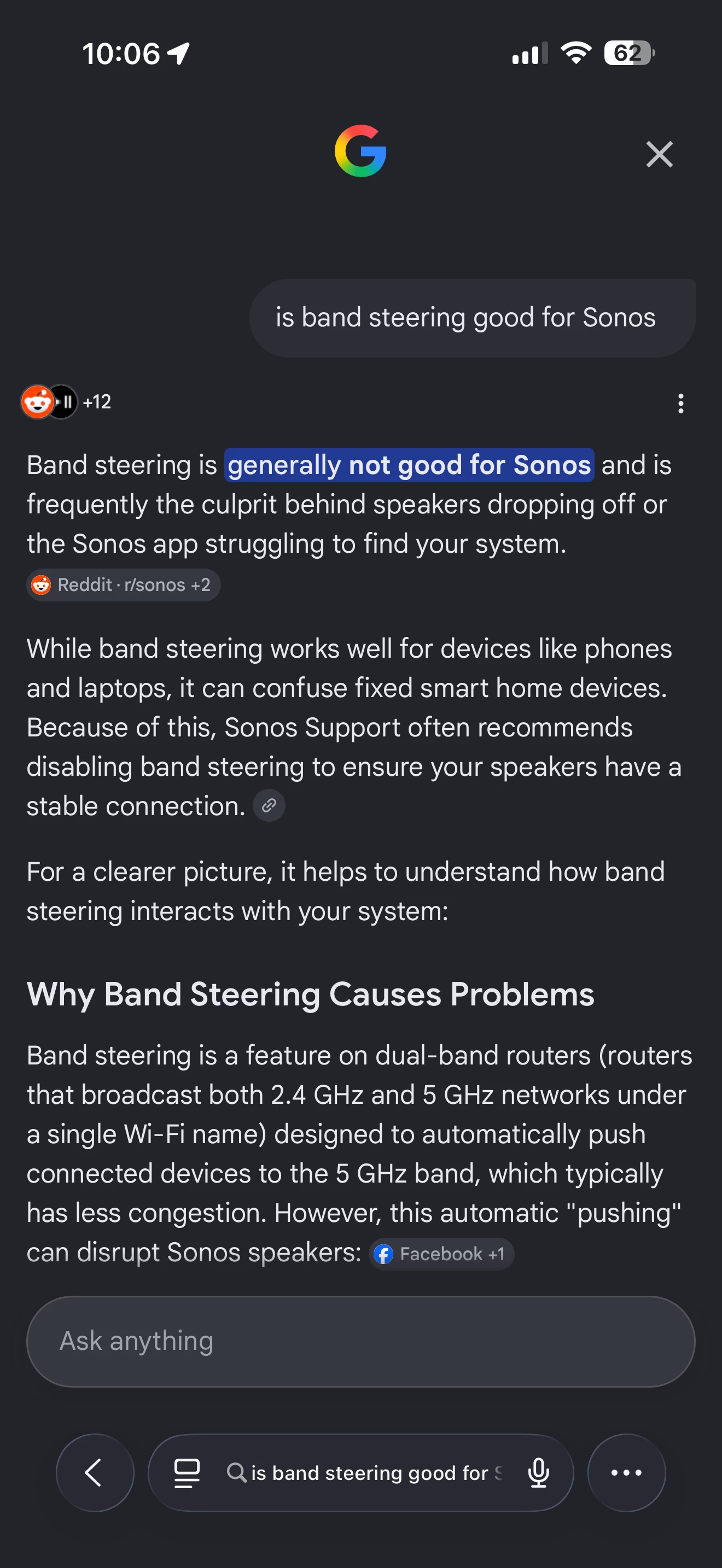
Regarding the Google mesh Sonos doesn’t play well with Band Steering or Airtime Fairness active. Reference Band Steering Sonos is smart enough to select the band it needs.

WiFi signal strength isn’t constant as it fluctuates. Having band steering active Sonos isn’t free to jump to a stronger band when there are fluctuations in signal strength. Although band steering may eventually make the adjustment it’s too late for Sonos.

Band steering is effective to balance the load on your network for most devices as they aren’t constantly talking back’ n forth as does Sonos. In short Sonos needs to be free to roam across any band it needs at any given time (ie 2.4Ghz and 5Ghz).

Regarding SSID’s. As a check…If you can physically select either the 2.4Ghz or 5Ghz band on your device then the bands are separated and not unified under one SSID. 


AjTrek1
  • July 20, 2026

In Continuation of my previous post here’s a Google search on band steering and Sonos


  • Author
  • Contributor II
  • July 20, 2026

OK…

As far as the 28 days is concerned the mention of that in the community is a moot point. No one that could take that statement to heart monitors this community. It’s better to call Sonos Customer Support to vent that grievance.

Regarding the Google mesh Sonos doesn’t play well with Band Steering or Airtime Fairness active. Reference Band Steering Sonos is smart enough to select the band it needs.

WiFi signal strength isn’t constant as it fluctuates. Having band steering active Sonos isn’t free to jump to a stronger band when there are fluctuations in signal strength. Although band steering may eventually make the adjustment it’s too late for Sonos.

Band steering is effective to balance the load on your network for most devices as they aren’t constantly talking back’ n forth as does Sonos. In short Sonos needs to be free to roam across any band it needs at any given time (ie 2.4Ghz and 5Ghz).

Regarding SSID’s. As a check…If you can physically select either the 2.4Ghz or 5Ghz band on your device then the bands are separated and not unified under one SSID. 

Ok… 

Well this band steering topic is a moot point because Google Home does not allow you to turn that off or physically select bands, and I’m not interested in shelling out more cash and energy to replace my home network because of a new $500 speaker that can’t figure it out when my other 12 Sonos devices (some more than a decade old) and the rest of my home operates just fine on it.

Also, this forum is hosted by Sonos, so there’s no doubt they monitor these threads.  In fact, I’ve found numerous posts about similar issues with the Era speakers where Sonos staff eventually responded.  

I just spent an hour on a chat with a Sonos support rep, after submitting another diagnostic, and by the end I was left with the speaker now stuck in a “not registered” state.  Turns out he had to escalate it to a “specialized team”, and I now wait to hear something via email.  


Forum|alt.badge.img+18
  • Local Superstar
  • July 20, 2026

If anyone has any ideas on how to solve these issues, I’d appreciate any input. 

Try moving your Giggle devices?


Forum|alt.badge.img+19
  • Senior Virtuoso
  • July 20, 2026

If anyone has any ideas on how to solve these issues, I’d appreciate any input. 
Try moving your Giggle devices?


This is not a laughing matter, ​@craigski 🤭

(Don't you love predictive text?)


Forum|alt.badge.img+18
  • Local Superstar
  • July 20, 2026

Apple must have messed up with autocomplete/predictive text when I posted, sorry!


Forum|alt.badge.img+19
  • Senior Virtuoso
  • July 20, 2026

Apple must have messed up with autocomplete/predictive text when I posted, sorry!

Don’t apologise: I suspect it made a lot of us laugh (or giggle?). 


Stanley_4
  • Grand Maestro
  • July 20, 2026

I can't spell well or type decently so the auto correct has great fun with me.

There is an edit post option under the ... menu at the bottom right. I use it a lot!