Drastic action - Reset and go back to S1 App - Hints/tips appreciated

  • January 16, 2026
  • 87 replies
  • 708 views

Show first post

87 replies

Mr. T
  • January 24, 2026

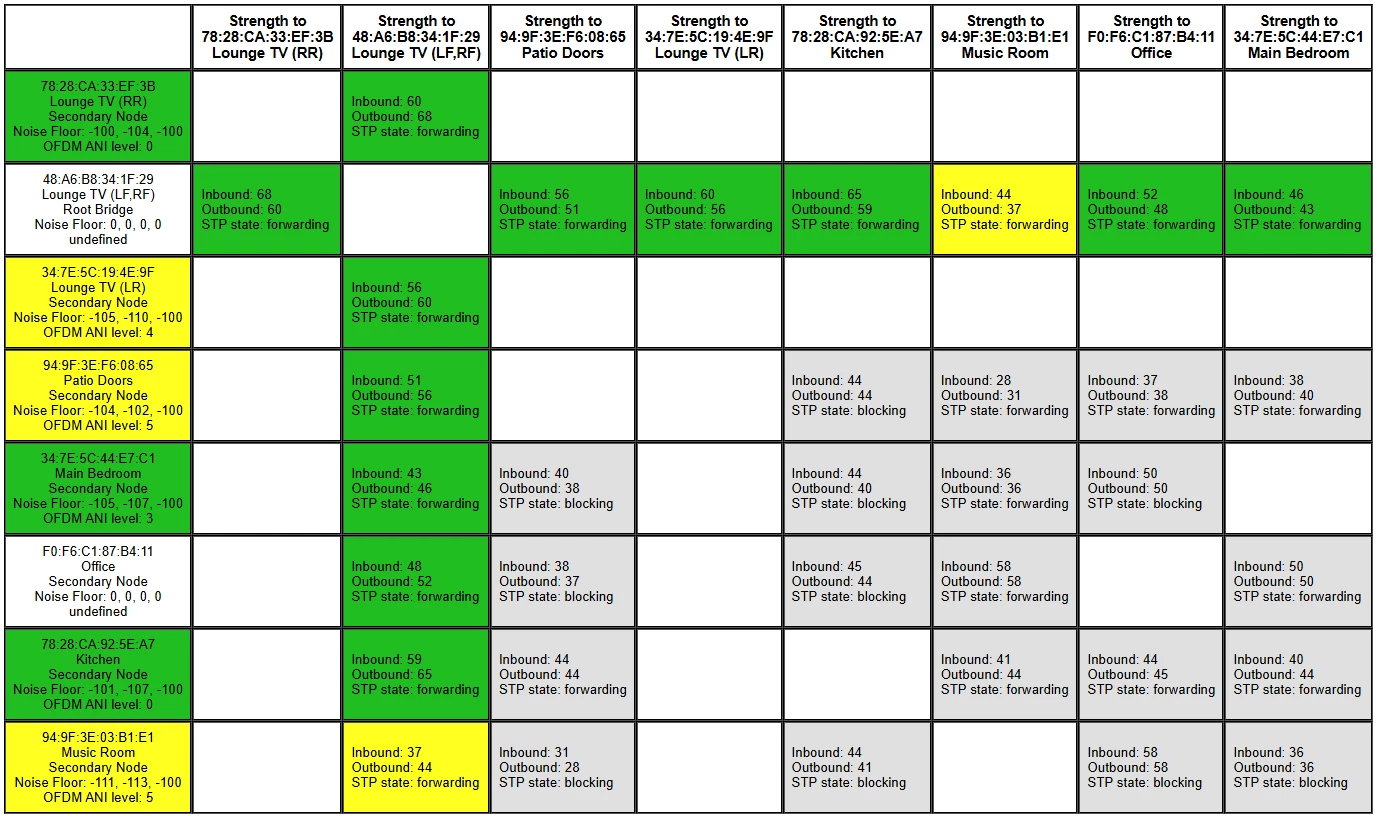
There’s certainly less interference around the devices compared to the two previous matrices posted.

But is the system functioning for you?


Forum|alt.badge.img+4
  • Author
  • Avid Contributor I
  • January 24, 2026

@Mr. T 


So far…...but I am not aware I have made any changes that would result in such a “clean” matrix. 


buzz
  • January 24, 2026

Perhaps a neighbor is interfering intermittently.


buzz
  • January 24, 2026

The first two matrix displays show 8, but the last shows 9 devices.


Mr. T
  • January 24, 2026

The first two matrix displays show 8, but the last shows 9 devices.

There are still 8 devices.

The additional column is the surrounds connection to the Beam. An undefined column will show when the TV is on.


Stanley_4
  • Grand Maestro
  • January 24, 2026

Something like a baby-monitor can clog all 11 2.4 gHz channels, some models go to a low data rate with no motion and ramp up with motion, even more if in color than IR mode. Lots of other devices are the same. The Wi-Fi band is shared and the rules aren't really aimed at reliable communication but good enough for error-recovery or just ignoring errors to make them usable.

Even my silly little batch of security cameras, at 10 fps and 1080 resolution, drove a single 2.4 gHz channel to something lk,e 70% usage. At 30 fps they couldn't deliver watchable video.


Forum|alt.badge.img+4
  • Author
  • Avid Contributor I
  • January 24, 2026

I am not aware that there are any neighbourhood changes.

I have checked the matrix again, it’s no longer all green….in fact its back to a large number of yellows, but the system has not fallen over. Beam and the surrounds are playing OK, the remainder are all still playing a streamed radio channel with no issues. Fingers crossed.


Mr. T
  • January 24, 2026

@GMR - the matrix is only ever a snapshot in time. If it shows interference, it doesn’t necessarily mean that you will experience dropouts, just the devices are having a harder time.

Actually, going back to the last matrix you posted, did you also now wire the Kitchen and Music Room as they are not showing any connection back to the Living Room (wired Beam) ?


Forum|alt.badge.img+4
  • Author
  • Avid Contributor I
  • January 24, 2026

@Stanley_4 

I did wire the kitchen and music room to the LAN as a test, but it did not improve anything. I still got the dropouts. 

All that is connected is the Beam in the Living Room.


  • Prodigy III
  • January 25, 2026

Have you checked Advanced settings, firewall, configuration for uPnP extended security? 


Forum|alt.badge.img+4
  • Author
  • Avid Contributor I
  • January 25, 2026

Have you checked Advanced settings, firewall, configuration for uPnP extended security? 

@Ian_S 

That’s way above my knowledge level.

I have an idea what you are talking about, but I wouldn’t know what to look for.

I assume we are talking ISP router options. I have been in the advanced settings and thought “very nice, leave it alone” and came straight back out again.


  • Prodigy III
  • January 26, 2026

It is exactly how I described it in the menu system… This setting on BT Smart Hubs has been known to cause issues with streaming if it’s on… so given that you still have issues even with a ‘clean’ Sonosnet map it ought to be at least worth a look to see if it is enabled. 

Personally I would ditch Sonosnet completely, but that does unfortunately mean you can never plug an ethernet cable into the Beam else it gets created automatically.