
Contributor I
September 7, 2023

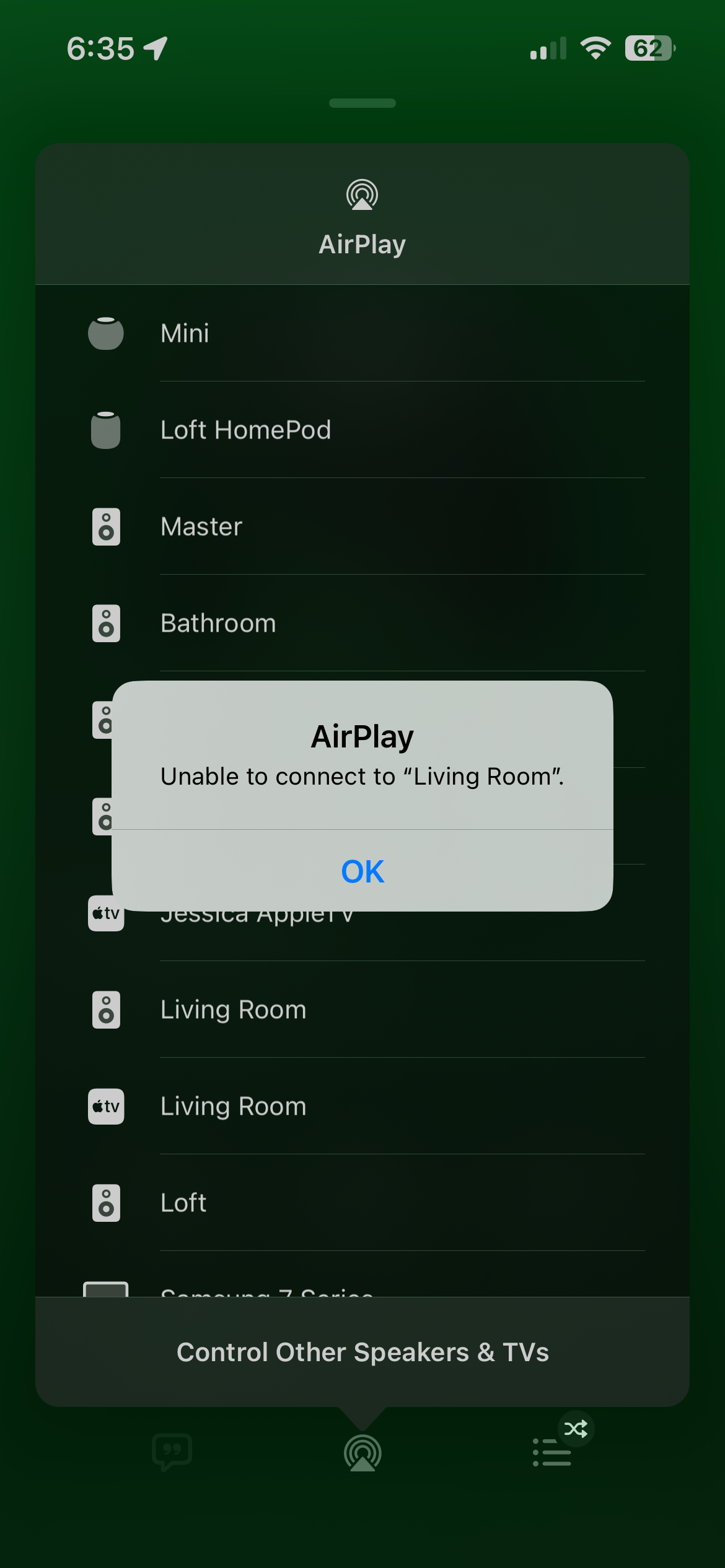
Airplay 2 unable to connect to Sonos
  • September 7, 2023
  • 52 replies
  • 16493 views

I have around 11 sonos speakers and 3 Apple HomePods. The HomePods work flawlessly for Airplay. But only certain speakers work on the Sonos side for Airplay and no matter what I do, (unplug all speakers and reboot router and modem and finally hard reset most speakers, nothing seems to work I consistently get “unable to connect to “speaker name””. However they all lseem to work on the Sonos V2 app. Has anyone found a fix to this issue?

This topic has been closed for further comments. You can use the search bar to find a similar topic, or create a new one by clicking Create Topic at the top of the page.

52 replies

Stanley_4
Grand Maestro
December 14, 2023

Sonos are pretty picky about networking, take them and your controllers off the VLAN and put them back on your normal LAN and see how they work. If you have issues then Sonos support should be able to look at a diagnostic and see what the issue is.

Lyricist III
December 14, 2023

They were on my default network, I moved them to a vlan to try and fix the issue. And if Sonos is that picky about network why is it only airplay I have an issue with the Sonos app works perfectly fine on every speaker from every device

Stanley_4
Grand Maestro
December 14, 2023

You could try sending Sonos a diagnostic with them on your VLAN and discussing it with them, not sure how that would go though. Putting them on your plain LAN is likely going to lead to a less confusing and hopefully productive support session.

Remember, all of us here without a Sonos Staff badge on our user ID have no ability to see inside your system or look at a submitted diagnostic.

Lyricist III
December 14, 2023

You could try sending Sonos a diagnostic with them on your VLAN and discussing it with them, not sure how that would go though. Putting them on your plain LAN is likely going to lead to a less confusing and hopefully productive support session.

Remember, all of us here without a Sonos Staff badge on our user ID have no ability to see inside your system or look at a submitted diagnostic.

It is just super frustrating, I have already factory forest speakers and they worked fine with AirPlay for about 3 days than started getting unable to connect. I wouldn’t even worry about it but I have a Bose soundbar setup in the living room and AirPlay lets me sync music to all the Sonos and the Bose.

Stanley_4
Grand Maestro
December 15, 2023

The factory resets are often a problem as they erase info Sonos could use to look at the problem and they very rarely solve problems even though they can often kick them down the road a few days.

Good luck.

Lyricist I
December 19, 2023

Just wanted to add myself to the list. It started with my Gen2 play 5’s and now my amp (new gen) is also affected… This is killing half the functionality for me, and making me reticent updating all my play 1’s as this would have been the main reason for me to do so (I use Airplay everywhere else without issue)...

Airgetlam
December 19, 2023

What did Sonos support say, when you submitted that diagnostic, and called them?

Bruce
Lyricist III
December 30, 2023

I will join this. My Ikea Symfonisk worked once using Airplay from AppleTV, The day after i failed and have never worked since. Reading this rather old thread it must be about time that Sonos does somthing about it. 

Bob235178
Enthusiast I
January 4, 2024

I, too, have this problem,   It’s ridiculous.   I have no idea who to point the finger at, both Sonos and Apple tend to release things without adequate QA.   I wonder how many people just don’t bother with dealing with problem and just stick with the Sonos app and never try to use Airplay.   All I know is that I can Airplay to pretty much everything except my Sonos speakers.


Neither Apple or Sonos seem to be copping to the problem, both act as if they haven’t heard anyone else ever have this problem.

I didn’t buy Sonos so that I would become a QA troubleshooting expert, I bought it to listen to things.  Users shouldn’t have to deal with all these recurring problems.

Lyricist I
January 22, 2024

I am also experiencing the same issue. I have a sonos amp connected via ethernet and all other speakers (bot new and old) are connected to the amp via sonosnet. I can airplay just fine to all my airplay-enabled speakers, except for the ethernet-connected amp.

I used to work fine a couple of days ago, but when I decided to revert my Philips Hue-lights from Matter to the old “homekit-setup”, since I got other issues with that setup, my airplay stopped working and I can't even re-add my speakers to the apple home app anymore. 

When I try to airplay from my iOS-device it just say “unable to connect” but when I try to connect from my MacBook it indicates it´s something wrong with my Home-app settings that´s not allowing me to connect, witch is strange since the settings is set to “allow all within the network” with no password set and the speakers are not even in the app itself.

The Hue lights works fine now though...