Question

Is there actually a manual or user guide?

  • August 28, 2026
  • 19 replies
  • 104 views

I started the setup aded the E100SL speaker. Connected to wifi, then It says - when flashing green and white … press the button.

Its flashing green and yellow.  But what button?

I found something on the kit but nothing happened.

is it a button on the app?

Have just bought two speakers, beautifully packaged...but so far it's form over function. Going to have to return.

Back to my Kef Coda 4s


19 replies

Stanley_4
  • Grand Maestro
  • August 28, 2026

Maybe in the quick guide included with the speakers?

You also can download the full user manual from sonos.com

https://www.sonos.com/en-us/guides/era100

and

https://support.sonos.com/en-us/article/set-up-your-sonos-era-100-sl


  • August 28, 2026

This is also a good one to look through:

SONOS User Guide - Sonos App


  • Author
  • Contributor I
  • August 28, 2026

Thanks for the links.  Included with the speaker was a guide of about twenty words!

It keeps telling me it cant connect, but I can play BBC Sounds on it.

Not yet got it to connect to my music on a PC share - something easily done with my ancient Marantz player.

Hoping the user manual shows me where the off switch is.

Pulled the plug out for now.


Airgetlam
  • August 28, 2026

Read the guide, it includes those ‘links’.

There is no ‘off’ switch, it is designed to be ‘on’ at all times, so that it can respond to network ‘wake up’ commands, just like your TV is always ‘on’, waiting for the remote control to ‘wake’ it up. And, just like the TV, the Sonos goes into a low energy consumption state when it’s not being used. 
 

Playing BBC sounds on it may not mean it’s properly set up. Or it may, it really depends on how you’re playing BBC sounds, and which Sonos speaker you have. I’m assuming, based on your initial post, it is an Era 100 SL. 
 

Connecting it to a PC share is fairly easy, just follow the instructions in the FAQ. Note that you can, from that page, search all of the FAQs that Sonos provides. 


  • Author
  • Contributor I
  • August 29, 2026

Strangley enough, I switch my TV off every night, using the power switch. All my kit has a standby function …. as well as an off switch.

Will try filling in the exact drive and folder details, Marantz just needed the PC name and drilled down.  Hope Sonos ERA 100 SL can handle nested folders. And Folder navigation. 🙏


Forum|alt.badge.img+19
  • Senior Virtuoso
  • August 29, 2026

Strangley enough, I switch my TV off every night, using the power switch. All my kit has a standby function …. as well as an off switch.

Will try filling in the exact drive and folder details, Marantz just needed the PC name and drilled down.  Hope Sonos ERA 100 SL can handle nested folders. And Folder navigation. 🙏

Do you mean the remote control “Power No/Off” switch? If so, that’s just putting into standby mode - the same as Sonos does automatically after a period of inactivity. If you actually power off at a mains socket power switch, you’re stressing the electronic circuits every time you re-apply the power. 


  • Author
  • Contributor I
  • August 29, 2026

I’m on day 2 of installing ERA 100 SL.  I like a lot of speech radio & recordings, as well as classical music.  But speakers are very bassy and somewhat muffled.  Have turned down bass to lowest, turned up treble to highest, turned off surround, but none of that has made an iota of difference.  Its on a glass table at the moment, would another surface be better?


  • Author
  • Contributor I
  • August 29, 2026

@nik9669a No, I mean the on off button at the bottom of the Sony Bravia screen. Bet you have one on your telly. :-) Thus speakers are the first without an off switch.  Even my cheapo bluetooth Sony speakers have an off button.  I’m eco conscious ( and electricity cost conscious). But this is a tangent, which will annoy some. 


Forum|alt.badge.img+19
  • Senior Virtuoso
  • August 29, 2026

I’m on day 2 of installing ERA 100 SL.  I like a lot of speech radio & recordings, as well as classical music.  But speakers are very bassy and somewhat muffled.  Have turned down bass to lowest, turned up treble to highest, turned off surround, but none of that has made an iota of difference.  Its on a glass table at the moment, would another surface be better?


Do you have access to an iPhone? If so, have you run Trueplay? 
Have you tried putting the Era on a different surface? 
Have you tried the Era in a different location?

Have you tried putting anything underneath the Era? 
What is your music source?

How have you “turned off surround”? 
Is the Era a single, standalone speaker? 


Forum|alt.badge.img+19
  • Senior Virtuoso
  • August 29, 2026

@nik9669a No, I mean the on off button at the bottom of the Sony Bravia screen. Bet you have one on your telly. :-) Thus speakers are the first without an off switch.  Even my cheapo bluetooth Sony speakers have an off button.  I’m eco conscious ( and electricity cost conscious). But this is a tangent, which will annoy some. 


https://s29.q4cdn.com/969873633/files/doc_downloads/2023/03/Sonos-Era-100-Product-Environmental-Report.pdf

In standby mode, Era 100 ( not the SL model) uses 1.86W. 


  • Author
  • Contributor I
  • August 29, 2026

Two things, I meant I’d turned off “loud” didnt have the app open at the time.  However, may have an answer below.


Success in linking and loading my music library.  Bad user error...first time I ever had to key in the name of the PC share (usually just select from a list) and there was a slight zero/O typo from me.  So all good there, nested folders good too.


Listening to first track Albinoni, and its quite trebley.  So re-upped the bass and reduced the treble, no change.

There seems to be a delay in updating the equaliser changes. Hoping I don't have to keep restarting for it to take effect.

Edit - Android here


Thanks for help so far.  Can’t wait till I try to install speaker two in the other room :) ! (mesh wifi) Maybe tomorrow...


Stanley_4
  • Grand Maestro
  • August 29, 2026

The power switch on my Sony isn't a power switch, it just toggles active and standby modes.

I had to add an external power switch to actually power it down to trigger a reboot.


Forum|alt.badge.img+19
  • Senior Virtuoso
  • August 29, 2026

The power switch on my Sony isn't a power switch, it just toggles active and standby modes.

I had to add an external power switch to actually power it down to trigger a reboot.

My Sony has back-panel control switches rather than under-the-screen, but again the “power” button doesn’t achieve disconnect from the mains. I think this is the case for most TV’s. To disconnect completely from the supply, they need to be unplugged. I’m sure your tv user manual will confirm this, ​@Curlew 


  • Author
  • Contributor I
  • August 29, 2026

Installing second speaker and grouping them was a piece of cake!  Much easier than the first.  Things I’ve noted:

  • The app tells you to press a button to pair with bluetooth….this not necessary, they pair anyway. (worrying?)
  • Music servers: Sonos won’t search for broadcasted PCs, you have to fill in the address exactly. (a bit agricultural imo). Get this sorted and updated with all your recordings before adding the rest of your speaker group.
  • If like me you have ensured your media server PC only has unimportant data and thus don’t usually demand a password for access, Sonos wants to use the PC sign on credentials, even though other kit doesn’t.
  • As I read elsewhere on here, set up secondary speakers on the same mesh router/duberry and only move them to other rooms after installing & testing all working well.

Happy bunny


Forum|alt.badge.img+19
  • Senior Virtuoso
  • August 29, 2026

Installing second speaker and grouping them was a piece of cake!  Much easier than the first.  Things I’ve noted:

  • The app tells you to press a button to pair with bluetooth….this not necessary, they pair anyway. (worrying?)
  • Music servers: Sonos won’t search for broadcasted PCs, you have to fill in the address exactly. (a bit agricultural imo). Get this sorted and updated with all your recordings before adding the rest of your speaker group.
  • If like me you have ensured your media server PC only has unimportant data and thus don’t usually demand a password for access, Sonos wants to use the PC sign on credentials, even though other kit doesn’t.
  • As I read elsewhere on here, set up secondary speakers on the same mesh router/duberry and only move them to other rooms after installing & testing all working well.

Happy bunny

I think you mis-read the app instructions, and mis-understanding what you can do with Sonos speakers.
The stereo pairing is done for you, if you elect to run them as a stereo pair (not recommended if they’re physically in separate rooms).
You can Bluetooth-pair a device to a Sonos speaker or stereo-pair of speakers. 

You can group two or more Sonos speakers. 
You can play the Bluetooth-sourced sound to a group of Sonos speakers. 


  • Author
  • Contributor I
  • August 29, 2026

Thanks ​@nik9669a 


I'm not stereo pairing them, I had two wired stereo speakers in each room before, Kefs and Goodmans - now decided my ears are past their sell by date, so the mono output is perfectly fine for me.  Sonos output is certainly better than mono output used to be back in the day.  Thin walls here too, so shift working neighbours not happy when I put my old speakers on (installed against the party wall).

One Marantz and four speakers heading for the loft.


AjTrek1
  • August 29, 2026

Installing second speaker and grouping them was a piece of cake!  Much easier than the first.  Things I’ve noted:

  • The app tells you to press a button to pair with bluetooth….this not necessary, they pair anyway. (worrying?)

There is button on the rear of the speaker to activate Bluetooth (BT). You may have pushed it inadvertently by mistake. At that point the speaker went into BT pairing mode and you made the connection. After the first paring when BT is active on the speaker your device will connect automatically if in range. You can prevent this in one of three (3) ways:

  • Turn BT off on the speaker
  • Disconnect from the Era 100 in the BT menu on your device  
  • In the app set the speaker to automatically disconnect when there is no BT stream from your device 

Installing second speaker and grouping them was a piece of cake!  Much easier than the first.  Things I’ve noted:

  • Music servers: Sonos won’t search for broadcasted PCs, you have to fill in the address exactly. (a bit agricultural imo). Get this sorted and updated with all your recordings before adding the rest of your speaker group.

Sonos speakers are on your network. For security you don’t want Sonos searching for servers (like your PC) as they can gather Personal Identifiable Information of a sort (PII); nor connecting to same without your permission. By security I'm referring to someone compromising your network using Sonos as a backdoor. However, the odds of that occurring are extremely remote with emphasis on “extremely”. 


  • If like me you have ensured your media server PC only has unimportant data and thus don’t usually demand a password for access, Sonos wants to use the PC sign on credentials, even though other kit doesn’t.

Same as my last response

Installing second speaker and grouping them was a piece of cake!  Much easier than the first.  Things I’ve noted:


  • As I read elsewhere on here, set up secondary speakers on the same mesh router/duberry and only move them to other rooms after installing & testing all working well.

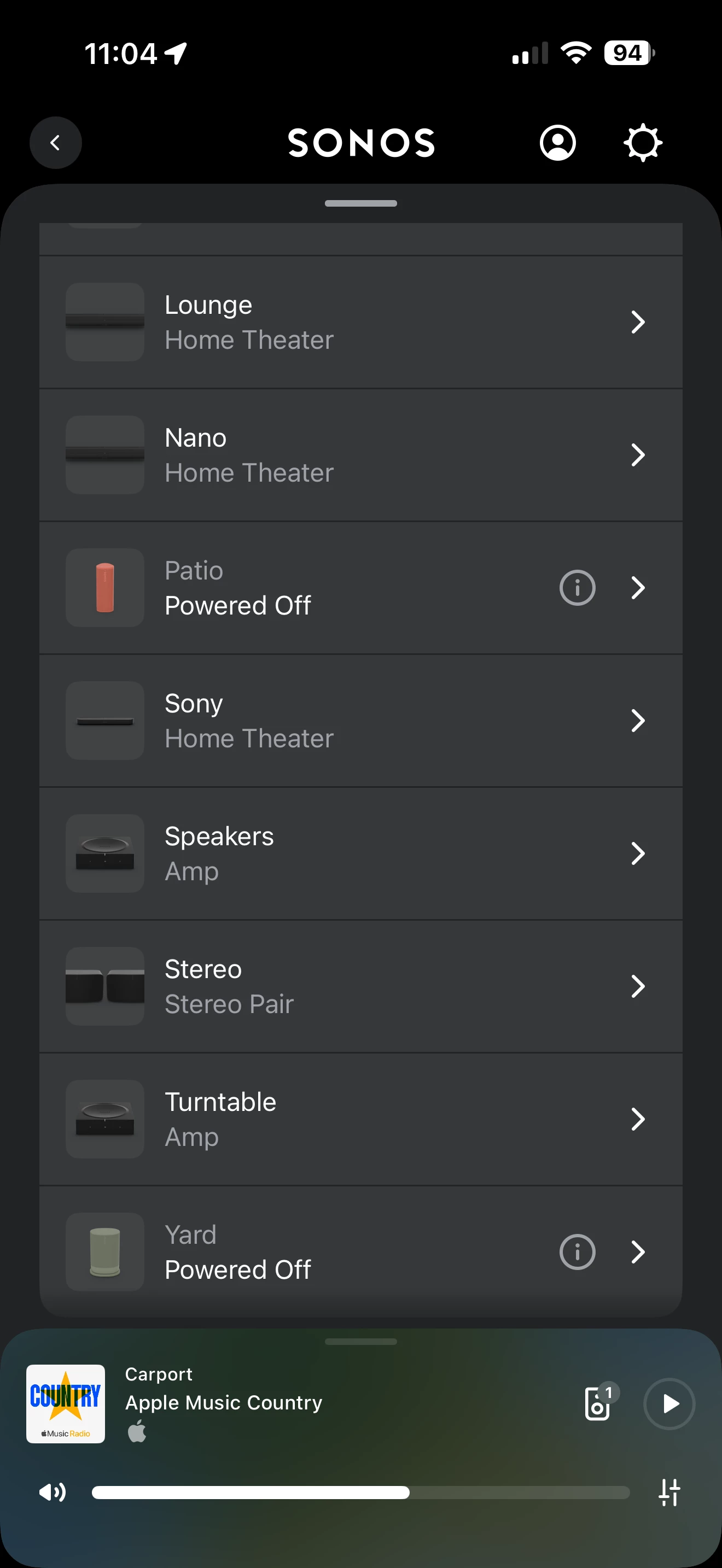
Sure you can do as you read. However, in Sonos speak a “room” is not necessarily a physical room like kitchen, living room or bedroom etc.

For instance my Arc Ultra in my bedroom is called “Nano”. My Arc Ultra in my Media Room is called “LG One”. Also in my Media Room is a a pair of Sonos Fives called “Stereo”. A room can be named whatever you like.

In the past if you used a non-conventional name for a room you had to remember what Sonos speaker was located in the room. However, today the App will help you remember what Sonos speakers/components are in a room with a visual representation. See screen shot below for example:


Forum|alt.badge.img+19
  • Senior Virtuoso
  • August 29, 2026

Thanks ​@nik9669a 


I'm not stereo pairing them, I had two wired stereo speakers in each room before, Kefs and Goodmans - now decided my ears are past their sell by date, so the mono output is perfectly fine for me.  Sonos output is certainly better than mono output used to be back in the day. 


Did you check the specs of the Era before buying it?  A single Era 100 is a stereo speaker, not mono. (But you can stereo-pair them so one becomes left channel and the other is the right hand channel.)


That said, you seem happy now with the setup of your system, your access to your music library, your ability to pair to a Bluetooth source, and your ability to group speakers. I hope you can now enjoy your system. 


AjTrek1
  • August 29, 2026

Thanks ​@nik9669a 


I'm not stereo pairing them, I had two wired stereo speakers in each room before, Kefs and Goodmans - now decided my ears are past their sell by date, so the mono output is perfectly fine for me.  Sonos output is certainly better than mono output used to be back in the day. 


Did you check the specs of the Era before buying it?  A single Era 100 is a stereo speaker, not mono. (But you can stereo-pair them so one becomes left channel and the other is the right hand channel.)


That said, you seem happy now with the setup of your system, your access to your music library, your ability to pair to a Bluetooth source, and your ability to group speakers. I hope you can now enjoy your system. 

Just as an FYI on ​@nik9669a ‘s comment about the Era being stereo which is correct.

You can’t compare a single Era 100 against your traditional stereo setup. Also, the Era 100’s stereo separation is going to diminish after more than say 6 feet as most human ears can’t catch the reflections from a single source. So that said the your Era 100’s audio may sound closer to mono than stereo.