Enthusiast I
October 5, 2018
Answered

Connecting Sonos to a projector based home Theatre

I have multiple Sonos speakers. I have also a new Benz 4K ish..projector. I also have a WiFi enabled Blu-ray player that I use to feed this projector with both Blu-ray and Netflix. I can’t figure out how to connect them to Sonos. Am planning to get a Beam,will an optical cable from the Blu-ray player to the beam do the trick? Is there any other way?

This topic has been closed for further comments. You can use the search bar to find a similar topic, or create a new one by clicking Create Topic at the top of the page.
AjTrek1
AjTrek1Answer
October 5, 2018
Hi BxVelocity

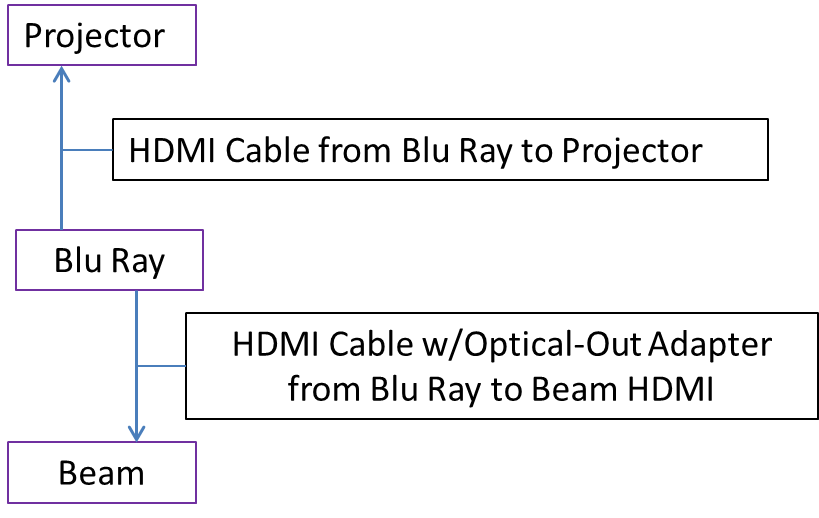
Not sure what connections your projector has but I assume it has the basics. The diagram shows a simple setup but your Blu-Ray player would have to be capable of sending DD5.1 over optical such as the Sony ES UBP-X1000ES. You would negate some of the other Beam features. Aesthetically the setup may not be pleasing to the eye :?

Cheers!

Together Everyone Achieves More = T.E.A.M.

18 replies

melvimbe
October 5, 2018
The Beam, playbar, playbase, and soon to be release sonos amp can all take input from a tv and play it in sync with the video. So yes, the beam will work. You can bond the beam with a sub or surround speakers to get a home theatre experience. As you probably know, you can also group the beam with other speakers to play in sync, but with tv audio, the other speakers will be slightly delayed and best not be in the same room for that reason.

The typical issue when using a projector is how to connect the projector or video source (your blue ray) with beam in a way that looks aesthetically pleasing. If you don't care, or can hide wires behind walls and ceiling, great. Other options get more complicated.
Danny
Enthusiast I
October 5, 2018
Thank you!
So, can I connect the Blu-ray source to the beam ? Is this the only way?
melvimbe
October 5, 2018
Sorry, didn't exactly answer your question. If your projector has an HDMI-ARC or optical audio out connection, this is most likely what you want to use. If not, if the projector has RCA audio out, then you can get a converter (RCA to optical) and connect it to the beam...but you'd be limited stereo only. You can connect the Beam to your player directly, but that mean you won't get audio from other sources. If your player doesn't have an optical out, then you would need a splitter that can take an hdmi input (from your player) and output HDMI (for projector) and optical (for the beam)

Were you thinking stereo audio only, or were you trying to get dolby digital (surround sound)?
Danny
AjTrek1
AjTrek1Answer
October 5, 2018
Hi BxVelocity

Not sure what connections your projector has but I assume it has the basics. The diagram shows a simple setup but your Blu-Ray player would have to be capable of sending DD5.1 over optical such as the Sony ES UBP-X1000ES. You would negate some of the other Beam features. Aesthetically the setup may not be pleasing to the eye :?

Cheers!

Together Everyone Achieves More = T.E.A.M.
Enthusiast I
October 6, 2018
Thank you both replies AJTrek and Melvibe

I have a BenQ TK 800 projector and a Sony Blu-ray player
My present plan is to .connect the Sony to the beam.via HDMI arc or Optical cable. Won't this give me 5.1 sound with a pair of Sonos ones and a subwoofer?
Can I use my play 5 as a sub? Would that be possible?
Is a Beam really that inferior to a playbar for he Theatre? Should I be getting a play bar? The thing is , it's older tech and has no HDMI Arc, but most reviews say that the sound is way better for a slightly larger room?
What do you think?
AjTrek1
October 6, 2018


Hi BxVelocity

My replies are written below your questions in BOLD.


I have a BenQ TK 800 projector and a Sony Blu-ray player

Nice!

My present plan is to .connect the Sony to the beam.via HDMI arc or Optical cable.

Depends....
1. HDMI: Unless your Sony Blu-Ray has two HDMI outs you will be forced to connect the Sony HDMI to the Projector HDMI
2. Optical: Does your Sony have optical out or coaxial out? The HDMI cable that comes with the Beam uses an Optical Adapter (not coaxial) in situations wherein HDMI ARC to HDMI ARC is not availble.


Won't this give me 5.1 sound with a pair of Sonos ones and a subwoofer?

If option 2 above is capable, yes. Note: the Sony must be able to pass DD5.1 over Optical.

Can I use my play 5 as a sub? Would that be possible?

No. You would need a Sonos sub to capture the LFE's processed by the Beam. Furthermore during the bonding process it would not be recognized as a sub, but as a speaker. Sonos is smarter than you may think :8

Is a Beam really that inferior to a playbar for he Theatre? Should I be getting a play bar? The thing is , it's older tech and has no HDMI Arc, but most reviews say that the sound is way better for a slightly larger room?

The Beam is not inferior to the Playbar/Playbase. It was just designed for a smaller space. Granted it does have more advanced technology. Dynamically the Playbar/Playbase according to Sonos should give you more room filling sound in a larger space. The conundrum is that a small space vs a large space is relative to the listener. Also, other factors come into play such as furniture, floors, drapes or blinds, enclosed or open and the list goes on.

As a gauge think of the Beam as a bedroom speaker typically with 4 walls (not open to other areas)


What do you think?


It's not what I think..it's what do you hear.

If you follow the diagram I submitted you should be OK. Just be sure the Sony can pass DD5.1 over optical. You can also go with the two Play 1's or Sonos One's as surrounds. I suggest you pick a retailer with a liberal return policy and try both the Beam and Playbar/Playbase. The latter two will force optical only from the Sony.

Cheers!
Together Everyone Achieves More = T.E.A.M.
Enthusiast I
October 6, 2018
Wow! AjTrek, am just blown away by the detail in your answer, thanks!

Now, I am planning to get the Sony X700 UHD Blu-ray player, as my current Blu-ray player does not support 4 K
This player has two HDMI outputs, one for audio and video and one for audio alone. I’m thinking of using the one for the projector and the audio HDMI out for the Beam? Do you think that would work?

The Sony X700 also has an optical out, ( just checked it, it is labeled as coaxial digital out and is orange)so if the HDMI cable doesn’t work I plan to connect that to the beam

I am looking for 5.1 sound, so I need the player to send all the data to the beam, I think the HDMI out from the X700 should achieve this, what do you think?

The play bar cost almost twice the beam, but as I mentioned I know it has older tech, with no HDMI out. My room is 20x15 feet,four walls enclosed,I guess it is okay that I’m leaning toward the beam instead of the playbar
AjTrek1
October 6, 2018


Hi BxVelocity

Now, I am planning to get the Sony X700 UHD Blu-ray player, as my current Blu-ray player does not support 4 K
This player has two HDMI outputs, one for audio and video and one for audio alone. I’m thinking of using the one for the projector and the audio HDMI out for the Beam? Do you think that would work?

It should work. I'm running HDMI from a Google Fiber box (non-ARC) to a HDMI_ARC port on my 5 year old Sony TV and everything is fine. Although for some reason Sonos does not mention connecting the HDMI_ARC to a regular HDMI port on a source they always mention using the optical out adapter:? That said since I don't have a Beam to verify yea or nay you'll have to roll the dice and find out. :8 Although I can't see why it shouldn't work. Remember in doing so you'll not have Alexa voice control as the Sony X700 UHD by my research does not support ARC.

The Sony X700 also has an optical out, ( just checked it, it is labeled as coaxial digital out and is orange)so if the HDMI cable doesn’t work I plan to connect that to the beam

That is not an optical port. See the diagram to know what an optical port looks like. My recommendationfor a Sony Blu Ray although more expensive does have Optical out.

I am looking for 5.1 sound, so I need the player to send all the data to the beam, I think the HDMI out from the X700 should achieve this, what do you think?

Refer back to my first answer...above.

The play bar cost almost twice the beam, but as I mentioned I know it has older tech, with no HDMI out. My room is 20x15 feet,four walls enclosed,I guess it is okay that I’m leaning toward the beam instead of the playbar

Good luck! let us know how things sort out. Cheers!


Together Everyone Achieves More = T.E.A.M.
Enthusiast I
October 6, 2018
Shoot ! I just ordered the X700
Which one do you recommend? The X 800?
AjTrek1
October 6, 2018
The x800 doesn't offer any more connectivity options than the X700 which is our concern. The least expensive Sony Blu-Ray player with multiple outputs is the UHP-H1:

Dual HDMI
Coaxial
Optical:D

Again the one you ordered may work with the Beam using the HDMI to HDMI sans the Optical adapter :?

Cheers!
Together Everyone Achieves More = T.E.A.M.