Enthusiast I
October 5, 2018
Answered

Connecting Sonos to a projector based home Theatre

I have multiple Sonos speakers. I have also a new Benz 4K ish..projector. I also have a WiFi enabled Blu-ray player that I use to feed this projector with both Blu-ray and Netflix. I can’t figure out how to connect them to Sonos. Am planning to get a Beam,will an optical cable from the Blu-ray player to the beam do the trick? Is there any other way?

This topic has been closed for further comments. You can use the search bar to find a similar topic, or create a new one by clicking Create Topic at the top of the page.
AjTrek1
AjTrek1Answer
October 5, 2018
Hi BxVelocity

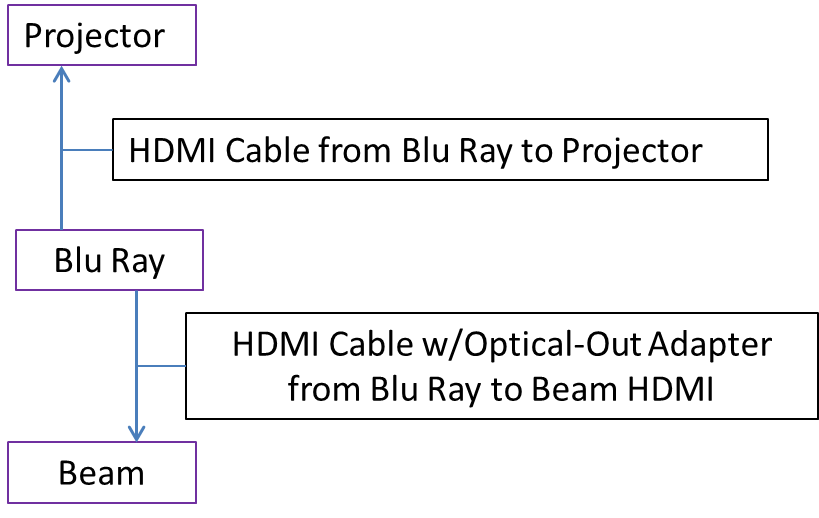
Not sure what connections your projector has but I assume it has the basics. The diagram shows a simple setup but your Blu-Ray player would have to be capable of sending DD5.1 over optical such as the Sony ES UBP-X1000ES. You would negate some of the other Beam features. Aesthetically the setup may not be pleasing to the eye :?

Cheers!

Together Everyone Achieves More = T.E.A.M.

18 replies

AjTrek1
October 11, 2018
Hi BxVelocity..again :D

You might try the Coaxial to Optical converter in the link with your Sony Blu-Ray that doesn't have an optical out. You'll also have to purchase a coaxial cable (the shorter the better) to run between the Blu Ray player and the Coaxial to Optical converter then attach the Optical Converter that cane with the Beam to one end of the HDMI cable and plug it into the Optical Out of the coaxial to optical converter and of course the other end into the Beam

https://www.amazon.com/Whizzotech-Coaxial-Toslink-Converter-sampling/dp/B01DP5N076/ref=sr_1_3?ie=UTF8&qid=1539263185&sr=8-3&keywords=coaxial+to+optical+digital+audio+converter&dpID=41aEIojQoCL&preST=_SY300_QL70_&dpSrc=srch

Cheers!
Together Everyone Achieves More = T.E.A.M.
Enthusiast I
October 17, 2018
So, I got my Sony X700, it has two HDMI outputs, one for video and one for audio, I’m thinking of connecting the audio to the beam, once I get it, it might work, methinks...
The other option is to get a Samsung 8500 that has optical out, but does not have two HDMI outs, if the Sony X700 doesn’t work
I want to use the beam to to get 5.1 sound, eventually
AjTrek1
October 17, 2018
Hi BxVelocity

See the attachment on how to connect your gear :)


Cheers!
Together Everyone Achieves More = T.E.A.M.
Enthusiast I
October 18, 2018
AJTrek 1, I love your diagrams!
Thanks a lot
My Sony has a weird blue screen when i start up netflix, so I think I'll get another, taking your advice , i thought I'd a Samsung UBD-M7500 4K Ultra HD Blu-ray Player as it has the optical output you mentioned, it think that would solve it.
But will it output 5.1 ?
AjTrek1
October 18, 2018
i thought I'd a Samsung UBD-M7500 4K Ultra HD Blu-ray Player as it has the optical output you mentioned, it think that would solve it.
But will it output 5.1 ?


Hello BxVelocity

Although the Samsung UBD-M7500 4K Ultra HD Blu-ray Player has optical out and will most likely decode DD5.1 it lacks one feature that for me would be a deal breaker_there;s no Wi-Fi option. You'd have to run an Ethernet cable for internet access which means another cable to contend with.

The model I suggested before will give you every option you need and provides choice: The Sony UHP-H1.
Remember, connections that don't have to be converted (i.e. coaxial to optical) are the best. The Optical to HDMI associated with the Beam IMO is a SOFT conversion as the initial signal from the UHP-H1 is already optical. Meaning not a coaxial to optical to HDMI.

I know the UHP-H1 is more expensive but not like hundreds above what you are considering but sometimes we have to bite the bullet, get what we need and move on. Of course I'm not advocating that you sacrifice essential needs for an electronic device. Either your budget allows it at this time or you may want to wait. Good luck to achieve what you want.

Cheers!


Together Everyone Achieves More = T.E.A.M.
Enthusiast I
October 18, 2018
I can’t thank you enough for the effort and the sincerity in your answers!
I’ll search for the model you mentioned
Many, many thanks!
AjTrek1
October 18, 2018
Hi BxVelocity

Scratch the Sony I recommended. I realized it is 4K UpScaling and not capable of playing 4K Discs natively. However, fear not here's a Samsung model that hits all the check marks. Click the link: https://www.samsung.com/us/televisions-home-theater/home-theater/blu-ray-dvd-players/ubd-m9500-4k-ultra-hd-blu-ray-player-ubd-m9500-za/

Cheers!
Together Everyone Achieves More = T.E.A.M.
Enthusiast I
November 21, 2018
I started using a PS4 and it works, however, its not a PS4 Pro, i connected it to the projector via a Marantz receiver, now I plan to connect it to the Beam