
Trending Lyricist I
April 5, 2019
Answered

10.1 broken alexa groups?

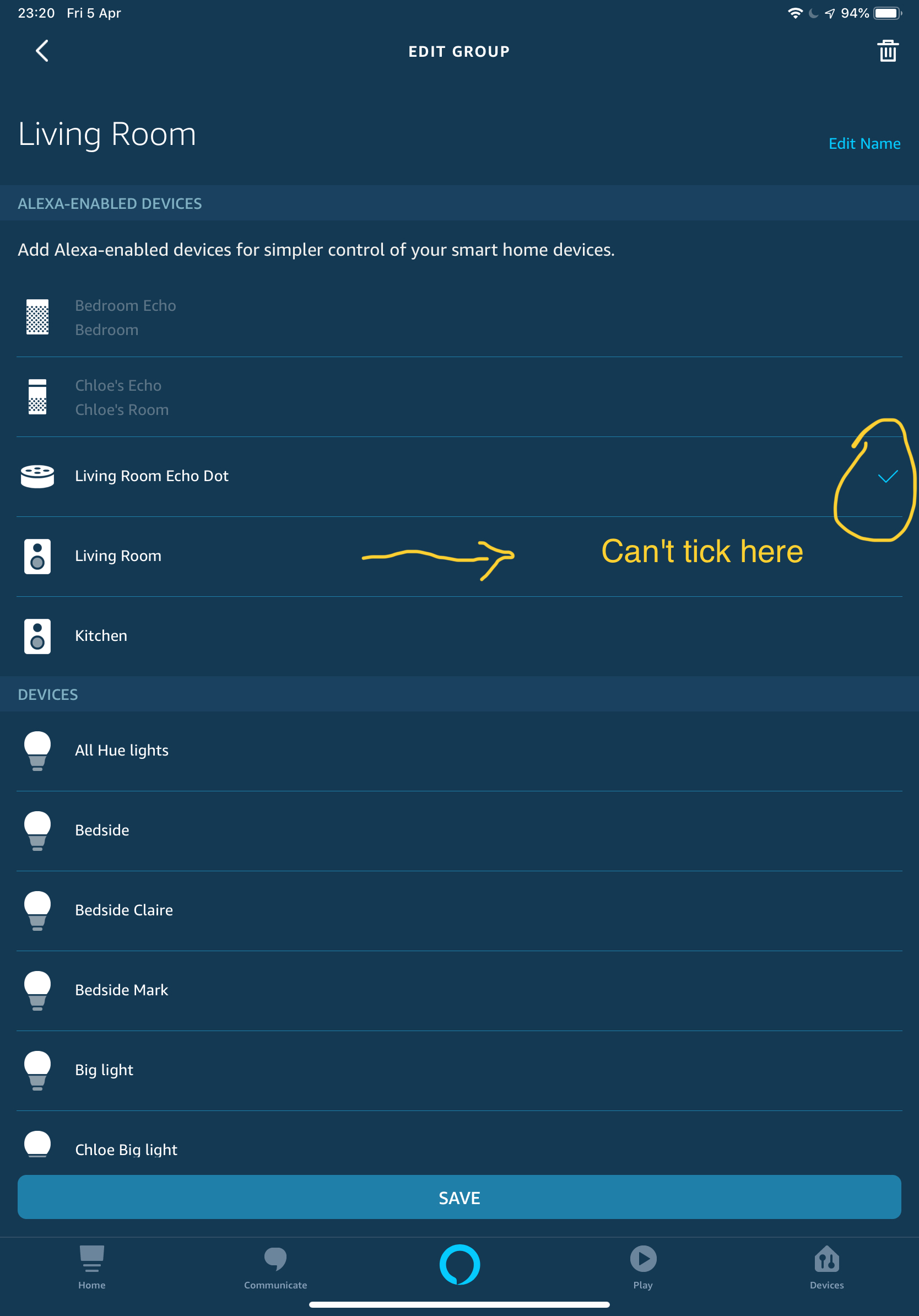
So it seems since the 10.1 update I can no longer set my sonos beam as the alexa enabled device in a group. This means I have to say the room name to change the lights for example rather than just saying lights and it take effect in that room/group. Where I could previously tick my sonos device under the applicable room/group it no longer let's me tick and will only let me select an Amazon device I.e dot, echo etc
    This topic has been closed for further comments. You can use the search bar to find a similar topic, or create a new one by clicking Create Topic at the top of the page.
    MDI79Answer
    Contributor II
    May 3, 2019
    same problem here. can'd add alexa enabled device (beam with 2 ones a surround) to alexa group. Only way to add is to go on amazon devices tab, delete sonos virtual speaker named ad the room (which hides beam speaker device), add the beam to the group on alexa app (now it is possible) and the search again for smart devices on alexa (the virtual speaker is found again)

    19 replies

    mark@scanAuthor
    Trending Lyricist I
    April 16, 2019
    Nobody else noticed this? There's been a couple of alexa app updates on ios since I updated to 10.1 however this problem persists
    mark@scanAuthor
    Trending Lyricist I
    May 2, 2019
    Come on SONOS reported this almost a month ago with steps how to recreate the problem and still the issue remains. Clearly something changed with 10.1 that now causes me not to be able to set a sonos device as the Alexa enabled device in a room/group. Note this behaviour only seems to occur with newly setup devices, if you do not delete then re-discover your device all will appear ok. I suspect this has something to do with the change to grouped devices now only showing once in the Alexa app which was a change in the 10.1 update.
    MDI79Answer
    Contributor II
    May 3, 2019
    same problem here. can'd add alexa enabled device (beam with 2 ones a surround) to alexa group. Only way to add is to go on amazon devices tab, delete sonos virtual speaker named ad the room (which hides beam speaker device), add the beam to the group on alexa app (now it is possible) and the search again for smart devices on alexa (the virtual speaker is found again)
    Ken_Griffiths
    May 6, 2019
    It’s definitely working here for me .. I can select my Beam (Dining Room) as the Alexa Enabling device for the Group. See screenshot attached. All my Alexa groups are working fine with both 'echo' and (relevant) 'Sonos' devices being able to ‘enable’ a Group.

    Don’t forget each device can only be used once (only) to 'enable’ or 'control' a group so make sure you are not using the device elsewhere.
    mark@scanAuthor
    Trending Lyricist I
    May 7, 2019
    It’s definitely working here for me .. I can select my Beam (Dining Room) as the Alexa Enabling device for the Group. See screenshot attached. All my Alexa groups are working fine with both 'echo' and (relevant) 'Sonos' devices being able to ‘enable’ a Group.

    Don’t forget each device can only be used once (only) to 'enable’ or 'control' a group so make sure you are not using the device elsewhere.


    It was working for me also prior to the 10.1 update...the difference now being if you delete the SONOS device in one of your groups and re-discover it in the alexa app now it will only discover the main device rather than all devices in a particular group (see below example) whereas previously it would show my beam and additionally my 2 sonos ones. This change was documented by Ryan here https://en.community.sonos.com/announcements-228985/sonos-version-10-1-now-available-recently-played-6822569 see under "Alexa app improvements"

    I would bet that IF you have other devices in your Beam (Dining Room) group, rear surrounds for example as I do... OR any of your other groups that have more than one SONOS device in it which is grouped they still show up as you haven't re-discovered following the latest update.

    Whilst it's great that you are not experiencing this problem please don't be so quick to try and discredit others who have replicated and reported the problem. I'm fully aware you can only use one alexa enabled device per group that's pretty standard stuff. If you want to help try the steps outlined above and delete/re-discover one of the alexa enabled devices in one of your groups (I would advise one of your least used groups if you do not want to be frustrated by this) and report back
    Ken_Griffiths
    May 7, 2019
    mark@scan,

    I think you have perhaps misunderstood Ryan’s post ... they have consolidated the Alexa icons for the Sonos One and Beam devices into just the one icon and embedded the other inside it... the speaker only needs to be added to the Alexa enabled 1st section and/or the 'preferred' section of the group. There are no changes to the speakers that do not have the voice assistants onboard.

    My groups here are working just fine... even if I delete a group and re-detect all... and recreate the group.

    The speakers (with voice assistants) that have been consolidated can still be added to the “preferred” speakers section too, across multiple groups... that’s in addition to enabling a single Alexa Group.

    That’s what the change were designed to do.
    Ken_Griffiths
    May 7, 2019
    mark@scan,

    Just as an example, see this extremely simple Alexa Group that I have just created with a Sonos One Speaker called “Hallway” ...this has two components, that at one point (prior to 10.1 App upgrade) were called “Sonos Hallway Alexa” ... which is the Alexa Voice Service part of the speaker and obviously the second component is called “Hallway”, which is the actual ‘speaker’ part of the device.

    They now both have the same name (and icon) called “Hallway”... just to prove this point, I have added the two components to the Alexa Group, but have taken the Alexa voice component “offline”, whilst leaving the speaker part in the preferred section “online”. See attached screenshot. The two Hallway icons whilst looking the same are actually two different ones and represent the different components mentioned.

    If I go into the 'offline' Alexa Enabled part ... I can go into its settings, where I find the old icon once called “Sonos Hallway Alexa”... which proves the Sonos developers consolidation and shows that despite seeing two Hallway entries in the group ... they are actually two entirely separate entities representing each component part of the Sonos One.

    My groups are definitely working fine here with this new consolidated setup. I suspect you are simply misunderstanding how these things now work
    mark@scanAuthor
    Trending Lyricist I
    May 7, 2019
    I'm familiar with how alexa enabled sonos devices work for groups. The fact remains that since 10.1 something has changed. The only thing I know for certain is that I can no longer set my living room and kitchen sonos devices as the alexa enabled devices in those respective rooms. I simply cannot tick the sonos alexa devices in those groups.

    The only thing different about these groups is that in the alexa app following the sonos 10.1 update I deregistered/deleted and then rediscovered the devices in these rooms. This results in only the beam showing in those rooms vs prior to the update it showed the beam + the ones...

    Incidentally I have 2 sonos ones grouped in my office, I didn't de-register/rediscover these, and my office group still performs as it did prior to 10.1...so can you explain why the difference?
    Ken_Griffiths
    May 7, 2019
    Incidentally I have 2 sonos ones grouped in my office, I didn't de-register/rediscover these, and my office group still performs as it did prior to 10.1...so can you explain why the difference?I will hazard a guess when you say your "grouped" speakers in your office.. you actually have them stereo "paired" ... and just like Sonos Ones surrounds "bonded" together with a playbase, of course they are different for Alexa Enabled Grouping purposes, otherwise an Alexa component would be hidden in both of those circumstances.

    The consolidation only currently applies to the standalone players with a voice assistant component. You will just have to take my word for it, the Grouping is working as the Sonos developers intended .. my players and groups are fine.

    I do not believe this is a fault.. I still think you are not understanding the changes that this merging of Sonos icons has brought about within the Alexa App.

    My setup is working just fine here ... if yours isn't, then I would perhaps contact your local Sonos Customer Care and discuss it with them.

    Perhaps they will explain the merging/consolidation features with you and you will grasp the way things now work.

    Let me just conclude here too by saying it is the "Sonos Skill" that consolidates the icons within Alexa and if you remove the skill and devices, all the devices you had prior to the 10.1 update will return during detection, but on installing the Sonos Skill and redetecting the devices, it will restore the consolidated/merged icons exactly as intended .. which (in my case, at least) is certainly working fine !
    Ken_Griffiths
    May 7, 2019
    marc@scan

    Just to perhaps assist you further, if you have three Sonos One Speakers in two separate rooms as follows...

    This is before the Sonos Skill is installed:

    Room 1
    "Hallway" standalone speaker with an Alexa component called "Sonos Hallway Alexa"

    Room 2
    "Bedroom" a stereo pair of speakers made up of "Bedroom Left" and "Bedroom Right" speaker each with their own Alexa component devices respectively named "Sonos Bedroom Alexa 1" and "Sonos Bedroom Alexa 2"

    After Sonos Skill installed:

    If you install the Sonos Skill in the Alexa App and scan for devices you will end up with just four top level devices

    "Hallway"
    "Bedroom"
    "Sonos Bedroom Alexa 1"
    "Sonos Bedroom Alexa 2"

    The "Sonos Hallway Alexa" appears to be missing but it is actually merged into "Hallway"

    If you go into the Hallway settings, in this example, you would then see "Sonos Hallway Alexa" .. the voice component.

    Currently the two bedroom Alexa devices are not consolidated, because you would otherwise lose an Alexa Enabling Component .. that's why you are perhaps seeing different things, but I understand this is setup as intended by the Sonos developers and it does work as intended and is clearly not a fault.

    I accept it confused me initially, but I can now see why Sonos have chosen this way of doing things with Alexa Groups.

    In such an example a user can now use these three devices "once only" to enable an Alexa Group:

    "Hallway"
    "Sonos Bedroom Alexa 1"
    "Sonos Bedroom Alexa 2"

    Only two speakers can be "preferred" but this can be done in multiple Alexa Groups as follows:

    "Hallway"
    "Bedroom"

    I hope that short/brief explanation helps you to understand the new consolidated Alexa icons, which do (or should) work fine with Alexa Groups. Mine are working exactly as expected.