
Trending Lyricist I
April 5, 2019
Answered

10.1 broken alexa groups?

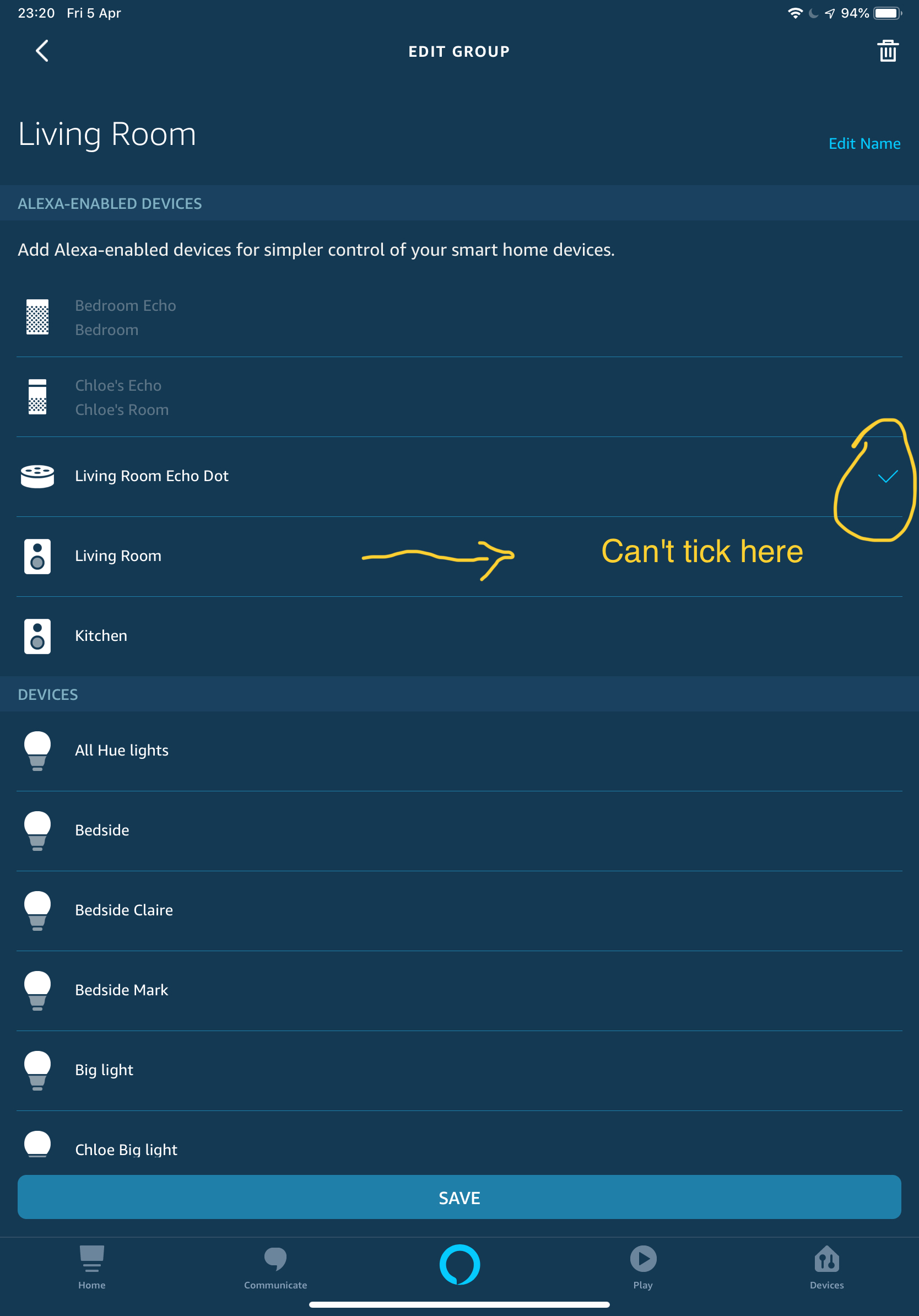
So it seems since the 10.1 update I can no longer set my sonos beam as the alexa enabled device in a group. This means I have to say the room name to change the lights for example rather than just saying lights and it take effect in that room/group. Where I could previously tick my sonos device under the applicable room/group it no longer let's me tick and will only let me select an Amazon device I.e dot, echo etc
    This topic has been closed for further comments. You can use the search bar to find a similar topic, or create a new one by clicking Create Topic at the top of the page.
    MDI79Answer
    Contributor II
    May 3, 2019
    same problem here. can'd add alexa enabled device (beam with 2 ones a surround) to alexa group. Only way to add is to go on amazon devices tab, delete sonos virtual speaker named ad the room (which hides beam speaker device), add the beam to the group on alexa app (now it is possible) and the search again for smart devices on alexa (the virtual speaker is found again)

    19 replies

    mark@scanAuthor
    Trending Lyricist I
    May 7, 2019
    I appreciate your efforts to try and help troubleshoot the issue. For me I just can't ignore that these groups worked fine prior to the recent sonos update, nothing else in my setup has changed. The only difference between the groups are:

    None working groups LivingRoom/kitchen: beam + 2x sonos ones in each acting as rear surrounds, my living room group also has a sub for 5.1

    Working group: 2x sonos one bonded in stereo.

    Apart from the different players the only other difference is that I de-registered/deleted and re-discovered both my LivingRoom and kitchen devices which is why I feel this is in some way related.

    Given that I've seen other users pop up on the forum recently to report similar issues I don't believe my problem is unique.

    As you say I may have to contact my local sonos support for further support.
    mark@scanAuthor
    Trending Lyricist I
    May 7, 2019
    Just as a little test, I've just set another echo device I have in the house to control my office so that I could see if I could then use the office pair as the alexa enabled device for the living room and what do you know...just as I suspected I am able to put a tick next to the office pair for my living room. Whilst it doesn't resolve my problem this makes me even more certain this is a sonos/alexa app issue than something unique to my setup.
    Ken_Griffiths
    May 7, 2019
    marc@scan,

    It's late where I am and so tomorrow I will look at your message and Group screenshots in depth and see if I can assist further.

    I'll come back to you tomorrow and see if we can resolve your issues.

    Hope that's okay.?
    Ken_Griffiths
    May 8, 2019
    marc@scan

    Just before I go off to bed, I will just quickly comment on the matter where you mention this..

    "None working groups Living Room/kitchen: beam + 2x sonos ones in each acting as rear surrounds, my living room group also has a sub for 5.1"

    These are both "bonded" configurations, which will each appear as a single device called "Living Room" and "Kitchen" in the Alexa device list... Any Sonos Ones in either of these rooms cannot be used to "enable" an Alexa Group ... I hope you appreciate that, as the voice assistants are disabled in a Beams "bonded" setup.. You can only use "Living Room" and "Kitchen" once only to "enable" an Alexa group...

    Just thought you may not have realised that fact..??

    Things are different with a PlayBar and/or PlayBase "bonded" setup, which behave differently in the Alexa device list and group features, because their voice assistants continue to both work, even whilst acting as surrounds.

    Anyhow, hopefully we can sort things tomorrow and get them working.?
    Ken_Griffiths
    May 8, 2019
    marc@scan,

    Can you confirm you just have the two Alexa Groups, please? Just wondering if you have any others?

    I presume one of those is to Group your Kitchen 5.0 and Living Room 5.1 bonded setups together, is that correct?

    Can you tell me the name of that group please? I see you are also using and Echo dot in this same group for some reason. Is that also correct?

    The second group relates to your Office... 2 x Sonos One in a stereo pair, is that correct and is the stereo pair the only speakers in your Alexa group? ... if so I don’t understand your reason for that group at the moment, unless it is to enable other smart-home devices like plugs, or lights etc.

    Can you clarify the groups please and any other groups you may have.

    Secondly, in your earlier posts you talk about de-registering some of your Sonos components and re-detecting them. Can you clarify if you also did the following:
    1. Removed the same devices from “manage your contents and devices” in your online Amazon Account? (See Screenshot attached)
    2. Considered removing and reinstalling your Sonos/Amazon sharing agreement from “login on Amazon” area of your Amazon Online Account?
    3. Removed the Alexa voice service from the device room (where relevant) before then deregistering the device from your Amazon Account?
    4. Removed/reinstalled the Sonos Skill post deletion and re-signed (accepted) the sharing agreement before rediscovering your removed Alexa devices?
    5. Signed out and back into your Amazon Account.

    If you have not done any of those five steps, I would ensure you do them when deregistering and removing devices from your Amazon Account.

    So if you can give some answers to the above then we can see perhaps where to go next.

    Thanks.?
    mark@scanAuthor
    Trending Lyricist I
    May 8, 2019
    Thanks for your continued efforts. I've got a call scheduled with SONOS support tomorrow and they have opened a case to investigate further.

    Will update the thread in due course
    Ken_Griffiths
    May 8, 2019
    Thanks for your continued efforts. I've got a call scheduled with SONOS support tomorrow and they have opened a case to investigate further.

    Will update the thread in due course
    Thanks for the update, hope you get things sorted soon. ?
    mark@scanAuthor
    Trending Lyricist I
    May 9, 2019
    Finally sorted!!!

    Following a call this afternoon with sonos support UK John P if you are reading ?

    Basically in both my lounge/kitchen groups I had to remove the surrounds/sub in the sonos app so that I was just left with just the beams. Then setup the groups again in the alexa app. This immediately let me tick next to each beam in each respective group where previously I could simply not tick. Once I had confirmed this as working and I no longer had to preface commands with turn on "kitchen" lights etc I setup the respective 5.1 groups in the sonos app again.

    I imagine this is an extreme edge case. Where I suspect things went wrong was that following the 10.1 update I deregistered and deleted the sonos devices in the alexa app and re-discovered them, this was simply to see the changes made regarding the "Alexa app improvements" indeed where prior to the update multiple devices showed after 10.1 they do not.

    However doing this appears to have had the undesired side effect of no longer letting you set those previously created sonos devices as the alexa control for that group... Hence the reason it wouldn't let me tick in alexa app.

    I don't imagine there will be many who come across this problem but if you do following the above should resolve the problem.

    Thanks KG for your assistance in helping trouble shoot this problem and also John P @ sonos support UK
    Ken_Griffiths
    May 9, 2019
    mark@scan,

    Really glad to hear you are all sorted mark@scan, that’s the main thing. Thanks also for the update/feedback.

    First class support too by John P. at Sonos Customer Care.?

    All the very best.