

Mike H
Retired Sonos Staff
October 23, 2025
News

Lossless is here. Included in Spotify Premium

Related content:SoftwarePartner

Hey everyone! 👋


As some of you may have noticed earlier this week, Spotify lossless is now available on

compatible Sonos devices.

First, you need to enable lossless in the Spotify app. You can read how to do that here on Spotify's own page.


Once that is done, connect to a Sonos speaker and activate lossless by adjusting the audio quality, once you are connected to a speaker that will enable it, as seen in the GIF below.
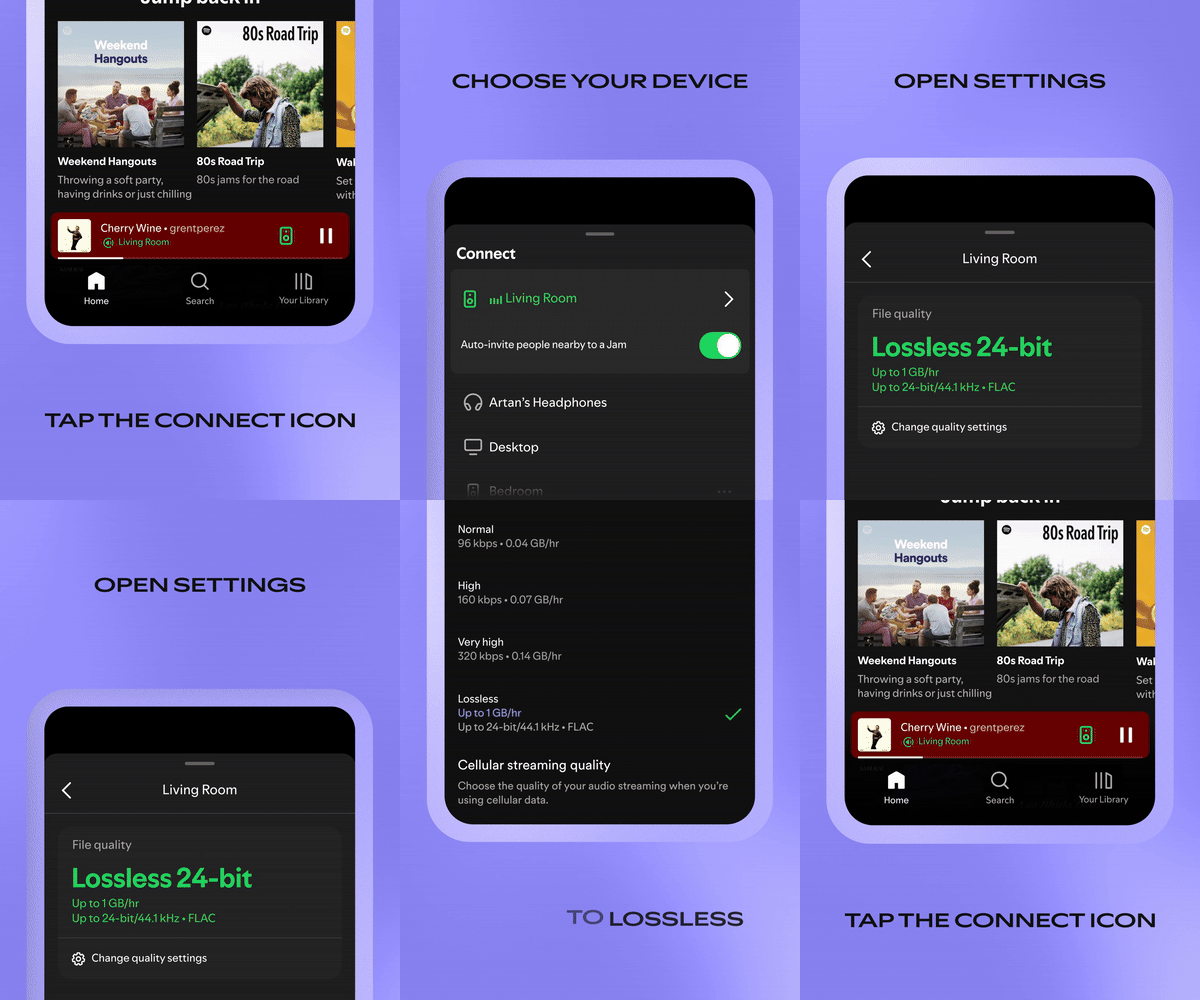


You now have lossless on Sonos! Keep in mind, as shown in the GIF, you will have to skip to the next song before lossless is enabled.

Note: This setting is system wide. Once you have enabled it on one Sonos speaker, the rest will have lossless enabled as well.


Enjoy, and let us know what you think!


Mike H


Quick note since a few people asked. As long as your speakers are running the latests software version Spotify lossless is supported. If they are on S1, then it sadly isn't supported.

🎃 = M

73 replies

Airgetlam
January 28, 2026

​@Brooks Perry If you can, I’d certainly recommend that you ‘edit’ your post to remove both serial numbers (which can be used to gather discounts) and IP addresses (which might be used for hacking purposes). 

Bruce
Corry P
Sonos Staff
January 28, 2026

Hi ​@Brooks Perry 

Yes, your speakers are compatible with Spotify Lossless.

To reboot everything, the best way to go about it is to turn off (or unplug) your router and all your speakers. Once the router has a been off for at least 30 seconds, turn it back on and wait for Wi-Fi to return before turning on the speakers, turning the Playbar on before the surrounds or Sub. Reboot the phone at roughly the same time - so it reconnects to the rebooted router. I wouldn’t even open the Sonos or Spotify apps until a minute after the last speaker has stopped flashing its white light.

I hope this helps.

"Common sense is the collection of prejudices acquired by age eighteen." - Albert Einstein
Mr. T
January 28, 2026

​ Thanks for getting back to us (DT24 is my partner--I posted the question from her account because we use her account to manage Sonos at this house).


I’d check that your partner’s Spotify account, which is the account linked to Sonos, has Lossless enabled.

Contributor I
January 28, 2026

​@Corry P 


I completed a reboot of my wifi router, all Sonos devices, my iPhone, my MacBook Pro, and her iPad.


Her iPhone is not at the house right now, but I reinstalled Spotify on her iPad and updated the wifi stream quality setting to Lossless on that device. I’ll update Spotify stream quality settings on her iPhone when she gets home.
 

Everything is now reconnected and the issue persists… no luck. I will try contacting Sonos Tech Support.
 

I have been unable to get ahold of anyone helpful at Spotify so far.

Contributor I
January 28, 2026

​@Corry P 

Also, I tested the functionality from the freshly reinstalled Spotify app on her iPad after the reboot and reproduced the same issue with her device and Spotify account. So it’s not specific to the account. 

Corry P
Sonos Staff
January 29, 2026

Hi ​@Brooks Perry 

That’s quite unusual - I hope the team can figure it out for you.

"Common sense is the collection of prejudices acquired by age eighteen." - Albert Einstein
Prodigy III
January 29, 2026

​@Corry P 

Also, I tested the functionality from the freshly reinstalled Spotify app on her iPad after the reboot and reproduced the same issue with her device and Spotify account. So it’s not specific to the account. 

Can I just check you’ve done it all?

Airplay a track from Spotify on iPhone or iPad to a Sonos speaker (using the same Spotify account that is used on your Sonos app), and while playing music, go to your name on the Spotify app (top left), select Settings and Privacy, then Media Quality, and ensure “Audio Streaming quality” is set to Lossless. Give it a minute, then stop Airplay streaming to the speaker. 

Go to the Sonos app and remove Spotify. Then re-add it (ensuring the same account as you had just Airplayed from), and start playing music. It should then stream in Lossless. Sometimes to see the Lossless tag, you might need to drag the elapsed time slider towards the end of the song, and then back again to get the tag to appear. A quirk of Sonos. 

106rallye
January 30, 2026

AirPlay a track from Spotify? You mean play a track to Sonos via Spotify Connect?

Prodigy III
January 30, 2026

AirPlay a track from Spotify? You mean play a track to Sonos via Spotify Connect?

Yes, same thing but I don’t want to assume anyone knows what Spotify Connect is. It’s not intuitive.

Mr. T
January 30, 2026

AirPlay a track from Spotify? You mean play a track to Sonos via Spotify Connect?

Yes, same thing but I don’t want to assume anyone knows what Spotify Connect is. It’s not intuitive.

You can also select to AirPlay from Spotify app in the speaker connection options. It does say Airplay > Lossless in the Spotify app when connected to Sonos, with Sonos app just evidencing Airplay.