

Mike H
Retired Sonos Staff
October 23, 2025
News

Lossless is here. Included in Spotify Premium

Related content:SoftwarePartner

Hey everyone! 👋


As some of you may have noticed earlier this week, Spotify lossless is now available on

compatible Sonos devices.

First, you need to enable lossless in the Spotify app. You can read how to do that here on Spotify's own page.


Once that is done, connect to a Sonos speaker and activate lossless by adjusting the audio quality, once you are connected to a speaker that will enable it, as seen in the GIF below.
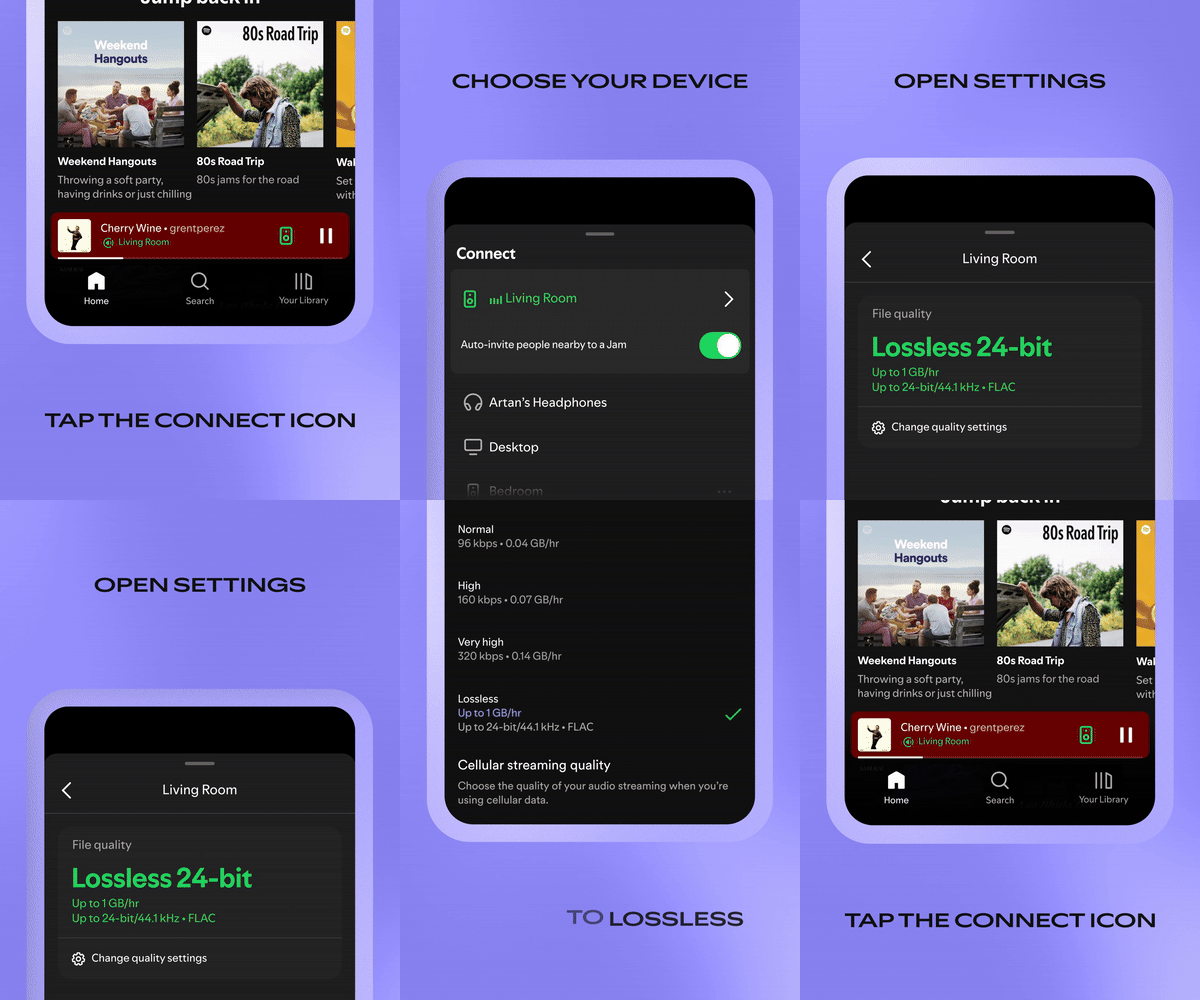


You now have lossless on Sonos! Keep in mind, as shown in the GIF, you will have to skip to the next song before lossless is enabled.

Note: This setting is system wide. Once you have enabled it on one Sonos speaker, the rest will have lossless enabled as well.


Enjoy, and let us know what you think!


Mike H


Quick note since a few people asked. As long as your speakers are running the latests software version Spotify lossless is supported. If they are on S1, then it sadly isn't supported.

🎃 = M

73 replies

106rallye
January 30, 2026

Not to make to fine a point of this but AirPlay and Spotify Connect are totally different things. AirPlay streams music from an iPhone only (Android does not do AirPlay) to your speaker, while Spotify Connect makes the speaker fetch a direct link to Spotify - that on Sonos will not even be broken when the phone that was used to for Spotify Connect leaves your WiFi.

Contributor I
February 2, 2026

​@Rhonny Yes, I’ve done that all. Several times now. Super strange.

The one other thing I’ll add is that Spotify streams lossless from my iPhone through my BMW Carplay just fine. So again, this points me to something specific to the Spotify Connect > Sonos integration.

I don’t have time to keep troubleshooting it, so I’m just over it at this point… If I find time and energy to deal Sonos and Spotify support and it goes anywhere, I’ll circle back here. But I might just wait til we move to a new house and set everything up from factory settings to see if that resolves it.

Very High sounds good enough that I’m not going to throw another 5+ hours at this issue. Thanks for everyone’s help and input!

Lyricist I
February 4, 2026

​@Corry P and ​@Rhonny great news!

Shortly after I posted that last reply to Rhonny a couple days ago, I checked both desktop OS versions of Spotify and Sonos for updates again and found a couple minor updates available. After I installed those updates, I gave the steps Rhonny suggested again just for good measure and for the first time, I saw a new option available after starting the Spotify Connect stream to my Sonos system when I clicked on Change quality settings.

Suddenly under Audio quality I saw separate streaming quality fields for my selected Sonos speakers above the streaming quality setting for This computer. At the time, audio quality had been set to Lossless wherever possible and it was already selected for This computer and for Downloads, but for the new devices that hadn’t appeared before it was set to Very high. I changed this to Lossless and advanced the track and my problem was solved!

Screenshot of new field attached. Hope this helps others who may not have had/seen this option before! Thanks for everyone’s help and patience. Grateful to the support gods who reviewed my case and finally ruled in my favor.

Cheers,

Brooks


Prodigy III
February 4, 2026

​@DT24 

That’s really very good news. 

By coincidence, I noticed today that I wasn’t streaming from Spotify on Sonos in Lossless. So I had to repeat the process. But what I realised was that - on the Spotify iPhone app - rather than selecting ‘Bluetooth & Airplay’ after tapping the speaker bottom left (which I had advised you before), I needed to select the Sonos speaker itself and play directly on there. THEN I changed the audio quality in the Spotify app to Lossless, and went into the Sonos app’s playback screen to check - and there was Lossless playing. 

I had mentioned Airplay to you in this thread previously, and some had jumped on that as incorrect. I now know that I needed to ignore Airplay and just select the Sonos speaker before changing the audio quality. Apologies to you and those who had seen my error….

MoPac
Headliner III
February 4, 2026

 When I look at the Now Playing screen why don’t I see the type of stream.  Only when it’s Atmos is that information showing.

Mr. T
February 5, 2026

 When I look at the Now Playing screen why don’t I see the type of stream.  Only when it’s Atmos is that information showing.

The Sonos Now Playing screen will show Lossless badge for Spotify when applicable.

Enthusiast II
February 5, 2026

Does Spotify lossless played through the Sonos app glitch/skip the way Apple Music does?

Prodigy III
February 5, 2026

Does Spotify lossless played through the Sonos app glitch/skip the way Apple Music does?

Neither Apple Lossless nor Spotify lossless skips here via the Sonos app…

MoPac
Headliner III
February 5, 2026

 The Now Playing screen, with some streaming services, does not show the streaming type unless it’s Atmos.  Apple Music & Qobuz show nothing unless of course Apple is streaming Spacial Audio.  This morning I did get Amazon Music Unlimited to show HD or Ultra HD.  I don’t care if Spotify shows anything as it’s only used for background dinner music.  I did however set up Spotify to stream High-Res.

MoPac
Headliner III
February 5, 2026

Raghu:

 The only issue I had with Apple Music was with Atmos.  It would play several tracks then just stop playing.  Amazon does not have that issue with Atmos streaming.