

Mike H
Retired Sonos Staff
October 23, 2025
News

Lossless is here. Included in Spotify Premium

Related content:SoftwarePartner

Hey everyone! 👋


As some of you may have noticed earlier this week, Spotify lossless is now available on

compatible Sonos devices.

First, you need to enable lossless in the Spotify app. You can read how to do that here on Spotify's own page.


Once that is done, connect to a Sonos speaker and activate lossless by adjusting the audio quality, once you are connected to a speaker that will enable it, as seen in the GIF below.
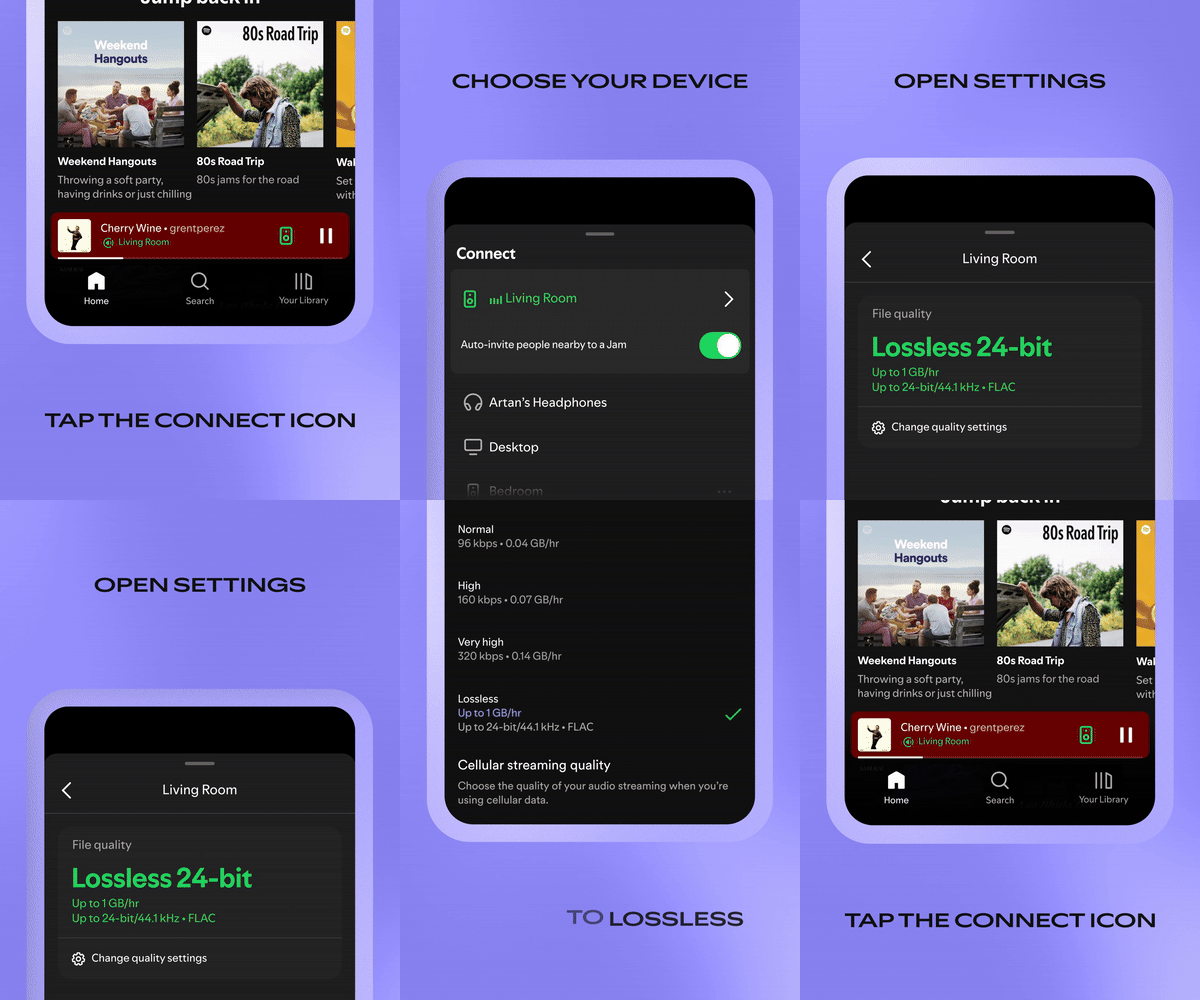


You now have lossless on Sonos! Keep in mind, as shown in the GIF, you will have to skip to the next song before lossless is enabled.

Note: This setting is system wide. Once you have enabled it on one Sonos speaker, the rest will have lossless enabled as well.


Enjoy, and let us know what you think!


Mike H


Quick note since a few people asked. As long as your speakers are running the latests software version Spotify lossless is supported. If they are on S1, then it sadly isn't supported.

🎃 = M

73 replies

Prodigy III
October 29, 2025

Many thanks, ​@Corry P !

Your mention of removing and re-adding Spotify to my account has solved it for me!! It reminded me that I use a dedicated ‘Home’ account for Spotify on my Sonos system (as one of my Spotify membership slots), not my own ‘personal’ one which my Spotify app is logged into. 

SO I logged into the Spotify app with the Home account, changed to Lossless, and that then generated the Lossless tag when selecting music via the Sonos app.

Eureka. Thank you! (Maybe this will help others who have multiple Spotify accounts connected to their Sonos app that they need to activate Lossless on every account.)

Corry P
Sonos Staff
October 29, 2025

Glad to hear it, ​@Rhonny!

Thanks for updating the thread!

"Common sense is the collection of prejudices acquired by age eighteen." - Albert Einstein
Avid Contributor I
November 7, 2025

Is the only way to get lossless Spotify on Sonos to play via the Spotify app? If I play Spotify from the Sonos app will that also get lossless audio? 

Thanks

106rallye
November 8, 2025

Once you set up lossless in the Spotify app it will work when using the Sonos app too……

Avid Contributor I
November 11, 2025

Ah, ok, thank you, I hadn’t realised that, so playing from Spotify in an app with the audio set to lossless to your Sonos system kind of activates lossless for the Sonos system? Cool, thanks

106rallye
November 11, 2025

You set it in the Spotify app first .

Trending Lyricist I
January 21, 2026

Many thanks, ​@Corry P !

Your mention of removing and re-adding Spotify to my account has solved it for me!! It reminded me that I use a dedicated ‘Home’ account for Spotify on my Sonos system (as one of my Spotify membership slots), not my own ‘personal’ one which my Spotify app is logged into. 

SO I logged into the Spotify app with the Home account, changed to Lossless, and that then generated the Lossless tag when selecting music via the Sonos app.

Eureka. Thank you! (Maybe this will help others who have multiple Spotify accounts connected to their Sonos app that they need to activate Lossless on every account.)

Thanks, this answered my question as I have a dedicated account on my family Spotify for my Sonos :-)

Lyricist I
January 21, 2026

Hello Sonos Community,

I have followed all the steps to enable lossless playback on all of my devices in the Spotify app. Spotify plays in “lossless” on my iPhone 12 Pro and on my MacBook Pro just fine, but when I use Spotify Connect to move the sound output to my Sonos S2 system, it says "File quality: Very High. This content isn't available in lossless."

That’s confusing… I know the content I’m playing is available in lossless because it’s playing lossless through the Mac device’s output in lossless (and when I connect wired headphones with an AudioQuest Dragonfly Cobalt DAC). However, as soon as I switch the device to one of my Sonos speakers, such as my 1-week old Move 2, the quality drops from “lossless” to “very high.”

I contacted Spotify Support about this today and spent more than 2 hours troubleshooting to no avail. Chat transcript can be downloaded here for the next 3 days: https://we.tl/t-7tqJttbloU

Please let me know if someone from Sonos Support can jump in to help resolve this issue. I’ve been waiting for lossless for so long!!

Thank you!

P.S. screenshots illustrating the issue from today…


1. Playing a lossless track on my iPhone through the device’s speaker


2. Spotify shows the track is streaming lossless 16 bit, and I hear it from my iPhone’s speaker


3. Using Spotify Connect, I switch the sound output to my newest Sonos Move 2 speaker, and it immediately changes from “lossless” to “very high”…


4. The Spotify app says that via Sonos Connect to Move 2 the quality is 320kbps and confusingly states that “This content isn’t available in lossless” even though the screenshots #1-2 contradict this statement.


Corry P
Sonos Staff
January 22, 2026

Hi ​@DT24 

I am sorry to hear about the trouble you’re having with getting lossless Spotify content to play on your Sonos system.

As the issue appears to be with the Spotify app, I am not sure how much use our technical support department can be, but they can certainly take a look at things from the Sonos side for you - I recommend you get in touch with them.

Before doing so, please try a reboot of the speaker, the iPhone and the router (the router is a long-shot, but you may as well give it a go - turn it off for at least 30 seconds), just in case that saves you from waiting on the phone.

I hope this helps.

"Common sense is the collection of prejudices acquired by age eighteen." - Albert Einstein
Contributor I
January 28, 2026

Hi ​@Corry P 

Thanks for getting back to us (DT24 is my partner--I posted the question from her account because we use her account to manage Sonos at this house).

I’ll try reaching out to Sonos tech support about it. I hope I can relay a link to this thread so they can see what we shared about the issue so far.

Re: our Sonos system, we have a system that includes the following products/versions (below). Perhaps this helps to eliminate a few potential issues? All these speakers are compatible since they are operating via the S2 app, right?

Re: rebooting, do I need to power cycle (manually unplug and re-power) each Sonos component listed below individually? And then power cycle my router after each of those has reconnected? What’s the most efficient way to accomplish a full system reboot?

iPhone has been rebooted multiple times and I’ve logged out/in of all Spotify and Sonos app instances on my devices. I’ve also reinstalled the apps.


---------------------------------

Sonos One: Bedroom

Serial Number: --

Sonos OS: S2

Version: 17.7 (build 92071170)

Hardware Version: 1.21.1.8-1.1

Series ID: A100

IP Address: --

WM: 0

---------------------------------

Port: Den

Serial Number: --

Sonos OS: S2

Version: 17.7 (build 92071170)

Hardware Version: 1.29.1.7-1.2

Series ID: A100

IP Address: --

WM: 0

---------------------------------

Sonos One: Den 2

Serial Number: --

Sonos OS: S2

Version: 17.7 (build 92071170)

Hardware Version: 1.21.1.8-1.1

Series ID: A100

IP Address: --

WM: 0

---------------------------------

Playbar: Lounge

Serial Number: --

Sonos OS: S2

Version: 17.2.2 (build 86270230)

Hardware Version: 1.9.1.10-1.0

Series ID: A100

IP Address: --

Audio In:

WM: 0

OTP:

---------------------------------

Play:1: Lounge (LS)

Serial Number: --

Sonos OS: S2

Version: 17.2.2 (build 86270230)

Hardware Version: 1.20.1.6-1.1

Series ID: A200

IP Address: --

WM: 0

---------------------------------

Play:1: Lounge (RS)

Serial Number: --

Sonos OS: S2

Version: 17.2.2 (build 86270230)

Hardware Version: 1.20.1.6-1.1

Series ID: A200

IP Address: --

WM: 0

---------------------------------

Sub: Lounge

Serial Number: --

Sonos OS: S2

Version: 17.2.2 (build 86270230)

Hardware Version: 1.8.2.5-1.2

Series ID: A100

IP Address: --

WM: 0

OTP:

---------------------------------

Move 2: Move 2

Serial Number: --

Sonos OS: S2

Version: 17.7 (build 92072171)

Hardware Version: 1.40.1.7-1.12

Series ID: A202

IP Address: --

WM: 1