

Mike H
Retired Sonos Staff
October 23, 2025
News

Lossless is here. Included in Spotify Premium

Related content:SoftwarePartner

Hey everyone! 👋


As some of you may have noticed earlier this week, Spotify lossless is now available on

compatible Sonos devices.

First, you need to enable lossless in the Spotify app. You can read how to do that here on Spotify's own page.


Once that is done, connect to a Sonos speaker and activate lossless by adjusting the audio quality, once you are connected to a speaker that will enable it, as seen in the GIF below.
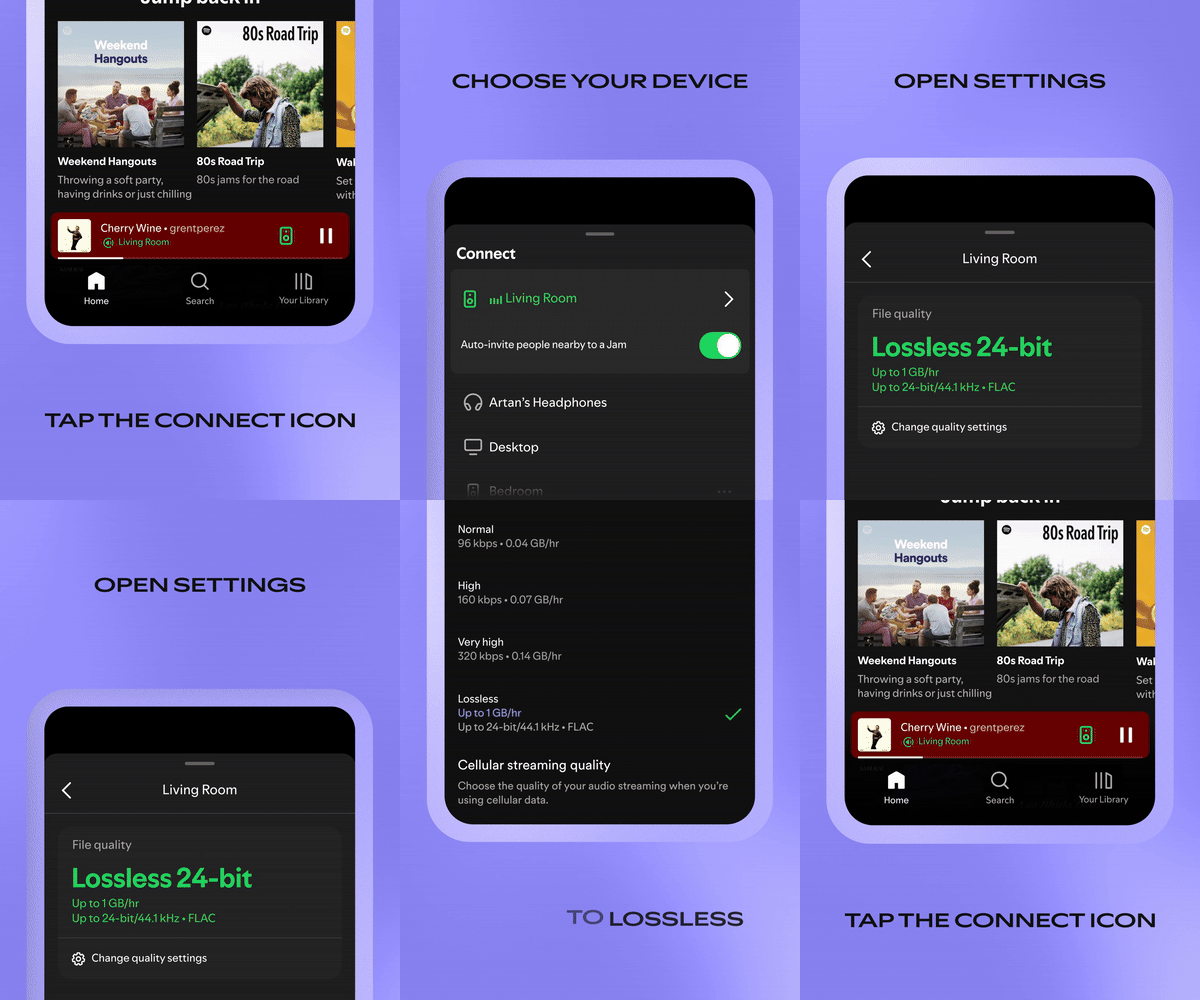


You now have lossless on Sonos! Keep in mind, as shown in the GIF, you will have to skip to the next song before lossless is enabled.

Note: This setting is system wide. Once you have enabled it on one Sonos speaker, the rest will have lossless enabled as well.


Enjoy, and let us know what you think!


Mike H


Quick note since a few people asked. As long as your speakers are running the latests software version Spotify lossless is supported. If they are on S1, then it sadly isn't supported.

🎃 = M

73 replies

Corry P
Sonos Staff
October 27, 2025

Hi ​@Kos 

I found the following: “Most compatible players connected to the Sonos App support 24-bit audio. Sub (Gen 1), Play:5 (Gen 1), Play:3, Play:1, Connect (Gen1), and Connect:Amp will automatically downmix any 24 bit audio to 16 bit when streaming from Music Library, a NAS share, or from your Android phone or tablet.” I presume this also applies to streaming services such as Spotify, but please don’t take it as “Gospel” quite yet. Note that some of the devices listed are not S2 compatible anyway. All unlisted S2-compatible devices will play 24-bit. 

Really, I am not sure what the Spotify app specifically would show in that circumstance.

I have asked for some of the related documentation (regarding 24-bit playback) to be updated in reference to Spotify Lossless - I’ll try to keep you informed of what I find out.

I hope this helps.


"Common sense is the collection of prejudices acquired by age eighteen." - Albert Einstein
Corry P
Sonos Staff
October 27, 2025

Hi ​@Smilja

​@Corry P, much appreciated. Could the support article be amended accordingly?

https://support.sonos.com/en-us/article/playing-spotify-lossless-audio-on-sonos

I am not sure it needs adjusted - the page states that “Sonos products must be updated to version 91.0-70011 or greater” - this eliminates S1 systems as an option.

"Common sense is the collection of prejudices acquired by age eighteen." - Albert Einstein
Enthusiast II
October 27, 2025

Hi ​@Kos 

I found the following: “Most compatible players connected to the Sonos App support 24-bit audio. Sub (Gen 1), Play:5 (Gen 1), Play:3, Play:1, Connect (Gen1), and Connect:Amp will automatically downmix any 24 bit audio to 16 bit when streaming from Music Library, a NAS share, or from your Android phone or tablet.” I presume this also applies to streaming services such as Spotify, but please don’t take it as “Gospel” quite yet. Note that some of the devices listed are not S2 compatible anyway. All unlisted S2-compatible devices will play 24-bit. 

Really, I am not sure what the Spotify app specifically would show in that circumstance.

I have asked for some of the related documentation (regarding 24-bit playback) to be updated in reference to Spotify Lossless - I’ll try to keep you informed of what I find out.

I hope this helps.


Thanks a lot, ​@Corry P — that really helps clarify things.

Just to make sure I understand correctly: when you say that “all unlisted S2-compatible devices will play 24-bit,” do you mean these products (my Port and Amp for instance) actually output 24-bit audio (at 44.1–48 kHz) through their DACs, or simply that they accept a 24-bit input stream but may internally down-convert it to 16-bit during playback?

It would be super helpful to know where the 24-bit path truly ends — especially now that Spotify Lossless is rolling out. THANKS!

Kos
Corry P
Sonos Staff
October 27, 2025

Hi ​@Kos 

Port and Amp will output 24-bit audio (at up to 48KHz sampling rate), yes.

I think it is a bit difficult to claim 24-bit playback if it’s not 24-bit all the way!

"Common sense is the collection of prejudices acquired by age eighteen." - Albert Einstein
Enthusiast II
October 27, 2025

Hi ​@Kos 

Port and Amp will output 24-bit audio (at up to 48KHz sampling rate), yes.

I think it is a bit difficult to claim 24-bit playback if it’s not 24-bit all the way!

Perfect, that clears it up — thanks for confirming it’s true 24-bit end-to-end on Port and Amp. Now we just need Spotify to deliver a lot more music in 24-bit — most of it is still 16-bit anyway, but that’s hardly Sonos’ fault :)

Kos
Schlumpf
Virtuoso
October 28, 2025

What about S2 legacy products like P5 Gen2, that don’t have the same latest firmware as the newer S2 products? Imo they should support Spotify lossless at least at 16bit 44,1kHz cd quality like they also do with other services like Deezer. 
Can someone report about using P5 Gen2, Play1, Play3, Playbase on S2 with Spotify lossless?
 

Ralf
Corry P
Sonos Staff
October 29, 2025

Hi ​@Schlumpf 

What about S2 legacy products like P5 Gen2, that don’t have the same latest firmware as the newer S2 products? Imo they should support Spotify lossless at least at 16bit 44,1kHz cd quality like they also do with other services like Deezer. 
Can someone report about using P5 Gen2, Play1, Play3, Playbase on S2 with Spotify lossless?

Sub (Gen 1), Play:5 (Gen 1), Play:3, Play:1, Connect (Gen1), and Connect:Amp will automatically downmix any 24 bit audio to 16 bit when streaming from Music Library, a NAS share, or from your Android phone or tablet.” 

 All unlisted S2-compatible devices will play 24-bit. 

I hope this helps.

"Common sense is the collection of prejudices acquired by age eighteen." - Albert Einstein
Mr. T
October 29, 2025

What about S2 legacy products like P5 Gen2, that don’t have the same latest firmware as the newer S2 products? Imo they should support Spotify lossless at least at 16bit 44,1kHz cd quality like they also do with other services like Deezer. 
Can someone report about using P5 Gen2, Play1, Play3, Playbase on S2 with Spotify lossless?
 

Using Spotify Connect to stream 24-bit lossless on an Era 100, I can group a Playbar and separate Play:3s.

Spotify Connect still shows the lossless stream as 24-bit with grouped speakers included.

Edit: Even using Spotify Connect directly to the Playbar or a Play:3 shows the stream as 24-bit.

Prodigy III
October 29, 2025

Can anyone help? I have followed the instructions for activating Lossless in the Spotify app, and when I play it via the Spotify app to my Sonos speakers, the Sonos app’s Now Playing screen shows the Lossless tag. All good.

BUT when I select a Spotify track via the Sonos app, I no longer get any indication that it’s Lossless. 

All my speakers and app are fully updated, and all meet the requirements to receive/stream Spotify Lossless. An earlier post confirmed that it is possible to get Spotify Lossless via just the Sonos app, so I believe it should be working fine.

Am I misunderstanding, or doing something wrong? I’m in the UK - does that currently make any difference?

Corry P
Sonos Staff
October 29, 2025

Hi ​@Rhonny 

Sorry to hear you are having trouble playing Spotify Lossless from within the Sonos app - as far as I understand it, you absolutely should be able to, using the steps you are using.

Please try the usual steps - reboot the controller, the speaker(s) and the router. Test playback afterwards, and remove and add the Spotify service should things still not have improved.

Finally, if you still don’t see the lossless badge in the Sonos app when initiating playback from within the Sonos app, please submit a diagnostic while playing and let me know here when you have done so, but without sharing the given number. Thanks.

Remove a content service account from Sonos

Add a content service to Sonos

I hope this helps.

"Common sense is the collection of prejudices acquired by age eighteen." - Albert Einstein