
Ryan S
Retired Sonos Staff
June 8, 2020

Introducing S2, New App and OS for Sonos
Related content:Software
Introducing S2, New App and OS for Sonos

The next generation of Sonos software is now available. Sonos S2 is a new app and an operating system for compatible devices, which brings support for higher resolution audio, saved groups, support for new Sonos products, and more.

Learn more about the Sonos S2 app on our S2 home page.


Support for the newest Sonos products

The all new Sonos Arc, Sonos Five, and Sonos Sub will require the Sonos S2 app. These new players are not supported by the Sonos S1 Controller. 


Saved Groups
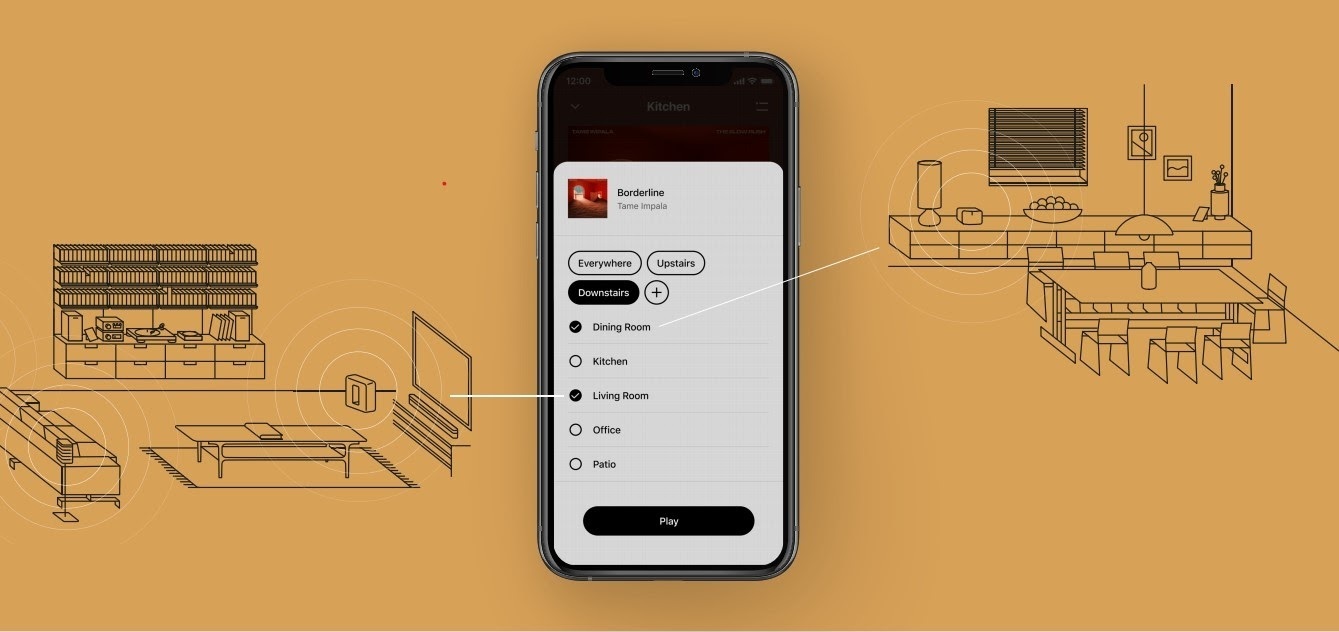
The new S2 app can save groups of rooms to create groups quickly and easily. Once a group is created, you can select it to start playing music and the players will automatically group up. 


High Resolution Audio


With S2, Sonos speakers now have support for high resolution audio, 24-bit, 44.1/48kHz for FLAC/ALAC only. This support is for local music libraries shared from computers and network attached drives. We’ve updated the article on Sonos supported music formats here.

The Sonos Arc is a Dolby Atmos soundbar, and S2 brings support for that audio to Sonos for home theater and music. Dolby Atmos can be read from Dolby Digital Plus, Dolby MAT, and Dolby TrueHD. 


How to get S2

All Sonos systems will be able to update to Sonos version 11.2, which contains some bug fixes and stability improvements. This version is a new S1 update, and compatible with all players. 

Once the 11.2 update is completed, systems compatible with Sonos S2 will receive a notification that the new app is available. You can tap that notification to start updating and the new app which will guide you through updating compatible players to the new platform. If you don’t see the notification banner, you go to System Tools in Settings to check compatibility and update. Sonos S2 is Sonos version 12.0.

You can check our Sonos S2 Compatibility article for a list of products that are compatible with S2.​​​​​


Articles and important information about S2

We will support products on Sonos S1 with bug fixes and security patches, and we will do what we can to ensure they keep working with the music services you love given their limited RAM and processing power.

We’ve put together answers to some of the top questions we’ve seen around S2 here, so please check out the following articles on:

Sonos S2 Overview - A great starting place to learn more about S2.

Sonos S2 Compatibility - Information about the differences between Sonos S2 and S1, including which Sonos products are compatible.

Set up separate S1 and S2 systems - Learn how to set up a separate Sonos S1 system with Sonos products that are not compatible with S2.

Known limitations with separate S1 and S2 Sonos systems - This article covers what you can expect when using two separate S1 and S2 systems.

Set up a separate Sonos S1 system

Remove Sonos products that are not compatible with S2 - Instructions on how to use the product removal tool in the Sonos S1 Controller before updating to Sonos S2.

Information about Trade Up:

If you’re interested in updating older Sonos speakers, here’s all the details on our Trade Up program, a way to get a big discount on any new Sonos products that are S2 compatible.

Trade Up home page - Get a general overview of the Sonos Trade Up program.

Trade Up support article - Step by step instructions on how to trade up your eligible Sonos products.

This topic has been closed for further comments. You can use the search bar to find a similar topic, or create a new one by clicking Create Topic at the top of the page.

230 replies

Ken_Griffiths
May 31, 2021

I’ve had S1/S2 systems on the same LAN since S2 began and the S1 components (that are compatible also with S2 - Play:1’s for example) have not ever self-upgraded to S2. I have moved compatible devices between the two systems, both upgrading and downgrading their firmware and there’s plenty of information on how to go about that on the forum here.

Even if a controller app is factory reset, it asks the user to press the ‘join’ or ‘play/pause’ button to connect it back to whichever system is required, that’s of course if there are two or more systems running (and seen) on the LAN, if it only see’s the one HH it will connect to that and I suspect that’s what may have happened in this case - the “about box” in the App clearly shows which system a controller is linked to and I think that maybe should have been checked before running any suggested updates particularly when setting up an S2 controller app. 

Anyhow all is still not lost🤞in these circumstances, that’s as long as there is one non compatible S2 device that still exists (not a Bridge, ideally) as that will be needed to initiate the downgrade process to S1 using the ‘correct’ steps, which as I recall begin with removing the S2 controller App (or at least it used to, but I haven’t done a downgrade in a while to test the process hasn’t recently altered).

In a good many situations, it’s often perhaps easier to stick with S2, as there’s every chance a user will mistakenly upgrade some of their components to S2 again anyway, that’s if they are not entirely clear on what they are seeing in some messages/aspects that appear on screen. It’s important to read the text that is presented during setup/update, or mistakes can be made, despite the various (sometimes repeated) ‘warnings’ that the app presents on screen.

Lyricist I
June 16, 2021

With S2, Sonos speakers now have support for high resolution audio, 24-bit, 44.1/48kHz for FLAC/ALAC only.  ****

In a good many situations, it’s often perhaps easier to stick with S2, as there’s every chance a user will mistakenly upgrade some of their components to S2 again anyway, that’s if they are not entirely clear on what they are seeing in some messages/aspects that appear on screen. It’s important to read the text that is presented during setup/update, or mistakes can be made, despite the various (sometimes repeated) ‘warnings’ that the app presents on screen.


*Moderator Note: Modified in accordance with the Community Code of Conduct, by removing spam links.

Lyricist II
June 22, 2021

Hi, 
Was really hoping for 96Khz and DD+…
Thanks @Ryan S 

When it includes 96 and 192 kHz like other services have had for years, then we will know you are serious about HD.

Lyricist III
July 10, 2021

Well that’s a welcome change!. always asking for more though…. 

  1. would be good to see higher def streaming services supported - especially Tidal - cant see the difference between a local library and streaming given most home internet setups. Hopefully you’re working on it. :) 
  2. And also to see the music format in the now playing screen like you do with the home theatre source in the latest s2 release.

Keep at it please! Also any plans for 96k?

4 x amp, 1 x play1, 1 x beam, 1 x roam 
 

Lyricist I
September 3, 2021

I know you guys have had your hands busy but I wanted to say great job on the new ui update. The small changes made a huge difference. Peace and love. 

Lyricist I
September 11, 2021

*Moderator Note: Modified in accordance with the Community Code of Conduct.*

Any news about SMB v1 and the 64k limit under S2? can i download from here some song : 

Airgetlam
September 11, 2021

No news yet. Sonos will inform us of significant changes when they get released. They tend not to tell us about specific ‘bug fixes’, but since SMB isn’t really a bug, and instead a large functionality change, I suspect they’ll trumpet the change. 

Bruce
Trending Lyricist I
May 24, 2022

Hello

would it be possible that Sonos expands S2 capabilites by adding a pair of One SLs as height channels (Atmos) for Arc and Beam Gen 2 the same way they can be added as surround rears ?

Airgetlam
May 24, 2022

Possible, probably. Likely, I wouldn’t think so. If they intended to do so, it would likely have already been done, IMHO. 

Bruce
melvimbe
May 24, 2022

Possible, probably. Likely, I wouldn’t think so. If they intended to do so, it would likely have already been done, IMHO. 


Even in Sonos worked out the technical issues with send two additional speakers/audio channels to accomplish the additional 2 height channels, I doubt they would enable use of Sonos Ones for the job.  The woofers are not upfiring, so it would be up to the user to figure out a way to tilt the speaker in a permanent fashion.  Maybe release some new stands/mounts?  Even then, trueplay tuning would likely be quite a chore to accomplish properly.

Danny