
Ryan S
Retired Sonos Staff
June 8, 2020

Introducing S2, New App and OS for Sonos
Related content:Software
Introducing S2, New App and OS for Sonos

The next generation of Sonos software is now available. Sonos S2 is a new app and an operating system for compatible devices, which brings support for higher resolution audio, saved groups, support for new Sonos products, and more.

Learn more about the Sonos S2 app on our S2 home page.


Support for the newest Sonos products

The all new Sonos Arc, Sonos Five, and Sonos Sub will require the Sonos S2 app. These new players are not supported by the Sonos S1 Controller. 


Saved Groups
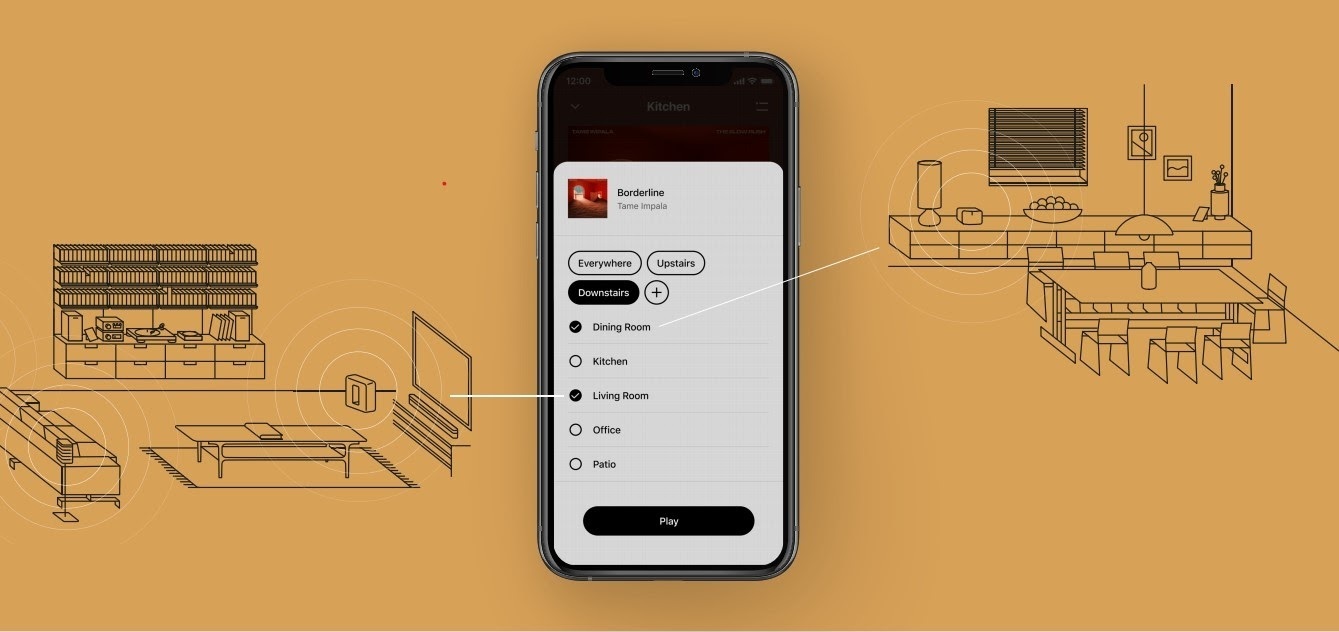
The new S2 app can save groups of rooms to create groups quickly and easily. Once a group is created, you can select it to start playing music and the players will automatically group up. 


High Resolution Audio


With S2, Sonos speakers now have support for high resolution audio, 24-bit, 44.1/48kHz for FLAC/ALAC only. This support is for local music libraries shared from computers and network attached drives. We’ve updated the article on Sonos supported music formats here.

The Sonos Arc is a Dolby Atmos soundbar, and S2 brings support for that audio to Sonos for home theater and music. Dolby Atmos can be read from Dolby Digital Plus, Dolby MAT, and Dolby TrueHD. 


How to get S2

All Sonos systems will be able to update to Sonos version 11.2, which contains some bug fixes and stability improvements. This version is a new S1 update, and compatible with all players. 

Once the 11.2 update is completed, systems compatible with Sonos S2 will receive a notification that the new app is available. You can tap that notification to start updating and the new app which will guide you through updating compatible players to the new platform. If you don’t see the notification banner, you go to System Tools in Settings to check compatibility and update. Sonos S2 is Sonos version 12.0.

You can check our Sonos S2 Compatibility article for a list of products that are compatible with S2.​​​​​


Articles and important information about S2

We will support products on Sonos S1 with bug fixes and security patches, and we will do what we can to ensure they keep working with the music services you love given their limited RAM and processing power.

We’ve put together answers to some of the top questions we’ve seen around S2 here, so please check out the following articles on:

Sonos S2 Overview - A great starting place to learn more about S2.

Sonos S2 Compatibility - Information about the differences between Sonos S2 and S1, including which Sonos products are compatible.

Set up separate S1 and S2 systems - Learn how to set up a separate Sonos S1 system with Sonos products that are not compatible with S2.

Known limitations with separate S1 and S2 Sonos systems - This article covers what you can expect when using two separate S1 and S2 systems.

Set up a separate Sonos S1 system

Remove Sonos products that are not compatible with S2 - Instructions on how to use the product removal tool in the Sonos S1 Controller before updating to Sonos S2.

Information about Trade Up:

If you’re interested in updating older Sonos speakers, here’s all the details on our Trade Up program, a way to get a big discount on any new Sonos products that are S2 compatible.

Trade Up home page - Get a general overview of the Sonos Trade Up program.

Trade Up support article - Step by step instructions on how to trade up your eligible Sonos products.

This topic has been closed for further comments. You can use the search bar to find a similar topic, or create a new one by clicking Create Topic at the top of the page.

230 replies

SirDigitalKnight
Enthusiast I
April 1, 2021

Just an update and PSA for those with URC Total Control and are upgrading S1 to S2, S2 works just fine in place of S1 on URC Total Control. You will of course have to update the MAC of the Sonos unit to the new S2 units mac address for the URC Total Control system so see it.

Renowned Enthusiast II
April 1, 2021

Will our old “Docks” and “CR100s” work with the “new” S1 App / Controller software?

7x CR100, 2x CR200, 5x SP100, 1x ZP80, 7x ZP100, 1x iPod Dock, 1x Boost, 4x Play 1, 3x Play 3, 2x Play 5, 1x PlayBar & 1x Sub.
Airgetlam
April 2, 2021

No. Those products have been retired, long ago.

Bruce
Renowned Enthusiast II
April 2, 2021

No. Those products have been retired, long ago.


I only ask because when I looked up “About Your System” on the Sonos website, it seems to indicate that the CR100s and Docks are compatible with S1.

Scrolling down the list of items in our system we see:-

  1. The Boost, Sub and a few more show as OK with S2.
  2. The Playbar, Play 1s, Play 3s, and a few more show as S2 compatible but “Upgrade Eligible get 15% off”
  3. The ZonePlayers 100s, ZonePlayers 80s, CR200s, Play 5s (1st Gen) and others are not S2 compatible and say “ Sonos S1 Only” and “Upgrade Eligible get 30% off”.
  4. For the CR100s and Docks it says “Sonos S1 Only”. (No mention of being upgrade eligible, presumably because they were subject to older upgrade offer years ago?).

Anyway because the Sonos analysis of our system says that our CR100s work with:- “Sonos S1 Only”, the implication seems to be that the “new” S1 software has been modified to be backwardly compatible with the CR100s and Dock as well as the ZonePlayer 100, ZonePlayer 80 etc.

This is why I have asked Sonos to confirm if this is the case or not.

7x CR100, 2x CR200, 5x SP100, 1x ZP80, 7x ZP100, 1x iPod Dock, 1x Boost, 4x Play 1, 3x Play 3, 2x Play 5, 1x PlayBar & 1x Sub.
Lyricist I
April 18, 2021

Excelente con la nueva actualización

Lyricist I
April 22, 2021

I have upgrade to  S2 as requested on iMac but it won't open in applications. Why not? Any ideas please.

Airgetlam
April 22, 2021

I’d highly recommend you open a new thread, rather than responding here in an announcements thread.

However, there are several things I’d look at in your case. 

  1. Which MacOS are you running? There are minimum requirements, posted here.
  2. Do you have any virus/trojan/VPN software running?
  3. Where did you download the file from? If it wasn’t Sonos directly, trash that file, and download a fresh one. 
  4. Less important to opening the file, but more important immediately after it opens: Are your Sonos devices on the same wifi subnet as your iMac?

It might be worth calling Sonos Support directly to discuss it. Much faster to resolution of the issue that way. 

Bruce
Lyricist I
May 10, 2021

With S2, Sonos speakers now have support for high resolution audio, 24-bit, 44.1/48kHz for FLAC/ALAC only. 

Prominent Collaborator I
May 31, 2021

So I got a Roam.  It only works with S2 and I didn’t want to break my S1 setup, so I thought I’d use is as a separate system - just portable.  And this worked at first and sounded surprisingly good.  The next day, the S2 app couldn’t find my “system”, so I let it “look for it” and it proceeded to, with no warning, update all my S1/S2 components to S2 breaking my setup while also never finding the Roam.  And it looks like I cannot use the software to “downgrade” (repair) the chaos. I’ll probably have to reset and reset up most of my system.

“While we don’t recommend downgrading your products to S1 after updating to S2, it is possible to downgrade cross-compatible products by resetting them and adding them to an existing S1 system.”  - even though the S1 app is telling me to update back to S1, then it errors out. Great.  So reset is probably the only option.

It’s actually worse - that quote above is one of several suggested ways to fix things - it doesn’t work.  So then there is the product removal tool:

“Remove products using the removal tool
Open the Sonos S1 Controller app for iOS or Android.
From the Settings tab, tap System.
Tap System Tools, then tap Remove Products.
Follow the on-screen steps to select and remove your incompatible products.”

It doesn’t work either because the incompatible units make the app unusable and it wants to upgrade first, then fails.

So then you are down to: If Remove Products is grayed out or missing, you can remove any products that are not compatible with S2 by resetting them to their factory settings."  I.e., remove power and repower while holding a play/pause button of the link button.

And elsewhere they say “For normal issues, you should not use the factory reset option. This is kind of the nuclear resort that should be done when every option has been exhausted.”  So I’m down to going nuclear and yes, that’s about how frustrated I am with this.

RESET is a pain if any of your units are in difficult to reach places or if you have stereo pairs or if you have eq tuned them or any combination of theses.  And then there’s the Playbase which refuses to reset using the online instructions. Hmm….

All this for trying out a stupid portable speaker. Jesus!  If you have an S1 system and want to keep it, do not bother with any S2 only products - it’s a mess.

Between this and the annoying nag screen on S1 to update to S2 which won’t work for me and that I have dismissed numerous times it seems like Sonos is hell bent on pushing users to S2 to the point of screwing them over and wrecking the S1 setup.  I’m boxing the Roam up and sending it back.  This entire S1/ to S2 mess is the end of Sonos purchases for me - I’ll just ride out what I have until it becomes obsolete or dies and find whatever has moved in to take its place.

106rallye
May 31, 2021

As I understand it, it should not be possible that Sonos “with no warning, update all (...) S1/S2 components to S2”. I'd be curious for a Sonos reaction on this statement,