

Atom P
Sonos Staff
May 4, 2026
News

Heads up: "Update Required" prompt in the Sonos app
Related content:Software

Hi everyone 🖖

Just wanted to keep you looped in as we roll out the latest app update this week.

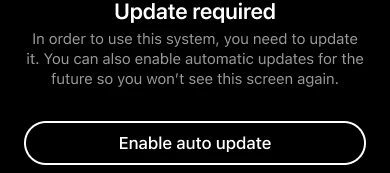
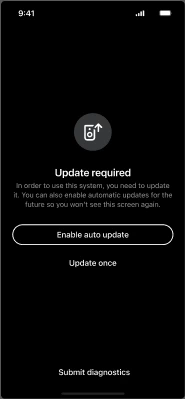
Most of you won't see any changes, but for a small percentage of users running older software, you may encounter an "Update Required" screen. This is a new minimum requirement to make sure your system includes the benefits of our most recent updates, such as improved reliability, streaming performance, and sound quality.
What you need to know:

    •  If your Sonos system is running an older version (more than 6 months old, prior to firmware version 92.0 for modern players or 86.2 for legacy players), you’ll be prompted to update to the latest firmware.

    •  Simply run the update (it should only take a few minutes) and you’re good to go.

    •  You’ll also see an option to toggle on Auto-updates, which we recommend to keep things running smoothly in the future.

If you already have auto-updates enabled, your system will have done this in the background. No actions required on your part.

As always, if you run into any hitches during the update process or have questions about your specific setup, drop a comment below. We’re here to help get you back to enjoying the music 🎶

50 replies

Lyricist I
May 12, 2026

I am getting the same message in the app: “Update Required” with two options “Enable auto update” and “Update once”. Whichever I choose, I am asked to login but after providing login credentials, I am returned back to the same “Update Required” screen, making it a loop. I am not able to use my Sonos system now. Anyone else having this issue? Thanks

Airgetlam
May 12, 2026

I updated my Mac version yesterday with zero issues, as well as my iOS versions today. Have you called Sonos Support to discuss it?

Bruce
Lyricist III
May 12, 2026

I am getting the same message in the app: “Update Required” with two options “Enable auto update” and “Update once”. Whichever I choose, I am asked to login but after providing login credentials, I am returned back to the same “Update Required” screen, making it a loop. I am not able to use my Sonos system now. Anyone else having this issue? Thanks

Oh man awesome work Sonos, not surprised with this given how buggy the app and update process is that people are gonna have this issue. How about you warn people but do not lock them out ever from using their systems? 

Lyricist I
May 12, 2026

I managed to update the Sonos device via the Windows application, I don’t know why this happened in Android (I am using Android 16). Thank you for your feedback.

106rallye
May 13, 2026

As explained: they don’t. App and firmware versions always needed to be within a few version number of each other. You can still set your system to not do automatic updates and you still need your phone to also not update the app automatically. Sonos is just being more transparent about this.

I am always amazed that on the one hand there are people on this community that go out of their way to have all Sonos devices on separate IOT networks and on the other hand you have people that gladly refuse to get (security) updates on their connected devices……

Prodigy III
May 13, 2026

Edited.

jgatie
May 13, 2026

Again folks, don’t take the bait.  It’s the same stuff that keeps coming around again and again.  The names change, but the shtick stays the same.  Ignore it, it’s not worth the time.

Lyricist I
May 17, 2026

As a result of the forced app update I can no longer use my Sonos Play:1. The update keeps returning an error so I can’t update it & I can’t use my speaker. Sonos please help! You can’t just cut support to legacy products that work perfectly well. It’s not a sustainability message that you’d like shared!!!

buzz
Grand Maestro
May 17, 2026

Can you show us the error message?

106rallye
May 18, 2026

Just because your speaker doesn’t update (which is very annoying, I understand this), does not mean Sonos cut support to older devices. All Sonos devices except for the remotes are still supported, unlike older devices from other manufacturers.

You could try and call Sonos.