

Atom P
Sonos Staff
May 4, 2026
News

Heads up: "Update Required" prompt in the Sonos app
Related content:Software

Hi everyone 🖖

Just wanted to keep you looped in as we roll out the latest app update this week.

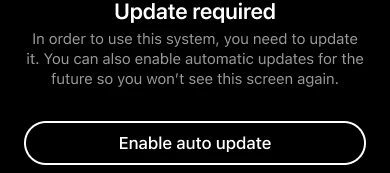
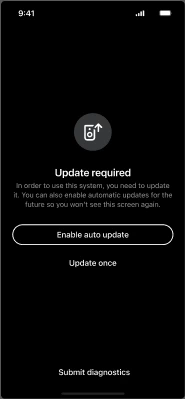
Most of you won't see any changes, but for a small percentage of users running older software, you may encounter an "Update Required" screen. This is a new minimum requirement to make sure your system includes the benefits of our most recent updates, such as improved reliability, streaming performance, and sound quality.
What you need to know:

    •  If your Sonos system is running an older version (more than 6 months old, prior to firmware version 92.0 for modern players or 86.2 for legacy players), you’ll be prompted to update to the latest firmware.

    •  Simply run the update (it should only take a few minutes) and you’re good to go.

    •  You’ll also see an option to toggle on Auto-updates, which we recommend to keep things running smoothly in the future.

If you already have auto-updates enabled, your system will have done this in the background. No actions required on your part.

As always, if you run into any hitches during the update process or have questions about your specific setup, drop a comment below. We’re here to help get you back to enjoying the music 🎶

50 replies

Atom P
Atom PAuthor
Sonos Staff
May 6, 2026

Because in the past, if your system and apps got out of sync, you would lose setup functionality immediately, and would eventually (after ~3-4 releases) lose all functionality.  You just didn’t have the specific 6 month limit.

This is correct. While I won’t say “nothing has changed”, I would say that is has changed back to the way it used to be...kinda.

It used to be the case that both the app and the firmware had to be completely up-to-date to be compatible with each other (or otherwise, both had to leave automatic updates off so they’re still on mutually compatible versions, even if they’re not fully up-to-date). That is the true “cabin in the woods scenario”, as described in the article I wrote, linked above:

All Sonos products and controllers need to be on the correct versions at all times for compatibility; if your mobile device continues to have an internet connection (via LTE or otherwise), you will need to turn off automatic app updates to prevent an accidental version mismatch

  • The only way to recover from a version mismatch is to get all devices and controllers to the same supported version again; this will require an internet connection

In this case, you can be as far as 5+ months (but less than 6 months) out-of-date on the firmware, and it will still work with the newest app. That wasn’t how it worked previously, and I have no idea if this is how it will be moving forward. But for now, there’s some wiggle room between how current the app can be with respect to how current the firmware needs to be. 

jgatie
May 6, 2026

Because in the past, if your system and apps got out of sync, you would lose setup functionality immediately, and would eventually (after ~3-4 releases) lose all functionality.  You just didn’t have the specific 6 month limit.

This is correct. While I won’t say “nothing has changed”, I would say that is has changed back to the way it used to be...kinda.

It used to be the case that both the app and the firmware had to be completely up-to-date to be compatible with each other (or otherwise, both had to leave automatic updates off so they’re still on mutually compatible versions, even if they’re not fully up-to-date). That is the true “cabin in the woods scenario”, as described in the article I wrote, linked above:

All Sonos products and controllers need to be on the correct versions at all times for compatibility; if your mobile device continues to have an internet connection (via LTE or otherwise), you will need to turn off automatic app updates to prevent an accidental version mismatch

  • The only way to recover from a version mismatch is to get all devices and controllers to the same supported version again; this will require an internet connection

In this case, you can be as far as 5+ months (but less than 6 months) out-of-date on the firmware, and it will still work with the newest app. That wasn’t how it worked previously, and I have no idea if this is how it will be moving forward. But for now, there’s some wiggle room between how current the app can be with respect to how current the firmware needs to be. 


So (if my understanding is correct) the latest release is actually more forgiving than before, in that the app/system can be up to 6 months out of sync and still have full functionality?  Whereas in the past, an app out of sync with the system firmware lost most of it’s setup functions, regardless of the time spent out of sync?  

Lyricist III
May 6, 2026

More forgiving than before when? AFAICT they haven’t don’t anything like this (version requirement) in the past two years. 


jgatie
May 6, 2026

???

Smilja
May 6, 2026

More forgiving than before when? AFAICT they haven’t don’t anything like this (version requirement) in the past two years.


It’s not really fair to compare a complex multi-room system to an iPhone or other standalone consumer electronics. I can’t imagine any multi-room manufacturer putting up with outdated software for long, especially when it comes with extra costs.


I suppose this is envisioned as a way to reduce support calls. [...]


»And the world is like an apple whirling silently in space, Like the circles that you find in the windmills of your mind.« (›Windmills Of Your Mind‹ [1967]. Music by Michel Legrand ; English lyrics written by Alan & Marilyn Bergman)
Airgetlam
May 6, 2026

As far back as I can remember, there’s been a loose connection between the app version (controller) and what is running on the system (speakers). That extends back to the late 2000s. I’ve had to call in in the past to get an un-updated device I’d been charged with maintaining up to a version that could be updated by the current controller and subsequently updated without a call. This would have been long before the S1/S2 split, back around 2015 or so. 

Bruce
Stanley_4
Grand Maestro
May 6, 2026

I'm not unhappy with the way things are and have been working, where new app versions require compatible firmware but the firmware will continue working, at some level, with older apps.

The rare cases of systems with no Internet connection to update firmware shouldn't be a reason to impact a majority of users.

Might be nice to have a way to update firmware over a cellular or other connection if there are enough users that would help to be worth the investment.

Not the full use of the system that isn't (below) supported, just a firmware update tool that can work over otherwise unsuppoted connections. Maybe a tool to download/cache the files needed for updating with no network connection necessary? (My router offers that as an update option and it is quite handy.)

https://support.sonos.com/en-us/article/sonos-system-requirements


Lyricist III
May 6, 2026

​@Smilja Sonos S1 would like a word. 

jgatie
May 7, 2026

Just ignore it folks, don't take the bait.

buzz
Grand Maestro
May 7, 2026

With respect to remotely located devices, beyond Internet coverage, it would be possible to develop an application that could be loaded on to a computer or portable drive that could then update the remote system, but I don’t think that the development cost could be justified.