

Atom P
Sonos Staff
May 4, 2026
News

Heads up: "Update Required" prompt in the Sonos app
Related content:Software

Hi everyone 🖖

Just wanted to keep you looped in as we roll out the latest app update this week.

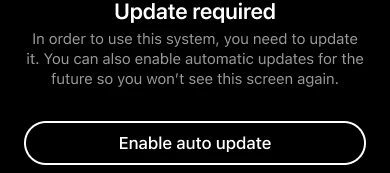
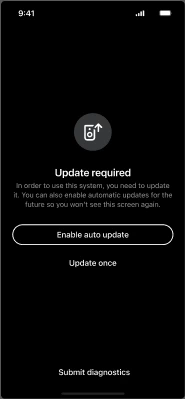
Most of you won't see any changes, but for a small percentage of users running older software, you may encounter an "Update Required" screen. This is a new minimum requirement to make sure your system includes the benefits of our most recent updates, such as improved reliability, streaming performance, and sound quality.
What you need to know:

    •  If your Sonos system is running an older version (more than 6 months old, prior to firmware version 92.0 for modern players or 86.2 for legacy players), you’ll be prompted to update to the latest firmware.

    •  Simply run the update (it should only take a few minutes) and you’re good to go.

    •  You’ll also see an option to toggle on Auto-updates, which we recommend to keep things running smoothly in the future.

If you already have auto-updates enabled, your system will have done this in the background. No actions required on your part.

As always, if you run into any hitches during the update process or have questions about your specific setup, drop a comment below. We’re here to help get you back to enjoying the music 🎶

50 replies

Atom P
Atom PAuthor
Sonos Staff
May 5, 2026

Does this mean that systems being used at an offline location (boats, remote homes, etc.) will stop working? 

If the app hasn’t been updated and the system also hasn’t been updated, there will be no change. This only impacts users who have been updating the app, but the system hasn’t been updated in more than 6 months.

No changes specifically for using Sonos in an offline environment (Sonos on a boat), because presumably the app also hasn’t been updating. 

kdowling
May 5, 2026

Does this mean that systems being used at an offline location (boats, remote homes, etc.) will stop working? 

If the app hasn’t been updated and the system also hasn’t been updated, there will be no change. This only impacts users who have been updating the app, but the system hasn’t been updated in more than 6 months.

No changes specifically for using Sonos in an offline environment (Sonos on a boat), because presumably the app also hasn’t been updating. 

I think that might be a bad assumption. The app is on your phone and has been kept up to date. The remote system has not, and now the controller refuses to work because a system update is ”required”. 

Atom P
Atom PAuthor
Sonos Staff
May 5, 2026

I think that might be a bad assumption. The app is on your phone and has been kept up to date. The remote system has not, and now the controller refuses to work because a system update is ”required”. 

In that scenario, you’re correct. If the mobile app has been updating and the system hasn’t for at least 6 months...regardless of whether it’s in a home, or on a boat, or out in the middle of the woods...the system update will be required. 

Local Superstar
May 5, 2026

Online systems where firmware or software (app) haven't been updated for more than 6 months are OK though, yes?

Prodigy III
May 5, 2026

I’d imagine so. In the same way an improved sewerage system would be of no consequence to you if you prefer to leave your toilet unflushed.

Atom P
Atom PAuthor
Sonos Staff
May 6, 2026

Online systems where firmware or software (app) haven't been updated for more than 6 months are OK though, yes?

tl;dr - Yes.

Depends on what you mean by “OK though”, so I might describe it slightly differently:

If “automatic updates” within the Sonos app are disabled, and app updates are disabled on each controller that’s used with Sonos (so either the Apple App Store or the Google Play Store), no update is required. Obviously we believe you’re missing out on some valuable updates, and we’d encourage you to take advantage of those improvements...but the app won’t require a change.

If “automatic updates” within the Sonos app have been disabled for at least 6 months (prior to firmware versions 92.0/86.2), but automatic app updates are enabled in the relevant app store, then the new app will see the old firmware and you’ll get the “Update Required” screen shown above. 

If “automatic updates” within the Sonos app have been disabled for less than 6 months (meaning your system firmware is on 92.0/86.2 or higher), and automatic app updates are enabled in the relevant app store, then no update is required. But we’d still recommend it. 

That’s a long way of saying “yes”, but it assumes that you mean that automatic updates for the app store are also disabled.

jgatie
May 6, 2026

Basically, nothing has changed, except the messaging, and the 6 month specifics.  Because in the past, if your system and apps got out of sync, you would lose setup functionality immediately, and would eventually (after ~3-4 releases) lose all functionality.  You just didn’t have the specific 6 month limit.

Moderator Note: Modified in accordance with the Community Code of Conduct.

kdowling
May 6, 2026

Basically, nothing has changed, except the messaging, and the 6 month specifics.  Because in the past, if your system and apps got out of sync, you would lose setup functionality immediately, and would eventually (after ~3-4 releases) lose all functionality.  You just didn’t have the specific 6 month limit.

Moderator Note: Modified in accordance with the Community Code of Conduct.

I wouldn’t say nothing has changed. I can take my updated phone app to the cabin in the woods and still play local music on non-up-to-date system. With this change, that’s no longer the case. The app will refuse to play until the system is updated. It’s not the end of the world and I really don’t care. There are plenty of third party apps that will continue to work perfectly,

Edit to say... that’s a hypothetical. I don’t have a cabin in the woods and all my music playing sonos gear was downgraded to S1 last year. Everything works well and will continue to.

jgatie
May 6, 2026

I wouldn’t say nothing has changed. I can take my updated phone app to the cabin in the woods and still play local music on non-up-to-date system. With this change, that’s no longer the case. The app will refuse to play until the system is updated. It’s not the end of the world and I really don’t care. There are plenty of third party apps that will continue to work perfectly,

Edit to say... that’s a hypothetical. I don’t have a cabin in the woods and all my music playing sonos gear was downgraded to S1 last year. Everything works well and will continue to.


Actually, that scenario is no different than it used to be, except the length of time is specified.  Previously, if you had an up to date app and tried to use it with the outdated system firmware at your cabin, it would not work for most settings menus, and it would not work at all if it was out of date by 3-4 releases.  Now it won’t work after 6 months.  Same deal, except for the 3-4 releases vs. 6 months stipulation.  

If you don’t update the app, and use it with your cabin scenario, it would work before, and it will still work now. 

kdowling
May 6, 2026

Actually, that scenario is no different than it used to be, except the length of time is specified.  Previously, if you had an up to date app and tried to use it with the outdated system firmware at your cabin, it would not work for most settings menus, and it would not work at all if it was out of date by 3-4 releases.  Now it won’t work after 6 months.  Same deal, except for the 3-4 releases vs. 6 months stipulation.  

If you don’t update the app, and use it with your cabin scenario, it would work before, and it will still work now. 

I don’t think I’ve ever attempted to use the sonos controller on firmware more than 1-2 versions from current. It just disabled the setup / configuration options. But music playback wasn’t affected. I assumed that would continue being the case. Thanks for the clarification.