

Atom P
Sonos Staff
May 4, 2026
News

Heads up: "Update Required" prompt in the Sonos app
Related content:Software

Hi everyone 🖖

Just wanted to keep you looped in as we roll out the latest app update this week.

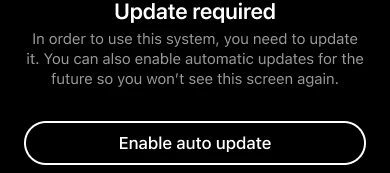
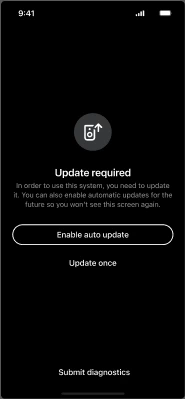
Most of you won't see any changes, but for a small percentage of users running older software, you may encounter an "Update Required" screen. This is a new minimum requirement to make sure your system includes the benefits of our most recent updates, such as improved reliability, streaming performance, and sound quality.
What you need to know:

    •  If your Sonos system is running an older version (more than 6 months old, prior to firmware version 92.0 for modern players or 86.2 for legacy players), you’ll be prompted to update to the latest firmware.

    •  Simply run the update (it should only take a few minutes) and you’re good to go.

    •  You’ll also see an option to toggle on Auto-updates, which we recommend to keep things running smoothly in the future.

If you already have auto-updates enabled, your system will have done this in the background. No actions required on your part.

As always, if you run into any hitches during the update process or have questions about your specific setup, drop a comment below. We’re here to help get you back to enjoying the music 🎶

50 replies

buzz
Grand Maestro
May 18, 2026

Players from the original 2005 batch are still supported. But, due to limited memory and processor speed, these old units can’t run the latest features, such as voice control, demanded by many modern users.

Prodigy III
May 18, 2026

As a result of the forced app update I can no longer use my Sonos Play:1. The update keeps returning an error so I can’t update it & I can’t use my speaker. Sonos please help! You can’t just cut support to legacy products that work perfectly well. It’s not a sustainability message that you’d like shared!!!

Try running the update from the desktop app (search Sonos desktop app download). That can often succeed in updating where phones etc fail. 

Lyricist III
May 21, 2026

Hey Sonos, can you tell me why I couldn’t update my system and thus not able to use either my app nor any speakers due to an infinite update loop?  I couldn’t quit the update process to investigate any system issues.  An attempt to use an up-to-date controller on a Windows machine was no help either.


The solution I found (and I’ve had to do this before):

 - Isolate (power-off) random speakers to see if app starts working

 - turn on individual speakers, check each for an update

 - rinse and repeat until update sticks or problem returns

In today’s latest episode I had to isolate my pair of Era 300’s, remove them as surround speakers (connected to an Arc), check again for any other speaker updates, then one-by-one power up the Era, update then add both back as surrounds.


In almost every case it has been my pair of Era 300’s used as surrounds on and Arc (if not the Era’s, then it’s the associated subwoofer).  Is there a bug with passing updates to the Era’s / subwoofer when they’re connected as accessories to an Arc?  It’s getting pretty annoying to have to intrusively interfere with my system just to apply and update to regain app control.


To be clear, once this update failure occurred the app on both my iPhone and iPad (IOS 26.4.2 & iPadOS 26.4.2) was unusable.  It was stuck at the black update required screen and that was all.  Useage was only possible after I’d powered-down speakers (obviously including the Era 300’s that were the problem).


Please advise what a better process would be.

JB

Stanley_4
Grand Maestro
May 22, 2026

Often powering down all Sonos and rebooting the router before powering them back up will clear the issue.  Not doing all often doesn't work.

If it happens often setting DHCP reserved addresses will usually stop it. 

Local Superstar
May 22, 2026

Please advise what a better process would be.

JB

I would create a new thread, and describe your network. I strongly suspect if the bonded HT speakers are having issues with updates, there is an ARP Spoof/Poison and/or ARP Cache issue being detected on your network equipment when the speakers are updated. If you can detail your network equipment, there is probably a setting that will help. I doubt reserving IP addresses, especially for HT speakers, will help.

User117655
Prodigy II
May 22, 2026


Please advise what a better process would be.

JB

I had this exact issue with bonded 300's and Sub failing updates, the same solution too. 

However, as ​@craigski suggests, it turned out to be anti ARP spoofing on my router blocking the speakers. Removed the ARP entries for the bonded speakers and no issues with updating since... 

Stanley_4
Grand Maestro
May 22, 2026

Reserving addresses is not a cure-all but it does solve a long running class of problems, even Sonos has acknowledged that.

Reserving the addresses only takes a few minutes, hurts nothing, and can be undone in a couple minutes.

Trying to diagnose the IP issues(s) has proven to be beyond the skills of any who have posted about it here, leaving the "try it and see" option. 


jgatie
May 22, 2026

Gee ​@Mangoe, we hardly knew ye.  😉

MoPac
Headliner III
July 14, 2026

I did not receive any requirement message.  I updated the app by looking in the Apple App Store; Never wait till IOS tells me there is an update.  Then updated the firmware.  All went well.  Guess if I waited I would have gotten a warning.

Prodigy III
July 14, 2026

Slightly tangential but I always check the App Store on a Tuesday at 3pm UK time as that’s when the updates tend to roll out - and was pleasantly surprised today to see today’s option to update the layout (for speaker selection simplicity) and the volume control improvements.