Liz P.
Sonos Staff
Nov 3, 2026 2:47 PM UTC

3rd Nov 2026 πŸ“² New Sonos 27 App & Player Updates Now Available! πŸ”Š

Related content:Software

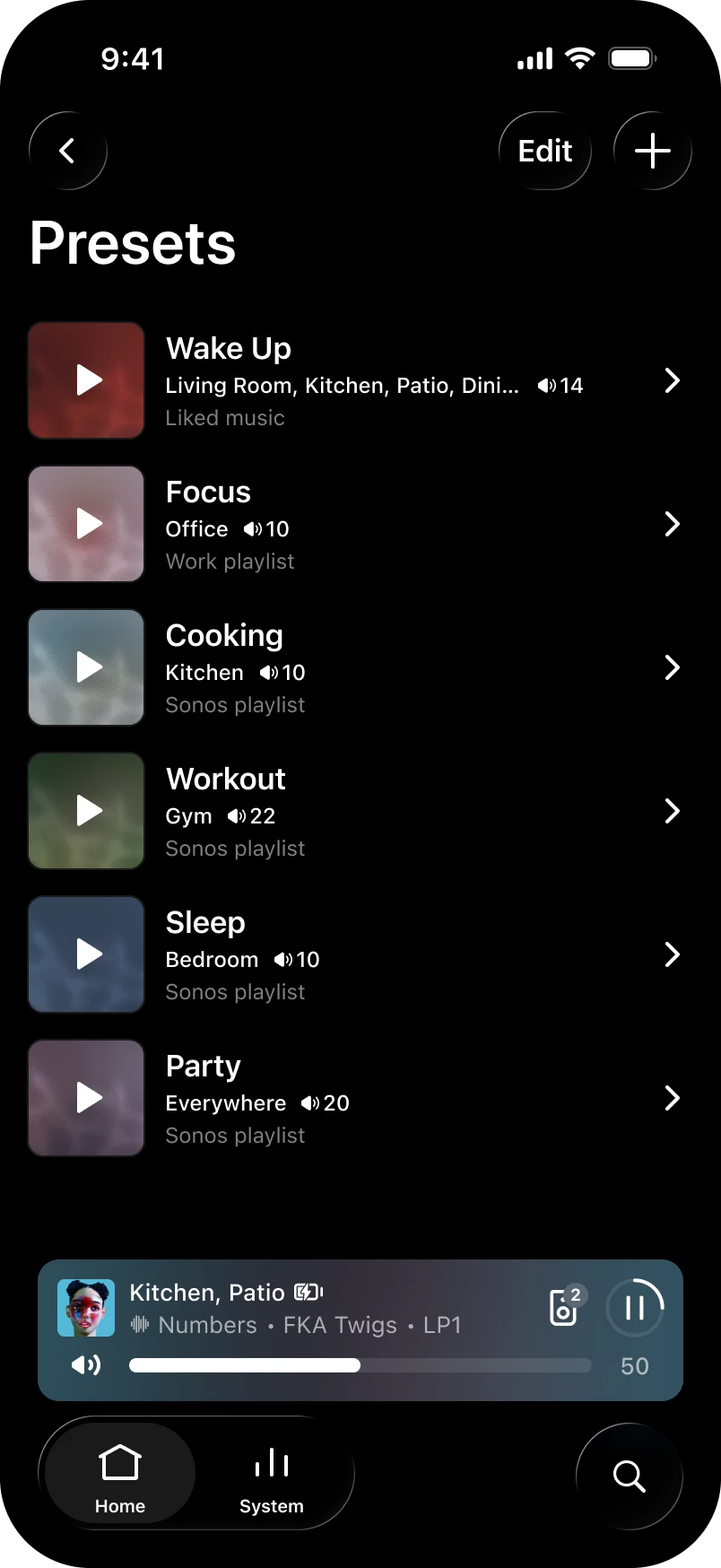
Hey all! We've got a new update live for both iOS and Android. This update brings an often requested feature: Presets - now you can start playback in a chosen room at a set volume with one tap!Β 

Want the full history of what we've been up to? Check out our App Release Notes here and System (Player) Release Notes here. This release is Sonos 27.3 for both App and Player.

Sonos app releases and features are rolled out over the course of several days, and in some instances, weeks, so you may not immediately receive the update or feature. You can check for updates in your iOS or Android app store to download the latest version of the app when it’s available. If you're on iOS and want to nudge it along, head to the App Store, pull down on your Account page (the one showing pending updates), and give it a refresh. That usually does the trick. Now, the details:

Β 

App Update

  • iOS - 91.00.41
  • Android - 91.00.33

Player Update

  • Modern: 98.0-82170
  • Legacy: 86.11-82170
  • Spotify volume levels, whether you use the Sonos app or direct control, are now more consistent with other services on Sonos.

What's New:

  • Presets - Start playback of pre-saved content in a chosen room at a specific volume with one tap.
  • Reorder your favorites - Arrange your saved content in preferred order by editing the "Featured" section in Sonos Favorites.
  • Swipe to skip - Swipe on Now Playing or the mini player to skip tracks.
  • Update network experience - Improvements to the experience when updating your network.
  • Sonos 27voice - Available starting Fall 2026 and supports US-English. If you're in the United States, you can opt in to try it and share feedback during early access. Signups begin soon - more to come.

iOS only

  • System Health - Find self-help info to spot potential issues and fixes for your system with the new System Health feature in the Help Center.

Android only

  • Services - You can now rearrange your list of connected services.

Β 

Ace Ultra - 3.0.10

  • Ace Vocal Guidance - Get spoken prompts when you change noise control modes, check battery percentage, or switch Bluetooth connections. You can turn it on or off in the app under Headphones > Settings > Hardware controls > Vocal guidance.

Β 

Let us know when you try out Presets. Tell us how you're using them, like a morning routine or a go-to party setup. We'd love to hear what's working for you.Β 

As always, feedback is welcome. The good, bad, or in-between. We read it all.Β 

Β 

69 replies

Lyricist I
Nov 15, 2026 8:41 AM UTC

Love the preset feature; just needs playlist shuffle as a settingΒ to make it awesome

Translate
Schlumpf
Virtuoso
Nov 15, 2026 2:11 PM UTC

When I setup a preset if see the option to activate a shuffle icon (crossed arrows). Also for playlists…

Translate
Ralf
Local Superstar
Nov 15, 2026 11:23 AM UTC

Whilst (still) waiting for the Presets, I have had a read of the Optimizely website. One of the preserved benefits of these deployment systems, is the ability to bypassΒ App Stores review process:

https://www.optimizely.com/optimization-glossary/feature-flags

This can be especially powerful for mobile app developers, who can use feature flags to release or roll back new features without having to go through the length app store review process.

Β 

However there has been 3 iOS Sonos App updates since 3/11/26: 27.3, 27.4 and 27.4.1 in less that two weeks, to support the Optimizely roll out. Which is sort of contradictory to the selling point of feature flags?

Translate
Smilja
Nov 15, 2026 1:21 PM UTC

Like you brought up earlier, it might be a glitch. Or perhapsΒ just eager anticipation.Β πŸ™‚

Translate
Β»And the world is like an apple whirling silently in space, Like the circles that you find in the windmills of your mind.Β« (β€ΊWindmills Of Your Mindβ€Ή [1967]. Music by Michel Legrand ; English lyrics written by Alan & Marilyn Bergman)
Contributor I
Nov 16, 2026 11:23 AM UTC

Does anyone else see inaccurate product colour when joining or unjoining stereo pairs?Β  the new Sonos One shows correctly as white, then in the Pairing Card it shows as black then becomes White again when paired.

Β 

Not a massive issue but more concerned its a me-thing rather than an app-thing :)

Translate
AjTrek1
Nov 16, 2026 12:22 PM UTC

What is the β€œNEW” Sonos One? They are discontinued. To your question I haven’t noticed the color change in any of my stereo pairsΒ but then again I’m not pairing and unpairing speakers. Also, I no longer own the discontinued Sonos One (Gen1 nor Gen 2).

Translate
Together Everyone Achieves More = T.E.A.M.
AjTrek1
Nov 16, 2026 3:45 PM UTC

I still do not have the preset option on my Android tablet. Strangely, over the weekend upon opening the Sonos app the presets appeared for a second (and I mean a second) and I haven’t seen them since. Yes… I deleted the app and signed in again several times. No Joy!

Translate
Together Everyone Achieves More = T.E.A.M.
Smilja
Nov 16, 2026 4:28 PM UTC

Β 

Β 

I cannot teach him. HeΒ has no patience.

Translate
Β»And the world is like an apple whirling silently in space, Like the circles that you find in the windmills of your mind.Β« (β€ΊWindmills Of Your Mindβ€Ή [1967]. Music by Michel Legrand ; English lyrics written by Alan & Marilyn Bergman)
Local Superstar
Nov 16, 2026 5:54 PM UTC

β€˜Tantelising’ FeaturesΒ - I’m the same boat. Hats off to Sonos Marketing.

Translate