Alternative control method for Sonos system

  • June 4, 2026
  • 10 replies
  • 74 views

Hello all.

Have been a Sonos user for well over a decade.  We have several Ones, Threes, Fives, Beams, Subs and Amps, and a brand new Roamer.  Still amazed at the ease of connection.  I know there’s lots of bad reviews out there, but we’ve focused on connecting the devices by ethernet - not wifi unless absolutely impossible.  So now we have the Roamer and and an Amp connected by wifi, and all else is copper connected.  And oddly enough, using the microwave in the kitchen still causes the Amp to loose connection.  Old microwave, brand new microwave - no difference.  But we live with that cause the rest of the system is so robust.

Anyway, I didn’t sit down to talk about that.  What I wanted to talk about was Sonos useless Android and PC control apps.  Honestly, I think the engineers at Sonos want us to only listen to Spotify…. NOT!!!  These apps make it impossible to browse our NAS based library (>10k tracks).  But there is hope.  I’ve found an excellent media management app called Media Monkey for PC that not only manages our very large library, but also streams directly to the network connected Sonos devices.  No need to use the USELESS Sonos apps on either PC or Android.  And bonus, there is a companion app  for Android that that allows remote control of the MM server running in the office.  REDEMPTION!

So, if you have not embraced the streaming only ecosystem, and want to use your Sonos system to listen to your self-owned, self-controlled, self-managed, old-man-shaking-stick-at-cloud music library I recommend giving Media Monkey a serious look.


10 replies

Airgetlam
  • June 4, 2026

Odd. I listen to all my music on my NAS without difficulty, on a daily basis. Since, if memory serves, Sonos released the original PLAY;:5 (which, at the time, wasn’t identified as the Gen 1, although it is now). Been listening through what has become S1 and then S2, using SMB v1 originally, now SMB v3.

I’m happy you’ve found something that works for you, but the Sonos software does everything I need it to do. 


  • Author
  • Contributor I
  • June 4, 2026

Hey Bruce.  I must be missing something.  In either the PC or the Android app when I try to surf my Music Library by Album I am inundated with duplicate lines for every track in every album in every folder …  (use your imagination)…  What am I doing wrong?  Why can’t I just see the library album-by-album then tap into an album to pick a track?

And picking specific tracks to add to a one-off playlist for the afternoon is way too much scrolling and swiping for this old man.  The MM app on the PC allows quick filtering of genres, albums, artists, etc. and easy addition to the queue to setup the day’s music.  Kinda what the Sonos apps used to be like before The Great Wasted Change but 1000% better.  

If the native apps work for you - good.  If you’re looking for more control, there are alternatives.

D


controlav
Forum|alt.badge.img+24
  • Lead Maestro
  • June 4, 2026

Sounds like the library index is messed up, either because multiple shares have been indexed, or some weird problem with the mp3 metadata. Hard to be sure without more info.

My local library lives on a Windows Server and has never given me any trouble, on S1 or S2.


Stanley_4
  • Grand Maestro
  • June 4, 2026

Any chance you are using a NAS root level share instead of sharing just your music directory? 

That too high level share can include backups, recycle-bin copies or just duplicates.

Worst case submit a diagnostic and call Sonos as they have access to the library's logs and settings we users don't. 


  • Author
  • Contributor I
  • June 4, 2026

@controlav  and ​@Stanley_4 

Thx for your replies but you’ve all got me at technical loss.  I don’t think I understand your suggestions.

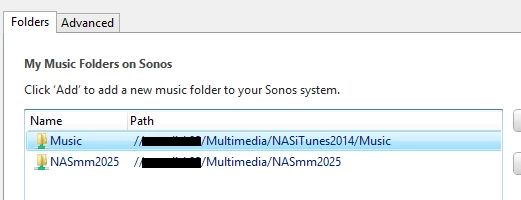
All Sonos devices and controllers are S2.  The library is in two pieces on a QNAP NAS.  The original piece is (was) the family iTunes library containing mp4’s.  The second piece is a rebuilt ripped CD library containing all FLAC’s.  90% of the content is in the new library.  The goal will be to eliminate all the mp4’s and have only the FLAC library in the end.

However, this issue of multiple lines for an album has been around since the The Great Wasted Change.  I only started separating our content last Christmas.

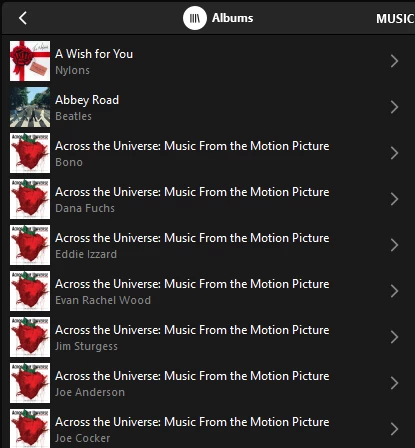
Couple screenshots to show what I’m talking about.  First, the multi-line album display…  You can see that every track in a compilation album (Across the Universe) reports as a separate album with one track.


Next, a snip of the library settings showing what is mapped…

I confirm that MM reads both these libraries with full clarity and accuracy.  I also confirm the two folders are exclusive and there is no common content.

Thoughts?


Stanley_4
  • Grand Maestro
  • June 4, 2026

The shares look good, they shouldn't be an issue.

I'd double check the directory listing on the NAS to insure there are no links to other locations. As it is Linux it will hide directories and links starting with a period. This command in a NAS shell should show everything. ls -al. (They are lower case Ls not 1 or I which silly font designers never consider a problem.)

ls command and options https://man7.org/linux/man-pages/man1/ls.1.html

If that isn't it, the support call is likely needed.


buzz
  • June 4, 2026

By default some NAS drives establish a backup folder that contains edited tracks, then present this folder to the indexer ahead of the actual library. The usual user complaint is “updates are ignored” because the indexer then ignores the following, current files as duplicates. If you have moved things around or fussed with file names, there could be close duplicates in the index. Make sure that there is no automatic backup or recovery folder in the library paths.


Forum|alt.badge.img+7
  • Prodigy I
  • June 4, 2026

@fam29  - Have a search on here for tagging compilation albums using and populating 'Album Artist'/'Compilation' tags…

May be an issue for at least some of your album multiples and potentially the ones you specifically mention above 🤞


  • June 4, 2026

Like ​@User117655 said, that looks like a tagging issue. Compilation tagging changed a bit from the S1 days. This might help: Music Library - Album Artist metadata change

There has also been a recent Sonos app change for Music Library album grouping. Albums can now be grouped by iTunes Compilation tag, Album Artist tag, or both. Look in Settings → Music Library → under Music Library Settings, Select “Group Albums By”.


  • Author
  • Contributor I
  • June 4, 2026

Cue the choir!!! Thank you ​@kdowling !