A fresh coat of paint and some new features coming to the Community Forums

  • September 18, 2026
  • 43 replies
  • 571 views

Show first post

43 replies

AjTrek1
  • September 21, 2026

I’m not sure about the confusion being sited regarding explanation of a Green LED.

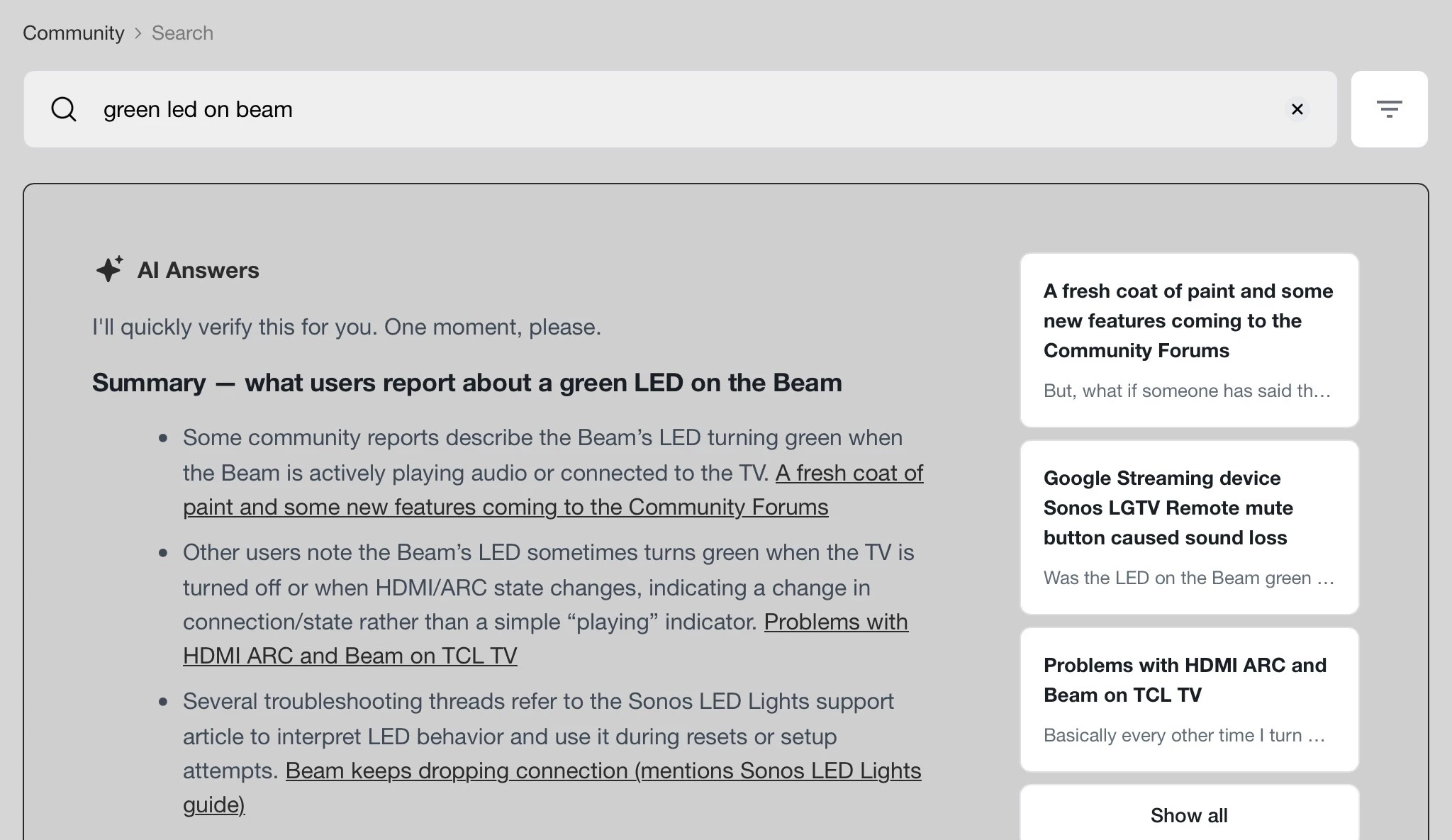
The 1st pic shows results found when typing “ Green LED” inside the community search “AI”.

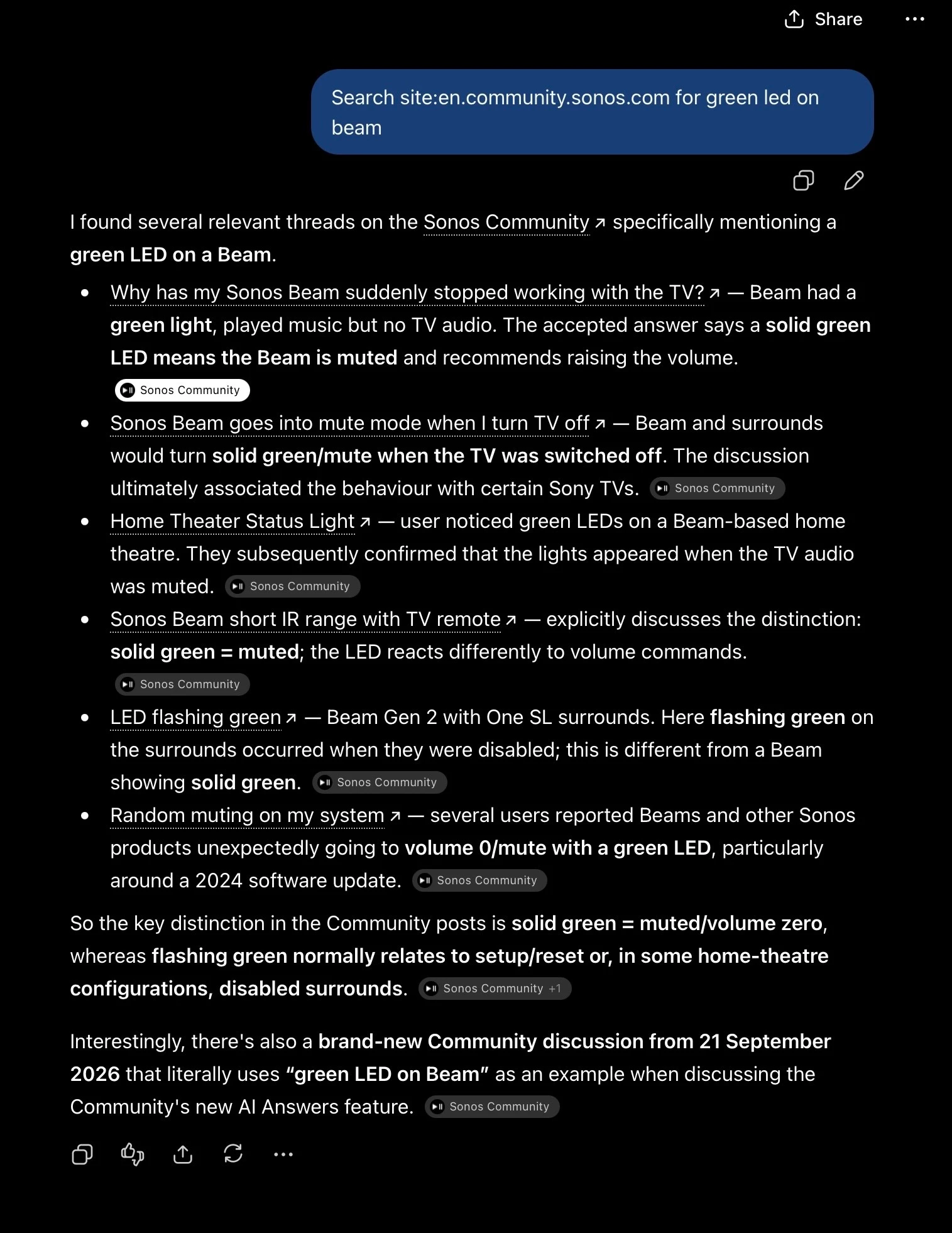
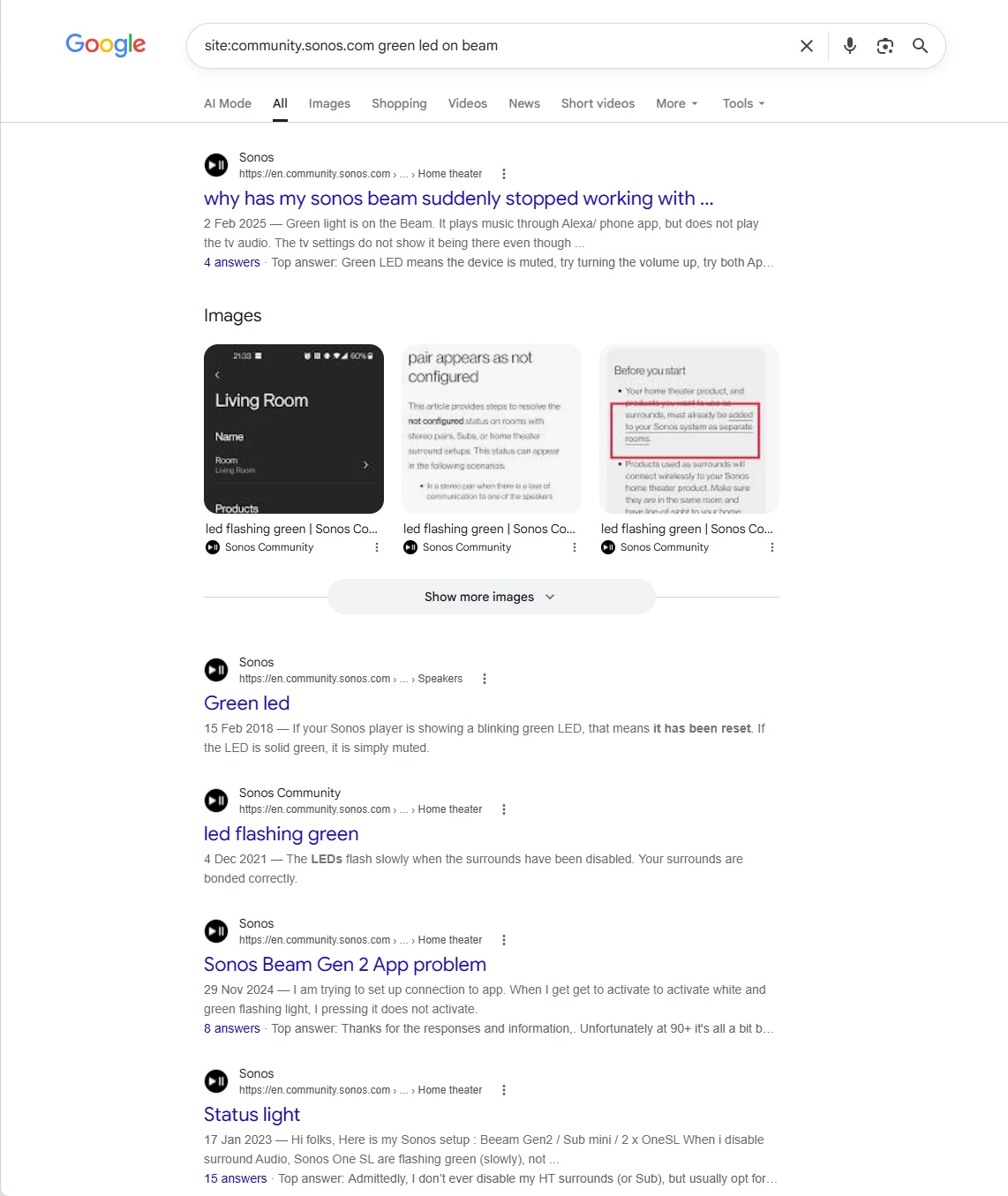
The 2nd pic shows results found when typing “Green LED” in Support when on the Sonos.com page available to anyone (meaning no community membership required).

They’re not exact but do cover what the possibilities are for a Green LED.  The improvement for the community AI search would be to have mimic more closely what the Support search returns.


That wasn’t the search. Try “green LED on Beam”.


I see your point; however That’s a learning issue for the AI. That should be a simple fix by the person(s) responsible. In this instance I see it as an issue that ​@Keith N might address with those responsible.

I’ve learned that with AI too much information can be just as detrimental as too little. In the this instance Green LED would suffice ( i.e. less is more 😂).


Corry P
Forum|alt.badge.img+19
  • Sonos Staff
  • September 22, 2026

To be fair to this one particular AI, it has not been trained on all things “Sonos”. It merely summarises the results of a search of this platform (and not of the support pages) - if no-one has explicitly stated here on the forum that a “green LED on a Beam means it is muted”, it’s not going to return that result.


buzz
  • September 22, 2026

But, what if someone has said that a “green LED on a Beam means it is playing”?


And, now what will AI do with these two conflicting statements?


Corry P
Forum|alt.badge.img+19
  • Sonos Staff
  • September 22, 2026

Hi ​@buzz 

It would presumably give you a summary containing both results - that’s all it’s doing in the first place.


Mr. T
  • September 22, 2026

But, what if someone has said that a “green LED on a Beam means it is playing”?


And, now what will AI do with these two conflicting statements?


Lol, well you’ve already done it with this post. A search for “green led on beam” now brings back this.


So in summary, the AI answers provided can be completely useless to an inexperienced user looking for help.


Mr. T
  • September 22, 2026

ChatGPT is much more helpful than the Sonos AI answers here.


Corry P
Forum|alt.badge.img+19
  • Sonos Staff
  • September 22, 2026

Hi ​@Mr. T  

Lol, well you’ve already done it with this post. A search for “green led on beam” now brings back this.

So in summary, the AI answers provided can be completely useless to an inexperienced user looking for help.

Yup, I was worried about that!

This is what comes of talking about what-ifs 😅

I don’t think the AI has much in the way of reasoning - it’s just collating search results and turning them into some paragraphs.

On the plus side, that means it’s less likely to be one of the AIs that try to kill us all in the next 10 years.

Or have I messed things up by saying that? 🤔


Forum|alt.badge.img+18
  • Local Superstar
  • September 22, 2026

What I want to see is a result for what I vaguely remember @buzz said back in 2022 about the Arc having trouble with Sony TV model #xxxxxx when using the Netflix app.  And I want @buzz's exact post from 2022, not a link to every thread that mentions Arc, Sony #xxxxx, and/or Netflix.   

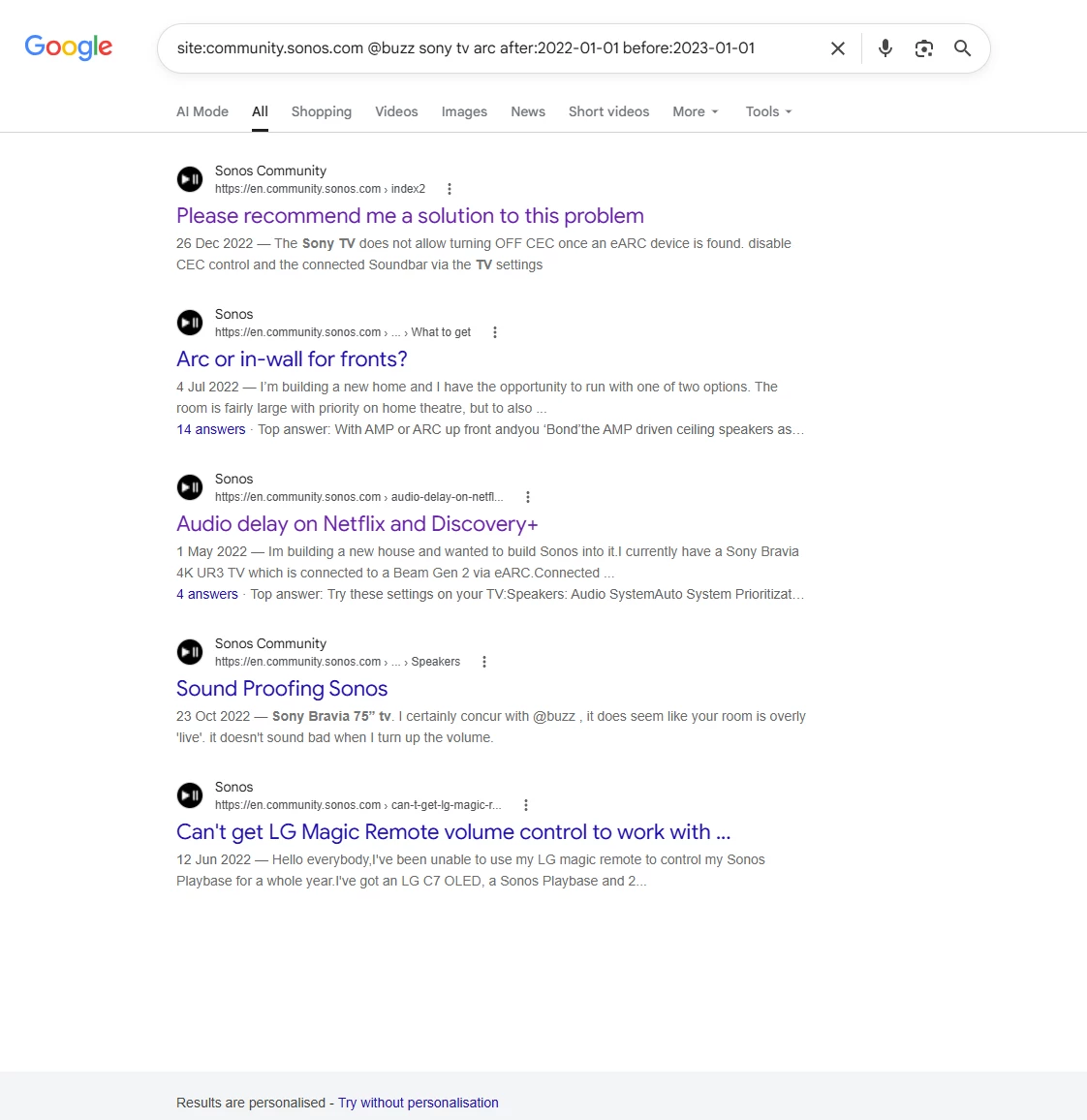
Not perfect, by Google can help with some parameters, whilst we patiently wait for the ‘new paint’ conceal features in LostSight, eg type this into google search:

site:community.sonos.com @buzz sony tv arc after:2022-01-01 before:2023-01-01

eg Buzz Sony


LostSight AI requires some kind of searching to harvest the knowledge, so the knowledge will be poor if the search indexing is poor?


jgatie
  • September 22, 2026

What I want to see is a result for what I vaguely remember @buzz said back in 2022 about the Arc having trouble with Sony TV model #xxxxxx when using the Netflix app.  And I want @buzz's exact post from 2022, not a link to every thread that mentions Arc, Sony #xxxxx, and/or Netflix.   

Not perfect, by Google can help with some parameters, whilst we patiently wait for the ‘new paint’ conceal features in LostSight, eg type this into google search:

site:community.sonos.com @buzz sony tv arc after:2022-01-01 before:2023-01-01

eg Buzz Sony


LostSight AI requires some kind of searching to harvest the knowledge, so the knowledge will be poor if the search indexing is poor?


Or Sonos could have used something fit for purpose on their Support FORUMS.


Forum|alt.badge.img+18
  • Local Superstar
  • September 22, 2026

Or Sonos could have used something fit for purpose on their Support FORUMS.


𝖦̶𝖺̶𝗂̶𝗇̶ ,𝖫̶𝗈̶𝗌̶𝗍̶ ,HindSight


Stanley_4
  • Grand Maestro
  • September 22, 2026

The glitch with the "new posts" link on staff tagged posts (news, tutorial) really needs fixed, getting the first post, not the new one is quite frustrating.

Edited to add more info.

Here is an example from this morning. There is something odd with the code dealing with new posts in News/Tutorial and other staff tagged topics.

Click the topic title - get the first post

https://en.community.sonos.com/tutorials-and-how-to-s-229149/sonos-unifi-best-practices-recommended-settings-6933597

Click new posts - get the first post. The difference in the new/last link, no: ?postid=xxxxx

https://en.community.sonos.com/tutorials-and-how-to-s-229149/sonos-unifi-best-practices-recommended-settings-6933597#post16897983

Click x minutes ago - get correct post.

https://en.community.sonos.com/tutorials-and-how-to-s-229149/sonos-unifi-best-practices-recommended-settings-6933597?postid=16897983#post16897983

But the new post link in non staff flagged topic looks like the non-working one.

https://en.community.sonos.com/components-and-architectural-228999/amp-multi-to-support-arc-surrounds-6934743#post16897964


  • September 22, 2026

To be fair to this one particular AI, it has not been trained on all things “Sonos”. It merely summarises the results of a search of this platform (and not of the support pages) - if no-one has explicitly stated here on the forum that a “green LED on a Beam means it is muted”, it’s not going to return that result.

I think we all understand that. The problem is, people coming here for help, don’t. Using AI makes sense on the support site, where it has digested correct factual information. It doesn’t make sense here and can be very misleading to the unsuspecting, IMO. This site just needs a fully functioning search.


jgatie
  • September 22, 2026

I think we all understand that. The problem is, people coming here for help, don’t. Using AI makes sense on the support site, where it has digested correct factual information. It doesn’t make sense here and can be very misleading to the unsuspecting, IMO. This site just needs a fully functioning search.


Regardless of AI being effective or not, this is a user’s support forum (or at least that’s what they tell me), and being a user’s support forum, people should be able to search for support by users just like every other site billed as a “forum”.  If one looks at forum software, the bare minimum offer a search by username, date, number of replies, etc., with the results coming back as a choice between threads or actual posts (or at least the dozen or so I’ve been using since the Internet had no AI presence do).  The ability to search like this in no way interferes with the use of AI for answers, it is just another option for those who want a real person’s advice or (rightfully so, as demonstrated) do not trust AI to give the correct answers.  


jgatie
  • September 22, 2026

Not to pile on ​@Corry P , because I know it’s out of your hands, but here’s another real world example:

A poster comes on and complains about the loss of the ability to play tracks from their iOS/Android device (something that happens, despite it being years since the function went away).  I know that some kind and thoughtful poster (or maybe not so kind back then) made a pretty thorough list of alternatives to playing off a device back when it first was removed.  If I search today, I get a mess of links to threads, one of which may (or may not) be the thread I’m looking for.  If I find the thread (a big IF), it is pages and pages long due to the uproar over the loss of the feature, and I have to go through every post to find the one I need.  After that, I give up. 

If search was like your average forum, I’d enter a “Search Forums” page, enter my search terms under subject/keywords, “kindandthoughtfulposter” under username, and the date range when the loss of the function happened.  If I wished, I could narrow it down by number of replies (I know the thread in question was huge) and sort the results by date or relevance. I’d get back a list of posts by that username on that subject in that date range, and easily pick out the one with the list of alternatives to playing on a device.  Copy/paste the link/answer to the current thread, and it’s done. 


Stanley_4
  • Grand Maestro
  • September 22, 2026

When your default search option is to open a tab to a different search engine  add the "site:en.community.sonos.com" tag (yes my android has learned that as the first suggestion) there is room for improvement.

Note that even with the site tag your customers are seeing ads for your competitors, not a good thing to show a frustrated customer who just might be fed up enough to click one.


Forum|alt.badge.img+18
  • Local Superstar
  • September 22, 2026

Note that even with the site tag your customers are seeing ads for your competitors, not a good thing to show a frustrated customer who just might be fed up enough to click one.

Interesting, I don’t see Google Ads using advanced Google search for the community site:


Stanley_4
  • Grand Maestro
  • September 22, 2026

Interesting on the Google results, I don't normally use them.

Without the site link you do see ads, good news, most of the ones I see are for Sonos. 


Forum|alt.badge.img+10
  • Headliner I
  • September 22, 2026

To-may-toe and to-mah-tow

I'll believe it when we see it