Surround sound disconnecting

  • October 13, 2025
  • 9 replies
  • 71 views

For years been looking up answers why my SL one left surround sound keeps disconnecting. Did all the troubling shooting, unplug, reset, move the speakers closer, get a WiFi boosters. I may figured out a partial solution. I haven’t added the Apple Music account and haven’t lost the speaker since. So reboot the system and don’t add the Apple Music. 

9 replies

Airgetlam
  • October 13, 2025

Not sure I understand this, but if it works for you….

Generally speaking, surround speakers connect to a ‘hidden’ 5Ghz signal emitted by the Sonos soundbar. While this signal can’t be seen in your controller, or in your router’s reports, it is susceptible wifi interference. They don’t, once set up, connect directly to your WiFi signal, no matter how many ‘boosters’ you use. 

It’s always a good idea to reboot a system, including a router. Electronics can get hit by various issues that can get cleared by reloading the OS, which happens when you unplug the device. 

I’m a tad confused about your ‘workaround’. 


AjTrek1
  • October 13, 2025

As ​@Airgetlam said your work around is not logical to resolve an issue with your surround speaker. There’s something going on with the hidden 5 GHz signal mentioned and/or the speaker has a failing network card.

There have been issues mentioned when streaming Apple Music lossless. Could you have been streaming Apple Music with the surrounds set to full for music when the assumed discount occurred?


  • Author
  • Contributor I
  • December 13, 2025

Welp I guess it didn’t work. But it lasted until the latest update. Now having the same issue with my left SL dropping off again.


Stanley_4
  • Lead Maestro
  • December 13, 2025

Boosters and extenders are often a problem for Sonos, best to go to a mesh setup instead.

What do the signal strengths look like for each Sonos?


  • Author
  • Contributor I
  • December 13, 2025

I’m not on any extenders/boosters. My app doesn’t tell me the strength just says if connected. 


Stanley_4
  • Lead Maestro
  • December 13, 2025

Are you on S1 or S2 software?

Are you using any wired Sonos / Sonosnet? 

If so have you verified that you have not selected "disable wifi" and turned off the radio essential for proper surround operation?


  • Author
  • Contributor I
  • December 13, 2025

S2 not wired 


Stanley_4
  • Lead Maestro
  • December 13, 2025

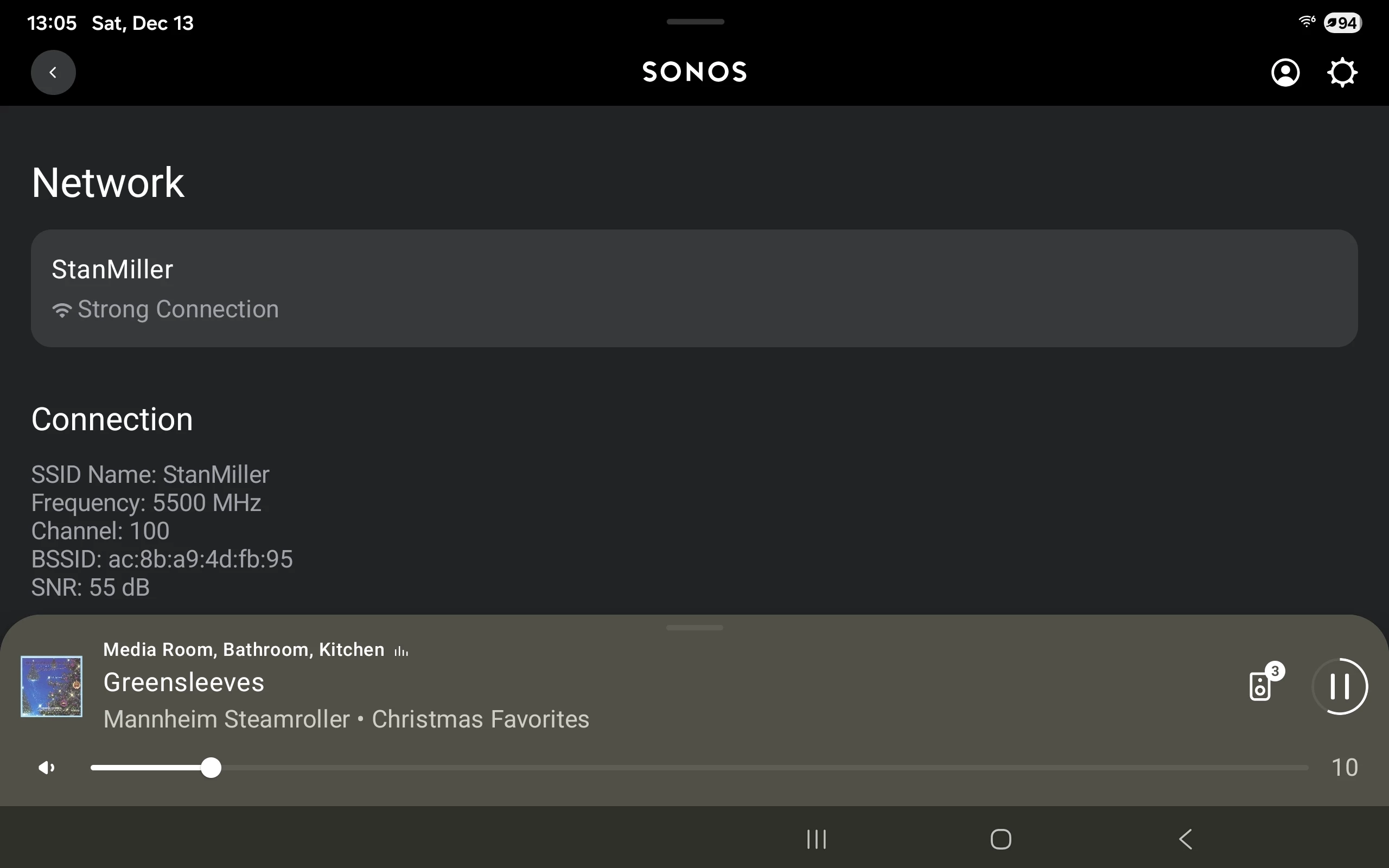
Not sure how you don't have the signal strength then, well unless you are on a really old release of the App. Update to the latest App and firmware, power down all Sonos, reboot router and controller and power up your Sonos. Once that is done you will see the signal strength screen I copied/pasted from my current S2 app.

Open Settings

Pick a Room

Pick a product

Pick Network

If it isn't  there you may have something VERY wrong, I checked on a gen 1 Play 5, I don't have a One SL powered up to check it on so I could be wrong.


buzz
  • December 14, 2025

Physically swap the units. Does the issue belong to the location or the unit?